Issues Downloading Fidelity

This discussion was created from comments split from:
Comments
-
Fidelity Investments is still not downloading into Quicken. Yes, did the latest updates.
0 -
What kind of account(s) are you having this issue with?
Also, please confirm that your accounts are set up to download via EWC+ (Express Web Connect+) It should show this at the top left of the account register directly beneath the account name.
Are you getting any error codes or messages? If so, what are they?
Quicken Classic Premier (US) Subscription: R66.23 on Windows 11 Home
0 -
I am not about to delete years of Fidelity data and lose my history.
An update by Quicken months ago ruined by online connection. "Fidelity Investments" brokerage account shows no connection method. When I try to set it up again and again, it goes through the motions of set up, connects to Fidelity, but nothing changes-NO download.
SPAXX shows no online connection and no set up option.
1 -
I am not about to delete years of Fidelity data and lose my history.
I don't think anyone has said anything about deleting Fidelity data. Why do think you would need to delete years of Fidelity data (or any Fidelity data for that matter)?
An update by Quicken months ago ruined by online connection. "Fidelity Investments" brokerage account shows no connection method. When I try to set it up again and again, it goes through the motions of set up, connects to Fidelity, but nothing changes-NO download.
The change was made by Fidelity. They decided to stop supporting Direct Connect and replace it with Express Web Connect Plus (EWC+). It was a "painful" transition but for most people downloading is no longer an issue.
If you would describe in detail how you are attempting to set up the download connection, again, perhaps I or someone else might be able to offer some suggestions on how to do it successfully.
Which type(s) of accounts are you trying to download? There are some account types that are still an issue, most notably HSA accounts.
Also, what version of Fidelity are you running (Help > About Quicken)? Some version updates were needed to address many of the downloading issues. The current version is R65.29. If you are not running it then you might want to consider updating to it.
SPAXX shows no online connection and no set up option.
Please clarify what you mean by this. SPAXX is a money market fund security and like all securities at Fidelity they do not now, nor never have, had an online connection. Only accounts can be set up for downloading.
One last question (asked in my 12/26 reply to your earlier post): Are you getting any error messages or error codes? If so, what are they?
Quicken Classic Premier (US) Subscription: R66.23 on Windows 11 Home
0 -
I have read some suggestions that said to delete the accounts and add new ones. I am using the latest Q version.
This involves an ordinary Fidelity investment brokerage account linked to SPAXX.
Currently, online access shows only set up and the lightening bolt on the register screen.
When I try either, they do go to access consent, then show account, don't add account, back to Q, and absolutely nothing happens-every time.
I can't delete or change anything online because the only option is setup. which accomplishes nothing.
It does not say anything about the online connection type. No error codes at this time.
0 -
Please help! I have not been able to update my Fidelity accounts since September. Every time I try to do a One Step Update, I get "Error CC-501: We are unable to update this account due to an unknown error. For more information see this FAQ and check quicken.com/support." (All of my other institutions are updating perfectly.) Most of my Fidelity accounts are brokerage accounts.
I run Quicken on a PC and my online connection type is set to EW+. I have Quicken version R65.29.
I have tried resetting my Fidelity accounts several times.
Any help would be most welcome!
-1 -
I have read some suggestions that said to delete the accounts and add new ones. I am using the latest Q version.
I've seen some posts suggesting that, too, but deleting accounts to fix a connection issue is usually fixes nothing. Sometimes it makes sense to deactivate the accounts and then add new ones but even that generally is not a good thing to do.
Currently, online access shows only set up and the lightening bolt on the register screen.
So you are seeing something like this? If not, what are you seeing?

When I try either, they do go to access consent, then show account, don't add account, back to Q, and absolutely nothing happens-every time.
Getting a "don't add account" during reauthorization usually means that Quicken thinks the account is already connected so it will not allow adding a new connection or a new account for it.
For each Fidelity account (backup your data file before proceeding):
- On the Online Services tab of Account Details: Do you see the "Deactivate" button? If so, click on that and follow the prompt to deactivate it.
- On the General tab of of Account Details: Remove all of the financial institution information (i.e., everything above the Contact Name field.
- When done with all Fidelity accounts: Tools > Add Account (not Set Up Now) > Fidelity Investments > follow the prompts to initiate and complete the reauthorization process > when prompted make sure to LINK the downloads to the existing accounts in Quicken.
If this process works you might have some duplicate transactions entered into the account registers. If they happen they will likely be within the last 60-90 days. Duplicates will need to be manually deleted.
There might also be some Placeholders entered or some shares counts discrepancies. Do not address them quite yet. Also don't worry about the SPAXX or Core Position reporting quite yet. The most important thing right now is to get downloading to work. Then we can address these other things.
Let me know if this works for you.
If it does not, describe the details of what you observed. There are other steps that can be taken and I'll try to walk you through them.
Quicken Classic Premier (US) Subscription: R66.23 on Windows 11 Home
0 -
See my immediately preceding post. Let me know if it was helpful or if the issue still exists.
Quicken Classic Premier (US) Subscription: R66.23 on Windows 11 Home
0 -
Any update on this issue? Still cannot "one step update" any of my Fidelity accounts.
0 -
Hello @karvel,
Thank you for sharing your experience.
I have moved your post to another thread that seems more appropriate. Please provide more information so we can better assist you.
- What exactly are you seeing from your end when you update your Fidelity accounts?
- Are you getting any errors?
- How long have you not been able to update these accounts?
The more information you can provide, the better.
Additionally, screenshots of what you are seeing might be helpful. If needed, please refer to this Community FAQ for instructions on how to attach a screenshot. Alternatively, you can also drag and drop screenshots to your response if you are not given the option to add attachments.
Looking forward to your response!
Quicken Alyssa
Make sure to sign up for the email digest to see a round up of your top posts.
1 -
Quicken cannot download cash balances from some of their accounts. It's been like this since August and they are still working on it.
0 -
@Boatnmaniac ARGH, I thought it had worked - the "last download" caption said January 9 - but I noticed that not too many transactions had been downloaded for each Fidelity account. So then I tried to update everything again and I got the same darned error code! So frustrating!
PS I hope you see this, I am not good with navigating the forums…!
0 -
I’ve read this thread and the cautions about deleting accounts, but I’m still seriously considering deleting my Fidelity accounts and reinstalling them in the app to start over. Downloads from Fidelity have become incredibly confused and inaccurate — spurious Reconciled amounts show up that have no relation to existing amounts in the ledger, and given the changes in securities and other investments I’ve made over the past few years, tracking these in Q has become burdensome and unreliable. I just use Fidelity’s trading software to do that.
The spurious R amounts began with Fidelity’s change to EWC+. It worsened when I had to restore a backup file last week due to a problem with a different, noninvestment, account. Q says my Fidelity accounts appear to be been deleted due to the restore and I should reconnect them — I’ve done that twice, but Q still produces the error when updating. Today the error was there but the accounts still updated. IMHO it’s time to start fresh with these accounts — IRAs, brokerages, cash mgt, (no HSAs or other types, mostly mutual funds, ETFs, and MM cash).
What will I lose by doing this? I realize that history back beyond the initial download from the reinstalled account will be lost. Should I try to remove the securities from Q as well before reinstalling?
I’m running Q Classic Business & Personal, R65.29
0 -
Hello All,
Just checking in on this thread to see if any of you are still needing assistance.
If you want to attempt deleting accounts, save a backup before doing so. This way, if you are unhappy with the results, you can get back to where you started.
Back up in Quicken for Windows
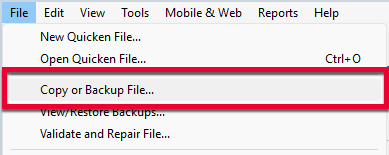
1. Select File > Copy or Backup File...
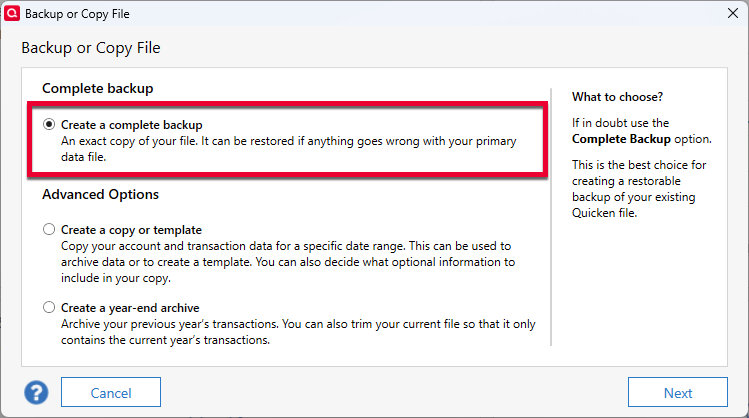
2. Select Create a complete backup and click Next.
3. To make it easier to identify your latest backup, you can put a check next to Add date to backup file name.
4. Quicken will show you the location where your backup will be saved, along with the name of the backup file (this is typically your Quicken file name followed by .QDF-backup).
- The default save location for backup files is C:\Users\[your name]\Documents\Quicken\BACKUP, and we recommend leaving this unchanged.
- If you need to change this location, click Change... then select a folder to save the backup to. After making your selection, click Save.
5. Click Create Backup.
Thank you.
Quicken Alyssa
Make sure to sign up for the email digest to see a round up of your top posts.
0 -
Quicken stopped updating only my Fidelity 401K account. I tried to reset the account and all of my Fidelity accounts are there and checked. But when it goes back to Quicken it says it doesn't see the 401K account. I even deactivated and tried to set it up and the same issue.
1 -
Still having issues downloading/updating transactions from Fidelity SPAXX and cash accounts. Have validated file. Deactivated/reactivated several times and still no updated transactions from 9/2025 (DIV). When I compare the portfolio accounts on the Online Center the market value is higher than what is shown on the account and what it should be. (no individual transactions) but Quicken states "Your Quicken account and brokerage account are in agreement." It is like the transactions are hidden somewhere or kept from posting to the accounts
0 -
Thank you both for adding to this discussion.
We had some issues with Fidelity connections last week, but those have since been mostly resolved. Are you still experiencing this issue?
Looking forward to your response!
Quicken Alyssa
Make sure to sign up for the email digest to see a round up of your top posts.
0 -
Yes, I have issues download transactions from my Fidelity brokerage accounts shortly after I upgraded to R66.18 yesterday (maybe coincidental) since then I also upgraded to R66.23.
I reached out to Online support, and he suggested to make a test.QDF file to see if I can download transactions and I was not able to download any.
0 -
I also have been unable to download any Fidelity accounts. OSU goes through as if normal, even the bar graphs for each account and finally indicates that the download is complete. But no data since 2/27 on any account. Using latest update R66.23.
0 -
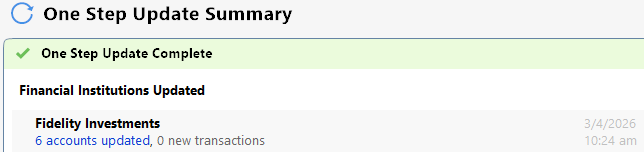
Similar problem here. I had actual buys and sells on March 3, 2026 for three Fidelity accounts, but none downloaded on EWC+. There were no error messages, and the Balances and Holdings tabs appear to be correct in the Online Center as of March 3 at 9:00 PM.
I had quite a few trades on March 3 - particularly in one account - and I will evidently need to add them manually. 😕
Running R66.23.
 0
0 -
Hello All,
Thank you all for adding to this discussion.
There was an Open Alert for this issue that has now been marked as resolved. Anyone still experiencing issues should reach out to Quicken Support directly for further assistance.
Thanks again!
Quicken Alyssa
Make sure to sign up for the email digest to see a round up of your top posts.
0 -
Hello All,
This Alert was marked resolved.
If you’re still encountering the issue, we recommend reaching out to Quicken Support for further assistance.
Thank you!
Quicken Alyssa
Make sure to sign up for the email digest to see a round up of your top posts.
0



