What does "Set Account based rule" do?

I thought the purpose of an account-based rule was to allow transactions to be assigned to different categories based on a combination of the Payee Name and the Account to which the transaction is being downloaded, but it is not working the way I expected.
Let’s say I have a credit card for my own use, and a debit card for my daughter’s use, and I want to keep track of what I spend in restaurants vs. what she spends in restaurants.
I created a line in the Memorized Payee list for Payee: Wendy’s, Category: Dining, and an account-based rule specifying my credit card; and I set up a second line for Payee: Wendy’s, Category: Daughter:Dining, and an account-based rule specifying her debit card.
When I download a Wendy’s purchase from my credit card, I want it to be categorized as Dining, and when I download a Wendy’s purchase from her debit card, I want it to be categorized as Daughter:Dining, but all Wendy’s purchases are categorized as Daughter:Dining regardless of what account they are downloading to.
What am I missing, or what am I doing wrong?
Why is Quicken giving me the ability to specify an account-based rule if it isn’t sorting transactions based on the rules I set up?
Comments
-
Hello @Mark A,
Thank you for reaching out with this question. To help troubleshoot, please provide more information. How do you have the account rule set up? If you haven't already done so, I recommend reviewing these help articles about using account rules: & . When you set up the rule, did you select the option to apply to existing transactions and did you verify if it correctly applied? Does Quicken see the rule and help you quickly edit the transactions after they've downloaded?
I look forward to your reply!
Quicken Kristina
Make sure to sign up for the email digest to see a round up of your top posts.
0 -
This is new to me. Where is the ability to set account-based rules?
Quicken user since version 2 for DOS, as of 2025 using QWin Premier (US) on Win10 Pro & Win11 Pro on 2 PCs.
0 -
@Rocket J Squirrel , You will find it when you edit a Memorized Payee. It was introduced late summer maybe. The OP's approach as written appears to be correct.
- Q Win Deluxe user since 2010, US Subscription
- I don't use Cloud Sync, Mobile & Web, Bill Pay1 -
Hello Kristina,
Thank you for your quick response.
I reviewed the articles you recommended, and it seems to me that I am conforming to the setup described in “Create a memorized payee.” That article gives the following example:
Example:
- Payee: Costco, Account: Amex Card → Category: Gas & Fuel
- Payee: Costco, Account: Chase Visa → Category: Groceries
The only difference between the example and what I have done is that I have selected more than one account for each line. Here is what I have done, laid out in the same format as the example:
- Payee: Wendy’s, Account: Debit A or Credit A → Category: Daughter:Dining
- Payee: Wendy’s, Account: Credit B or Credit C → Category: Dining
Quicken categorizes all purchases from Wendy’s as Daughter:Dining, regardless of which account is being downloaded
So, I am left to wonder if there might be a preference setting under “Register,” “Data Entry and QuickFill,” or “Downloaded transactions” that my be preventing Quicken from categorizing transactions the way I want it to.
FYI, Help/About says I have Version R656.29, Build 27.1.65.29.
0 -
It certainly should work, and the only way I could see that the Renaming rules would matter is if the renaming rule changed the payee's name in a way that it didn't match the memorized payee. But then again, my ones that do work don't have any renaming rules, so it might be something to try where you have no renaming rule.
Here is an example of a working one that I use.
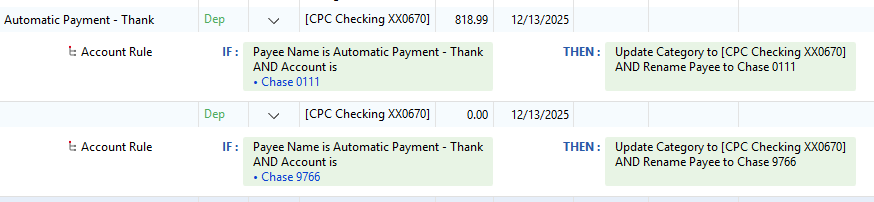
Note that these, like renaming rules, are hard to test because they only take effect during downloading of transactions.
And for what it is worth, if I had implemented it, I would have done it in the renaming rules not the memorized payee list, but when this was suggested both ways were suggested by the users, so I can't really fault them for doing whatever was easiest.
0 -
Note I missed something. At the bottom of the Create Memorized Payee dialog there is this:

So, you should be able to use this to test on existing transactions unlike the renaming rules that only happen at download time.
0 -
I just noticed the quirk in it.
You have to first memorized one of them from the register. Edit it to have the account rule, and then when you go to do New Payee in the Memorized Payee List it will create the new payee and not replace the old one.
If you instead go to the Memorized Payee List and try to create two payee entries with the same name but with something like the account as different it will only replace the first payee entry.
0 -
@Chris_QPW
Are you suggesting that it matters whether I manually created a line in the Memorized Payee List vs having the lines created automatically when I accepted transactions downloaded from the credit card company?
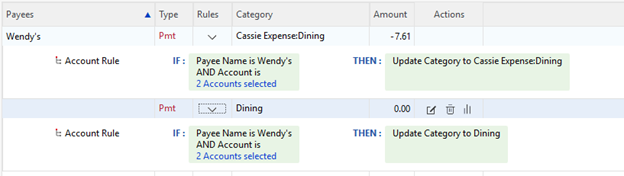
If I’m following your point, both lines were created from the register. I had a downloaded transaction on my daughter’s debit card (Debit A in the example) for Wendy’s, and I manually classified it as Child:Dining, and I had a transaction on my Credit card (Credit B), and I manually classified it as Dining. Since Automatically memorize new payees, these transactions were automatically memorized. I then edited the two lines in the Memorized payee list to have the account-based rules described above.
 0
0 -
No, I'm not sure what your problem is, it does seem like with what you are showing it should work as long as the accounts are selected correctly.
The problem I noticed is like this. If try to create this kind of setup entirely in the Category List it won't work.
If you are in the Category List and create the first Memorized Payee with accounts and such and then try to create another for the same payee it will overwrite the first one, it won't add to the existing one.
If on the other hand you create the first one by memorizing the payee from the register you can then create the second one from the Category List and it will add to it properly.
Since yours has both entries it seems like the way you did it should work.
I do have a question though, why do both of your rules say, "2 Accounts selected"? In your comment only mention one for each of you. For a single account it should show the account name.
0 -
@
Chris_QPWMy daughter has a debit and a credit card, which I called Debit A and Credit A, and my wife and I use credit cards I called Credit B and Credit C in my original example earlier in the thread:
- Payee:
Wendy’s, Account:Debit AorCredit A→ Category:Child:Dining - Payee:
Wendy’s, Account:Credit BorCredit C→ Category:Dining
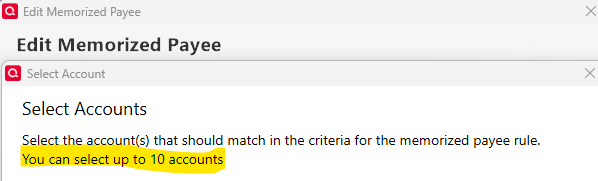
Selecting 2 accounts for each line of the rule should not be causing the error. The instruction on that page refers to the optional selection of more that one account.
PS: Credit B and Credit C are pseudonyms. The real names in Quicken are formatted like "BOA MC 1234" and "Citi Visa 5678"
0 - Payee:
-
Also, I should note that I have NOT test the function by selecting the "Apply to existing transactions," because I am afraid that if I do that Quicken would go back and misclassify hundreds of carefully categorized previous transactions. I tested by looking at the credit and debit card websites to identify recent transactions for selected payees and then downloading real transactions for the accounts in question. There happened to be purchases for Wendy's on my daughter's card and on one of my cards, so that is what I used to test the malfunctioning function.
0 -
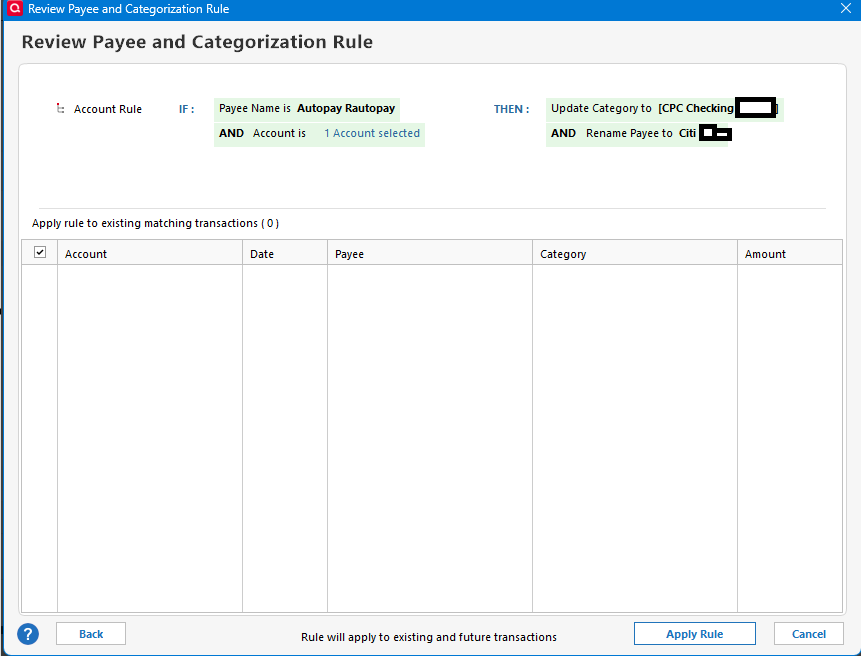
I suspected that was the case, I just wanted to make sure. It should work then. I haven't tested it with more than one account though. I have also not tried the feature to do it for the existing transactions.
I just tried it and what it does is give you a list of transactions that it will apply the rule to. I guess that makes it pretty safe, but if one was to try it for real (I didn't have any matches because mine are already changed) you should make sure you have a good backup just in case.
 0
0 -
After realizing that the scope of applying rule to existing transactions would just be just a few dozen purchases from Wendy's (apply dope slap here), I tried applying the rule for both of the Wendy's, and it worked as expected. It then promised to apply the rule to future transactions, so it looks like we need to have lunch at Wendy's sometime soon.
1 -
Based on all comments and descriptions I cannot find anything in your setup that could cause the issue - as you already suspected. You just may have found a bug - a difficult one to reproduce since it is a unique download-specific case. I suggest that you report it via Help > Report a problem so that at least they have a record if/when reported by other users.
- Q Win Deluxe user since 2010, US Subscription
- I don't use Cloud Sync, Mobile & Web, Bill Pay0 -
Thank you for your replies,
If you follow @BK's recommendation to send a problem report, please be aware that you will not get a direct response to that problem report. These submissions do go directly to a database that is accessible by members of our Product and Development teams, escalation teams, and other internal support channels.
If you want a direct response, then I recommend that you reach out to Quicken Support directly. The Quicken Support phone number can be found through this link here. Phone support is available from 5:00 am PT to 5:00 pm PT, Monday through Friday.
I apologize that I could not be of more assistance!
Quicken Kristina
Make sure to sign up for the email digest to see a round up of your top posts.
0




