Update to Windows 11 seems to have lost Quicken

Since I was updated to Windows 11, I am having a problem with Quicken, along with several others.
- The actual program runs fine as long as I start by clicking the QW.exe program or its icon directly.
- When I try to start the program by clicking on one of the QDF files, my normal approach, I get a prompt saying I must install the program.
- When I right-click one of the QDF files, I can select which program to use to open the file and Quicken is shown as one of the choices. When I select that, I am back to the must-install screen.
Like I said up front, the actual program works exactly as always when I start from the QW.exe file or icon.
I appreciate any suggestions as to how to fix this.
Answers
-
The issue you are facing may not be as a result of Windows 11, rather the recent releases of Quicken have caused this issue for many users - known problem. The solution is to Uninstall and then Reinstall Quicken using the instruction in the respective links. Hope this helps.
- Q Win Deluxe user since 2010, US Subscription
- I don't use Cloud Sync, Mobile & Web, Bill Pay0 -
I wonder if something's screwed up in the default apps area:
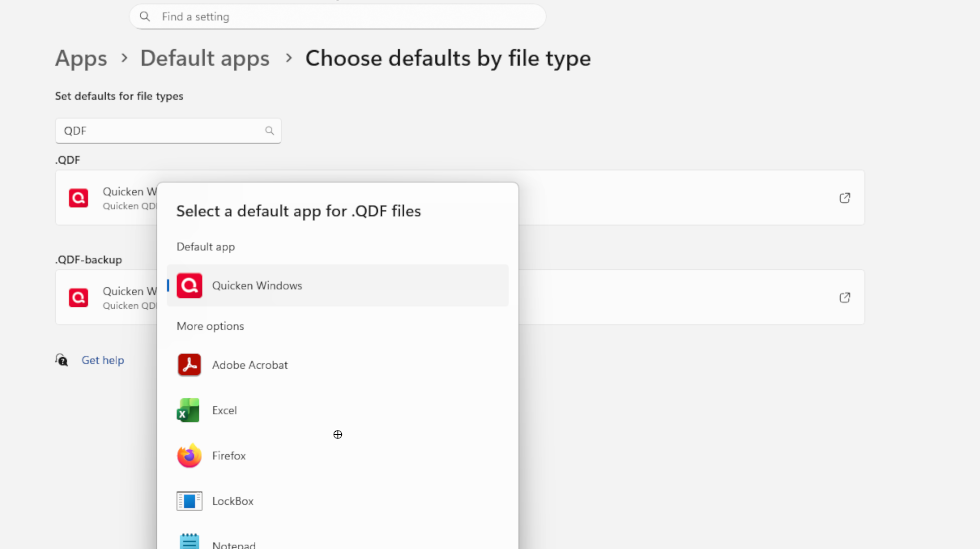
I'm pretty sure that association is handled as part of the install. Maybe a re-install?
0 -
Hello @PaulHampel,
We haven't heard back from you in a while. Do you still need assistance?
Were you able to give the suggestions provided above a try?Check back and let us know! Thank you.
-Quicken Anja
Make sure to sign up for the email digest to see a round up of your top posts.0 -
Hello again,
Checking in once more before this thread is closed.
Let us know if you still need assistance.Thank you!
-Quicken Anja
Make sure to sign up for the email digest to see a round up of your top posts.0 -
Hello again,
Due to the lack of response, I went ahead and closed this post.
If you still require assistance, please feel free to start a new post.
Thank you!
-Quicken Anja
Make sure to sign up for the email digest to see a round up of your top posts.0


Categories
- All Categories
- 6 Product Ideas
- 34 Announcements
- 248 Alerts, Online Banking & Known Product Issues
- 19 Product Alerts
- 265 Welcome to the Community!
- 301 Before you Buy
- 1.5K Product Ideas
- 55.8K Quicken Classic for Windows
- 16.9K Quicken Classic for Mac
- 1K Quicken Mobile
- 834 Quicken on the Web
- 129 Quicken LifeHub