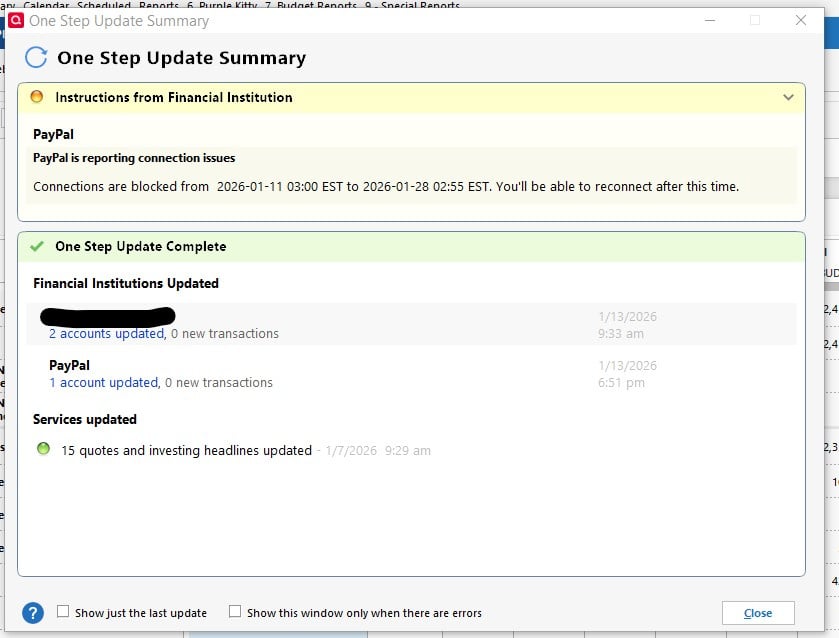
PayPal & SoFi are Blocking Connections from 1/11-1/28

Is anyone else getting this message during OSU?
Does anyone know why?
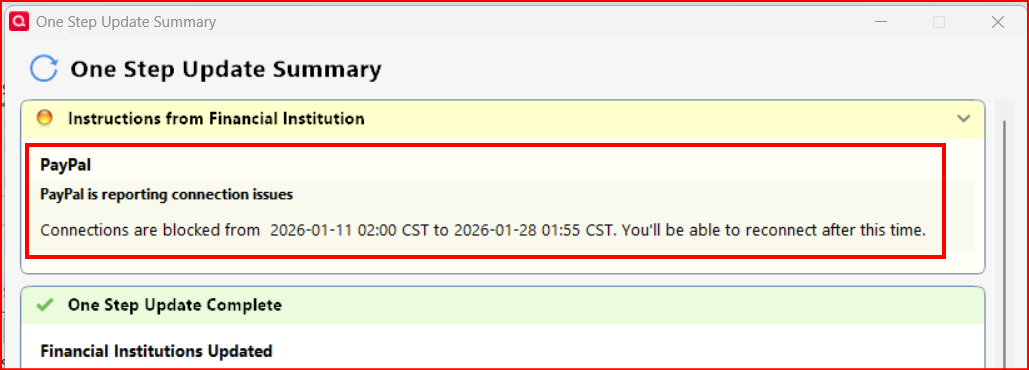
UPDATE: I have 3 different PayPal accounts. Now when I try to log into them I am prompted to create new PWs but when I change the PW for one account it doesn't change it. Instead it changes the PW for one of the other accounts. There does not seem to be any pattern to it. Really odd.
EDIT (1/13/2026): Added SoFi to the title since others have reported it is happening with SoFi, as well.
Quicken Classic Premier (US) Subscription: R66.23 on Windows 11 Home
Answers
-
PayPal worked for me earlier today
1 -
I received the same message today. I was able to log in to my PayPal account without issue. Don't know why I got the Quicken error.
1 -
I just ran OSU, again.
- Account #1: Updated and downloaded a transaction correctly but I still got the message stating that PayPal is blocking connections.
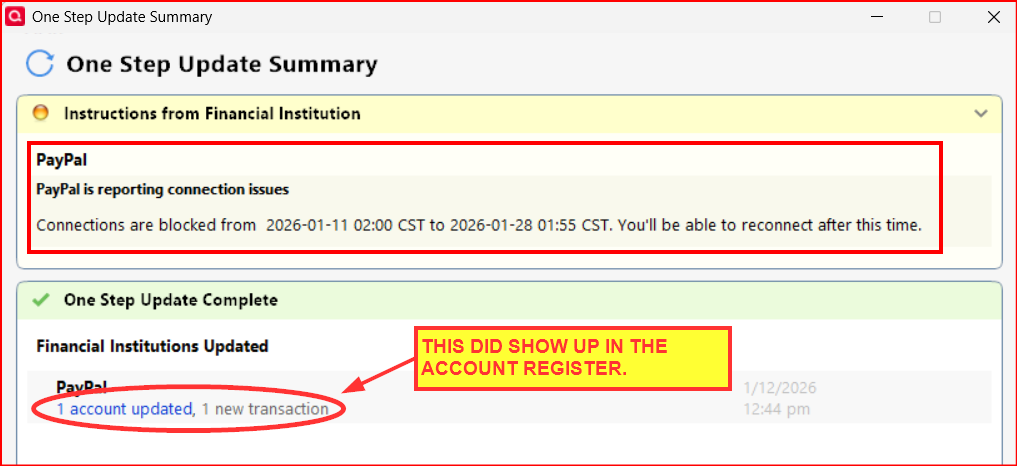
- Account #2: Appears to have updated correctly but there were no new transactions to download so I cannot confirm this. I still got the message that PayPal is blocking connections.
- Account #3: I was prompted to reauthorize but the reauthorization could not be completed because PayPal.com would not recognize the UserID nor the PW. I have tried logging into PayPal.com on 3 different browsers and both gotten the same result. I tried to reset the login information on PayPal.com and it is asking to answer security questions that I do not recognize. (Yes, I have requested a call from PayPal regarding this.)
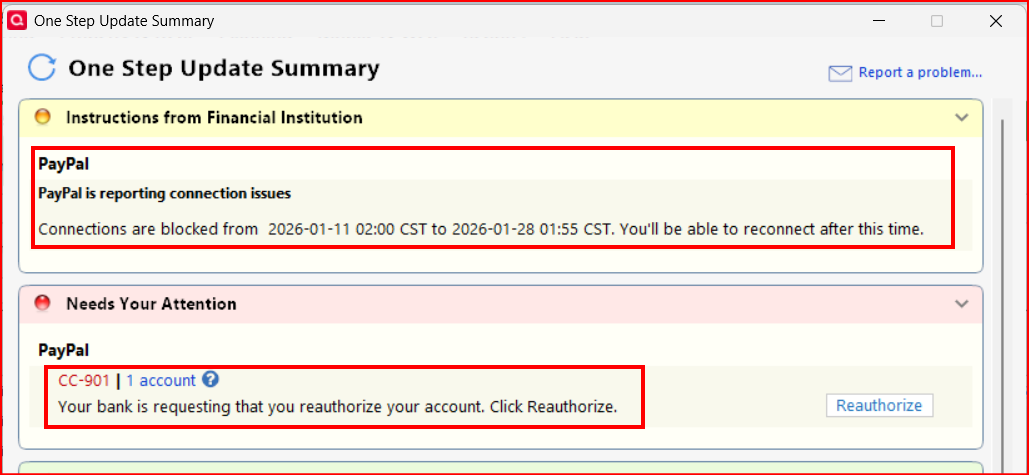
So, for me the situation has changed some but there is still that message that PayPal is blocking connections.
I did see another thread started on 1/10 regarding a CC-502 issue with Venmo (and now a posted Alert regarding this). PayPal owns Venmo and has been doing some integration of Venmo starting in Nov so I'm wondering if this PayPal issue might be related to this Venmo CC-502 issue.
Quicken Classic Premier (US) Subscription: R66.23 on Windows 11 Home
0 - Account #1: Updated and downloaded a transaction correctly but I still got the message stating that PayPal is blocking connections.
-
This fixed the problem for me, from Perplexity:
You are seeing that message because Quicken is using a generic “blocked connection” text for a scheduled PayPal connectivity window, even though in practice it usually means PayPal/Quicken needs your account to be re‑authorized rather than that PayPal is truly down for that entire date range.[1]
What the message actually means
- The text “Connections are blocked from 2026‑01‑11 03:00 EST to 2026‑01‑28 02:55 EST” is Quicken substituting dates into a template message used for “instructions from financial institution.”[1]
- Quicken users have reported the same style of wording with other card issuers (e.g., Citi, Amex), and Quicken staff confirmed it often shows up when the FI wants you to re‑authorize or fix the connection, not when they are literally blocking access for weeks.[1]
Why it’s happening with PayPal
- PayPal has been changing how its accounts connect to Quicken, requiring users to re‑link or authorize accounts through a new method.[2]
- During or after these changes, Quicken can lose authorization for your PayPal account, and instead of a clear “reauthorize PayPal” error, it sometimes surfaces this blocked‑connection message in One Step Update.[3][2]
How to fix or work around it
Try these steps in order:
- Update Quicken
- In Quicken: Tools → One Step Update → Update Now, or use Help → Check for Updates to be sure you are on the latest release, since PayPal connectivity has been under active change.[4]
- Re‑authorize your PayPal connection
- In Quicken, go to Tools → Account List → Edit for your PayPal account → Online Services → Deactivate.
- Then choose Set Up Now / Connect, and follow the browser‑based sign‑in to PayPal to grant Quicken access again, as described in Quicken’s PayPal change notice.[2]
- Check for PayPal security prompts
- Log in directly to PayPal in a browser and clear any security, MFA, or “new terms” prompts, as these can block Quicken and cause connection errors until acknowledged.[5][3]
- If it still fails
- This can indicate an open/known PayPal–Quicken connectivity issue; Quicken Community threads on PayPal show periods where downloads stop working despite correct setup.[3][5]
- In that case, best next step is to contact Quicken Support and reference the PayPal connection message so they can check if there is an active Alert on their side.[6]
1 -
Quicken claims that the provider is blocking Quicken. There has been no details or notice of these blockages. I can't reach PayPal but SoFi says that it's a Quicken problem not something on their end. Will this be another endless finger pointing connection issue?
 0
0 -
Thanks. This reads like it was written back when PayPal migrated their download connection method from EWC to EWC+ (maybe a year ago?). But I thought I'd give it a shot with two of the accounts and see what happens. The result was downloading is still occurring but that message still appears at the top of the OSU Summary, just like it did the last time I posted.
I did not try the 3rd account because there is an issue with being able to log into the online account in the browser (actually with 3 different browsers). I was told someone from PayPal's tech support would contact me but that hasn't happened, yet.
What makes me think this is a PayPal issue is that when I first did OSU this morning all 3 of the accounts failed to connect and download anything. Then a few hours later 2 of the accounts worked (but still had that message). But the 3rd account was totally broken and can't be reauthorized yet because PayPal does not let me log in and is not letting me reset the login.
While it did not resolve the issue for me, hopefully it will help others resolve the issue.
Quicken Classic Premier (US) Subscription: R66.23 on Windows 11 Home
0 -
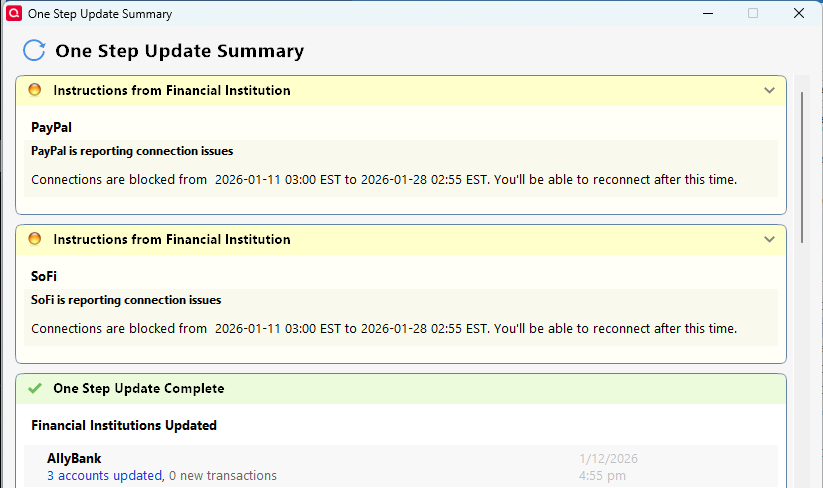
Others (including me) are reporting this issue with PayPal starting this morning. This is the first I've heard that it also exists with SoFi.
I'm going to ask a Moderator to merge your post into one that I'd started this morning.
Quicken Classic Premier (US) Subscription: R66.23 on Windows 11 Home
2 -
Hello All,
I forwarded this issue to the proper channels for further investigation and resolution. If you haven't already done so, please navigate to Help>Report a Problem and send a problem report with log files attached.
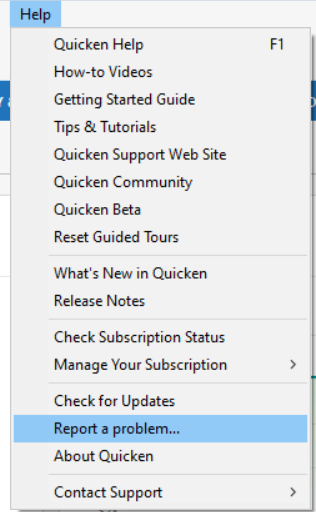
While you will not receive a response through this submission, these reports will help our teams in further investigating the issue. The more problem reports we receive, the better.
We apologize for any inconvenience!
Thank you.
(CTP-15988)
Quicken Kristina
Make sure to sign up for the email digest to see a round up of your top posts.
1 -
UPDATE: Just ran OSU, again, and this time I got the same PayPal is blocking message but also got a new error code….CC-800. (Last time it was CC-901.)
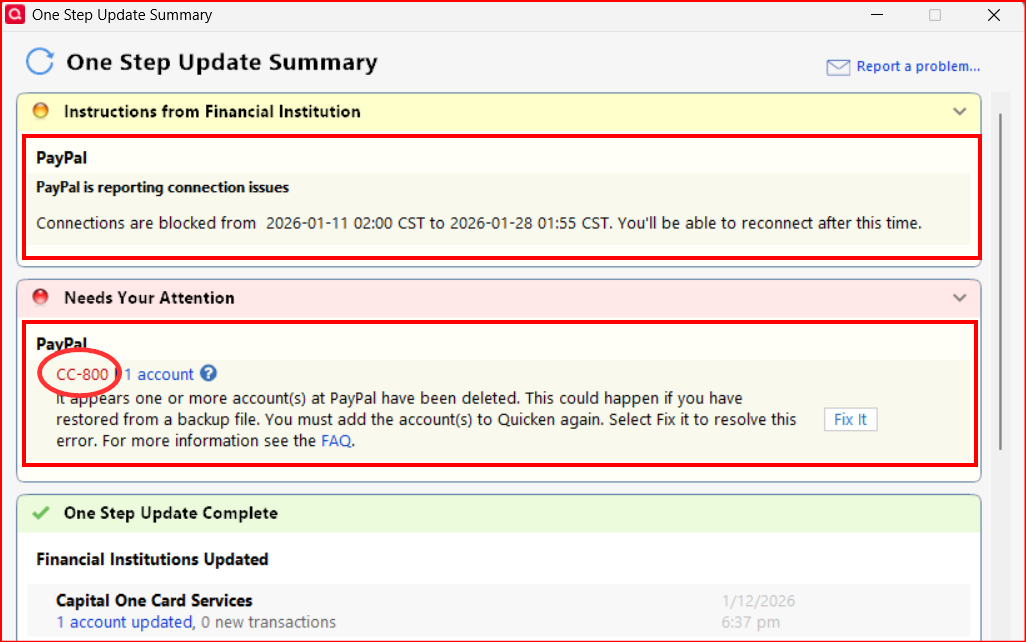
I reset the account, again, and the error code went away but the PayPal is blocking message remains.
I submitted the problem report and referenced this thread in it.
Quicken Classic Premier (US) Subscription: R66.23 on Windows 11 Home
1 -
I just ran a one step update and both PayPal and SoFi give the same announcement.
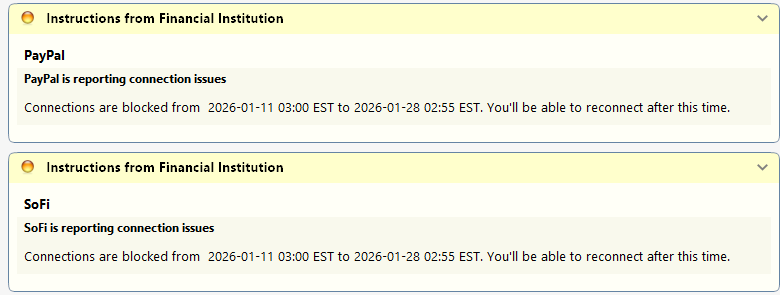 0
0 -
Getting same OSU PayPal message this week. Re-activating the online account has no effect.
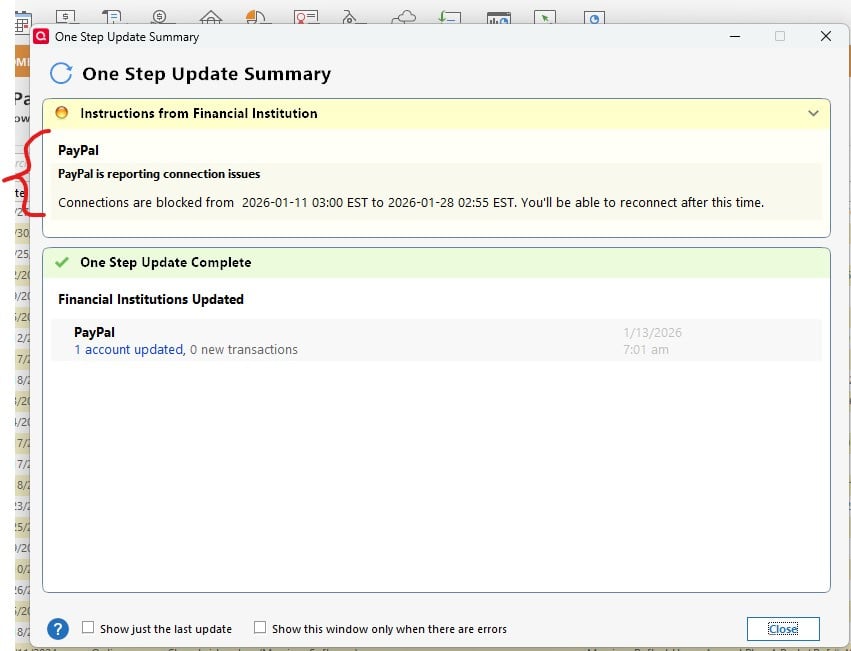 0
0 -
I followed the Perplexity solution yesterday and had clean downloads of the newly re-added accounts. The problem with both Paypal and Sofi is back this morning.
1 -
OSU for my 3 PayPal accounts this morning completed properly with no error codes and with transactions downloaded from 2 of them. But the message that PayPal is blocking the connections is still present with all 3 of them.
Quicken Classic Premier (US) Subscription: R66.23 on Windows 11 Home
1 -
I have this exact same problem with both my PayPal and SoFi accounts. I tried to reset my PayPal account, but I still see the same message.
0 -
Hello @Michael Rosen, @jordanal, @Gary Talda, & @ChrisFowler,
Thank you for letting me know you're also impacted by this issue. I added you to the ticket.
Thank you for the additional information!
Quicken Kristina
Make sure to sign up for the email digest to see a round up of your top posts.
0 -
Hi @Quicken Kristina I just started getting the issue with PayPal this morning. Please let me know if there is anything I can do to help troubleshoot.
I'm also getting issues with Synchrony, but that is a different error and I'll have to see if there is a thread on that separately.
0 -
Hello @jennie.griner,
Thank you for letting me know you're encountering this issue also. I added you to the ticket. If you would like to contribute to the investigation, please navigate to Help>Report a Problem and send a problem report with log files attached.
Thank you!
Quicken Kristina
Make sure to sign up for the email digest to see a round up of your top posts.
1 -
Me too. PayPal Update gives this message:
"PayPal is reporting connection issues.
Connections are blocked from 2026-01-11 03:00 EST to 2026-01-25 02:55 EST. You'll be able to reconnect after this time."Download to Quicken has worked flawlessly for years prior to this. Any advice what I can do to download transactions?
 0
0 -
Hello @Glen Dais,
Thank you for letting us know you're also seeing this issue and for sending a problem report with logs attached. I added you to the ticket.
Thank you!
Quicken Kristina
Make sure to sign up for the email digest to see a round up of your top posts.
0 -
@Quicken Kristina I am getting the same "Connections are blocked…" error message from Paypal.
0 -
Deactivate the PayPal account and Set Up Now - again in Online Services did not fix the message. After deactivating when I did the 'set up account', it prompted to login to PayPal on the browser and authorize. I did. The browser said Quicken authorized. Quicken prompted to "Link to existing account" as expected and said downloaded last 90 days of transactions.
However, when I close and then do "One Step Update", it still returns the message that PayPal "Connections are blocked from 2026-01-11 03:00 EST to 2026-01-28 02:55 EST. You'll be able to reconnect after this time." And in the Update Summary it says PayPal - '1 account updated, 0 new transactions' but the connection issue message persists.
0 -
I am still getting the message about PayPal blocking connections today, as well.
Quicken Classic Premier (US) Subscription: R66.23 on Windows 11 Home
1 -
Note: when I do updates from the account, I do NOT get the error message. I only get it as part of One Step Update.
1 -
This morning Jan 17th did NOT get the errors in One Step Update for either Sofi or Paypal.
1 -
Thank you for the update,
I'm glad to hear you're no longer seeing the error!
Please let me know if it returns!
Quicken Kristina
Make sure to sign up for the email digest to see a round up of your top posts.
0 -
Same good results for me today. In 3 different data files, each with a unique PayPal account, this message of PayPal blocking the connection was not present in the OSU Summary Reports.
Quicken Classic Premier (US) Subscription: R66.23 on Windows 11 Home
1 -
No longer getting the "Connections are blocked…" message after One Step Update on PayPal. Seems to have corrected itself.
0