I cannot setup One Step Update on my Three Bank of America Accounts

I just learned that Bank of America will not allow us to download OFX files anymore. I read all of the troubleshooting articles on the Quicken Support page and I still cannot find a solution for my three Bank of America accounts. It's frustrating because all of my other bank accounts, i.e., Chase, American Express, Citibank have no problems. The problem is when I go to the Edit my account section and select the "Online" tab, there is no option to select One Step Update. I tried going to the One Step Update tab to see if it would allow me to add my Bank of America accounts and there is no option to add accounts.
Attached is a picture of what my page looks like. I need help, what do I do???? I am using Windows 11
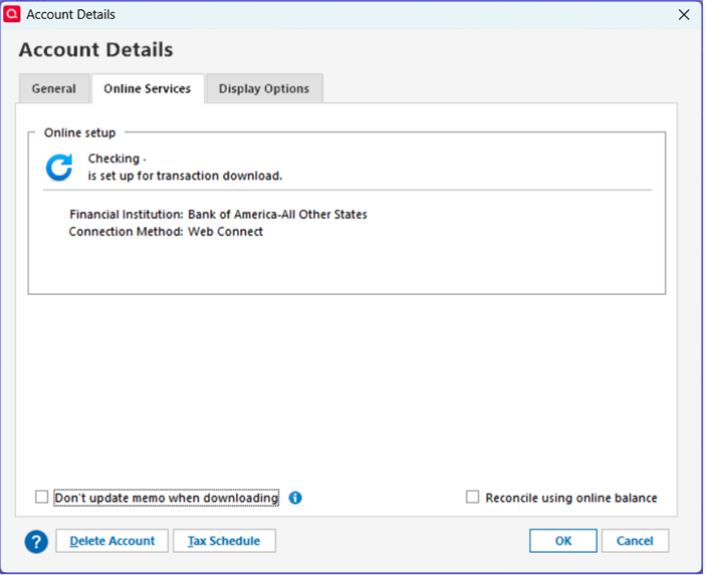
[Edited - Removed partial account number]
Best Answer
-
Hello @ElizGarza7,
Thank you for letting us know you're encountering this issue. What are you seeing on the Add/Link screen in Quicken when you're trying to link the accounts to your existing Web Connect accounts? Are you able to click the dropdown and select the existing accounts from the list, or do they not show as an option?
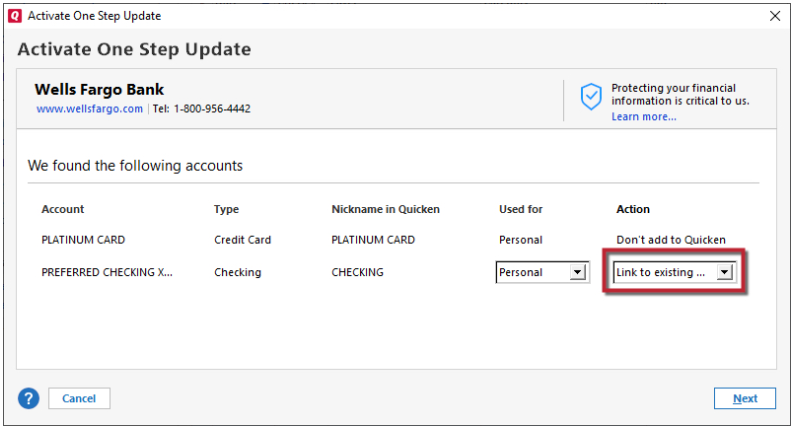
If there's no option to link them through the Add/Link screen after going through the process to authorize and connect your accounts, then the next best option may be to backup your Quicken file, then cut/paste the transaction history from the original accounts into the newly added ones.
I hope this helps!
Quicken Kristina
Make sure to sign up for the email digest to see a round up of your top posts.
0

Answers
-
"Bank of America - All other states" is no longer the name you want to use. BofA made the decision to stop using that name.
Try switching to
Bank of America - Quicken https://www.bankofamerica.com/ 1-800-933-6262 https://secure.bankofamerica.com/login/sign-in/signOnV2Screen.go ACTIVE BANKING,CREDIT,ACCOUNTINFO&EXP-WEB-CONNECT
Q user since February, 1990. DOS Version 4
Now running Quicken Windows Subscription, Business & Personal
Retired "Certified Information Systems Auditor" & Bank Audit VP0 -
I get an HTTP error 404 when I try that link.
0 -
Hello @ElizGarza7,
Thank you for letting us know you're encountering this issue. What are you seeing on the Add/Link screen in Quicken when you're trying to link the accounts to your existing Web Connect accounts? Are you able to click the dropdown and select the existing accounts from the list, or do they not show as an option?
If there's no option to link them through the Add/Link screen after going through the process to authorize and connect your accounts, then the next best option may be to backup your Quicken file, then cut/paste the transaction history from the original accounts into the newly added ones.
I hope this helps!
Quicken Kristina
Make sure to sign up for the email digest to see a round up of your top posts.
0 -
You are correct, there is NO option to link my three accounts in One Step. I already tried that. I don't understand what you mean by cut/paste the transaction history to the newly added ones. Are you saying I should go through the One Step process and download my bank data as if they were new accounts and then add the old data to it? No sure about "cut/paste", how does that work. I hope Quicken has the step-by-step info how to do that.
0 -
When I open One Step, there is option to add an account to One Step Update.
0 -
Do I have to choose, "Add Account" and add my three Bank of America account again?
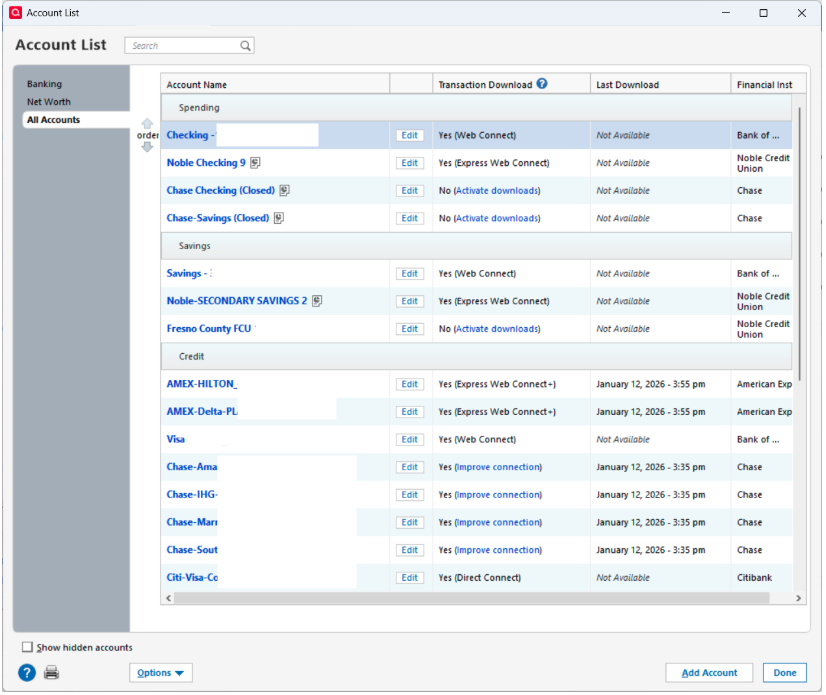
[Edited - Removed account numbers]
0 -
I cannot express enough how my I appreciate you taking the time to answer my questions. I figured out the cut/paste thing. It's kind of scary because my accounts go back to 2007. Maybe the best thing for me to do is to start fresh with the new accounts that get downloaded using One Step. I think only one year (12 months) of transactions will download into Quicken. I am trying to work on my 2025 taxes and I will have to do whatever is necessary to get my bank data.
0 -
Hello @ElizGarza7,
Before starting new accounts, try this. For EACH (ALL) of your Bank of America accounts, go to Account Details, Online Services, and Deactivate the Online Setup. Also, in the General tab, clear the Financial Institution fields. Now, in one of those accounts, under Online Services, Activate. Since BofA uses Express WebConnect+, you will have to signon to BofA and follow the prompts for you to allow Quicken to interface with BofA. After that completes and returns you to Quicken, you should see your account and "Line to existing" choosing the proper Quicken account for each to link to. (using the pulldown) Now One Step Update, should handle all three accounts.
0 -
I am in the exact same situation as @ElizGarza7. However, under Account Details, Online Services there is no way to Deactivate the Online Setup. It appears to be display only. There is no way to change the connection type. I think the issue is that the old institution was "Bank of America - All Banks" and the new one is "Bank of America - Quicken".
Anyway, I gave up and created NEW account names for the same accounts and will just keep the old ones there for historical purposes. Kinda messes up the ability to see trends, etc. over years. [Edited - Language]
Let me know if you ever fix this to allow existing accounts to use the new Express WebConnect+ without having to do workarounds like cut+paste, etc. It shouldn't be that hard to change the institution/connection method versus making millions of users jump through hurdles.
0 -
Hello @Jeff28210,
Thank you for sharing your feedback and the work around that you found for this issue.
If you are unable to link the accounts because Quicken sees them as connected via Web Connect (but also gives you no option to deactivate them), then you might be able to force them to deactivate by making a copy of your file. To create a copy, please navigate to File > Copy or Backup File... > Create a copy or template (see examples below).
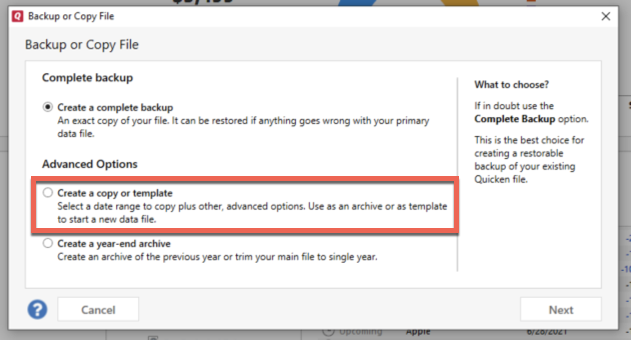
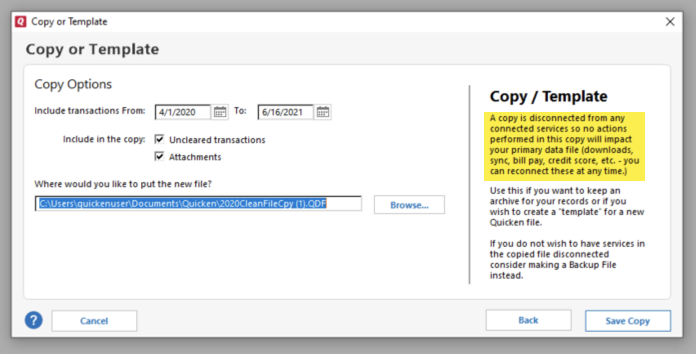
It's important to know that all online services will be disconnected in the copied file, and you will need to sign back in with your Quicken ID and reconnect all of your online accounts, online billers, Quicken Bill Manager services, etc if you plan to use that copied file going forward. The reason for this is that the new copy also creates a new and separate dataset ID.
Reconnect only what is necessary to test if the issue is resolved. If the issue is resolved, then reconnect everything and use the copied file as your new main file going forward.
If the issue is not resolved in the copied file either, then feel free to switch back to your original file. For instructions on how to switch between Quicken files, please click here.
I hope this helps!
Quicken Kristina
Make sure to sign up for the email digest to see a round up of your top posts.
0
