Transaction attachments not working

I am suddenly no longer able to attach documents to transactions in bank registers. Neither Drag and Drop or manual Add File works. Anyone else having this problem? Quicken Classic Deluxe; Version R65.29; Build 27.1.65.29
Thanks.
Comments
-
Hello @GPetersCA,
Thanks for reaching out to tell us about this issue!
To better assist you, could you please provide the following details?
- Where is your Quicken data file stored? Is it on your local hard drive (C: Drive) or a cloud-based/external drive (e.g.: OneDrive, DropBox, USB, etc.)?
- Please provide the exact file path as shown in the example below.

- Please provide the exact file path as shown in the example below.
- Have you attempted any troubleshooting steps so far? If so, what were they?
- When did this issue first start occurring?
- Do you receive any error messages when you attempt to add an attachment?
- Were there any significant changes to your system or software before the issue began (updates, new installations, etc.)?
Your answers will help us diagnose the issue more effectively.
Looking forward to your response!
-Quicken Anja
Make sure to sign up for the email digest to see a round up of your top posts.0 - Where is your Quicken data file stored? Is it on your local hard drive (C: Drive) or a cloud-based/external drive (e.g.: OneDrive, DropBox, USB, etc.)?
-
I'm having the exact same problem. It was fine on January 13.
1 -
same here. was fine on 1/13/26. only the latest security fix, KB5074109 was added on 1/15/26.
1 -
Same here - fine on 1/13, not working since lates update. Version R65.29 Build 27.165.29
1 -
Answers to Quicken Anja's questions:
File location: OneDrive/*** - Personal/Documents/Quicken
Troubleshooting: No formal troubleshooting tried other than a search of the Community. I did try to attach the same pdf to another transaction and tried to attach a different pdf to the original transaction. Neither worked.
First occurred: 1/14/2026
Error messages: Nothing. The attachment window just does not show anything after either dragging or using the Add dropdown. When you save there is no attachment on the transaction.
Significant changes to system: Windows "2026-01 Security Update (KB5074109) (26200.7623)" on 1/14/2026 was the only recent update I am aware of.
1 -
Same problem here. Uninstalling KB5074109 and turning off auto update fixes the problem. I've reported it to Quicken, next stop, report to Microsoft.
1 -
I have the KB installed on Win11 but my datafile is local and not on OneDrive. I do not have any problem attaching a .txt file or .pdf.
0 -
Hello All,
Thank you all for chiming in and letting us know you’re experiencing the same attachment issue.
To help us investigate this more effectively, we ask that anyone impacted please reply with the same details I requested earlier, similar to the way @GPetersCA provided them (file location, recent system changes, error behavior, troubleshooting tried, etc.). Having consistent information from each user makes it much easier for us to identify patterns and escalate accurately.
@GPetersCA Thank you for providing such thorough details—they were extremely helpful.
Because your Quicken data file is stored in OneDrive, we strongly recommend disabling OneDrive syncing for the folder that contains your Quicken data file and keeping the file stored locally on your C: drive only. Cloud-sync services like OneDrive can interfere with how Quicken writes to and reads from its database, which can lead to data damage and/or corruption, and unexpected behavior—including issues with attachments not saving correctly.
Even when the file appears to work normally, OneDrive can silently interrupt file operations while syncing, which is why Quicken officially recommends keeping data files on a local, non-synced path.
After moving the file to a local folder or turning off OneDrive syncing for that location, please let us know if the attachment issue improves.
For everyone else experiencing this:
Are any of you seeing this issue without your Quicken data file being stored in OneDrive or another cloud-synced location (such as Dropbox, Google Drive, etc.)?
Please let us know your file location as well—this will help confirm whether cloud syncing is a contributing factor to this problem or if the issue is strictly tied to the recent Windows update.
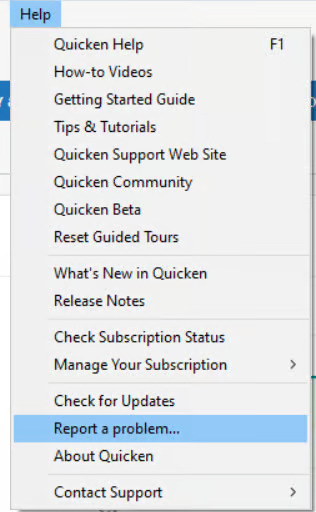
Additionally, we will also be forwarding this issue to the proper channels to have this further investigated. However, we request that you please navigate to Help > Report a problem within your Quicken program and submit a problem report with log files and screenshots attached in order to contribute to the investigation.

It would also aid the investigation to include a sanitized file when submitting the problem report. A sanitized file is a data file that removes personally identifiable information so you can comfortably share this file with the Quicken team.
While you will not receive a response through this submission, these reports will help our teams in further investigating the issue. The more problem reports we receive, the better.
Last, @hj.rose.tx—thank you for submitting a problem report already, however, we only received 4 log files from you. Could you please resubmit your problem report and submit all log files, and if possible, a sanitized data file?
We apologize for any inconvenience in the meantime! Thank you.
(CTP-16051)-Quicken Anja
Make sure to sign up for the email digest to see a round up of your top posts.0 -
Quicken files was under one drive and has been fine for many years. Cannot attach pdf to transactions and cannot add attachments to accounts. Error from account attachment states "Quicken cannot attach the file because it is already in use. Please close the program running the file, and then try again." Created a pdf with a different browser, same result. Disabled onedrive and created a pdf, same result. I use adobe acrobat 2020 and rebuilt the installation with the same result.
1 -
It turns out, if you uninstall KB5074109, the attachment function returns to normal. The security update did something with the pdf documents stored in onedrive due to them being accessible from multiple sources. Therefore, when we download the pdf into a onedrive covered folder, it can't be utilized by quicken. Question is, does quicken have plans to modify its programming to be able to use the pdfs in the onedrive folder? I want to keep those documents stored off-site. I do not want to disable onedrive nor do I want to disable security updates on my computer.
2 -
@trekkie1dh Thank you for the additional details and for testing with OneDrive disabled—it’s very helpful to understand how the security update (KB5074109) is interacting with Quicken.
Even if the issue is resolved for you now, we still need complete log files and, if possible, a sanitized copy of your data file to help our teams move forward with investigating this issue. Please submit a problem report via Help > Report a Problem in Quicken to do so.
Thank you!
-Quicken Anja
Make sure to sign up for the email digest to see a round up of your top posts.0 -
As of yesterday 1/15/2026, I'm having the exact same problem as everyone else on this issue.
2 -
I'm having the same problem here. All my data is in OneDrive, as it should be. Recommending that we not use OneDrive makes no sense. Quicken needs to figure out how to work with OneDrive, just as it has always worked before now.
Also, you can temporarily pause syncing in OneDrive, which I did, and I still can't add attachments. Makes me believe OneDrive has nothing to do with this.
3 -
Hello @sMcdowell & @AbeK,
Thank you for chiming in and sharing your experience.
I can see you have both submitted log files, and both your details and files have been added to the ticket for this issue.
Thank you!
-Quicken Anja
Make sure to sign up for the email digest to see a round up of your top posts.0 -
I'm having the exact same problem. It was fine a few days ago. Now I'm unable to attach anything.
1 -
My Quicken data files are stored on OneDrive. Uninstalling Windows 11 update KB5074109 worked for me as well and the attachment function is again working normally.
1 -
What you can also do, and is recommended, is to keep your Q data file entirely OUT of OneDrive … but send your backup files to OneDrive.
And, Q has always had problems with OneDrive since OneDrive interferes with Q's access to it's own files. Q has been around MUCH longer than OneDrive … so MS should fix OneDrive.
Q user since February, 1990. DOS Version 4
Now running Quicken Windows Subscription, Business & Personal
Retired "Certified Information Systems Auditor" & Bank Audit VP2 -
My quicken classic transactions will no longer attach my pdf invoices as attachments. One error I received in another category said "quicken could not find the specified file". It's worked fine until recent updates. Others just don't attach and the attachment box remains empty. I really would like this problem fixed.
0 -
As a decades long user of Quicken, I have become very reliant on the attachment function, adding attachments to many transactions. I am not particularly computer savvy and am not comfortable moving my Quicken data file(s?) that have worked for years to a new location of my choice. I am not even sure which files to move let alone where to move them. I sincerely hope that Quicken comes up with a solution to this sudden change in functionality sooner rather than later! Thank you to those more knowledgeable folks who are working on a solution.
0 -
I am having the same issue. Just sent in a report. Scanner is being recognized but acts like the scan never happened. The weird thing is it is not even letting me bring in a pdf file as an attachment. Pretty basic function I would think.
0 -
Now I can't enter any transaction at all. I'm not I.T. but something broke this software. I'm going to delete it and bring in a new copy. Will see if that fixes the issue.
0 -
I am having a slightly different problem. I can attach files to some accounts but not to others. My main file is on OneDrive, but I don't think that's a problem because I can attach to various accounts - just not all. ???
0 -
- Have you attempted any troubleshooting steps so far? If so, what were they? Tried rebooting, tried adding attachment from different location, tried screen clip and PDF neither works. Restored a backup still does not work
- When did this issue first start occurring? about January 13 2026
- Do you receive any error messages when you attempt to add an attachment? no, appears as if it is adding it but never attaches anything
- Were there any significant changes to your system or software before the issue began (updates, new installations, etc.)? No updates nor software additions on my end. I do run Norton Utilities for virus protection — unsure if they updated anything
0 -
Hello everyone,
Thank you all for chiming in and sharing your experiences—we truly appreciate the feedback.
For anyone who has not yet done so, please submit a problem report via Help > Report a Problem in Quicken, and include:
- Log files
- Screenshots of the issue
- A sanitized data file, if possible
This allows us to attach your individual details and files to the open investigation so our teams can better analyze patterns across different setups.
At this time, the issue remains under active investigation, and there is no ETA available yet, but every additional report helps move it forward.
Thank you for your patience and for helping us with the investigation.
(CTP-16051)-Quicken Anja
Make sure to sign up for the email digest to see a round up of your top posts.0 -
i am having this issue as well. i have reported via the Report a Problem menu option as recommended.
KB5074109 is installed.
0 -
@MajorTom Thanks for chiming in and submitting your files! Your details and files have been added to the ticket.
Thank you!
-Quicken Anja
Make sure to sign up for the email digest to see a round up of your top posts.0 -
Deleted all Quicken files. Tried to re-install Quicken Classic for Windows. Get's about half-way through install then rejects installation. Will be calling support line.
0 -
I uninstalled KB5074109 yesterday (1/19) and was able to attach files. Now today (1/20) back to not being able to attach files. Come on Intuit - Quicken fix it!!!
0 -
I have KB5074109 installed but the data file is not in a Onedrive path and I am not experiencing any issues.
0 -
I too, am having this issue as well. Started about 6 days ago. I have also reported via the "Report a Problem" link
0


