Quicken Is and Has Been Extremely Slow [Edited]

I just don't know how to make my voice heard - Quicken has been slow for years! I see comments from the development team as "hardly anyone reports problems",… not true - lots of open and closed threads about this topic. - Also, stop the excuses. I have top of the line PC, running the latest version of everything, not on cloud drive, no antivirus, etc… The slow performance is not my issue, it is something built into the architecture of Quicken, which Quicken has to seriously face. It cannot be only me that is experiencing this slow perfomance. Every click is an exercise in patience! on every function. I am OK with the Synce being slow, because you can blame the institution servers and whatnot. But every click on a new transaction, reassignment of categories, etc is just not fair.
My file path is: C:\Users\[username]\OneDrive\Desktop\Documents\Quicken
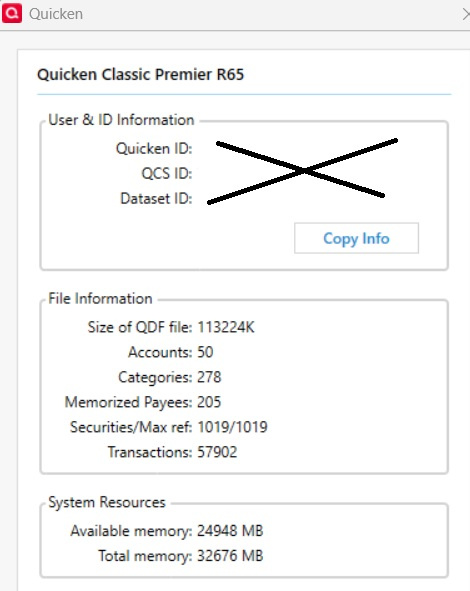
My file info is the following:

I hope you can help and build a better app
Comments
-
Your fundamental problem is that your Q data file is stored in a folder that's managed by OneDrive … and OneDrive is interfering with Q's operation.
Move your file to a non-OneDrive folder and direct the Backups to the OneDrive folder, which should help with your performance issue.
Q user since February, 1990. DOS Version 4
Now running Quicken Windows Subscription, Business & Personal
Retired "Certified Information Systems Auditor" & Bank Audit VP2 -
@Mario66 - I agree with @NotACPA . You said you are not on a cloud drive but the path you posted shows "OneDrive" which is a cloud drive.
I'm guessing you did not know that and did not put your data file there. One of the few bad things about MS is that every once in a while there is a major software update and without seeking any user permission the update will default personal files to this OneDrive folder. So, after every MS update I check to make sure none of my personal files and folders are saved there and then make sure that the OneDrive folder is disabled. I used to like OneDrive because I thought I would be able to simply backup my personal local drive files there on a demand basis. But then I found out MS seems to not understand what on-demand backups are and is constantly backing up my personal files in real-time. I (and many others posting on the Internet about this) do not want our local drives hijacked in this manner.
BTW, you might want to take a good look inside that OneDrive folder. I'm guessing you will be surprised to see how much of your personal files are being actively saved to the OneDrive cloud account.
Quicken Classic Premier (US) Subscription: R66.23 on Windows 11 Home
2 -
The first thing I would do would be to put your working file in a path that does not include OneDrive. It is OK to store backups in a directory that is controlled by OneDrive, but storing working files there has been known to cause problems.
See if that helps. Also what specifically is slow about Quicken - Downloading transactions? Entering transactions? Particular accounts? How slow?
You have a lot of Memorized Payees. Do you really need that many? If some of them are variations on the same real Payee, you can use Renaming Rules to reduce the number you need.
Go to Tools > Account list. If the "# of transactions" column is not displayed, click on options at the bottom and check it. How many transactions are in the slow accounts? Are the accounts with fewer transactions noticeably faster?
Please let us know what you find.
QWin Premier subscription2 -
Can you further explain where to find my working file (Mine looks line One Drive also) and how to move it to a local 1TB Drive
Quicken Premier 2019 R22.12 V27.1.22.12 - Windows 10 Pro V1903 OS Build 18995.1 - Quicken user since Windows 98.0 -
The path to your current Q data file is shown at the bottom of the FILE menu dropdown.
But, the easiest way to move it is to use the Windows file move/copy function.
Q user since February, 1990. DOS Version 4
Now running Quicken Windows Subscription, Business & Personal
Retired "Certified Information Systems Auditor" & Bank Audit VP0 -
I've been having the same issue of an extremely slow file. I've been using the same file since 1998 so it's large, around 508 KB. I'm mostly using Quicken for my bank and credit card transactions.
My sync download speed is fine but when I accept the transaction its taking an over 30 seconds for me to be able to move to the next transaction. I see a blue circle spinning while I wait. This has been going on for some time, over a year, but continues to get worse. I'm to the point that it's just not usable with the amount of transactions I have, takes way to long.
I've talked with Quicken and they've tried all the typical stuff, validation, archiving prior years, etc… nothing seems to help. I've seen other posts from people who have a slow file as well but I haven't seen a post that fixes the issue.
If anyone can help or point me to a post that will help it would be greatly appreciated.
0 -
Soooooo, 25yr user of quicken here.
I too can relate and want to complain about the sluggishness of recent builds.
I'm running r65.29 (latest) on local NVME drive on qin11 with 64gB RAM (task manager never reports more than a 40% use of RAM) - a relatively fast machine.I've noticed a continuous degradation in snappiness over the past year for simple operations (such as moving from portfolio view to a specific account register - taking 15+sec), entering a transaction (start typing recipient/payee and auto-lookup takes 30sec to catchup to my typing), etc.
My files are of all sizes, from <10mB to over 100mB - but the performance is consistently laggy and frustrating.It makes it difficult to use.
Who at Quicken will raise this issue with the bug manager?2 -
If you want to report a problem your best bet would probably be to contact Quicken Support.
Official Quicken® Support - Phone, Chat, or Community
Or Help → Report a Problem (This does go to the development group, but you will get no response for this, and they really only work on problems that a reported by many people)
In general, though I doubt any of this will be actually worked on.
You are better off looking at the advice here to check for things like keeping the data file on a local drive/no cloud folder, running validate, and for investment accounts, limiting the amount of securities/security lots/transactions in any given register using the Archive Transaction menu option from the gear icon in the register.
Because "performance is laggy" isn't something that a developer can work on. Mainly they need to be able to reproduce the problem, and if that doesn't happen in their data file, then there is little chance that they will be able to fix it.
1 -
Appreciate the quick response, Chris_QPW
Unfortunately, all the tricks you mentioned haven't helped.
Seems to me as the program expanded its abilities/feature set, it started acting like any other 'fits all shoes' s/w and bloated - become less effective at its chore tasks - which is to be a quick database access and building tool. uSoft Windows comes to mind, but uSoft spends the resources to tune their kernel to take advantage of hardware advances - they have major upgrades ever few years. Quicken would do better to follow such a course.
Any other suggestions are appreciated.
Have you noticed any performance changes for your files the past few releases?Be well, Boulderwise
0 -
I can't really say that I can pin down performance problems to the last few releases.
But unfortunately, that doesn't seem to be how performance problems seem to manifest in Quicken. On a general level I do think Quicken has gotten a bit slower over the years, but in general it is small and might even just be perception not really proven with a stopwatch.
When people report performance problems they tend to fall into a couple of categories. One being the assumption that "I have a very powerful machine so Quicken should be fast". This just doesn't hold up. And it times it can be the opposite. People that expect Quicken to be as fast as modern program especially if it isn't really even the same kind of application, are just not facing the reality of what Quicken is.
For the people that have real performance problems their instincts of what would cause the problems are usually wrong. For instance, data file size has very little impact. What is in that data file or what services they are using can have a much bigger impact. My data file is 186 MB and in general isn't too "laggy". But I even though have a lot of accounts in my data file, not too many were ever "open" at any given time, I don't trade securities very often. And as of the beginning of the year except for my wife's 401K which is even in simple investment mode, I stopped tracking investments in Quicken. Not because of performance, but just because my investments are so dead simple, I don't even want to bother with tracking them both in Quicken or the one financial institution they are in.
0 -
Quicken is slower than molasses in a polar vortex. I have been complaining for years and so have others. Just accepting transactions in an investment account take at least one minute per transaction. Switching to an investment account takes several minutes. And on top of that it randomly loses online access and the access has to be disabled and reenabled for each account. It often locks up when trying to generate a report. I suspect the application needs to be rewritten from the ground up to solve the speed issue. Looking for alternatives. Quicken is a time-sink - life is too short to continue fighting this app. If they had some competition, I suspect it would get a lot faster…
-1 -
@DRHayes We would need more details about your file in order to help with your speed issues.
What is the full path to your data file? Does it have OneDrive, Dropbox, or another cloud storage or backup service in the path?
Click on Help and hold down the Ctrl key while clicking on About Quicken. What does it say in the File information box?
Are some investing accounts faster than others?
Go to Tools Account List and if the number of transactions in each account is not shown, click on Options at the bottom and add a check mark next to Number of transactions.
How many transactions are in the slow investing accounts?
QWin Premier subscription1 -
I notice that this complaint is about investment transactions/registers. Quicken definitely has performance problems when there are a lot of transactions/securities/security lots in any given investment register. The general workaround is to use the archive function from the gear icon to move closed lots out of the investment registers that you are actively using. And in general, if you are an "active trader" Quicken probably isn't for you.
I was looking at a comment the other day about CSV importing into an investment account and they were fighting the rounding problem, and they mention doing the work for "50 transactions a day" was a problem for them. If someone is entering 50 investment transactions into a given register a day, I would be amazed if they don't have problems.
-1 -
not just files that are mainly investments. Standard banking files are slow as well.
I'd be happy to divulge my specific issue details and associated files to a quicken tech employee, but unless they are interested in actually doing something about our complaints its not worth my time.0 -
local files on an otherwise fast computer
0 -
@boulderwise If you want to interact with a Quicken tech employee, you should contact Quicken support by phone tomorrow.
Good luck.
QWin Premier subscription0 -
I am using a local file path. I have archived old investments before with no improvment in speed. Other accounts are slow too, just not as slow as investments. What about losing online connections intermittently, reports crashing, etc… I have been online with tech support countless times over the years trying to solve these issues but nothing seems to cure these problems. I have done all of the recommended actions and confirmed my computer is way over the specifications suggested. The fact that there are a large number of daily transactions in investment accounts makes the speed issue exponentially painful. Prior posts about speed issues never get resolved and are just closed.
1 -
The fact that there are a large number of daily transactions in investment accounts makes the speed issue exponentially painful.
@DRHayes You have answered some but not all of my earlier questions.
Please click on Help and hold down the Ctrl key while clicking on About Quicken. What does it say in the File information box?
Are some investing accounts faster than others?
Go to Tools > Account List and if the number of transactions in each account is not shown, click on Options at the bottom and add a check mark next to Number of transactions.
How many transactions are in the slow accounts?
QWin Premier subscription0 -
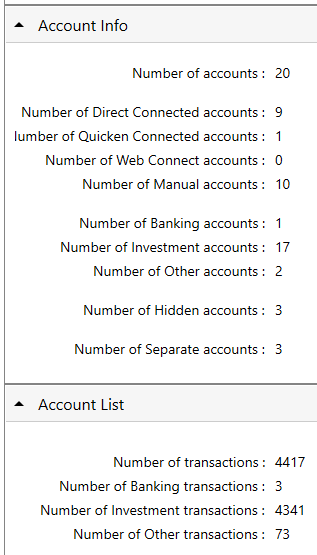
I took the opportunity to do what you suggested and there is no difference in snappiness between large a/c registers and small one (w/r # transactions….)
 0
0 -
@boulderwise Yours sounds like an unusual case, since 4,341 transactions spread among 17 investing accounts should not cause serious performance issues.
Perhaps you have overly aggressive antivirus software or something else that is interfering with Quicken.
I suggest you contact Support for assistance on this. You will need to be patient because they must rule out possible fixes that you may have already tried.
Please let us know what you find.
QWin Premier subscription0 -
Considering the number of complaints here, Reddit and elsewhere, I don't consider my files' performance issues as outlets at all.
I have waisted hours with Q support phone calls & gotten nowhere. Q is not sympathetic to our voiced concerns.
I think next steps are to create an online petition and post links to it here.
0 -
If you or any other users here can help gather a list of users & threads expressing performance issues, please list them here.TY
0 -
Also, would be best to address the petition to a senior manager responsible for product enhancement. Please post here if you know who that might be and associated contact info
0 -
Just an fyi. I was experiencing slowness a few months ago. I tried all of the Quicken related suggestions, with no success. As it turned out, it was not a Quicken issue at all. Before continuing trying to troubleshoot Quicken, I took the time to make sure the underlying system it rides on was not the culprit. So….. I updated my network and system drivers (which, as it turns out, were very outdated) using a third-party driver updater. Lastly, I performed an update to Win 11 by doing a……
Settings/Windows Update/Advanced Options/Recovery/Fix Problems using Windows Update.
This reloaded Win 11 (fixed possible corrupt system files) without affecting data, apps, or settings.
In my case, it resolved my issue. I was quick to blame Quicken as well but turns out it was not the root cause. At least in my case. Hope this is helpful.
1 -
- [Removed - Personal Information]
0 -
glad that helped - no such luck with my issues
0 -
When I last had very slow Quicken response I did 3 things that resolved it for me:
- Pulled up the Startup Apps Settings and disabled all but apps to launch at startup except for those that are absolutely necessary. (There were several that were launching at startup that consumed a lot of memory and cpu resources.)
- Changed my antivirus software setting so that constant scanning was disabled.
- Disabled Malware Bytes, both the app and the browser extention.
I think (not sure) that #2 and #3 were the main culprits.
Quicken Classic Premier (US) Subscription: R66.23 on Windows 11 Home
0 -
QUICKEN R65.29 is just SLOW. It is pathetic that people have been complaining about it for MONTHS, and nothing has been done.
DO not blame WINDOWS. Don't blame the anti-virus.
My file is on SSD drive, as is the program itself.
I have tried the archive idea, but that just screwed up my datafile. Anything beyond a year has been lost due to the quirks of the archive process. Comparing year-to-year is now a lost capability for me because of 'archive'.
I have snoop'd the internet traffic, and quicken is not doing anything in this regard when moving from one brokerage account to another. quicken is just getting lost in its own underwear when moving from account to account. It is so slow that is seems like the program is waiting for some lock or semiphore to timeout before continuing.
It anything, based on the info in this thread, AND THE REPEATABILITY of the issue, the quicken team is doing absolutely nothing with this issue. AND it would appear that the quicken team does not use it own product for themselves. If the team were using the product, this issue would have been fixed a long time ago.
I use the stock-quote feature the most. If I find another tool/program that has this feature, I will be done with quicken. Subscription pricing and poor performance do not make for happy customers.
0 -
I have done the 'validate files' and 'super validate file' but no issue have been found.
0 -
Dealing with Quicken Lag? It Might Not Be Your Hardware
I totally feel this. A few years ago, I treated myself to a high-end gaming PC. I figured with a beefy CPU and GPU, Quicken would run at lightning speed.
The reality? It was painfully slow right out of the box.
Tried every "best practice" and optimization trick suggested on this forum, but nothing worked. Even a standard clean install failed to fix the lag. Here is what finally did the trick:
The "Aha!" Moment
A month later, I did a full clean install, but this time:
- Wiped ALL partitions (in clean install) completely.
- Blocked Armory Crate (this was an ASUS machine) from installing itself.
The result: Quicken sped up a lot. It still isn't "fast" by modern standards, but it proved to me that the bottleneck was the Windows environment, not the Quicken installation process.
The Bigger Issue: Modernization
I realize the Quicken team is small, but a ground-up modernization of the code would be a total game-changer. Honestly, I’d happily trade some of the newer 'features'—like Bill Pay, which has caused me nothing but headaches—for a smoother experience. At the end of the day, I still love the core features; I just wish the engine under the hood was as solid as the tools I rely on.
I feel for the users experiencing a slow Quicken experience.
Quicken user since DOS Version 2; Running Premier (US) on Windows 11 Pro.
0