Downloading 401k transactions as BoughtX/Sold X

For years, one of our 401k accounts were being downloaded from Fidelity as BoughtX and SoldX. This works because we don't track contributions/matching from our paychecks. Starting around 9/30/2025, Quicken started downloading them as Bought/Sold which just makes the cash balance negative.
- how do I set up the account to have transactions downloaded as BoughtX/SoldX?
- do I have to manually "fix" the existing transactions from Bought/Sold to BoughtX/SoldX one by one?
Thanks in advance
Answers
-
Hello @carlyn.irwin,
Thank you for letting us know you're seeing this issue. To help troubleshoot, please provide more information:
- You mentioned this started around the end of September. Did this coincide with changing the connection type for the account from Direct Connect to Express Web Connect+?
- Is this affecting multiple accounts, or just one?
- Are there other Fidelity accounts where the BoughtX/SoldX are downloading as expected?
- Is the cash in the Fidelity account tracked as cash or as a money market fund?
- If it's tracked as a money market fund, which fund is it?
I look forward to your response!
Quicken Kristina
Make sure to sign up for the email digest to see a round up of your top posts.
0 -
I also experience this same issue with my Fidelity 401k account. For every contribution (2x times/month), I have to manually change from Bought to BoughtX. I agree that this was working fine "before" but the problem is that I just don't recall when before was.
- Not sure if it was aligned to Express Web Connect+ changeover as I don't recall the timing.
- I have not seem any issues with my Vanguard account, but that does not have contributions where BoughtX would be used.
- I only have the 401k account on Fidelity, so cannot answer the question.
- There's no cash in my 401k account. All contributions get invested into mutual funds.
James
0 -
I'm not sure this is a Quicken issue vs. the FI. But I could be wrong. I have a 457b that's Fidelity that I need to manually import a .QFX for and it also does it "wrong" (not the regular purchases, but rather it's a dividend reinvestment that the FI lists as two separate transactions). Same with my Charles Schwab accounts. However, it doesn't seem to do with my Alight account. Thus, my reasoning that this isn't a Quicken issue, but rather the FI reporting things as such?
0 -
Here are my answers:
- You mentioned this started around the end of September. Did this coincide with changing the connection type for the account from Direct Connect to Express Web Connect+? - I can't recall but both my 401K accounts held at Fidelity are set up to Express Web Connect+
- Is this affecting multiple accounts, or just one? - It is only happening to one of my 401k accounts held at Fidelity
- Are there other Fidelity accounts where the BoughtX/SoldX are downloading as expected? Yes, my second account is getting downloaded properly
- Is the cash in the Fidelity account tracked as cash or as a money market fund? There is no "cash" as everything is invested.
- If it's tracked as a money market fund, which fund is it?
0 -
When you say it used to download as a BoughtX, usually that would transfer the cash to buy the shares from another Quicken account. Is that what you were seeing, or did it somehow buy the shares without affecting the cash anywhere else in Quicken?
In the other account where this is working as you expect, is the cash to buy the shares transferred from another account, perhaps as part of a paycheck entered in another account?
QWin Premier subscription0 -
It bought the shares without affecting the cash anywhere else in Quicken. By default the "transfer" account was the 401k account (transferred from same account).
0 -
@Jim_Harman The "transfer" account is the same 401k account. When I change the transaction from Bought to BoughtX, I also have to tell Quicken that the transfer account is the same 401-k account. In reality, the cash is a transfer from my paycheck into the 401-k account. I do have paychecks fully setup in Quicken, except that I did not have my 401-k contribution transferred from my paycheck to the 401-k Fidelity account.
I suppose that I could change my paycheck setup so that it DOES transfer the cash into the Fidelity 401-k account, and then the Bought transaction should actually work properly. I guess I could do that, but I'm still frustrated that this has changed.
0 -
I wonder if the issue of this thread is related to the issue described by @DoctorBrown in this one. It seems to me that there might be broader issue with "X" transactions that are perhaps related to either one of the latest releases (R65.29 was released toward the end of Dec when these "X" issues started popping up in this forum) or maybe a lagging issue related to the Fidelity EWC+ migration.:
Quicken Classic Premier (US) Subscription: R66.23 on Windows 11 Home
0 -
My understanding of the issue the OP is describing is different from my issue. In my case, the 401k WithdrawlX was treated as a Taxable event by Quicken but the SoldX was not.
At Fidelity when you setup a withdrawal, sold or deposit, bought from/to a 401k you can specify the account where the proceeds go to (Taxes are withheld by Fidelity) or come from. But I don't think the transaction received by Quicken from Fidelity can include the account information where the funds go to or come from. So I can't see how the Downloaded transaction Action can be ever be classified as a SoldX/BoughtX. You should always need to add the Category [Account] to the transaction.
This must be changed in the accepted transaction. Or this can be specified in a Bill and Income Reminder in Quicken to automate it. Then the Reminder will create a SoldX/BoughtX transaction that will Match to downloaded transaction.
What Fidelity seems to have changed is the way it reports the shares of the MMF FDRXX funds to Quicken. Now if I don't create a Bought/Sold of the FDRXX funds, Quicken will report a Share discrepancy.
0 -
Yes, at the top level I agree with you. But my thought is trying to understand if there might be some root cause that is impacting "X" transactions so that cash is not moving or captured in Quicken as it should be. In other words, why is it that "X" transactions have suddenly stopped working as they have historically acted?
Quicken Classic Premier (US) Subscription: R66.23 on Windows 11 Home
0 -
I hear you.
I can't see any explanation of how Quicken would have enough data it needs in the downloaded transaction to create any "..X" transactions in an investment account. I believe that those "…X" transactions can only be created if the From: or To: field is filled in with the name of a Quicken account so the transaction in Quicken has a source AND target account specified. If this is not the case, I would be glad to know that.
I don't have an answer as to why the OP's "…X" used to work but don't now. Maybe they were being created but did they have the data in the 'From:' field? Maybe Fidelity was transmitting a reference to an external account, but it wouldn't know what Quicken account to post it to. Quicken would have to supply that info somehow.
Here is what a BoughtX and SoldX look like in my file when I create them manually. Note the From: field in the Bought and To: field in the Sold transaction. And the transaction as they appear in the Investment account in Quicken:
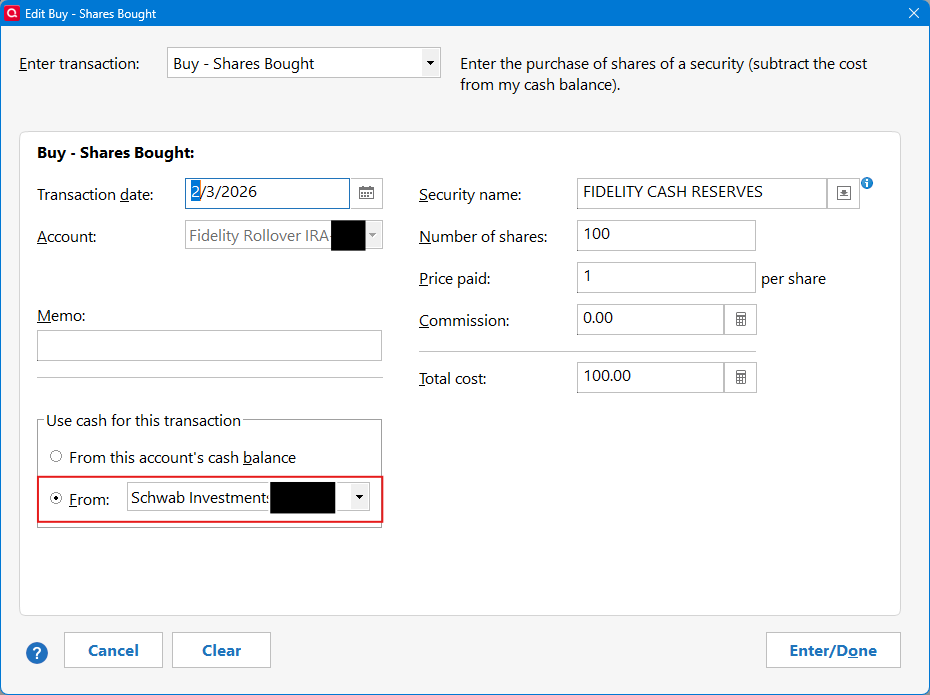
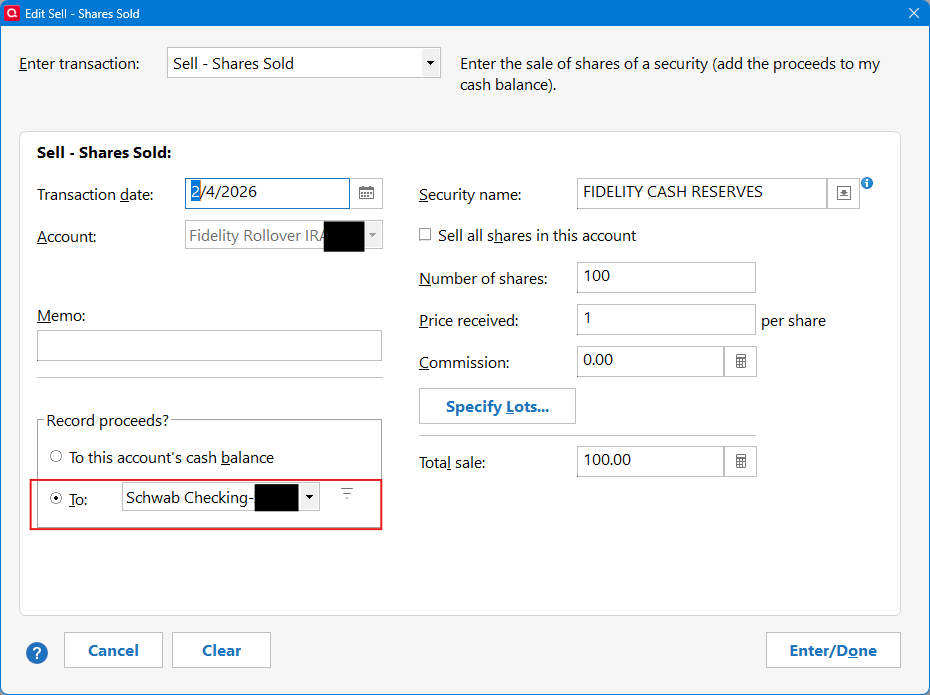

If the "From/To this account's cash balance" is set, then the transaction is a Sold or Bought transaction.
So the OPs transactions must have those From:/To: fields filled in to create the "..X" transactions. I suggest comparing, and posting, the past transactions when it was 'working' with recent transactions when it wasn't.
I have had cases where Quicken would 'Find' the matching transaction in the other account and ask if I that was the transaction I was pointing to. But, still the From:/To: field must be filled in.
0 -
@DoctorBrown yes, I also struggle to see how Quicken would know if it's an "X" transaction or not.
I do think this issue started about the same time that Fidelity made the change to EWC+.
For now, I have changed my paycheck to include actual transfers of pre-tax and Roth catch-up cash into my 401-k account. So, on Feb 15, we'll see how that works when 4x "Bought" fund transactions with actual cash in the account.
0 -
Hello @carlyn.irwin, Back to your issue….
Please explain more details about this statement:
This works because we don't track contributions/matching from our paychecks.
In my experience, the "…X" transactions designate that funds were transferred into or out of the Quicken Investment account. That would correspond with the funds going to another account at a FI.
Fidelity seems to have changed the way it handles the Cash portion of the Investment account. As far as I can tell, Fidelity has always kept the Cash funds in a MMF called FDRXX: FIDELITY CASH RESERVES, in the transactions downloaded to Quicken, the funds were coming from or going to the Cash Balance of the account. But strangely, the Reinvested Dividends download to Quicken were credited to FDRXX. Now, for me, whenever I buy or sell securities, (or execute Withdrawals) the downloaded data from Fidelity causes a Share Balance discrepancy error to pop-up for the FDRXX fund. I must manually enter a Sold or Bought transaction to the FDRXX security to balance the shares.
This tells me that Fidelity is now reporting to Quicken the Share Balance of the FDRXX security. Fidelity does not download a Buy/Sell transaction for the FDRXX security. And you don't see them in the Investment Report from Fidelity.
This might be what you are seeing. Let me know if this makes sense. There may be nothing you can do except manually enter the appropriate transaction for the FDRXX security. I've fought with Quicken and Fidelity about this but they are pointing fingers at each other.
This article may be informative:
Also, goto the Community Homepage and select the Alerts, Online Banking & Known Product Issues then search for Fidelity.
0 -
This may be off topic. I just looked at my Fidelity account online. If I look at the Account Positions and expand Cash, there is a button Change Core Position where you can select different funds for the Core Position.
0 -
This has been there since R65.15 was released in November. It does not change what the Core Position is at Fidelity. It only changes which one you are designating as the Core Position in Quicken. You should select the MMF for the Core Position in Quicken that matches what the actual Core Position is in the online account at Fidelity. Failing to do so may cause issues with Holdings discrepancies between Quicken and Fidelity which can create Placeholders in Quicken that will need to be resolved. It can also cause Cash Balance discrepancies between what is shown in Quicken and what is reported by Fidelity.
That button also gives users the ability to have the Core Position reported as shares held instead of as Cash Balance.
Quicken Classic Premier (US) Subscription: R66.23 on Windows 11 Home
0 -
@Boatnmaniac Very true. Thanks. The MMF may be different for other accounts at Fidelity. And must match the security defined in Quicken.0 -
I mentioned above that I changed my paycheck in Quicken so that my 401-k contribution actually gets transferred into the Fidelity 401-k account, meaning that "Bought" will be the correct transaction, not "BoughtX."
I just had a paycheck, followed by the Fidelity "bought" transactions coming through. It semi-worked. What I failed to think about was the company match funds that also need to be deposited into the 401-k account. I'm not really sure how to do a company match from my paycheck. Given that I plan to be retired in <2 years, I can't really be bothered to figure it out (I'm sure there's a method), so the path of least resistance for me is to just go back to how I had it before. That means I just need to change all the transactions manually from Bought to BoughtX.
0 -
@James White Have you tried setting up your paycheck using Quicken's Paycheck Wizard? You can get started by clicking on Add Paycheck on the Planning > Tax Center page or other equally obscure places.
This will lead you through setting up a Paycheck reminder with gross pay and deductions, including 401(k) contributions and employer matches. Your contributions and the match will be entered as transfers to the 401(k) account.
QWin Premier subscription0


