Is there a setting in Quicken that hides selected portfolio positions?

I am using Quicken Classic for Mac Premier v 8.3.3. I have previously posted this question on January 4, 2026:
In the portfolio tab, after updating the account (a Fidelity account), all of my holdings are listed correctly except for one, which is missing. Fidelity has reported this position in the past and there is no reason I am aware of that Fidelity would stop the reporting. In an attempt to "force" the security to appear, I added the position in the transaction tab, but still the security does not appear in the portfolio.
So I wonder: Is there a setting in Quicken I might have inadvertently set that hides selected portfolio positions?
Answers
-
Hello @FC Wolf,
Thank you for reaching out! Yes, it is possible to hide securities. However, as @jacobs pointed out below, hidden securities would still be visible in the portfolio screen. [Edited]
Please provide more information so we can help troubleshoot:
- What security is it?
- What kind of security is it (bond, money market fund, etc.)?
- When did you first notice the issue?
I hope this helps!
Quicken Kristina
Make sure to sign up for the email digest to see a round up of your top posts.
0 -
@FC Wolf said: …the security does not appear in the portfolio.
@Quicken Kristina said:Yes, it is possible to hide securities. Please see this article for more information: About the Securities window
I think that's an incorrect response to the original question. It's correct that in the Securities window, a security can be marked as Hidden. But all that does is remove the security from the list of securities in a dropdown menu. But it does not make that security, if currently held, disappear from the Portfolio screen, which is what the question was about.
Is there a setting in Quicken I might have inadvertently set that hides selected portfolio positions?
If you hold a security, then the Portfolio view with filters set to "Portfolio Value" and "By Security" should show the security. There's no setting to hide one particular security from the Portfolio view.
So let's backtrack a bit. You said that you created a manual transaction to add this security, and it still doesn't show in the Portfolio. Was that an Add Shares transaction that you entered? It sounds to me like Quicken believes, from the information downloaded from Fidelity, that you currently own zero shares of this security. So Quicken creates a placeholder transaction to set the number of shares to zero, even though you added some. You can verify this by going to the Transactions tab and entering the security symbol in the Search box, so you'll be seeing only transactions for this security. Do you see a gray placeholder transaction removing shares?
Oh, and let's double-check something else (I probably should have started here): the missing security isn't your core money market fund is it? With certain brokerages, core money market funds are no longer tracked as securities, and are shown simply as Cash, the last line in the Portfolio list. With Fidelity, for instance, FDRXX is one such security which disappears from the register when it is the core money market fund for an account and displays its balance under Cash.
Provide us more details about what security is missing, and what you see when you look at just transactions for that security in your register, and hopefully we'l be able to figure out what's going on.
Quicken Mac Subscription • Quicken user since 19931 -
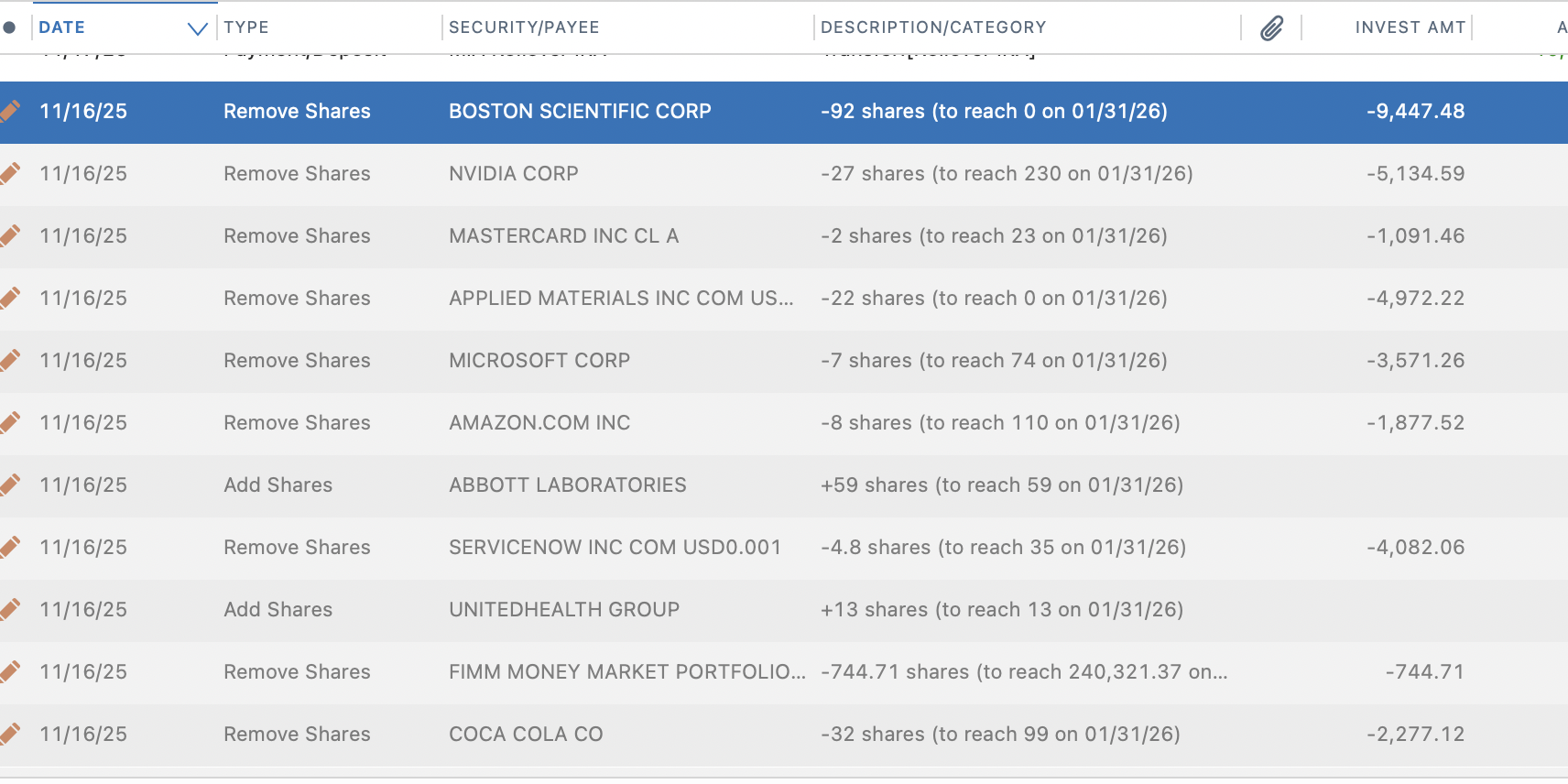
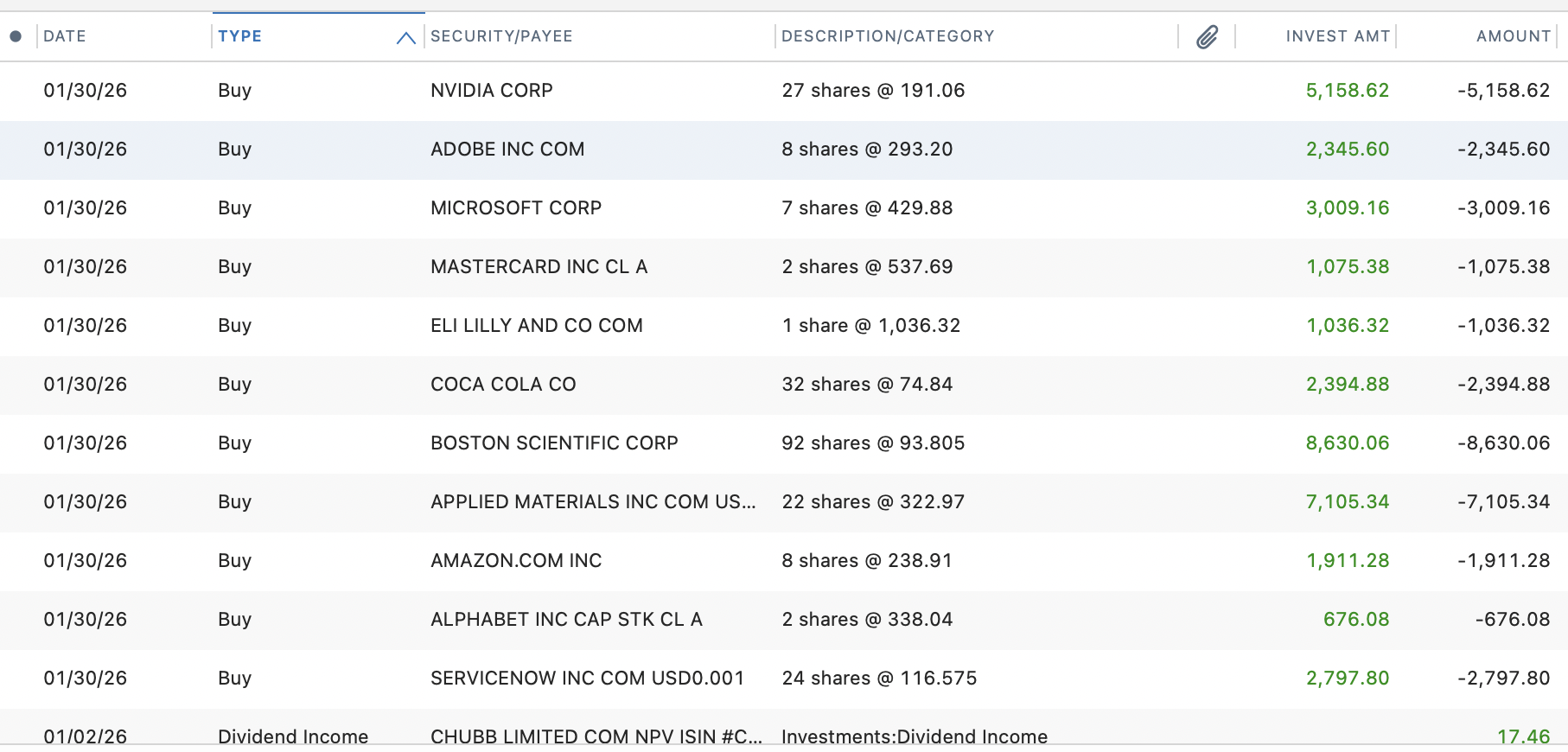
Not sure what is happening but I am seeing a similar thing in Mac Quicken with Fidelity. The buy and sell transactions are coming through the Fidelity feed with the correct share count and dollars. Quicken is generating Add and Remove transaction that they say are tying to what they say are the share counts coming from Fidelity. These are negating the true trade transactions. As I discovered the last time there were issues, the Add and Remove transactions are dated with when the account was opened. This is often many years ago. If i delete them, they regenerate. I create a error report with Quicken today. My hunch is Fidelity is not populating some tie out feed that Quicken uses. It may go away when the trade actually cash settles (or it may not)
 0
0 -
Thank you all. My further comments.
The security involved is Vanguard Federal Money Market Fund, VMFXX. The issue arose some time before 12/11/25, which is the date I entered the Add Shares transaction: I can't pinpoint the actual start date any more precisely.
Regarding comments posted by jacobs:
"f you hold a security, then the Portfolio view with filters set to "Portfolio Value" and "By Security" should show the security. " Yes, those are the filters that have been set.
"Do you see a gray placeholder transaction removing shares?" Yes. It is dated on the first date transactions are recorded in the register and the type is Remove Shares. This seems to be the key to the issue. If I delete my Add Shares transaction, the negative amount of this placeholder transaction is reduced by exactly the same number of shares. If I try adding or removing different numbers of shares, the placeholder changes by an offsetting number. So yes, it appears the placeholder is causing the holding to remain "hidden" by keeping the share amount at 0. So I deleted the placeholder and now the holding appears in the portfolio listing. I quit Quicken, relaunched and updated the account, and still the holding appears, although the number of shares differs from that reported by Fidelity. Also, your comment that "It sounds to me like Quicken believes, from the information downloaded from Fidelity, that you currently own zero shares of this security" leaves me uncertain this will be a permanent solution. And Lane1983 reports that the transactions regenerate after they are deleted.
"the missing security isn't your core money market fund is it?" No. It is a money market fund, but it is listed along with all other holdings without any "core" or related designation.
Lane 1983 has created an error report with Quicken. Perhaps that will be my next step if the placeholder regenerates of if the number of shares does not agree with Fidelity. Other thoughts appreciated. Again thanks for the support.
0 -
"the missing security isn't your core money market fund is it?" No. It is a money market fund, but it is listed along with all other holdings without any "core" or related designation.
Ah, but the Vanguard Federal Money Market Fund (VMFXX) is the primary default settlement fund (core fund) for most Vanguard brokerage accounts. And that would explain why Quicken is setting the holding of VMFXX to zero with the placeholder transaction, irrespective of your attempt to manually add shares. Vanguard is reporting your VMFXX holdings as cash rather than a shares of a security.
The question is: is the value of your VMFXX holdings displayed in the Portfolio as all or part of a Cash line as the last row in the list of holdings. If yes — there is a Cash line which includes the value of the VMFXX money market fund — than this is considered standard behavior. If not, you have a problem to discuss with Quicken Support. There are other threads which describe a Fidelity core money market holding being part of cash, but reinvested dividends being download and posted as reinvested dividends instead of as cash dividend; if you're experiencing that with the Vanguard money market fund, that would be a different problem to bring up with Quicken Support
Quicken Mac Subscription • Quicken user since 19930 -
My Vanguard Federal Money Market Fund is held at Fidelity. Its value is not included in the cash line. Fidelity does not report cash for the account, a 401(K). (A related problem I still need to address is that Quicken is showing a cash balance while Fidelity has no position for cash.)
0 -
Fidelity does not report cash for the account, a 401(K). (A related problem I still need to address is that Quicken is showing a cash balance while Fidelity has no position for cash.)
@FC Wolf Yes, this is exactly what I'm describing. On your Fidelity statement, it shows shares in a money market fund. But when Fidelity downloads to Quicken, it translates core money market funds to cash. So in your Quicken portfolio, you have a Cash line which doesn't exist on your Fidelity statement; on your Fidelity statement, you have a money market fund which doesn't exist in your Quicken portfolio. Are those two amounts the same?
I don't use Fidelity; I use Schwab. In some of my accounts, my Schwab statement shows a section for Cash and Cash Investments; it includes "Cash", "Bank Sweep (TD Bank)" and "Money Fund non-sweep (SWVXX Money Market Fund". When I compare my monthly statement to Quicken, I need to add together the "Cash" and "Bank Sweep" amounts on the statement to compare to the "Cash" line in the Quicken Portfolio. Other brokerages report things slightly differently, but the concept is similar: one money market fund designated as the core or sweep found for the account may appear on the brokerage statement with the fund name and balance but will appear in Quicken as simply all or part of the Cash amoount.
Quicken Mac Subscription • Quicken user since 19930 -
The amount of cash reported by Quicken and the value of the money fund reported by Fidelity are not the same. The money market fund held at Fidelity is an investment position no different from any other mutual fund. There is no cash in the account. When one investment is sold another must be bought for the proceeds. Nothing flows into or out of cash. True, that is not the way other, perhaps typical, brokerage accounts function.
0 -
@FC Wolf What is the difference between the cash value reported in Quicken and the value of the money market fund reported by Fidelity? Are there any other money market funds in this account which could account for the difference?
I understand there is no cash reported in your Fidelity account. What I'm telling you is that when the core money market fund's balance is reported to Quicken, it is shown in Quicken as cash rather than as a separate security. If those two amounts are the same, then it's not too big a deal for anyone to deal with. But if those two amounts are different, as you're saying, then some additional digging is needed to find out why Quicken is showing a Cash balance which doesn't match the money market fund value.
So my first thought is wondering if there is another money moarket fund which could be adding to the cash balance in Quicken. If your other investments are securities other than money market funds, the I would next turn to the transaction register for the account to look for clues. Is the running balance in the transaction register equal to the Cash amount on the Portfolio screen? As you scroll back in time, was the balance always zero, and recently became non-zero? If not, when did it become non-zero — and what transactions are generating and/or consuming cash?
When one investment is sold another must be bought for the proceeds. Nothing flows into or out of cash.
Got it. But Quicken has no way to exchange 'x' shares of security XYZ for 'y' shares of security ABC in one transaction. I think of every such exchange as a sale of a security creating cash followed by a buy of a security using up the cash. Your Fidelity statement may not show that two-step process, but I'd expect that's the way it would be reported to and tracked by Quicken. So when you look at your transaction register for the last time you exchanged some shares of one security for some shares of another security, how is that recorded in the transaction register? Are there two transactions for the Sell (creating a cash balance) and then Buy (using up the cash balance)?
Quicken Mac Subscription • Quicken user since 19930 -
@jacobs It's a 401K. I never had a Fidelity 401K but if it works like the one I did have there's no such thing as a core account or uninvested cash. Every dollar was invested in an asset and there was never a cash balance of any kind. When you moved money around it moved directly from one investment to the other - whatever buying or selling was going on was not reflected in your account activity as cash transactions, it was more like Remove Shares and Add Shares.
0 -
@Jon Okay, that souunds a bit different than the IRA accounts I've had at Vanguard and Schwab, but the key here is that Quicken account is showing cash. I was trying to get at where that cash balance is coming from. Maybe Fidelity isn't translating a share exchange in the account correctly for downloading to Quicken. Maybe they, or Quicken, isn't distinguishing this account from other types of brokerage accounts. That's why I wanted to know what was happening to create cash in the transaction register.
Quicken Mac Subscription • Quicken user since 19930 -
Update on my issue: as of today, trades settled and it has gone away.
0 -
Thank you for the follow-up,
I'm glad to hear that the issue has resolved!
If you need further assistance, please feel free to reach out!
Quicken Kristina
Make sure to sign up for the email digest to see a round up of your top posts.
0

