Credit Card Payment Reminders

Using Quicken Classic desktop for Windows. I have a credit card and they do online billing. So I have them setup in my billing screen.
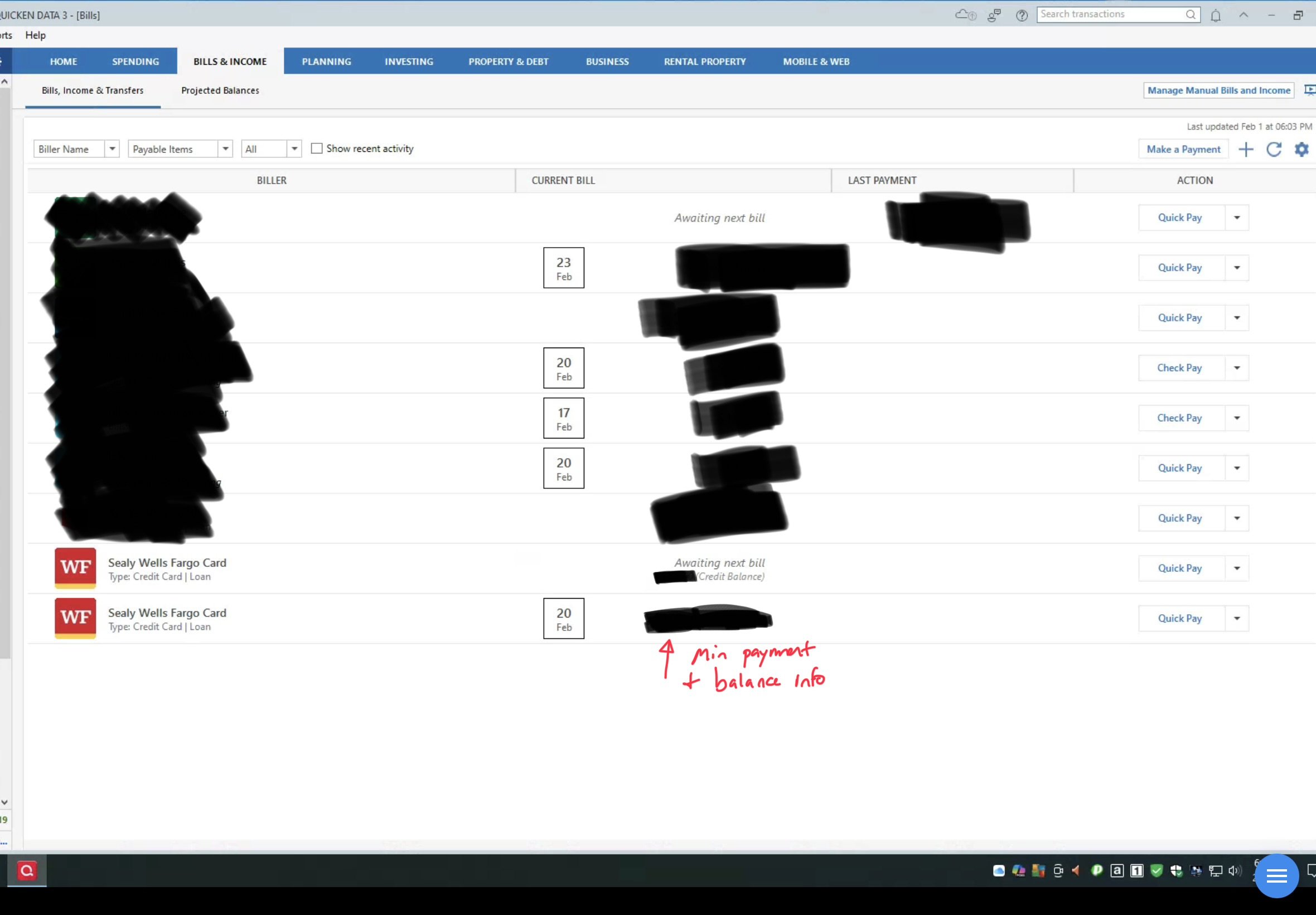
Question 1: They appear twice even though I only entered them once. I’m afraid if I choose one to delete, both will leave, and I’ll have to sign in again. How to fix?
Question 2: I don’t have a reminder set for them. If wanted to create one, is it a bill or a transfer? I actually have the credit card account setup as an account in Quicken, so before I started using their bill stuff, I set up the payment reminder as a transfer, but sure about now.
Thanks!
[Edited - Readability]
Answers
-
Hello @randomguy114,
Thank you for reaching out! To help troubleshoot, please provide more information:
- Which financial institution is the credit card with?
- You mentioned it appears twice. Are both identical?
- If possible, please provide a screenshot of the duplicate biller (make sure to redact any personal information).
- If needed, please refer to this Community FAQ for instructions on how to attach a screenshot. Alternatively, you can also drag and drop screenshots to your response if you are not given the option to add attachments.
To address your second question, if you're setting up a manual reminder, you could set it up as a bill, then set the category as a transfer category to the credit card.
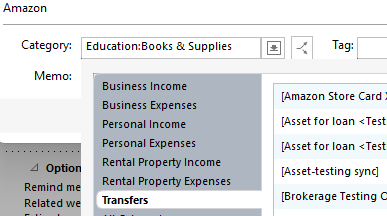
That would set up the reminder to document transfer from the payment account to the credit card.
I look forward to your response!
Quicken Kristina
Make sure to sign up for the email digest to see a round up of your top posts.
0 -
See screenshot below.
 0
0 -
Thank you for your reply and the screenshot,
I suggest you try to Review and Repair Online billers. However, I do recommend that you save a backup of your data file first (just in case). After that, please navigate to the Bills & Income tab and click on the gear icon on the top-right. Then, click on Review and Repair > Review and Repair Online Billers in the dropdown menu.

Once that is done, see if the issue still continues to persist.
Let us know how it goes!
Quicken Kristina
Make sure to sign up for the email digest to see a round up of your top posts.
0 -
Hello @randomguy114,
We haven't heard back from you in a while. Do you still need assistance?
Check back and let us know! Thank you.
Quicken Kristina
Make sure to sign up for the email digest to see a round up of your top posts.
0 -
Hello again,
Checking in once more before this thread is closed.
Let us know if you still need assistance.Thank you!
Quicken Kristina
Make sure to sign up for the email digest to see a round up of your top posts.
0 -
Hello again,
Due to the lack of response, I went ahead and closed this post.
If you still require assistance, please feel free to start a new post.
Thank you!
Quicken Kristina
Make sure to sign up for the email digest to see a round up of your top posts.
0
