Why are reminders automatically appearing in register without category?

I'm not sure why this prior thread was closed without any resolution, but the problem persists.
https://community.quicken.com/discussion/7967187/reminders-automatically-appearing-in-register-without-category
There are two problems here: 1) manual reminders are automatically being entered into the register, AND 2) they are entered without the category specified in the reminder.
Specifically, starting a few weeks ago, presumably after an update, my MANUAL bill reminders started automatically entering themselves into my register, even though they are set NOT to. These transactions in the registers do not include the category they were set to in the reminder. In the register, they have a blue pencil saying they were manually entered from a bill reminder. But they were not manually entered by anyone. When I actually manually enter a transaction from a bill reminder, it shows with a red pencil and says Uncleared until it's matched to a downloaded transaction.
It seems (though not 100% certain) that this situation occurs when a transaction is downloaded that Quicken believes matches a reminder.
[Edited-Readability]
Answers
-
I spent hours on phone with support explaining to them what happened. They said they would investigate and follow-up. Never happened. I sent them an email asking what the status was and they said the case had been closed. I called and was told they would open another ticket for it. When I inquired about that later, they said the ticket was closed also. I'm still having the issure but I guess there are not enough people reporiting it for them to care about it.
Quicken Classic - R66.28, Windows 11 PRO current on updates
My data file is NOT being synced nor backed up.
1 -
Specifically this has to do with Pending Transactions. When you have pending transactions turned on and a specific account selected, when a pending transaction occurs it causes the "reminder" to be inserted into the account register, without the category, even though the pending transaction itsel is not added to the register. The register is set to NOT show pending transactions in the register.
Quicken Classic - R66.28, Windows 11 PRO current on updates
My data file is NOT being synced nor backed up.
2 -
Here is my post from October;
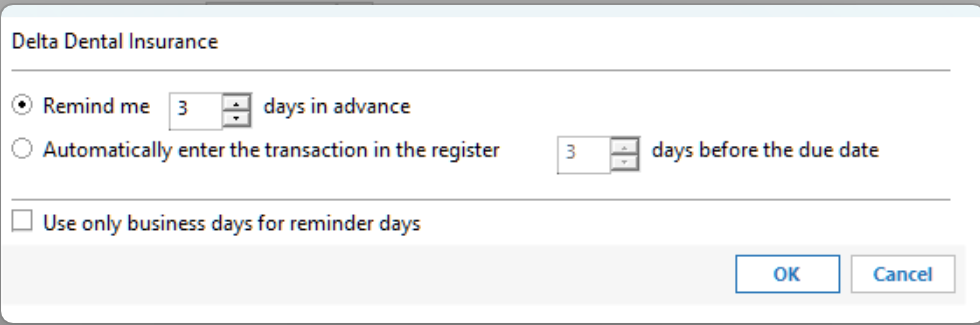
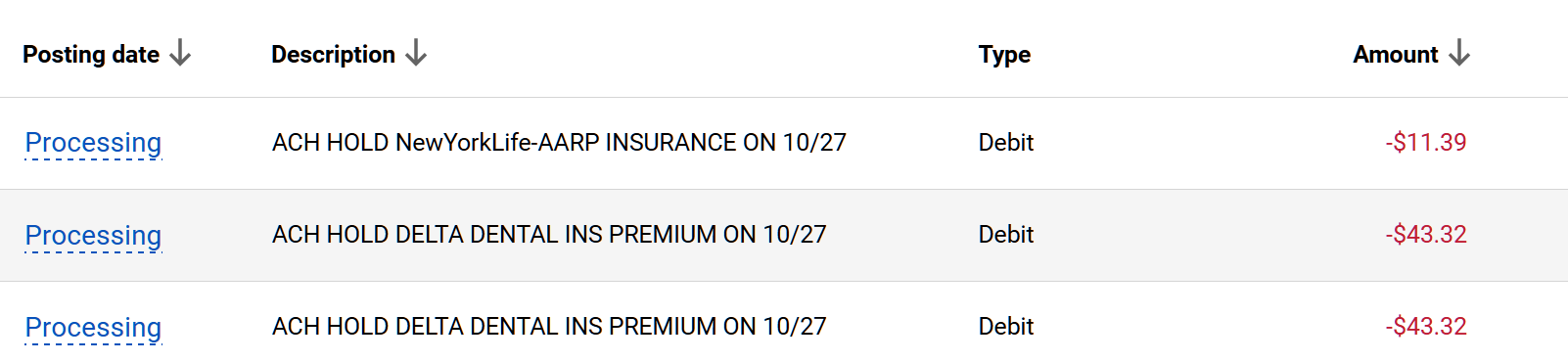
Greg BrownQuicken Windows Subscription Member ✭✭✭✭October 2025edited October 2025What's the status of this issue. I have to believe it was caused by one of the recent releases. I also included the bill reminder setting showing it is NOT set to automatically enter in the register…Also the blue icon indicates"Entered Manually on 10/25/2025" which did not happen. It says "New Match" "Matched to adownloadedtransaction in the last update on 10/27/2025". But as you can see, the transactions are still "pending" in my BofA account. The third reminder down in the screenshot below, the one I erased was set to "autopay". Not sure if that has anything to do with it. It is automatically charged to my account by Frontier Communications on the due date. The reminder does not get entered automatically, I enter it manually, as I do with the other reminders.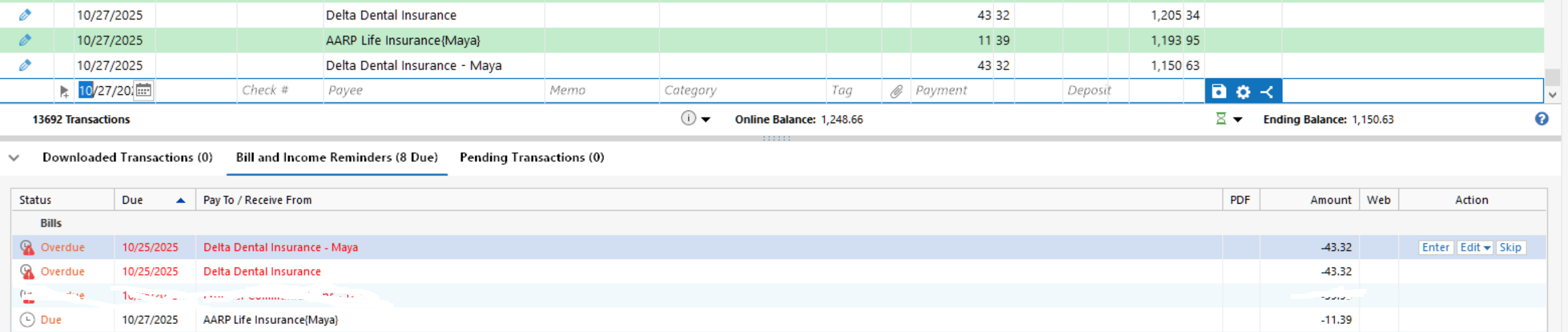
Quicken Classic - R66.28, Windows 11 PRO current on updates
My data file is NOT being synced nor backed up.
2 -
I'm not sure why this prior thread was closed without any resolution, but the problem persists.
Post threads are generally closed out after about 1 month of no posting activity. That indicates the thread has become stale due to lack of interest or that the issue is no longer an issue. Those who wish to make sure a post thread stays open need to make sure someone adds a new post at least once every 2-3 weeks.
Over the last 1-2 months the Moderators have begun posting inquiries in apparently stagnant threads asking about whether or not the posted issue/question is still an issue/question and cautioning that the thread will soon be closed out for lack of activity. After a couple of such posts with no responses received the threads are then closed. That, I think, is a big improvement so people will know why threads are closed, even when there is no posted resolution. And it gives those in the thread who are still experiencing the issue a chance to respond accordingly.
Keep in mind that Quicken Community is first and foremost a users forum, not a formal Quicken Support channel.
Quicken Classic Premier (US) Subscription: R66.23 on Windows 11 Home
3 -
I had the same issues. I reported it. It seemed to resolve itself in recent days. Sorry, I do not use Quicken Support call center, as I mostly end up on the phone for over an hour, uninstalling, reinstalling, repairing file, moving file, creating new file, etc. and none of that ever works, because that's not the issue.
I always hope that the moderators of the forum will see activity with issues like this and create a ticket. Sometimes, yes. Sometimes, no. Oh well.
0 -
One thing that helps to get the moderators to raise an issue is to collect multiple posts or links to posts about the issue in one place.
Quicken user since Q1999. Currently using QW2017.
Questions? Check out the Quicken Windows FAQ list0 -
Sorry, I spoke too soon. The problem is back this morning. I just ran a OSU, and there it is.

The blue pencil transaction is not supposed to be there. The red pencil transaction is placed there by a scheduled reminder. The actual transaction has not been downloaded from the bank yet. And there is no pending transaction yet. I reported it.
0 -
The bill is showing as a "Pending" transaction on my bank web app. But it does not show as a "Pending" transaction in my Quicken desktop app. It's as if it matches the pending transaction to a manual bill reminder, and then removes it from the pending list, and adds it into the register with a blue pencil. The date of the pending transaction on the bank web app is 2/6/2026, which matches the blue pencil transaction date.
I do have other pending transactions and they show in the "Pending Transactions" tab in Quicken app. And they match the bank web app. But none of those transactions have manual scheduled bill reminders.
0 -
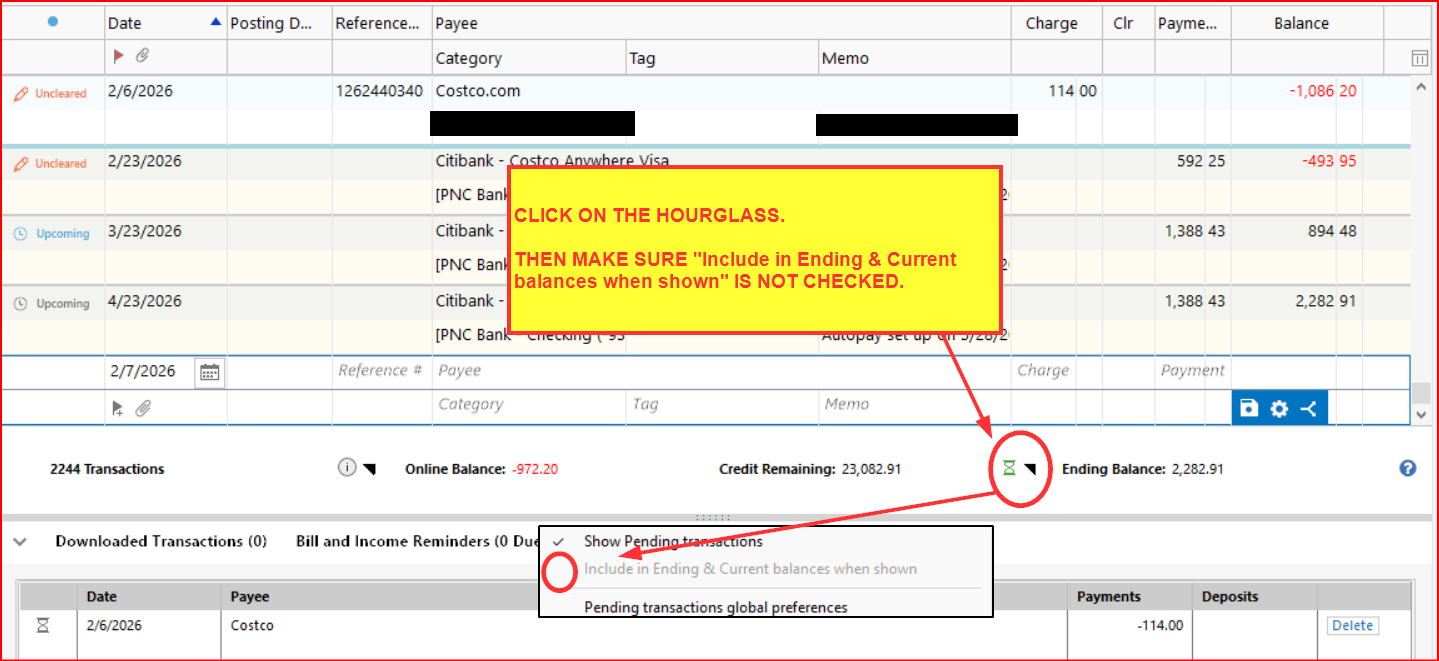
@Randy 415 - Maybe try clicking on the Hourglass icon just to the left of Ending Balance below the Account Register. Then make sure Include in Ending & Current balances when shown is not checked. If it is checked, uncheck it.
Quicken Classic Premier (US) Subscription: R66.23 on Windows 11 Home
0 -
That just turns off the pending transactions tab and keeps the pending transactions from appearing in the tab. Same as "Edit, preferences, pending transactions", and deselecting that account.The problem is that Quicken is adding the pending transaction(s) to the register when they match a reminder, and not including the "category" AND leaving the reminder in the "Bill and Income Reminders" tab. If you want to see pending transactions, and you set up reminders, for that account, you're going to have this issue…
Quicken Classic - R66.28, Windows 11 PRO current on updates
My data file is NOT being synced nor backed up.
1 -
Thanks for the concise summary.
Showing pending transactions in the register has been problematic for many people (including for me) since this feature was first implemented a couple of years ago. One of the issues (including for me) has been what is described in this thread. I and many others have long ago turned it off so it no longer is a problem….which is why, I think there is so little posted about this issue anymore.
I still have pending transactions enabled but just for the tab beneath the register and not to be shown in the register.
I had assumed (wrongly?) that the global Preference is already disabled for showing transactions in the account register and it sounded to me like that global Preference might not have disabled that in just one account. That has happened to me in the past and my last post was about checking to make sure it was also disabled in the account-specific setting, not just in the global Preference.
I, too, agree that this issue still occurring after so long is frustrating and not acceptable. It needs to be reported to Quicken (Help > Report a Problem) and/or reported to Quicken Support via Phone or Chat. The more people who report the issue the more likely it will get the attention that is needed for tech resources to be dedicated to fix it.
Until then, then the best that I can suggest at this point is to:
- Disable pending transactions from being added to the account register.
- Allow pending transactions to be shown below the account register.
- If one wants to have pending transactions to be shown in the account register so the account balance reflects it: Before or after the pending transaction is downloaded below the account register, manually add it to the register. When the posted transaction gets downloaded, Quicken will generally match it to the manually entered transaction.
I don't think there is anything else that can be done at this time short of disabling pending transactions entirely.
Now, if I am really misunderstanding the situation, I apologize. Let me know what it is about the issue that I did not get right or that I missed.
Quicken Classic Premier (US) Subscription: R66.23 on Windows 11 Home
1 -
Almost…
The only way to show pending transactions in the tab below the register is to enable them in the Pending Transactions Preference at the acocunt level. This will allow them to appear in the pending transactions tab and not in the register, However the issue that manual reminders will show up in the register without the category will still happen. The only way to keep that from happening is to turn off pending transactions at the account level.
Quicken Classic - R66.28, Windows 11 PRO current on updates
My data file is NOT being synced nor backed up.
0 -
That is an issue I have not ever had. I have pending transactions enabled just not for entry into the account register. And I regularly enter transactions manually (both from scratch and from Reminders) and also have some Reminders entered automatically.
If I can think of anything to try, I'll post it back here, but for now I'm out of suggestions other than to report the issue to Quicken.
Quicken Classic Premier (US) Subscription: R66.23 on Windows 11 Home
0 -
you might turn off the reminders that you have entered automatically and make than manual in an account that you have pending transactions turned on for. Then when the pending transaction comes through, it will trigger the reminder and add it to your register without a category. And it will leave the reminder in your manual Reminders
Quicken Classic - R66.28, Windows 11 PRO current on updates
My data file is NOT being synced nor backed up.
0 -
Are you directing this to me? As I'd mentioned, I'm not have any issues with how I am using Reminders (both manually and automatic) nor with pending transactions (which I have turned on for all of my EWC and EWC+ connected accounts).
Quicken Classic Premier (US) Subscription: R66.23 on Windows 11 Home
0 -
OK, my bad I must have misunderstood. Go Seahawks…
Quicken Classic - R66.28, Windows 11 PRO current on updates
My data file is NOT being synced nor backed up.
0 -
NP. I can see how my prior post could have been misunderstood.
I'm a Vikings fan since the 1970s. I was so upset when they let Darnold go. So, yeah, go Seahawks!
Quicken Classic Premier (US) Subscription: R66.23 on Windows 11 Home
0 -
Just to keep this thread alive, I've been suffering from the same issue for months. Thanks for the tip about disabling pending transactions. I'll give that a try.
0 -
Hello All,
Thank you all for reporting the issue you are seeing with reminders.
Can we have anyone still experiencing this submit log files and sanitized data files, so this issue can be further investigated?
To do this, go to Help>Report a problem>Send to Quicken.
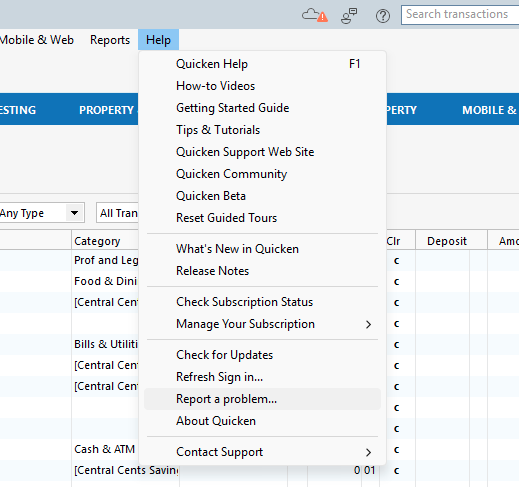
Leave all log files checked off, and check the sanitized data file box as well. Please let us know once you have sent them.
Thank you!
Quicken Alyssa
Make sure to sign up for the email digest to see a round up of your top posts.
0 -
I reported the issue per the instructions provided by Alsyssa, along with full description. For me, the actual reporting process (with all the logs) took several minutes.
1 -
I have submitted another report this morning. I cannot submit sanitized data files, as my file is too big. But yes, I still have the problem. Thanks for all the comments. So far, none have solved the issue. It appears that it is related to pending transactions. I believe that if you turn off pending transactions, the problem will disappear. Not that that is a solution; it is only a temporary workaround. It does disable functionality. I like pending transactions.
1 -
This was already Not Checked. Thanks for the suggestion.
1 -
The problem happened in my credit card account at first. Now it is happening in my checking account. It is always with Pending Transactions (PT) and Manual Bill Reminders (MBR). It is as if PT is matching to a MBR, and adding it to the register without category/tag. Funny thing is it does add the Memo.
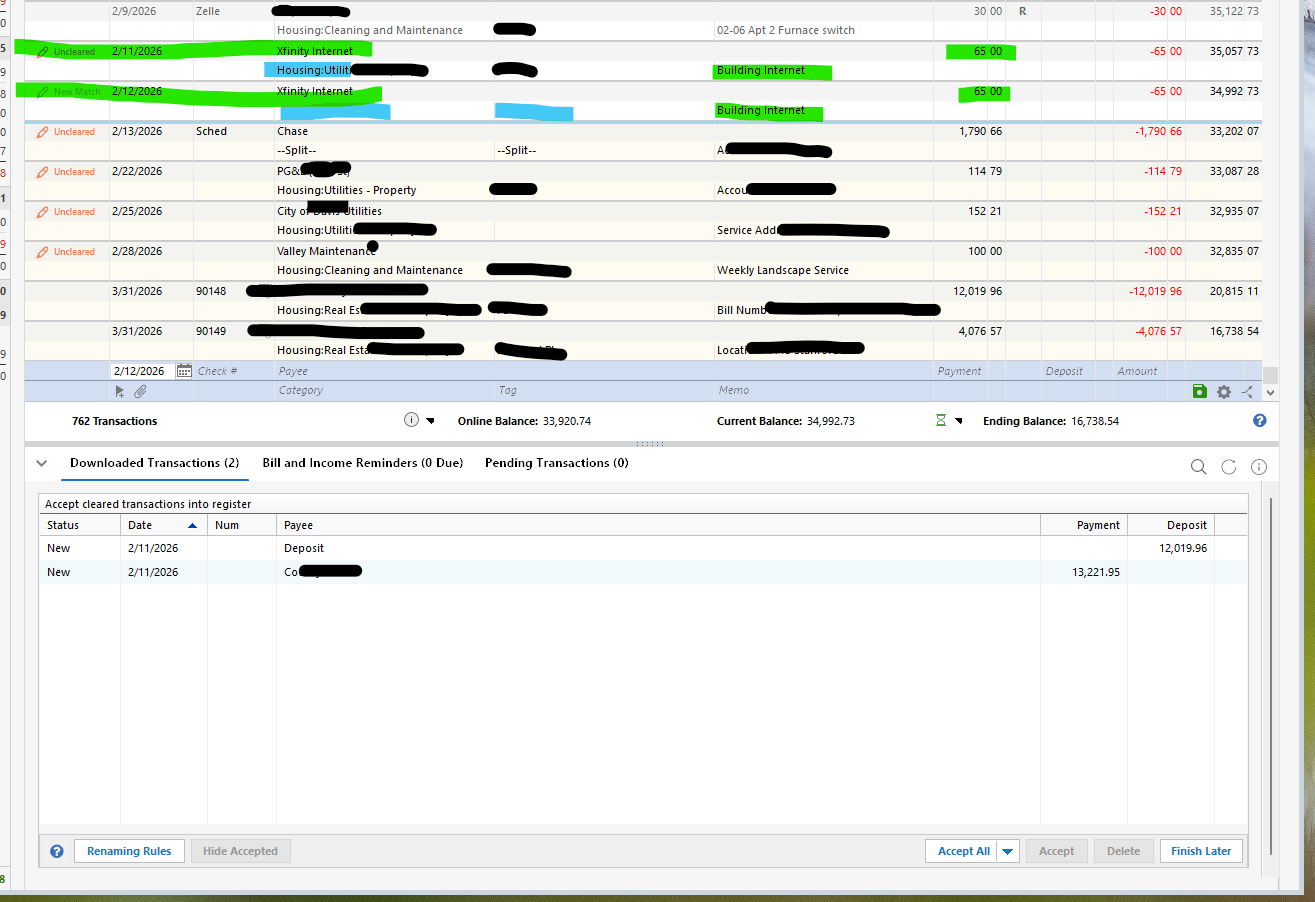 1
1 -
Hello All,
Thank you for sending in log files and the sanitized file.
I have passed this issue along internally for escalation. If anymore log files/sanitized files are sent, let me know, and I will get them added.
Thanks again!
[CTP-16297]
Quicken Alyssa
Make sure to sign up for the email digest to see a round up of your top posts.
0 -
Thank you for the additional explanation and the picture. It really helps be better understand the issue you are seeing.
It reminds me of an identical or nearly identical issue I experienced in the latter part of April and early part of May 2024 (I still have the screen grab picture files of what I was experiencing back then). Unfortunately, I do not remember what resolved the issue for me. I think (not sure) it just one day suddenly "disappeared." I just now reviewed the April-May 2024 release notes and found no reference to this issue. If I can think of or find any additional information on this I will post it here.
Quicken Classic Premier (US) Subscription: R66.23 on Windows 11 Home
1 -
My issue has been, to this point only on accounts that have the "Show Pending Transactions in Register" set at the account level with Global Pending Transactions ON. Now however accounts that are NOT set to include pending transactions are being affected. NOW the only way to stop it is to turn off pending transactions GLOBALLY. This I believe started with the latest release. R66.12.
Quicken Classic - R66.28, Windows 11 PRO current on updates
My data file is NOT being synced nor backed up.
0 -
I have not turned off Pending Transactions Globally yet so this is an assumption…
Quicken Classic - R66.28, Windows 11 PRO current on updates
My data file is NOT being synced nor backed up.
0 -
Sometimes I surprise myself. This afternoon I found some notes I'd made about this issue that I'd experienced in 2024 and what I did that resolved it for me.:
- Global Pending Transactions Preferences: Enabled and to show Pending transactions in register but not enabled for Include in current and ending balance.
- Account Level Pending Transaction Preference: I found that most of the accounts were still enabled to be included in the current and ending balance. Disabling this at the account level as well as at the Global level eliminated this issue for me and it has not returned as an issue in the nearly 2 yrs since then.
At that time, it was pretty clear that disabling Include in current and ending balance was not working for me so I needed to also disable it at the account level. Since making
Quicken Classic Premier (US) Subscription: R66.23 on Windows 11 Home
0 -
This is happening in mine as well. In the last two or three weeks. Any transaction that downloads, that has a reminder, automatically populates in the register. Driving me nuts. R66.12.
0 -
It has been driving me nuts since October… Got worse a few weeks ago as I mentioned in an earlier post.
Quicken Classic - R66.28, Windows 11 PRO current on updates
My data file is NOT being synced nor backed up.
1


