STILL "Awaiting Next Bill"
Comments
-
Hello @Ilya & @Paul Edwards,
Thank you for letting me know you're also impacted by this issue. I added you to the ticket.
The ticket is still open and ongoing. There are no new updates yet.
ConEdison currently isn't showing on the list of supported billers. It might be supported in the future, but for now, you would need to use manual reminders. For assistance connecting with T-Mobile, I recommend that you contact Quicken Support directly, as they have access to tools we can't access on the Community and they're able to escalate the issue as needed. The Quicken Support phone number can be found through this link here. Phone support is available from 5:00 am PT to 5:00 pm PT, Monday through Friday.
Thank you!
Quicken Kristina
Make sure to sign up for the email digest to see a round up of your top posts.
0 -
I have the same problem. I can't remember the last time the bill tracking worked.
1 -
Hello @Rick Norkin,
Thank you for letting us know you're also encountering this problem. I added you to the ticket.
Thank you!
(CTP-15189)
Quicken Kristina
Make sure to sign up for the email digest to see a round up of your top posts.
0 -
I too am having the same problem on every one of my online bills and have tried every suggested fix. This problem is unacceptable and needs to be addressed in a timely manner. This is not the first time this has happened.
0 -
still waiting, is it possible to get an update on progress?
0 -
Any fix coming on this ?? It's been a long time.
Thanks.
0 -
Thank you for the follow up,
The ticket is still open and ongoing. I'm not seeing any new updates yet.
Thank you!
Quicken Kristina
Make sure to sign up for the email digest to see a round up of your top posts.
0 -
I have the same issue. Ever since you guys switched providers for the online billers, it has been a nightmare. This move should have never been done until the new provider was at least on par to the provider that functioned and had many more options for linking billers. Half of my billers are no longer an option in this new provider and the ones that are, either never update or fail to connect (like T-Mobile).
1 -
I am also experiencing this issue. Chase, Fidelity, Citi, Discover. Review and Repair doesn't solve. Resetting accounts does not resolve. Been going on for a couple months now. Help!! Please add me to list of users paying for something that no longer works.
0 -
I just today started to test out changing a manual bill to an online bill to see how it would work. My intention was to have Quicken automatically populate the amount due field on that online bill and eventually on all of my now-manual bills.
My American Express statement ending date for February was the 23rd so I expected the bill reminder to show the balance due for March 20 after doing a One Step Update. The American Express bill does not show up when I press the Bills & Income tab and select "show all bills;" if I select "show only online bills," American Express is listed, but instead of showing a balance due, it says, "awaiting next bill" despite it being five days past the last statement ending date. It does show up if I go into Scheduled Transactions, but it shows a balance due of zero.
Needless to say, I changed my American Express reminder back to a manual bill—experiment OVER!
Please add me to the ticket as well.
2 -
Hello @aistswc01 & @Steven Latus,
Thank you for letting us know you also encountered this issue. I added you to the ticket.
Thank you!
Quicken Kristina
Make sure to sign up for the email digest to see a round up of your top posts.
1 -
This content has been removed.
-
I have consistently been having the same issue. Many of my online billers no longer work and American Express will not update the current bill to show. This has been going on for months. Quicken no longer cares about fixing this and appeasing their customers. Online billers feature is a joke.
1 -
Hello @StevenS-TX,
Thank you for letting us know you're also seeing this issue.
We do now have a Community Alert that you can bookmark to be notified of updates and to know when the issue is resolved:
Thank you!
(Ticket #12281918/ CTP-14851/15189/16565)
Quicken Kristina
Make sure to sign up for the email digest to see a round up of your top posts.
0 -
I have also been having this issue.
0 -
Will this ever get fixed or should we just give up on it ever working again.
1 -
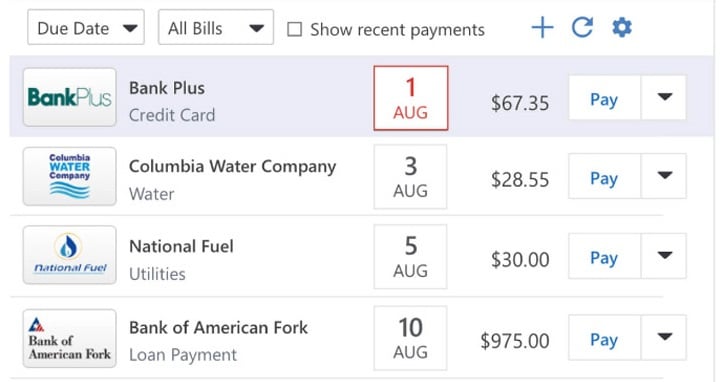
I have also been impacted by this issue for months. The "Bills" tab used to look something like the image below, clearly showing each bill's next due date and the amount owed. I relied on this overview to enter the upcoming autopay transactions into my register so that Quicken could accurately forecast my expected account balances.
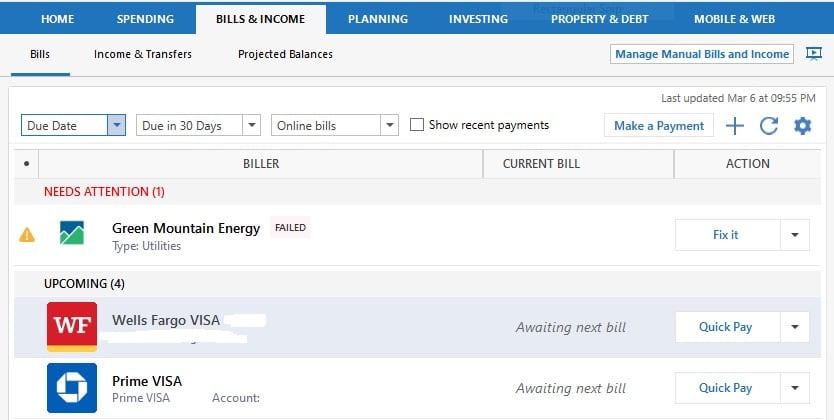
Now, this tab looks like the image below, forever saying "Awaiting next bill" without any display of the due date or statement amount.
Interestingly, I've discovered that Quicken is actually downloading the online bill information. When I click the gear icon in the top right corner of the Bill tab and click "Manage Online billers", the window that pops up summarizes the billers and shows each bill's received date, due date, total amount, and minimum amount:
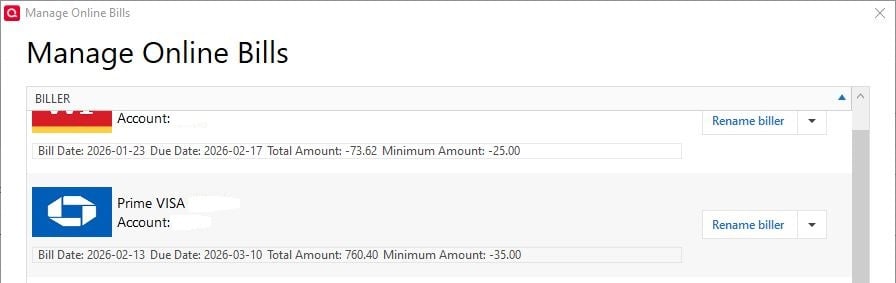
Thus, this issue appears to fully be a software bug that preventing the readily available data that's successfully downloaded from online billers from being displayed on the Bills overview tab where it can help the user.
Please resolve this ASAP. A paid finance service like Quicken is incomplete if it can't help the user stay on top of their bills.
0 -
Hello @Paddle2419,
Thank you for letting us know you're also affected by this issue and for providing that additional information. I added you to the ticket.
Thank you!
Quicken Kristina
Make sure to sign up for the email digest to see a round up of your top posts.
0 -
today for the first time in months (at least since the bill update issue has been going on) I found that my American Express bill was automatically updated from 'awaiting next bill' to the correct amount of the bill that is due on April 9. Is this just a fluke or was something changed? I did not do anything on my end.
1 -
Thank you for the update,
I'm glad to hear that your American Express bill updated!
Quicken Kristina
Make sure to sign up for the email digest to see a round up of your top posts.
0 -
When updating my bills this morning the one Amex invoice that had shown up correctly in upcoming bills suddenly moved back to 'awaiting next bill' status—which is what most if not all of us have been experiencing. I decided to make a single change on the Amex bill by clicking the down arrow on the Amex line and changing it to "Default to total Amount Due". This moved the reminder to where it should be in the stack of bill reminders and updated to the correct amount due. I doubt this is a 'fix' but merely reporting what I have found. BTW, this worked for my Capital One Card as well. Haven't tried it yet for other online billers.
1 -
Thank you for the update,
Thank you for sharing the workaround you found while waiting for this issue to be fixed!
Quicken Kristina
Make sure to sign up for the email digest to see a round up of your top posts.
0


