0/0/1900 and 0/0/2027 Quicken date transactions

First, note that this discussion started from troubleshooting Fidelity HSA transactions not being downloaded, as discussed here. This issue includes the infamous Quicken red flag coming up indicating "You have transactions to review". For my issue, since I was seeing no downloaded transactions in the Fidelity account, this adds on further question as to 'how can I have transactions to review when I don't even see a single transaction?'.
After doing some testing, changing "Automatic Entry" from OFF to ON and doing so repeatedly, I have compiled the attached Word document summary. I used the info from Tools…Online Center… for most of these screen shots.
Below is summary of my questions:
(1) Are $0.00 transaction(s) expected to show in the Tools…Online Center… detail, either with a blank date, or an illegitimate date, such as "0/0/1900"? In both of my examples, this "0/0/1900" date is accompanied by "Activity" of "Credit" - what does this mean?
(2) Are there any "Quicken by design" expectations for "0/0/2027" transactions to be entered into the register under ANY known specific conditions, like shown in some of the screen shots? If not, why are these occurring?
(3) There are some examples where the "Transaction count" for these $0.00 entries are 0, some that are 1. Are there known Quicken design reasons when this count should be 0 vs. 1 and is my data showing unexpected irregularities for either/both of these cases?
(4) There are several transactions showing $0.00 with no date. Is this normal? Some of these transactions have a transaction count of 0, some of 1. Is either/both normal?
(5) Are any of these findings related to why the Fidelity HSA transactions are not being displayed in Quicken, helpful to obtain a permanent resolution to this problem?
Comments
-
See @Quicken Kristina's update at the bottom of this thread
https://community.quicken.com/discussion/comment/20528466#Comment_20528466?utm_source=community-search&utm_medium=organic-search&utm_term=HSA
Q user since February, 1990. DOS Version 4
Now running Quicken Windows Subscription, Business & Personal
Retired "Certified Information Systems Auditor" & Bank Audit VP0 -
@NotACPA , I'm not sure exactly what update(s) you are referring to, but I do see the following:
No Transactions for Fidelity HSA Accounts (Ticket 11999090)– HSA accounts are not downloading transactions.Status: Ongoing. The only current workaround is manual entry.
However, my point here with this post was to try to provide perhaps some more relevant technical details around what I am seeing with my own Fidelity transaction info, particularly with what could be pertinent technical details that I don't see posted to any degree in the recent past. Specifically, if one searches on "0/0/1900" and "0/0/2027", there are a few threads that mention these transaction dates in the past also being seen, but I don't see anything that explains from anyone on why these bogus dated transactions exist? What is actually causing these? I don't see anything in Kristina's 12/19/2025 Fidelity thread update mentioning these specific dated transactions, but I would imagine this has to be related to some sort of problem, right? And perhaps influencing the root cause of one or many of those problems in Kristina's overall list?
0 -
@Quicken Kristina using the output data and observation comparisons from my original PDF above and across my own defined Quicken accounts, it appears the "0/0/1900" date and "Activity = Credit" values within the "Transactions" tab of the Tools…Online Center… window are perhaps supposed to be reserved for Direct Connect only defined accounts? If this is the case, it appears the problem with the Fidelity HSA account transactions is that it may still be acting as a "Direct Connect" account even though it is defined as EWC+ within the Quicken app(ie, does it make sense to be showing "0/0/1900" and "Credit" for this Fidelity HSA account?)? Can someone confirm if any of this is valid? I have confirmed that the "Balances" and "Holdings" data displayed here in Quicken is accurate for this HSA account, so that data from Fidelity is clearly getting transferred fine. It appears the only problem is with the individual transactions.
For comparison of other EWC+ defined accounts in Quicken, I have 2 Citi accounts defined as EWC+, and they show a blank date and 0.00 "Charge"(note "Charge" label rather than "Amount"). However, my Citi accounts are "Credit" defined Quicken EWC+ accounts vs. the Fidelity HSA is "Investment" defined Quicken EWC+ account, so perhaps that is a pertinent detail difference observation and related to why the specific Fidelity HSA transactions are not working? I am running version R65.29.
0 -
Hello @JQuick1,
The information about the issue that's available to us is in this announcement:
I hope this helps!
Quicken Kristina
Make sure to sign up for the email digest to see a round up of your top posts.
0 -
@Quicken Kristina and others,
Unfortunately these issues are more than just the Quicken transactional problems (even for just the Fidelity HSA accounts alone). Today, after verbally talking with Fidelity support and Quicken support online chat, I'm unsure if enough technical detail is being passed to both Quicken and Fidelity support. I also question the proactive desire/will to pass these tech details to the appropriate people in an effective and timely manner. Perhaps this is just my own perception and I hope I am wrong.
Due to this outcome and additional results I have seen throughout today, I have compiled my own overall summary results over the past 5 days and questions at the below link. I will leave it up to whatever connections you and other potential influencers may have to Quicken development to determine if/how you want to share this information. Hopefully this info and line of questioning is beneficial.
No Transactions for Fidelity HSA Accounts (Ticket 1999090) – HSA accounts are not downloading transa
0 -
Since Fidelity was switched to EWC+ today; I started to see transactions downloading for Fidelity HSA from today - earliest date it downloaded was 12/19/2025. Looks like either Fidelity or Quicken has fixed HSA transactions not downloading into Quicken issue.
0 -
Yes, @S_P. Tracking the details of all the irregular things I personally have seen with the Fidelity HSA account alone has been challenging using this discussion board (the comms gets redundant, difficult to recall/track where what is put, etc…). So I summarized all my own findings at this particular post, with the most recent updates indicating downloaded transactions starting to work the late afternoon of 1/15.
0 -
I have two questions for others related to this problem:
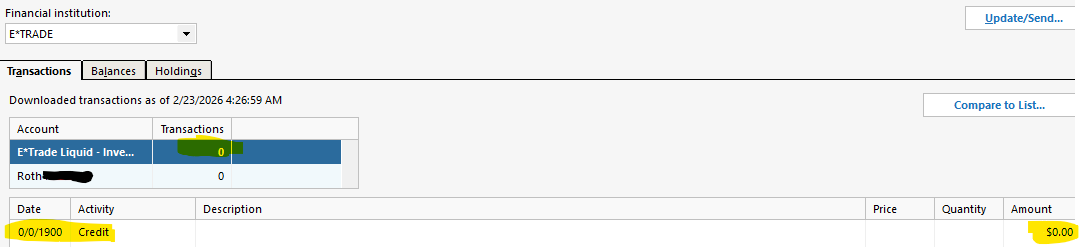
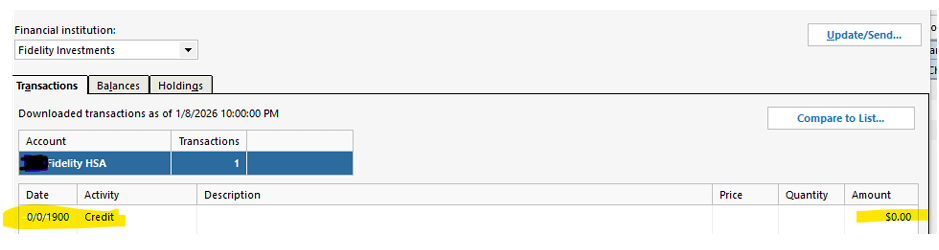
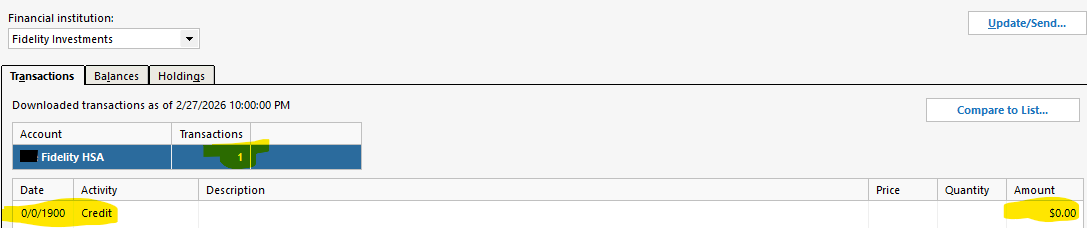
(1) Is anyone else seeing the "0/0/1900" date show up in the Online Center as the date for the single $0.00 transaction in the "Transactions" tab for their Fidelity HSA account? If not, what date do you see here? Below is an example.


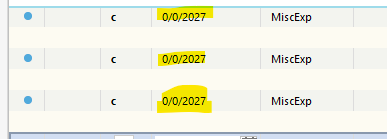
(2) Is anyone else seeing the "0/0/2027" date displayed in the account register for any accounts, action of "MiscExp", and all other fields blank, showing up after a new additional legit downloaded transaction is added to the register? Below are examples, this specific account being of type Direct Connect and auto downloaded transactions. However, I have seen this for EWC+ account and manually entered or auto downloaded transactions as well (see first PDF file in this discussion for an example).
The transaction count of 3 below means there also were 3 corresponding legit(ie, correct date/data) transactions also added at the same time these phantom 0/0/2027 transactions were added; thus each of these 3 transactions potentially having a different date/happening at different times. Yet, all of these non legit transactions show this unexplained "0/0/2027" date. I can manually delete these "extra transactions", but this doesn't resolve the underlying problem, so the same thing occurs again(sporadically and I don't know why?). Ideally root cause can be identified so hopefully a permanent fix can be applied.

 0
0 -
I too am experiencing fictitious dates 0/0/2027 in investment accounts. It self-populates as a ContribZ transaction. I have over thirty. When clicking on the transaction, you can only leave the transaction if you correct the invalid date. The warning panel says "Enter a valid date" . I've been experiencing this invalid date issue for over a year with my Charles Schwab accounts. I have submitted this to Quicken via the Help "report a Problem"
1 -
@john.schultz.jr Thanks for confirming John. I too can't leave/save the transaction without changing the date to a valid entry. Have you just been deleting these transactions periodically?
Your description sounds similar to me, however, mine populate as the "MiscExp" Action. I'm wondering if this Action type getting auto defined for these fictitious 0/0/2027 transactions relates back to the specific transaction of why Quicken created this additional transaction to begin with? Most recently for me, I believe these bogus "MiscExp" transactions relate back to legit "Bought" and "IntInc" transactions going into the same register at the same time. Do you see any correlation of valid new transaction occurring at the same time as a NEW 0/0/2027 transaction getting added to your register?
Regarding the 0/0/1900 date showing in Tools…Online Center…(#1 issue above), can you confirm if you see this date in any of your transactions for any accounts, particularly any of the $0.00 transactions? I am wondering if this 0/0/1900 date here is possibly related to the 0/0/2027 transactions showing up periodically in the register in some manner?
0 -
Thank you for your replies,
Is this happening in all of your investment accounts? If not, is there any pattern to the ones it is happening in (connected to a specific financial institution, manual, account type, etc.)?
Is it changing the date on real transactions, or fabricating completely new transactions?
Have you tried validating your file to determine whether the issue is file-specific? To validate your file, please save a backup and then follow these steps.
Validate:
- File
- Validate and Repair File...
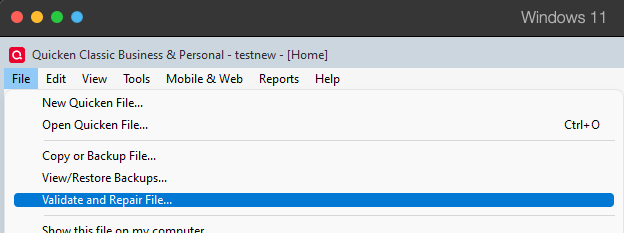
- Validate File
- Click OK
- Close the Data Log
- Close Quicken (leave it closed for at least 5 secs)
- Reopen Quicken and see if the issue persists.
Please let me know how it goes!
Quicken Kristina
Make sure to sign up for the email digest to see a round up of your top posts.
0 -
@Quicken Kristina I have run the Validate in the past and it has not corrected this problem. I will run again soon, but want my wife to reconcile some currently unreconciled CC charges first (don't believe these trans are anyway related since these date problems don't exist for these type of accounts, but I have seen unreconciled downloaded transactions sometimes get deleted in the past when the "Validate" option is run).
Regarding account(s) I have seen this problem with, I have been trying to track this. Thus far, I have noticed that the accounts where these phantom 0/0/2027 transactions periodically show up appear to be accounts that are saving a blank transaction at the bottom/most recent/current date. Below is an example. This transaction copy is the last transaction in my Fidelity HSA account. It is similar for all of my brokerage/investment E*trade accounts too. In particular, note the “Enter/Edit/Delete” buttons being displayed, with current date, but everything else missing. Is this behavior to be expected? To me, it seems that Quicken has created a blank transaction with no info and has saved it as such???

In contrast, below is from E*trade bank account (ie, a non investment account, but transactions are still online downloaded using same overall “Etrade” online account). The date is the same, transaction is blank, the icons at end are different, BUT the transaction is NOT SAVED . In fact, if I click the SAVE icon in this state, nothing happens, which I think is to be expected since I need to fill out all the information of the entire transaction before it should save it, right??? If so, then why isn’t this also required for the investment accounts (see above)?

Regarding the 0/0/1900 date showing up for a single $0.00 transaction in the Fidelity HSA account in Online Center…, it would be great if some other Quicken user or Quicken Support directly, with same type of account, could tell me what they see in this same location to try to determine "what is normal/to be expected here?" For example, should this line be completely gone? Should just the $0.00 be seen and blank Date & Activity values? Something else?
From my initial post above, below is what I see for these different online accounts, only difference is the transaction count is 0 for the account configured for account with auto entered transactions(E*trade, Direct Connect online Investment type, Automatic Entry is on, complete tracking, and a separate linked cash account), transaction count is 1 for the account that requires manual entry(Fidelity HSA, online EWC+ Investment type, Automatic Entry is off, complete tracking, and cash balance is NOT in a different checking account/register).
Lastly, is the data in this 2018 post FAQ: Quicken Windows - red flag but no transactions to review — Quicken still valid/applicable today or should different/additional process be done? I believe the flashing of these red flags in front of these accounts, another thing I am sporadically experiencing, is related to root cause of these 0/0/1900 and 0/0/2027 date problems as well.
0 -
Thank you for your reply,
If so, then why isn’t this also required for the investment accounts (see above)?
Banking registers and Investment registers behave differently. That is the most likely reason why the investment register allowed the blank transaction to save while the banking register did not.
…it would be great if some other Quicken user or Quicken Support directly, with same type of account, could tell me what they see in this same location to try to determine "what is normal/to be expected here?
I don't have the same type of account, but 0/0/1900 isn't a normal date for Quicken to display.
Lastly, is the data in this 2018 post FAQ: Quicken Windows - red flag but no transactions to review — Quicken still valid/applicable today or should different/additional process be done?
The information in that FAQ looks correct; however, I recommend using our article on the issue instead, since it gets updated more frequently:
Please let me know if the validation finds any issues!
Quicken Kristina
Make sure to sign up for the email digest to see a round up of your top posts.
0 -
@Quicken Kristina Thanks for the info. I understand that the 0/0/1900 and 0/0/2027 dates are not to be expected nor desired, so I know this is a problem that needs fixing. I also know that I am not the first to experience this and likely not the last. Is there an explanation of possible reasons why/when Quicken uses these dates? Are the 2 different dates inter-related to each other? I am looking for more detail than just knowing these dates are not expected to be seen.
Specifically, in Online Center, is a $0.00 amount entry expected to be seen for Fidelity HSA EWC+ and/or Etrade Direct Connect accounts, WITH A BLANK DATE OR SOME OTHER DATE? I see different things for different types of accounts, and below is my own permutation list at this point in time for these $0.00 entries. By observation, it appears that a $0.00 entry is to be expected, but with a blank date? I further see that the 2 types of accounts that have the 0/0/1900 date have "Activity" value of "Credit" - is this expected? The other account types have "Num" instead of "Activity", with a blank value for "Num" for the $0.00 entry.
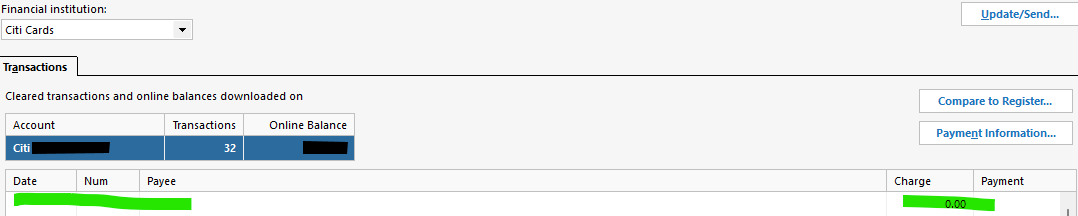
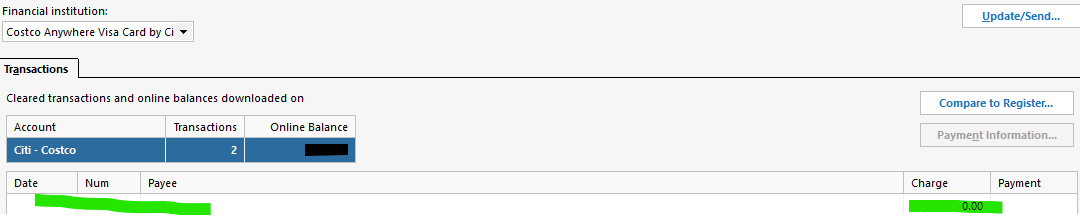
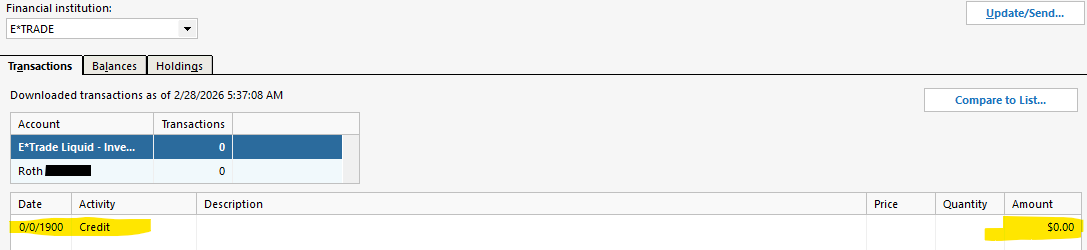
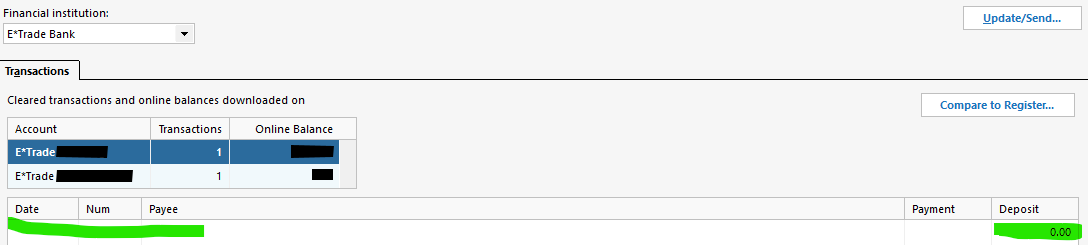
The support document at Quicken Says There Are Transactions to Accept But I Do Not See Any | Quicken does not say anything about the 0/0/1900 or 0/0/2027 transactional dates. It also doesn't state anything about sporadic flashing red flags(indicating some quantity of outstanding downloaded transactions) in front of various accounts, with most of these going away just by selecting the account name in the left window pane within the Quicken app. I do understand that the final step in this document is to run file Validation, but I want to make sure I run all the steps I should do PRIOR to doing this, as I know there is data integrity risk in executing the Validation.
The Fidelity HSA account only has 7 transactions visible to me (account created new in 12/2025), yet constant red flag on this account indicating there is 1 transaction to review. Per that support doc, I have had the automatic entry for this account set to Off for some time. Is it possible that a transaction issue related to one or more of the Etrade accounts(Direct Connect) is affecting the different Fidelity HSA account(EWC+)?
Lastly, note that the Fidelity HSA account above does NOT have a "Compare to Register…" option(like the support doc says it should), but rather a "Compare to List…" for me, which just takes me to the Register and shows me the 7 transactions. Does this difference mean something? In contrast, the other 3 types of accounts above do have "Compare to Register…" instead, as shown in above screen shots.
0 -
With all existing downloaded transactions cleared, I was ready to go through a process of additional troubleshooting today, both the red flag problem, as well as the 0/0/1900 & 0/0/2027 date problems. I did not see as good of details in the more current 9/2025 document at Quicken Says There Are Transactions to Accept But I Do Not See Any | Quicken , so I decided instead to base my steps on the more aged, yet more detailed, 2018/2021 document at FAQ: Quicken Windows - red flag but no transactions to review — Quicken . Below is summary of my steps and results. The italicized text is coming from the older Quicken Support document.
- If there are transactions listed, click the "Compare to Register" button to the right and that should move the transactions to the Downloaded Transactions section in the register view to review and accept. If nothing happens, that confirms those transactions are "stuck" and our next step will be to adjust the preferences to temporarily auto-accept new transactions.
Unsure what “Compare to List…” means vs. “Compare to Register…” in Online Center? The Fidelity and Etrade problematic 0/0/1900 dated accounts show “Compare to List…”.
2. Please click on the Edit tab at the top, left side of Quicken and select "Preferences" from the menu that opens. In the new window, click "Downloaded Transactions" on the left side and then mark the top two boxes on the right side of the window and click Ok.
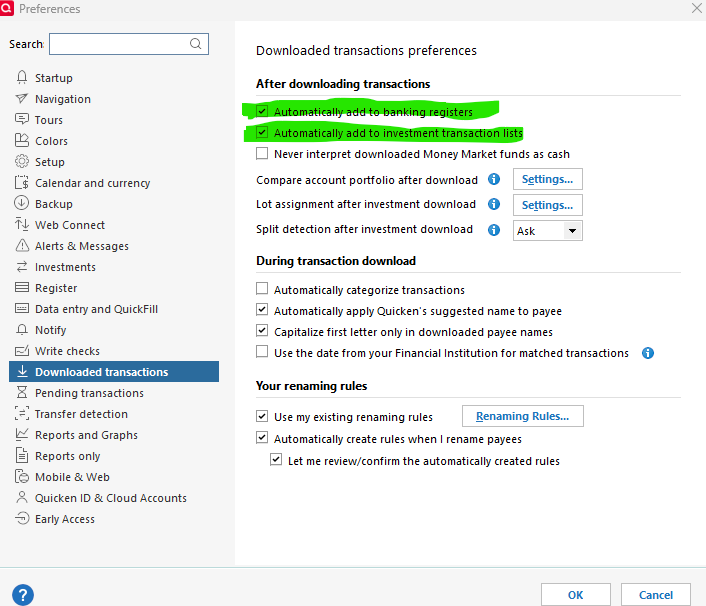
Note that Quicken crashed soon after I made the above changes. I re-opened Quicken and went back in here, discovering these checkbox changes were not saved. I then re-did this step, confirmed saved, and everything seemed stable after this.
3. Next, open the Tools menu again and this time select "Account List" from the menu. In the window that opens, click on the "Edit" button to the right of the account name in question. In the new window that opens, select the middle tab for "Online Services" and click the link for "Automatic Entry is _" and toggle that to "yes, always automatically add to registers for this account" and click Ok then Ok once more on the Account Details window. Quicken should refresh itself at this point and clear the red flag.
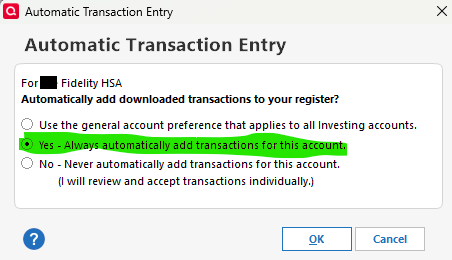
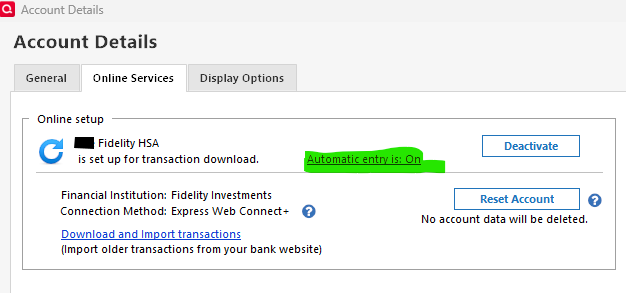
After doing above, I noticed red flag did not initially disappear. I then did an OSU, at which point in time the red flag for the Fidelity HSA account then disappeared. Yeah, one success!!! Not surprising to me, the below highlighted 0/0/2027 “phantom transaction” became apparent in the register after doing the above steps, which assume this proved to be the “hidden transaction” causing the red flag problem.:

After doing these steps, I verified that Online Center still showed the same for this account as it did before, showing count of 0 transactions, but the single “0/0/1900 Credit” transaction still showing:

At this point in time, I decided I was going to delete this phantom transaction from Quicken to see if above 0/0/1900 entry would then clear. However, before doing so, I went back into the Register and clicked “Edit” for this 0/0/2027 transaction, which showed the following and I then clicked “Cancel”:
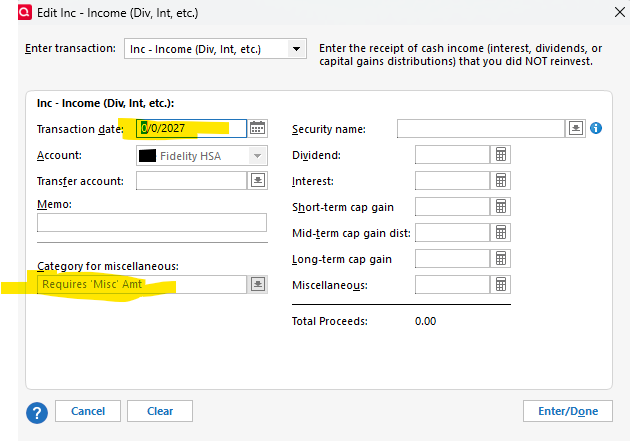
Before deleting this 0/0/2027 transaction, I decided I was going to first save this transaction to the current date, to see if this changed the Online Center results? I did this, but Online Center did not change, the 0/0/1900 entry still existed. I then did a “Mark as reviewed” for this phantom transaction and saved it. The single 0/0/1900 dated transaction in Online Center for this account still existed. I then deleted this 0/0/2027 transaction from the Register, and the single 0/0/1900 dated transaction in Online Center for this account still existed. I then did an OSU update, but this still did not change the 0/0/1900 transaction showing in Online Center for this account.
I also confirmed that the single 0/0/1900 transaction still existed for the E*trade accounts, as previously mentioned from past posts.
At this point in time, I decided to move to the next step, running a Validate and Repair File.
4. If it does not, then open the File menu again > File Operations > Validate & Repair. Check mark the "Validate File" box and click ok, this will run the tool to reset the online information in your data file. Once finished and a data log appears with the results of the validation, close or keep the data log as you prefer. Then close and re-open Quicken, it should refresh and clear the flag.
A log of what was done was created and I saved this log. I exited Quicken and restarted it. I noticed the two 0/0/1900 entries still in Online Center. I then did an OSU. After this completed, it appeared the blue status circle appeared for every account that is getting downloaded transactions. Upon simply selecting each account from the Quicken Home page, the blue status circle next to each account would then magically disappear. However, after further inspection, it appears 6 of the 7 total E*trade investment + cash accounts have a single NEW blank “0/0/2027” transaction with blue status circle, as well as the 1 Fidelity HSA account. Below is an example of what shows for the Fidelity account:

The one Etrade account that does NOT have the 0/0/2027 transaction is a legacy brokerage account, but which is also tied to a separate cash “Spending” account(tracking the cash amounts). One unique thing I see related to this 0/0/2027 transaction for the Etrade cash account is that the register shows this transaction being today’s date, 3/4/2026, as opposed to displaying the 0/0/2027 date(which is what is showing in the Register for all other accounts with this problem). Yet, if I go into “Edit transaction” for this new & blank 3/4/2026 dated transaction, the 0/0/2027 date appears in a “Find and Replace” window. Below are screen shots showing this current state/experience:

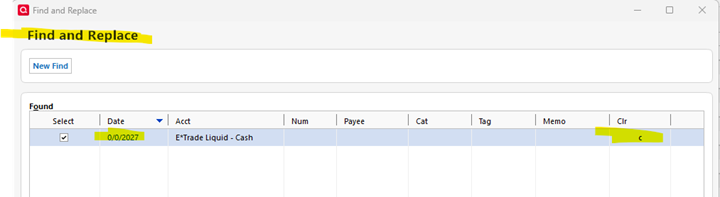
At this point in time, I am going to pause my investigation, looking for something from Quicken support. In summary, I have no red flag issue at this point in time, but these 0/0/1900 and 0/0/2027 transactions persist, even after file Validation. In short, the affected accounts of the 0/0/1900 issue gained a single 0/0/2027 transaction AFTER doing the file validation, restarting Quicken, and then an OSU.
I have yet to do the final step (5) below, as mentioned last in the 2018/2021 support document, FAQ: Quicken Windows - red flag but no transactions to review — Quicken . I am awaiting Quicken support guidance after providing all of the above details.
5. When the flag is gone, you'll just want to go back to the preferences and Account Details > Online Service windows and change the options back to their original settings.
0 -
Below are 5 summary observations I made today after trying some iterative Validations/Re-Validations. I hoping someone can provide some next steps.
Observation #1: The process of doing file validation is adding more 0/0/2027 transactions. I did 3 validations. After each of these 3 validations, I would immediately see a new 0/0/2027 transaction added to the Register for each of the 6 problematic investment accounts(5 Etrade, 1 Fidelity), each and all marked with the blue “new status” circle. In addition, I would see the similar, yet different transaction(shows valid date in register rather than 0/0/2027 date until you go into Edit of the transaction), added to the Etrade investment cash account as well. Can this be explained?
Observation #2: Of the 6 investment accounts with this problem, 3 accounts are identifying “Action” of these 0/0/2027 transactions as “MiscExp” and 3 accounts as “ContribX”. Can this variation be explained? Below is the breakdown:
Fidelity HSA, Etrade 2 Roth IRA accounts: MiscExp
3 Etrade Trad IRA accounts: ContribX
Observation #3: I deleted all 0/0/2027 transactions from all accounts. I then ran a validation. The QDF part of the validation came back clean:
QDF:
Validating your data.
No errors.
The file reloaded after the Validation completed and I noticed that each of the 6 problematic investment accounts had a new blue circle 0/0/2027 transaction. The Etrade cash account did not have this extra/new transaction at this point in time. I kept my mouse focus on this investment cash account and I then did an OSU. After this was complete, I didn’t see a new blue circle transaction in the Etrade cash account, but did now see a blue circle in front of the Etrade investment account from the Quicken app home page. I selected this account, the blue circle in front of this account then immediately disappeared. I then selected the associated Etrade investment cash account, and I now saw the new blue circled transaction, which showed the current date for this transaction, but the “0/0/2027” date showed upon selecting this transaction and then “More actions…Edit transaction”. Can this behavior be explained?
Observation #4: Each Validation yields something like the below for the QEL portion. The large integer #s in parenthesis change for each validation run, but there is always 7 total entries that are returned. What is the meaning/significance of this?
QEL:
The old file was corrupt and only some of the data has been recovered.
QEL:
Corrected number of pending investment/banking transactions in account (1376035912 to 0).
Corrected number of pending investment/banking transactions in account (2077521848 to 0).
Corrected number of pending investment/banking transactions in account (2085934360 to 0).
Corrected number of pending investment/banking transactions in account (2077521720 to 0).
Corrected number of pending investment/banking transactions in account (2077521880 to 0).
Corrected number of pending investment/banking transactions in account (2085934360 to 0).
Corrected number of pending investment/banking transactions in account (2077521752 to 0).
Observation #5: Below is everything else I see returned from the most recent Validation. Is this normal output?
Maximum security reference: 102, number of securities: 102.
Analyzing securities.
All security references are within the normal range.
Validation has completed.
1 -
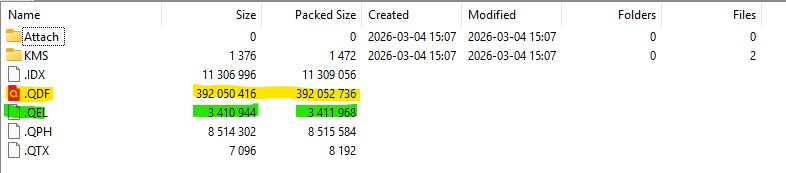
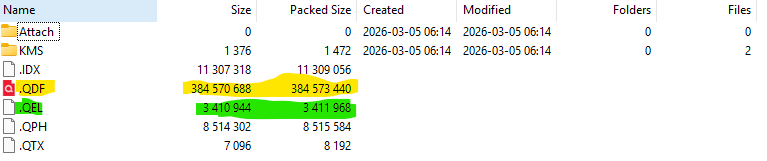
I have since run Supervalidate twice and this seems to have resolved my issue, and I will explain this further below. However, using 7zip and comparing QDF file size before vs. after resolution, it appears the QDF portion of the larger QDF file is about 8 MB smaller after resolution (out of ~392 MB initially), which I'll show below. So I guess my question is, what was actually deleted to correct this problem? Do I have missing transactions now? Is there any way to determine what was deleted and/or updated?
»»»»>
First, it appears both Validate and Super Validate kept increasing the # of the 0/0/2027 transactions in the 7 affected account registers if these transactions existed PRIOR to running either of these functions. I missed deleting two of these transactions prior to the first time I ran Super Validate, thus I think why I had to run a second time to correct the overall problem, which was after deleting all of the 0/0/2027 transactions first. Below are results of the 2 different Super Validate:
Super Validate #1 results:
[Thu Mar 05 05:54:47 2026]
File: "C:….."
QDF:
Validating your data.
Quicken found the following future-dated investment transaction (with a date more than 10 days in the future). This might cause some balances to display unexpected values.
"XXXXX" 0/ 0/2027
Quicken found the following future-dated investment transaction (with a date more than 10 days in the future). This might cause some balances to display unexpected values.
"XXXXX" 0/ 0/2027QEL:
The old file was corrupt and only some of the data has been recovered.QEL:
Corrected number of pending investment/banking transactions in account (1376708040 to 0).Corrected number of pending investment/banking transactions in account (1528207248 to 0).
Corrected number of pending investment/banking transactions in account (707515504 to 0).
Corrected number of pending investment/banking transactions in account (1528207440 to 0).
Corrected number of pending investment/banking transactions in account (1528207312 to 0).
Corrected number of pending investment/banking transactions in account (707515504 to 0).
Corrected number of pending investment/banking transactions in account (1528206992 to 0).
[Thu Mar 05 06:01:10 2026]
Maximum security reference: 102, number of securities: 102.
Analyzing securities.
All security references are within the normal range.Super validation has completed.
After seeing above, I then made sure I deleted all existing 0/0/2027 transactions before running Super Validate #2:
Super Validate #2 results:
[Thu Mar 05 06:11:57 2026]
File: "C:….."
QDF:
Validating your data.
No errors.QEL:
The old file was corrupt and only some of the data has been recovered.QEL:
All internal consistency checks passed.[Thu Mar 05 06:15:17 2026]
Maximum security reference: 102, number of securities: 102.
Analyzing securities.
All security references are within the normal range.Super validation has completed.
The below, taken from 7zip, shows how the file sizes changed, paying attention in particular to yellow highlight. Note that even though the final Super Validate above indicates all internal consistency checks passed with the QEL portion, the size of QEL data does not change, but rather the QDF size decreases nearly 8 MB.
Backup immediately prior to Super Validation #1, backup taken 5:30 AM on 3/5:
After Super Validation #2, backup taken 6:55 AM on 3/5:
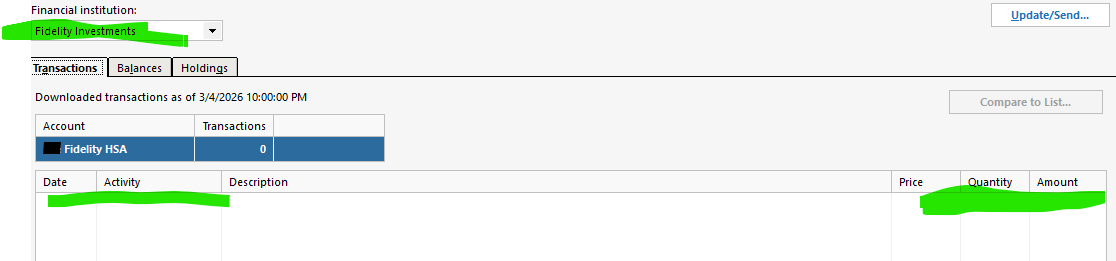
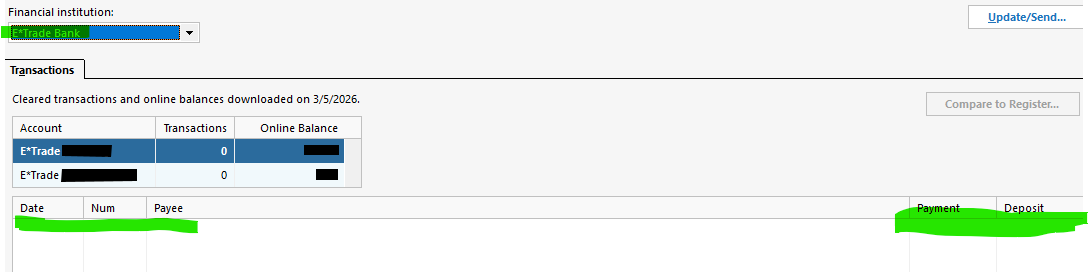
Last, the below shows the 0/0/1900 date problem corrected in Online Center now, which I think was directly related to the 0/0/2027 transactions in the register, so hopefully I don't see either of these problems return. I have done several OSU updates since and the 0/0/2027 transactions have not re-appeared, which had not previously been the case. I would also add that it appears the separate 0.00 transactions(with no date) that were seen in other types of accounts as described above are gone now as well. I give screen shot examples of both below for comparison.
 0
0 -
Since I make periodic Quicken backups, I decided to try to determine when this 0/0/1900 date started showing up in Online Center within Quicken. From some meticulous loading and investigation on these old backups, I determined this file corruption occurred sometime between 4/12/18 (file is clean) and 5/10/18 (the 0/0/1900 dates for 0.00 entries show up in Online Center for the first time). I have no backups between the 4/12/18 and 5/10/18, so I can't pinpoint anything more specific than this. Based upon this, I was running Quicken 2016 at that time.
From this, is there any reasonable thing(s) I can do in analyzing/comparing the data in these old files and my current "super validate fixed" file to help determine what data was compromised and potential root cause? Are there any known legacy support problems with Quicken 2016 related to this topic documented in this 2018 era?
My goal, for example, is to try to understand if I can/need to restore perhaps any pertinent data that I have lost as a result of the recent super validation fix, perhaps by using data(transactions?) in the clean 4/12/18 backup copy?
0 -
Thank you for your replies,
Unsure what “Compare to List…” means vs. “Compare to Register…” in Online Center?
The difference is that Compare to List refers to Investment accounts (since the register is the transaction list), and Compare to Register is for banking accounts.
The behaviors you were observing likely all stem from this part of the validation results: QEL:
The old file was corrupt and only some of the data has been recovered.That line means that part of the file was damaged, and the process was not able to fully recover all the damaged data.
It sounds like running repeated Validate/Super Validate operations did finally correct the main issue. Did they cause any other issues to appear? Are you still seeing $0 transactions with a blank date in the Online Center? Are the 0/0/1900 or 0/0/2027 date transactions still appearing?
From this, is there any reasonable thing(s) I can do in analyzing/comparing the data in these old files and my current "super validate fixed" file to help determine what data was compromised and potential root cause? Are there any known legacy support problems with Quicken 2016 related to this topic documented in this 2018 era?
The most common culprit is if the file is accessed by more than one user/process at the same time (For more information, see this article). For example, if the file is or was synced with a cloud service, such as OneDrive, iCloud, or Dropbox, that service may have been trying to sync while you were accessing the file.
My goal, for example, is to try to understand if I can/need to restore perhaps any pertinent data that I have lost as a result of the recent super validation fix, perhaps by using data(transactions?) in the clean 4/12/18 backup copy?
It's a good idea to review the account(s) to confirm that there is no missing data. You should be able to recover missing data from the older backup, if needed. However, there isn't a way to directly copy/paste from the older backup to your current file. You would likely need to export or print an investment transaction report with the missing data, then manually input the transactions into your file.
Thank you!
Quicken Kristina
Make sure to sign up for the email digest to see a round up of your top posts.
0

