Odd Memorized payee list

Recently, I've been seeing odd listings in my memorized payee list such as

I never entered a transaction for Alta Strada with the category of Pets. I confirmed there is no such posting by doing a Find. There is a 36.28 transaction for Pets but the Payee is Amazon.
Answers
-
Hello @acs2,
Thank you for reporting the issue you are having with your memorized payees.
I am curious if this might be something specific to your data file, as this does seem like a strange thing to happen. I have some follow-up questions for you.
- How long have you noticed this issue happening?
- Is this the only affected payee that you know of?
- What, if any, troubleshooting steps have you tried so far?
- Where is your data file located?
- Is your file being synced/backed up by any third-party services like Norton, OneDrive, or iCloud?
Looking forward to your response!
Quicken Alyssa
Make sure to sign up for the email digest to see a round up of your top posts.
0 -
It's been going on for about a week. I've noticed it before
No it is multiple payees
Just Close and reopened Memorized payees, closed the Quicken file and ran validate
File is locate in a folder in my PC as it has been for years
All files are backed up periodically by Blackblaze the same service I have used for years. And I back up to my PC often.
0 -
Thank you for following up.
I suggest excluding the data file that you are actively working in from the Backblaze backup service. It is ok to have your backup files included in this, but doing so with your active data file can cause issues.
As for the file location, I am curious what the exact pathway of your file is. The default location is C:>Users>username>Documents>Quicken, and that is where we recommend storing it.
After these adjustments are made, you can then validate your file to clear up any damage.
To do this:
- Save a backup.
- Go to File.
- Select Validate and Repair file…

- Check the first box for Validate file.
- Click Ok.
Once the validation has completed, it will produce a report of anything it has found/corrected. See if it mentions anything about memorized payees.
Let me know how it goes!
Quicken Alyssa
Make sure to sign up for the email digest to see a round up of your top posts.
0 -
Alyssa,
There maybe some confusion.
- You said exclude files from Blackblaze that I am actively using. Blackblaze backs up my entire PC periodically as a safety measure. I do not actively use any of those backuped files.
- The path to my Quicken files is the default that you indicated.
C:>Users>username>Documents>Quicken - I already validated my Quicken file > actually a couple of times < but no errors were reported
Thus no fix yt. I appreciate your help and hope other ideas come to mind
0 -
Hello @acs2,
Thanks for the clarification, and I appreciate the additional details you provided. Since validating the file didn’t report any errors and the file is stored in the recommended default location, the next step I’d suggest is creating a copy of your data file.
Creating a copy rebuilds Quicken’s internal lists and database tables, which can often resolve unusual behavior like this and help prevent it from continuing.
Create a copy of your data file
- Go to File > Copy or Backup File…
- Select Create a copy or template
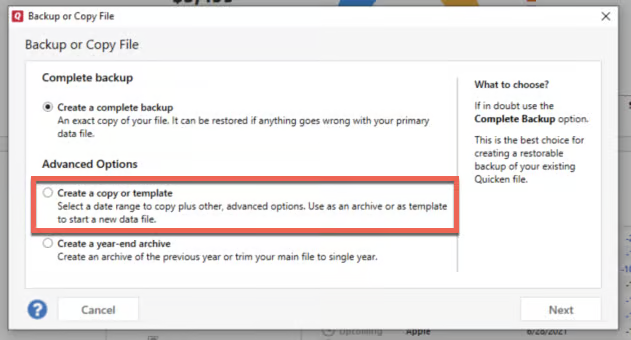
- When prompted for a date range, make sure the entire date range of your data file is selected if you don’t want to shrink the file
- Complete the process and open the copied file
If the copy is successful and things behave normally, you would then move forward using the copied file.
Important things to be aware of
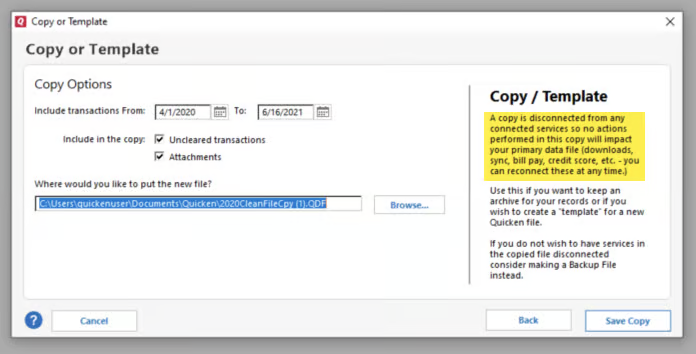
- Creating a copy disconnects all online services in the new file
- You will need to sign back in with your Quicken ID
- All online accounts, billers, and Bill Manager services will need to be reconnected
- This happens because the copied file receives a new dataset ID
About the memorized payee entries
It’s important to note that creating a copy will not automatically remove the existing odd memorized payee entries you’re seeing—those would still need to be deleted manually from the Memorized Payee List.
However, rebuilding the internal tables via the copy can help prevent those incorrect entries from reoccurring, which is the main goal of this step.
Hope this helps!
-Quicken Anja
Make sure to sign up for the email digest to see a round up of your top posts.1 -
I'll try it!
0 -
Sounds good, @acs2! Let us know how it goes.
-Quicken Anja
Make sure to sign up for the email digest to see a round up of your top posts.0 -
Just checking in to see if copying your data file resolved the issue you were having.
I also wanted to clear up the Backblaze confusion. Basically, allowing any third-party service to access the data file you are actively using can cause data file integrity issues. In your situation, having your Quicken data file included in that periodic backup that Blackblaze performs could be the root cause of the issues that you are seeing.
I would still recommend excluding your data file from Backblaze. Especially if you are now in a new copy of the file, it would be important to make sure the new file is excluded from the Blackblaze backup, so the issues you were having don't resurface.
Hope this clears things up!
Quicken Alyssa
Make sure to sign up for the email digest to see a round up of your top posts.
0 -
Quicken Alyssa
Make sure to sign up for the email digest to see a round up of your top posts.
0 -
Anja,
The memorized payee list which I thought had settled down but it has not. I'll now go through the Copy the data file process
Arthur
0 -
@acs2 Thanks for the update! Once you’ve completed the process, please let us know if the memorized payee list behaves as expected or if you’re still seeing any unusual entries.
Thank you!
-Quicken Anja
Make sure to sign up for the email digest to see a round up of your top posts.0 -
Anja,
I had to go through the create a copy process as my memorized payee list was still problematic. There was improvement after that but I noticed a problem today. I downloaded transactions and went through my typical process of checking and correcting categories and tags. After that I often go to my memorized payee list, sort on last used to see if there were any errors or modifications related to new transactions. After that I then sort on payee name BUT the resulting sort list is in error. The Alliance Service company Travel Parking category is the only transaction for that company. All the others in the list are actually Amazon categories. I found others as well. Essentially a sort on last used then on payee is not accurate

Arthur
0 -
I noticed that changing the sort order in the new-style Memorized Payee List may result in apparently incorrectly named entries.
For me, this appears to be a bug in how the MPL is re-displayed after changing sort order. For example, the Payee Name for Amazon - entries does not move to the first listed entry of all Amazon entries. It remains with an entry which was the first Amazon entry before sorting occurred.
When sorting by something other than Payee, every MPL entry should display the Payee Name.1 -
@UKR that seems like an easily reproducible bug that a moderator could help to report.
Quicken user since Q1999. Currently using QW2017.
Questions? Check out the Quicken Windows FAQ list0 -
That was my assumption. Will moderators pick this up or do I need to submit it somewhere?
0 -
Has this observation been picked up by moderators as bug to be corrected? It's clear do me that if the memorized payee list is sorted by date and then by payee name the list becomes erroneous. Do I need to post it somewhere else to get it on a do do list?
thanks
0 -
@acs2 I edited your post to call out the Moderators.
To help Quicken to understand this problem, you can go to Help > Report a problem and submit a report.
In your submission, be as clear and thorough as possible. Provide a link to this discussion. Provide step by step instructions to reproduce the problem and note any error messages you receive. Development will not pay much attention to a problem unless it is clearly documented and they can replicate it in house or see it in a support session.
You will not get a response to an electronic submission, but apparently they review and prioritize the submissions and use the data to help resolve problems they decide to work on. The more reports they receive the better.
QWin Premier subscription0 -
thank you I'll do it now
0 -
Hello @acs2,
Thank you for submitting your log files—we’ve received them, and I appreciate you taking the time to send those in.
I did attempt to replicate the behavior you described, but I wasn’t able to reproduce the issue on my end. That said, I am currently running a later release than what I’m seeing you are currently running.
It appears you’re still on R65.29. Before I forward this along for further escalation, I’d like to have you update to the latest release, R66.12, just to rule out anything that may already be resolved in the newer version.
You can update by navigating to:
Help > Check for Updates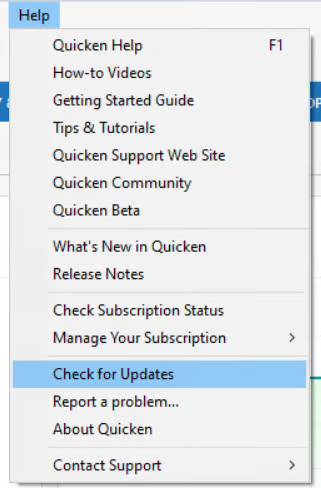
If the update is not offered there, you can manually download and install R66.12 using this support article.
Once you’ve updated, please let me know if you’re still seeing the same behavior. If the issue persists after updating, I’ll be happy to escalate it further.
Thanks again!
-Quicken Anja
Make sure to sign up for the email digest to see a round up of your top posts.0 -
Anja,
Check for updates gave me that mie is up to date R65.29
I then downloaded the patch (QW27.1.66.12MPatch.EXE) tried to Open it and got the little circle showing it was starting BUT it never opened. I tried more than once and even redownloaded it.
Thoughts
0 -
@acs2 Thanks for the update. I’ll make a note in the ticket that you attempted to install R66.12 but were unable to. In the meantime, sometimes a simple restart of your computer can help clear any processes that might be blocking the installer—you could try that and then attempt the manual install again.
Either way, I’ll include this information in the escalation so the team has full context.
Thank you!
(CBT-1041)-Quicken Anja
Make sure to sign up for the email digest to see a round up of your top posts.0 -
thanks, I will restart
1




