CC-503 with Multiple Financial Institutions [Edited]

I have a question for everybody (he says tongue-in-cheek)… who's loving all of the CC-503's with Quicken?
FYI: Quicken Classic Premier version R65.29 build 27.1.65.29, Windows 11 with all updates installed for both Windows and Dell, up to the posting date.
Not that this necessarily matters to the question at hand, but very recently I've gotten sick and tired of seeing "damaged data block" when I do file validations on the Quicken data file that I've had running for so many years that I lost count (it has to be at least 15 years or more). So I followed some advice I found here some time ago, and did the "complete copy" hoping that the new version of my data file will be cleaner. And, voila, it was - no damaged data blocks. Hurray.
However, as anyone who has ever done this before knows, a complete file copy resets all of the bank connections and you have to reinitialize them.
I was hoping that the "refresh" would solve the various CC-503 errors that I reported in a discussion post last year. But alas, most (thankfully not all) of them are still present.
So, for the benefit of Quicken Support, the current list of CC-503's that I'm getting include these banks/FI's:
- Synchrony: this is a HUGE one for many people I'm sure, because they hold a practical monopoly on many store/branded cards. Specifically for me, these include: ALL of the PayPal cards (Smart Connect, PayPal Credit, PayPal Cashback Mastercard), OnePay (the new Walmart-affiliated card), Lowes, Sams Club, and CareCredit. Interestingly, the PayPal accounts themselves go through fine, but the PayPal credit accounts won't. I wouldn't whine so much about them IF PayPal hadn't changed their system so you can't even download transactions into a QIF anymore.
- Comenity: Dell, Petco, and Bread Financial.
- Barclay Bank
- SoFi (Social Finance): this one perplexes me, because prior to my "refresh", this was working perfectly for everything: bank accounts, investment account, and credit card. Now it won't.
- First Bankcard (FNBO): various branded cards including Sheetz and BP.
Just to verify things, I tried connecting these same accounts via Quicken Mac and Quicken Business & Personal (Web) - on all three, I'm getting CC-503's every time. I even tried over a period of 3 days. No joy.
So, I'd like to see if anyone else is having the same issues with the same or similar accounts and if Quicken Support has any input on where these are coming from (because it doesn't seem to me to be from the software itself, but from the connection attempts upstream from the software).
Comments
-
Also getting CC-503 since 2/11 when trying to connect to Synchrony Savings.
1 -
I used to be able but not for the past week, make a connection to ALLY bank, Sam's credit card, Belks, Amazon, Venmo, and Target. The Amazon, Belk's and Sam's personal card are all tied to Synchrony. Ally and Venmo are not
0 -
Hello All,
Thank you for taking the time to bring this to our attention!
Synchrony Accounts
——
We do currently have this open Community Alert specifically regarding CC-503 errors with Synchrony-branded cards and accounts. This issue has already been escalated internally and is actively being worked on.
At this time, we do not have an ETA to provide. Please refer to the Community Alert for ongoing updates and any new information as it becomes available.Venmo
——
There is also this open Community Alert for Venmo connection issues. While the error code listed in that Alert may differ, the behavior being reported here could potentially be related. We recommend reviewing that Alert as well for details and updates.Other Financial Institutions (Ally, Barclays, SoFi, FNBO, Comenity, etc.)
If you are receiving CC-503 errors for institutions not listed in an active Alert, please review the information and follow the troubleshooting steps below:A CC-503 error means that the financial institution is reporting the login credentials as invalid. Below are the recommended steps to try (which you can also find in this support article):
Step One: Verify your bank login information- Type your password/PIN into a text application, such as Notepad, WordPad, or other text/word application.
- Note: This is a way of confirming you don't have typographical errors in this field.
- Highlight the "confirmed" password and then copy it (Ctrl + C) and paste it (Ctrl + V) into the appropriate fields in Quicken.
Step Two: Verify your bank login at the bank's website
- Go to your bank's website and confirm that you're able to log in with the expected username and password.
- Once you are logged in, review your account at the website for notifications (such as pending messages in a mailbox or message center) to confirm if further action is required to grant Quicken access.
- Some banks will require a separate login, password, or both to access accounts on third-party software. Also note, you may need to go to your settings at the website to access these prompts for new credentials.
New passwords: If you are required to make a new password, be aware that some special characters may cause errors in Quicken. These special characters are the ampersand (&), left carat (<), right carat (>), backslash (\), and forward slash (/). Additionally, while Quicken does not have a character limit, your bank may have one.
Step Three: Update your password(s) in Quicken
- Launch Quicken and go to Tools > Password Vault > Add/Edit Passwords.
- Click on the account in the Password Vault.
- Choose Delete Password for the account.
- Complete a One Step Update, you will be prompted to enter the password manually.
- Type in the password (the same one used on the bank's website) and check in the box marked Save next to the password field.
- Click Update Now.
If there is no option to delete and update the password, or if the login ID/username also needs to be changed:
- Choose Tools > Account List.
- Click the Edit button next to the account you want to change the login ID for.
- In the Account Details window, click the Online Services tab.
- Click Reset Account.
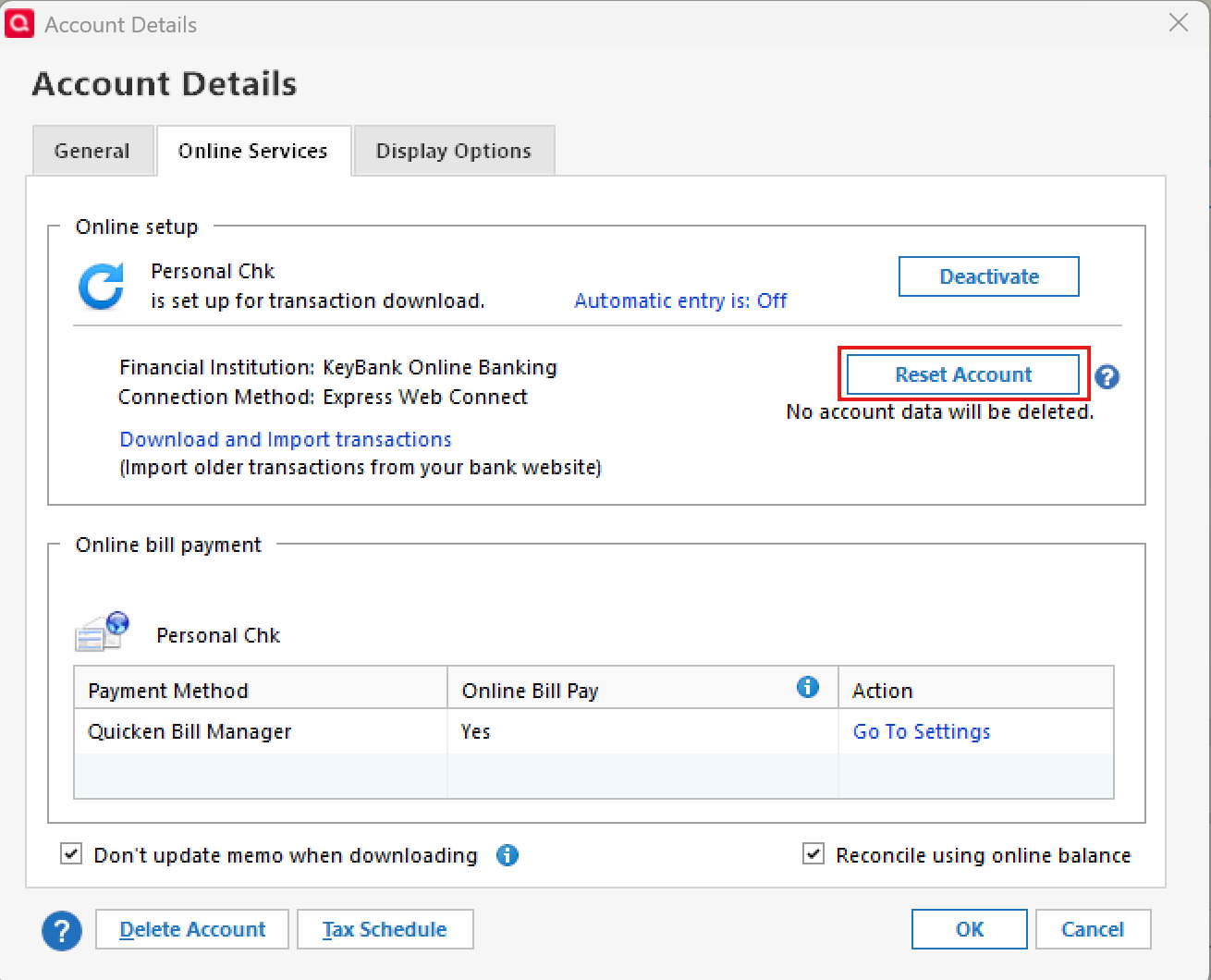
- Enter the correct login ID and follow the on-screen prompts to complete the reset.
- If prompted, carefully LINK the accounts found to the existing accounts in Quicken.
After the reset process is complete, attempt your online session again.
If the issue persists
Try Deactivating and Reactivating the affected accounts:
- Choose Tools > Account List.
- Click the Edit button next to the account you want to change the login ID for.
- In the Account Details window, click the Online Services tab.
- Click Deactivate, and then click Yes to deactivate online services.
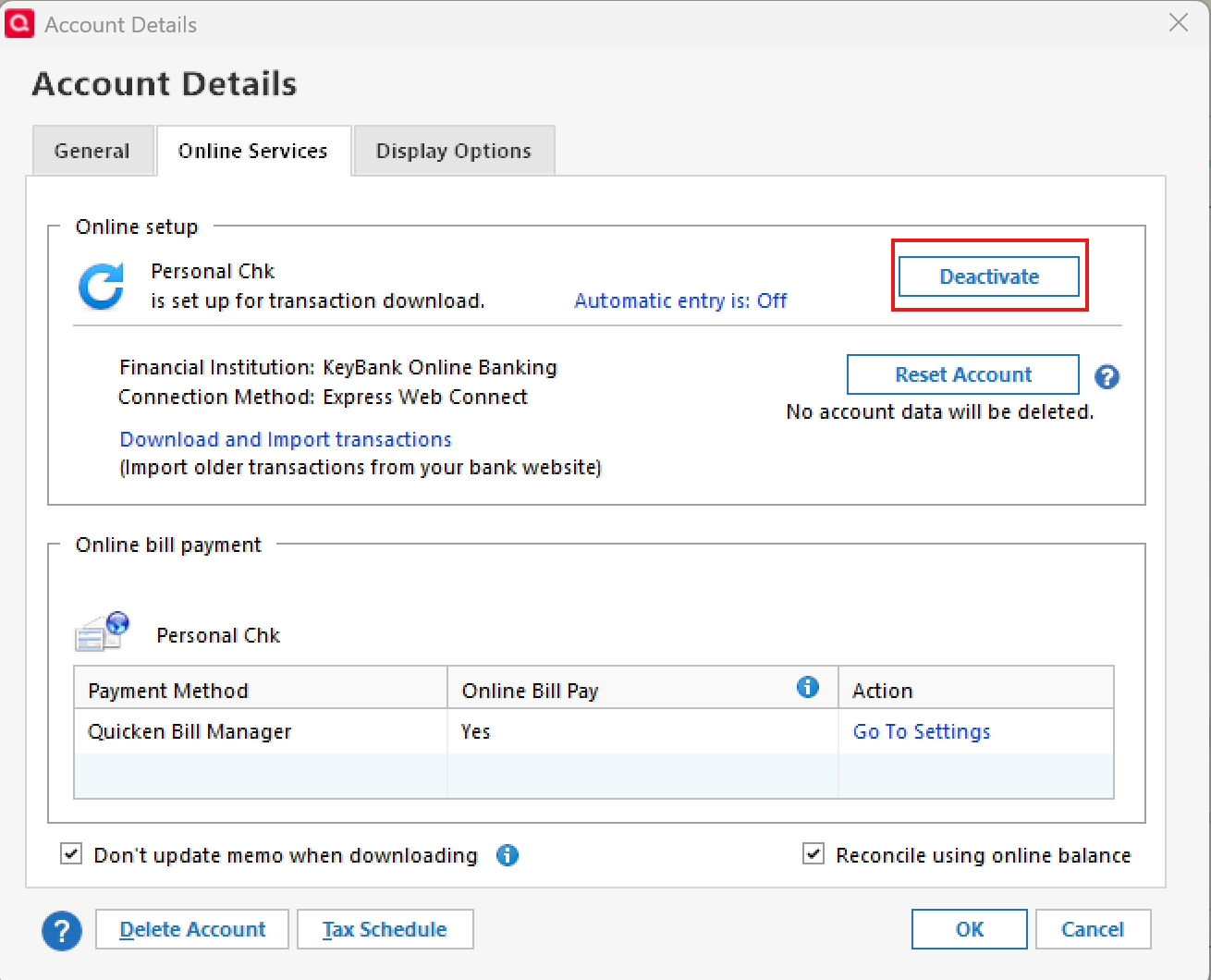
- Click Yes again, if necessary, to confirm your choice.
- Repeat these steps to deactivate all accounts at this same bank.
- Return to the Online Services tab and click Set up Now for each account you've deactivated.
- Enter the correct login ID and follow the on-screen prompts to activate your account.
If the problem continues after following the guidance above, then we recommend contacting Quicken Support so they can review your logs and connection attempts in more detail.
Thank you!
-Quicken Anja
Make sure to sign up for the email digest to see a round up of your top posts.0 - Type your password/PIN into a text application, such as Notepad, WordPad, or other text/word application.
-
I recently converted from Quicken Mac to Quicken Windows. When converting one must re-establish online banking connections. I have had multiple CC-503 and CC-929 errors for three specific banks…Barclays, PayPal credit and Sams Club credit. I have chatted with support twice before and have attempted all of the following steps unsuccessfully.
-I have verified multiple times that I am entering the correct user id and password
-I have removed as many special characters as I can and avoided using the & sign, some banks require at least one
-I don't use a password vault
-There is nothing to reset as when converting you must re-establish the connection as if for thef irst time
-I've tried to add anew account, I've created a new file and tried to add a new account, both unsuccessfully
-I've waited overnight to retry and now I receive the CC-929 error
All of the above occurred on the 10th and the 11th. After waiting overnight I contacted support again on the 12th and after 2 hours was told by support its a bank problem. Stunningly, I contacted Barclays and after back and forth they advised me its a Quicken problem.
0 -
Hello @lbsunbum,
Thank you for outlining everything you’ve already tried—that’s very helpful, and I understand how frustrating it is to be told “it’s the other side.”
For Sam’s Club and PayPal Credit, please note these are Synchrony-backed accounts, and we currently have an open Community Alert regarding CC-503 errors with Synchrony-branded cards. This issue has already been escalated internally. At this time, we do not have an ETA, but we recommend following that Alert for updates.
Regarding Barclays and the CC-929 error:
A CC-929 error occurs when an account has been unsuccessfully added or connected to Quicken too many times. The official guidance is to wait at least one hour before attempting to add or connect the account again.
Since you’ve already tried multiple connection attempts, including new files and waiting overnight, the error may now require log review by Support to determine why the account is still being blocked and to clear the repeated-attempt block.
We recommend contacting Quicken Support again and referencing your prior case (Ticket #12230532). Let them know that all troubleshooting steps have already been completed and that the CC-929 persists—this gives them the context to escalate properly without repeating basic troubleshooting.
Thank you!
-Quicken Anja
Make sure to sign up for the email digest to see a round up of your top posts.0 -
I am not bothering with Quicken Support regarding these issues. All I receive now on all three are CC-929 errors. I try to reconnect every morning so waiting the hour doesn't work. I really don't care whose problem it is, the Bank or Quicken. The Bank's attitude is they offer access to your accounts through their site. I would think that even if it was the banks problem Quicken would prioritize correcting this issue because uncorrected Quicken becomes somewhat problematic and useless.
1 -
I agree with the above. I started with 503 errors and now its CC-929 on the accounts that used to have CC-503. Who the heck is working on this stuff?
1 -
Quicken Anja, the link you posted above (https://www.quicken.com/support/error-when-updating-accounts-cc-503/) is just a generic cc-503 issue post. Is there a link to the actual Synchrony issue that I can bookmark or save?
1 -
Yep Anja, I've tried all of the above too, and no joy. In fact, I'm starting to get the same 929 errors on the above-mentioned accounts. I submitted an error report on this through the software last week (I've yet to hear back from support).
It seems to me that there's a break in connectivity between the software and the intermediary (Intuit) causing these errors to spit out, rather than the end-users simply mis-typing their login credentials for the FIs. Though it's probably unlikely, I envision the ugly gremlins at Intuit blocking access, wringing their little hands and letting out evil laughs while doing it.
Seriously though, it seems to me that the Quicken software itself isn't so much at fault; the source is very likely upstream. Nevertheless, I'm certain that if we who are vocal about this are having these issues, how many other Quicken users are having the same issues but just not saying anything? I think the software engineers need to look at the connectivity issue, and not worry about some bug in the software.
1 -
I called Support today and after a long troubleshooting episode, I finally have my account free of the CC-929 errors BUT not free of the CC-503. The QKN software folks had to unlock my account. Now it's a matter of waiting for the software jocks to figure it out. I can log into each of my accounts on the web and see the transactions and pay bills, but Qkn is stuck. I just hope when it's all cleared up all the old transactions come in so I don't have to manually enter them.
1 -
Will we be getting a weekly update on the status of the issue of so many accounts having the CC-503 error? It would be nice
1 -
Hello everyone,
I understand how frustrating this has been, especially with multiple institutions involved.
For Synchrony-backed accounts, please refer to the active Community Alert linked above in my earlier responses, and any updates will be posted there as soon as new information becomes available. For other financial institutions experiencing CC-503 errors—please follow the troubleshooting steps provided earlier, and contact Quicken Support if those steps fail to resolve it.
If an account transitions to CC-929 due to repeated connection attempts, Quicken Support can assist with clearing that block, as noted above.
@Phil H.—I reviewed the ticket notes from your recent Support interaction and can confirm your case was escalated. The escalation ticket (ticket #12239824) is currently still open. We’re unable to provide an ETA, but if the escalation team needs any additional information or has further instructions, they will reach out to you directly via email.
Thank you!
-Quicken Anja
Make sure to sign up for the email digest to see a round up of your top posts.0 -
Oh Happy Day.
All seven of my accounts with CC-503 errors are now working. I had to re-add but at least I'm back in business
ALLY (2), Venmo (2) Amazon, Belk, Sams
-1 -
@Phil H. Thanks for the update! Glad to hear it's all working for you now.
-Quicken Anja
Make sure to sign up for the email digest to see a round up of your top posts.0 -
Any hopes for the rest of us? Can you tell us what works?
1 -
OK Anja et. al., after a discussion with the support line a couple of weeks ago, my issues have "graduated" from CC-929 errors, back to CC-503 errors on all of the FI's I mentioned in my opening post.
@Phil H. - enquiring minds want to know, how did you get it to work? I've tried re-adding but I still get 503's.
Anja: Maybe this is a side-question, or maybe it's thoroughly related. Why, on these accounts that I'm getting 503's (and no longer 929's), do all attempts to set up transaction download/FI setup, give me a screen like this (below), rather than the newer "version" of being sent to the FI's website to login and authorize accounts to give Quicken access to?
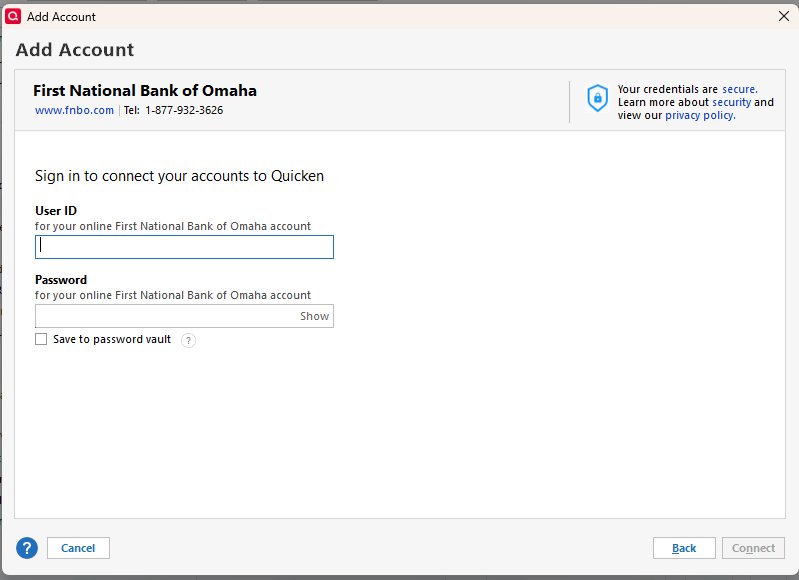
I swear that SoFi USED to go directly through Intuit to the FI's website, but now I'm getting the same screen as above for them.
Is this a clue for troubleshooting use by the techs?
0 -
@BereanPK : I had tried each day for 2 weeks to add the accounts that failed and eventually the 503's became 529's. QKN tech did some "stuff" to get me back to 503. I tried a few times and still came up with 503's so I just waited for another day. I screwed up one of my investment accounts, so I reloaded a backup and of course I then had to re-add the accounts that worked before the reload of the backup. After I got those to work, I figured what the heck, let me try one of the ones that gave me 503's. Presto, it worked and then I just added all the rest. I know, it doesn't make sense but that was the sequence.
0 -
I have been using 2 separate data files (QDF) for years. One for daily use and the other I use approximately once every 4 to 6 weeks. On the daily file, I have 2 Synchrony Bank Accounts (savings & checking) for which I continue to receive CC-503 which, of course, remains unresolved. Interestingly enough, the other data file contains 8 separate Synchrony Bank accounts (savings, checking & CD) all of which update normally, and no connection issues with Synchrony. I have spent way too much time with Quicken Support, and no one is able to tell my why this is the situation, let alone fix the CC-503 which is impacting my weekly data file. Can I get some help?
0 -
Have you tried to restore the backup of the good to the failed??
0 -
They are 2 unique sets of data, meaning they contain totally differfent accounts. The working set has absolutely nothing to do with the other. They are used to keep personal finances seperate from the finances of a trust.
0 -
I have been using Quicken since the DOS days, and I can't fight it anymore. I am just plain exhausted. I have 5 Syncrony accounts. It's either close the accounts or leave them open and not use them. This affects my credit rating. I could simplify my record-keeping using PNC's Bill Pay. I really don't like that option because I like Quicken's functionality. Even after all these years, I would really like to find another option to Quicken. They have forgotten their loyalty to their base users over the years.
0 -
Just sent this email to Eric Dunn, CEO of Quicken
Dear Mr. Dunn,
I am writing as a Quicken user of over 20 years to raise a serious and ongoing issue that has been affecting both myself and a large portion of the Quicken Community since at least February 11, 2026.
The issue involves persistent CC-503 errors, most notably with Synchrony Bank, but also impacting connections with other financial institutions. This is not an isolated incident. Numerous users have reported identical problems, and despite the passage of time, there has been no clear resolution or meaningful communication outlining a timeline for a fix. For a product that many of us rely on daily for managing our financial lives, this level of disruption is unacceptable.
As a long-time customer, I have remained loyal through many transitions of the product. However, the current situation is undermining confidence in Quicken’s reliability. Financial software must meet a higher standard—issues of this nature should be prioritized and addressed with urgency, transparency, and consistent updates to users.
I am asking for the following:
- Immediate acknowledgement of the issue at the executive level
- A clear and specific timeline for resolution
- Regular status updates communicated to affected users
At a minimum, the community deserves clarity on what is being done and when we can expect a fix. Continued delays without substantive communication are not reasonable given the critical role this software plays.
I would appreciate your direct attention to this matter and a response outlining next steps.
Sincerely,
0 -
Hello All,
I understand the frustration here, especially with how long some of these issues have been ongoing and the number of financial institutions involved.
To clarify where things stand:
- Synchrony-backed accounts: There is an active Community Alert for this issue. It has already been escalated and is being worked on. At this time, we do not have an ETA, as resolution depends on multiple factors (including the financial institution and service providers). Any updates will be shared in the Alert as soon as they become available.
- Other financial institutions (not listed in an Alert):
If you’re continuing to receive CC-503 errors for those, the next step is to contact Quicken Support so your specific cases can be reviewed and escalated individually. - CC-929 errors:
These occur after repeated connection attempts and may require Support to clear the block before further troubleshooting can continue.
We appreciate everyone’s patience while these issues are being worked through.
Thank you!
-Quicken Anja
Make sure to sign up for the email digest to see a round up of your top posts.0 -
@Quicken Anja , the community alert link above just goes to the generic cc-503 page. Maybe that is something that can be fixed?
0 -
Hello @JoeyMaggard,
Thank you for letting us know! I corrected the link; you should be able to view the Community Alert now.
Thank you!
Quicken Kristina
Make sure to sign up for the email digest to see a round up of your top posts.
0 -
Sorry this comment is delayed; my medical practice has been insanely busy for the past few weeks!
Back in early March after I posted my last comment, I was on with Quicken Support who attempted to "unlock" my account but they were unable to get it working, the 929's were still there (I wasn't bothering with the Synchrony 503's because of the ongoing issue with that FI). While waiting for Support to call me back with other options, I tried something: I created a Simplifi trial using a completely different email address, and believe it or not, it worked - all of the accounts that I was getting 503's on. When the support rep called me back, I mentioned this to him, and long-story short, I transferred my longstanding Quicken account to the email address that I used for the Simplifi trial (transferring my payment to the new email account) and ever since then, voila - everything works fine (except Synchrony).
So I know that's kind of an extreme way to solve the problem, but it worked for me, as the support rep agreed with me that somehow or other, my original email account got corrupted and couldn't be "uncorrupted" at their end.
NOW… here's my educated guess on the Synchrony CC-503 issue. Many of you who have Synchrony accounts (either Synchrony Mastercards, or Synchrony-managed store cards like Lowes, Sams Club, etc.) will know that some months ago, Synchrony moved to a new login method that unified all of their branded cards under one login (aka, no separate logins for Sams, Lowes, CareCredit, etc.). Not long after Synchrony moved completely to this new login system is when I think we were experiencing the CC-503's, which begs several questions that I'd like to ask Anja or Kristina to answer for us:
- Is Quicken even aware of this login change by Synchrony?
- Has anyone from Quicken (or Intuit since I know that Quicken still uses Intuit for account access for some FIs) even spoken to Synchrony about this?
- If not, why not?
- If so, are they offering any solutions? Or are they balking and not wanting to allow Quicken users to access their accounts through the software? This second option would be incredibly frustrating since Synchrony took away the option to download transactions into anything other than a dumb CSV.
Just a thought, guys…
0 -
Hello @BereanPK,
Thank you for sharing your experience. You're not the only person who has resolved chronic CC-503 errors affecting multiple accounts by changing your Quicken ID. However, it is an extreme step to take, and is not recommended unless you have a chronic issue with CC-503 errors affecting multiple financial institutions, and nothing else (including working with our escalated teams) has resolved the issue.
Is Quicken even aware of this login change by Synchrony?
- Has anyone from Quicken (or Intuit, since I know that Quicken still uses Intuit for account access for some FIs) even spoken to Synchrony about this?If not, why not?If so, are they offering any solutions? Or are they balking and not wanting to allow Quicken users to access their accounts through the software? This second option would be incredibly frustrating since Synchrony took away the option to download transactions into anything other than a dumb CSV.
- Yes, Quicken is aware of this change.
- Yes, Quicken has contacted Synchrony about this.
The tickets I can access are for tracking and don't provide in-depth information about what is being done behind the scenes to resolve the issue.
Thank you!
Quicken Kristina
Make sure to sign up for the email digest to see a round up of your top posts.
0

