Wrong Update Entries

Running Classic 8.4.2 on Mac. Every update entry from Firstbank Colorado is entered as Personal Income. Every expense item is entered as income! It started at my last update on 2-19-26. I've been using Quicken for years successfully.
Best Answer
-
It seems like your bank made a change which is resulting in expenses, which should negative amounts in a checking account, being downloaded as positive amounts. The improper categories applied are a result of that.
Click on one of the transactions, and pull down the main menu View > Show Inspector. In this box, look at the bottom section which says "From your Financial Institution". These are the values exactly as downloaded from your bank, before Quicken does any manipulation of them. If the Statement Amount for these expenses shows as a positive number, then it's a fault of the bank. You need to reach out to Quicken Support to get this reported to the connectivity team (Intuit) to reach out to the bank about the problem.
Quicken Mac Subscription • Quicken user since 19930

Answers
-
Hello @winterbear,
Thank you for letting us know you're seeing this problem. To help troubleshoot, please provide more information:
- When you say they're entered as Personal Income, do you mean the Payee is being changed, the category is being changed, or something else?
- Is the amount reflecting as income instead of an expense?
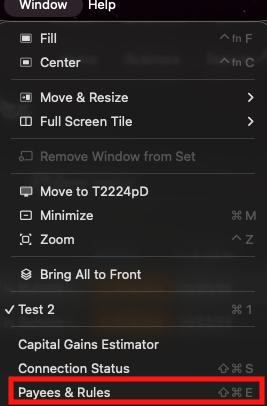
- Have you navigated to Window>Payees & Rules to confirm that Quicken didn't learn an incorrect rule?
I look forward to your reply!
Quicken Kristina
Make sure to sign up for the email digest to see a round up of your top posts.
0 -
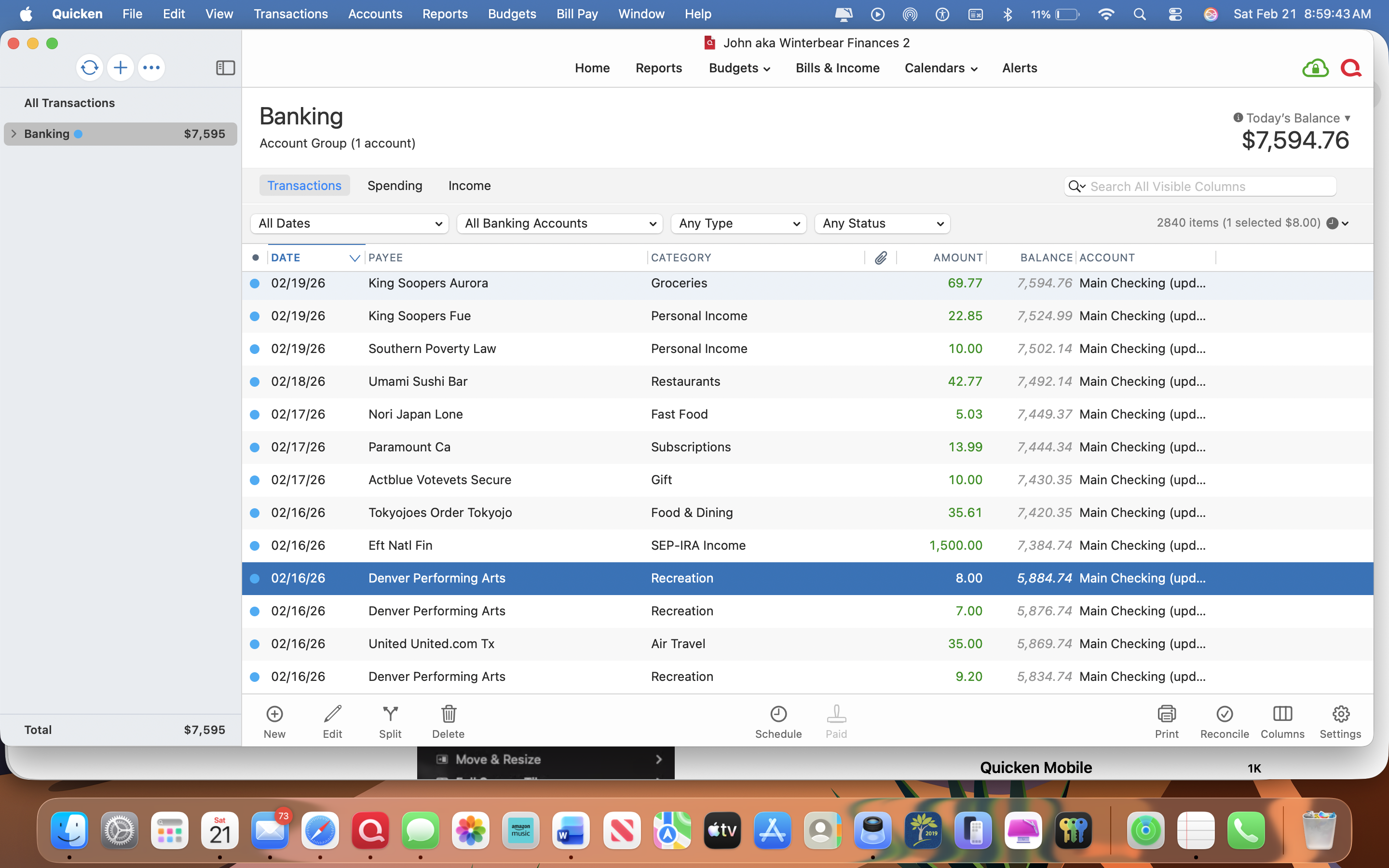
A screenshot may give you enough information, I hope it comes through here. All those entries above the highlighted one, for example, are all positive/green entries- not expense entries. I checked the Windows/payees box and it told me nothing- what do I look for?
I changed nothing anywhere in the settings. I've used Quicken for years- probably 25 years? I've never had any serious glitches until now.
Might this turn into a situation where I have to delete Quicken and reload it? Even with that will I have to go back and change every incorrect entry?
Thank you!!0 -
Hi, @winterbear
I don't have a solution here, and my gut feeling is that this issues is on the backend servers providing your download data. But, before you continue further, please note that you a viewing an account grouping-that is why your running balance is in italics.
If you click on the "greater than" sign left of Banking in the sidebar, you will be able to expand that grouping and select the individual account. Since you only have one account here, that shouldn't make much difference, but be aware of this.
After you do this so you can see that account with a valid running balance that is increasing instead of decreasing, you can then (from the Help Menu) Report a Problem and submit your data file/logs so that Quicken can push this up to their data provider.
I don't suspect that this has anything to do with Payee & Rules.
0 -
I sent in a problem report but I'm not optimistic. Even if corrected will the problem entries be corrected?
I think I've been on Quicken since the early '90's and am preparing to let Quicken go and go the analog route and just use my printed check registers from my bank. There have been very few hiccups along the way with Quicken but nothing like this.
Thank you for the reply!
0 -
It seems like your bank made a change which is resulting in expenses, which should negative amounts in a checking account, being downloaded as positive amounts. The improper categories applied are a result of that.
Click on one of the transactions, and pull down the main menu View > Show Inspector. In this box, look at the bottom section which says "From your Financial Institution". These are the values exactly as downloaded from your bank, before Quicken does any manipulation of them. If the Statement Amount for these expenses shows as a positive number, then it's a fault of the bank. You need to reach out to Quicken Support to get this reported to the connectivity team (Intuit) to reach out to the bank about the problem.
Quicken Mac Subscription • Quicken user since 19930 -
I do suspect this is a problem on the bank's/Intuit's end, but that doesn't matter to you as this is understandably a hassle. And in answer to your question, even if the problem gets resolved, it won't fix the wrong transx already in your register, You will have to manually change the sign on each in the interim.
If you go to manual entry (via paper registers or still within Quicken) is up to you, and I can understand your decision. Good luck.
1 -
Yes! It is my local bank that has created this issue. Thank you Quicken for running this down.
At first I went into a handful of erroneous entries and changed the category from income to expense and recategorized them BUT the dollar amounts remained as deposits. I'm not sure what to do next.
Thanks again for the follow-through.
0 -
All you need to do is edit the amount of each transaction to add a minus sign.
(If you want, you might find it easier if you had two separate columns for deposits and withdrawals instead of the single Amount column you currently have. If you want to try this, click on the Columns icon on the bottom toolbar, and then click on Deposit and Payment to add those columns, and amount to remove that column.)
By the way, John and I who have replied here do not work for Quicken; we are fellow users. Once you get your erroneous transactions fixed for now, you should still contact Quicken Support so they can get this problem documented and escalated to hopefully get the bank to fix their problem. (I have seen on this site that there have been several issues with Firstbank Colorado in recent months, so I’d just guess that while fixing one problem, they introduced the new problem you’re experiencing.)
Quicken Mac Subscription • Quicken user since 19930

