memorized payee list deletions

In recent weeks I've been updating my memorized payee list > deleting, renaming, merging etc. When I delete an item in the list the display then scrolls back to the last memorized transaction that I edited. Thus, if I edit a memorized transaction such as Home Depot and then continue to scroll through the list and delete Mosaic Theatre the result display scrolls back to Home Depot. To continue my review I than have to scroll back to the item just after where Mosaic theatre was located.
IMO opinion when one deletes an item the resultant display should be just after deleted item. If there are multiple items deleted simultaneously the resultant display should be just after the first item in the deletion list.
What is the experience and thoughts of others?
Comments
-
Hello @acs2,
Thank you for reaching out! To assist with this, please provide more information:
- When did you first notice this behavior?
- Has it always behaved this way, or is it a relatively recent change?
I look forward to your response!
Quicken Kristina
Make sure to sign up for the email digest to see a round up of your top posts.
0 -
I have noticed it for many weeks. I cannot exactly recall if it has always been this way. It is annoying as it slows editing and review significantly
Thx
Arthur
1 -
Thank you for your reply,
I did some additional testing, and it appears that this behavior started in R65. I forwarded this issue to the proper channels for further investigation and resolution. In the meantime, if you haven't already done so, please navigate to Help>Report a Problem and send a problem report with log files attached to assist with the investigation.
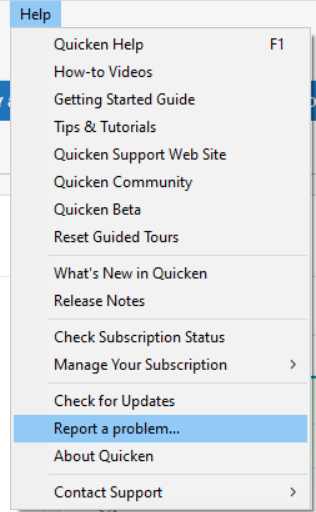
While waiting for the issue to be corrected, there are a couple of ways to bypass the issue.
- You can set Quicken to automatically remove memorized payees that haven't been used in a set time period.
- You can do this by going to Edit>Preferences>Data entry and QuickFill.
- In the QuickFill and Memorized Payees section, select "Remove memorized payees not used in last 'x' months". Fill in the number of months. Then click OK.
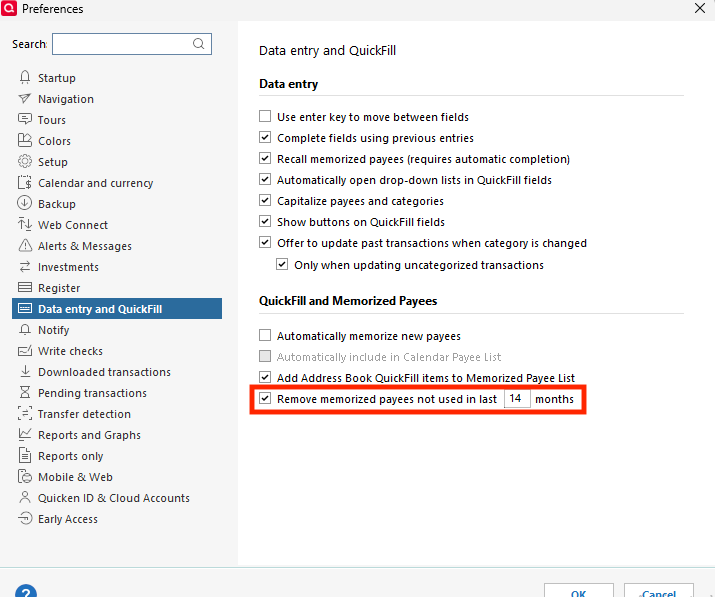
- You can revert your Quicken program to a version that predates when the problem started.
- This is typically not recommended. If you were affected by bugs that were recently fixed, rolling back to an earlier version will cause those bugs to return.
- If you choose to revert to an earlier version, backup your Quicken file first, then use the article linked below to download and install the appropriate patch. When I tested, the issue did not happen in version R64.19 and earlier.
Thank you!
(CTP-16413)
Quicken Kristina
Make sure to sign up for the email digest to see a round up of your top posts.
0 - You can set Quicken to automatically remove memorized payees that haven't been used in a set time period.
-
I would like to take advantage of the automatic deletion of entries that have not been used recently, but I generally lock the entries. Locking prevents them from being changed if I edit a downloaded transaction, to change the Category for example.
Unfortunately locking also prevents them from being automatically deleted as described above.
QWin Premier subscription1 -
I submitted a report.
I use the option of deleting memorized payees not used in the last 12 months. It does not seem as thought this option works well as some of my memorized payees were last used in 2021 asper this :
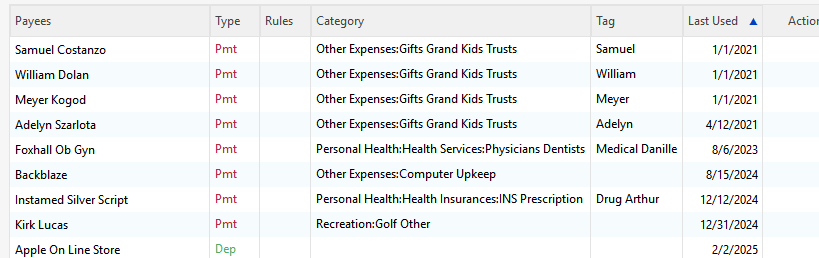
I'll report this as a problem
1 -
Are the memorized payees that are not being deleted automatically Locked, i.e with a padlock icon in the Memorized Payee List Lock Lock column? If the Lock column is not shown in the list, click on the Columns icon above the vertical scroll bar and select it.
As noted in my previous post, locking a payee prevents it from being auto-deleted. It has worked that way for a long time and that appears to be the design intent, but I think locking should only prevent the Payee details from changing and not prevent auto-deletion. Maybe there should be a separate "Prevent auto-deletion" setting.
QWin Premier subscription5 -
Jim, You are correct. They are locked. I've now added Lock to my display which will help me keep track. Should I/can I remove report a problem that I submitted for this
1 -
Thank you for your replies,
Thank you for adding that clarification!
Thank you for confirming that the memorized payees that weren’t being automatically deleted were locked. There is no way to unsend a problem report; however, there is also no need to do so. Problem reports are reviewed daily to monitor trending issues and for escalation or troubleshooting purposes.
Thank you!
Quicken Kristina
Make sure to sign up for the email digest to see a round up of your top posts.
0 -
I reported the problem from my original post where I described an issue with deleting memorized payees. The issue is that after deleting a payee the display scrolls back to the last payee that was edited. The display should not scroll back but should remain at the payee immediately after the one deleted. I did report a problem. Is there a way to look up the Report a Problem list to be sure it is in the queue or know if it is being worked on?
0 -
Thank you for your reply,
No, there isn't any tracking for problem reports. However, since there is a ticket for the issue, CTP-16413, you can track the issue by asking about the CTP here on the Community. Moderators have the ability to view the tickets.
I hope this helps!
Quicken Kristina
Make sure to sign up for the email digest to see a round up of your top posts.
0 -
Thank you
0


Categories
- All Categories
- 24 Product Ideas
- 34 Announcements
- 248 Alerts, Online Banking & Known Product Issues
- 19 Product Alerts
- 265 Welcome to the Community!
- 301 Before you Buy
- 1.5K Product Ideas
- 55.8K Quicken Classic for Windows
- 16.9K Quicken Classic for Mac
- 1K Quicken Mobile
- 834 Quicken on the Web
- 129 Quicken LifeHub