Midfirst bank connection problem error FDP-107
Answers
-
It appears to be only a temporary fix, the next time I do a One-Step-Update from the home page it just updates the same three accounts.
1 -
Thank you for your reply,
To help troubleshoot the 2 problem accounts, please provide more information:
- What type of account are they (checking, savings, etc.)?
- Have there been transactions, other than automatic interest payments, in the last 90 days?
- Are you the primary account holder on these accounts?
- Are the accounts sub-types of another account?
Thank you!
Quicken Kristina
Make sure to sign up for the email digest to see a round up of your top posts.
0 -
- What type of account are they (checking, savings, etc.)? 1.Saving account named "Premium Saving". 2.Credit Card account named"MidFirst Visa Card"
- Have there been transactions, other than automatic interest payments, in the last 90 days? YES, for the Credit Card account. NO, for the Saving account.
- Are you the primary account holder on these accounts? YES
- Are the accounts sub-types of another account? NO
Also I see the following error (409) during the "Reset account" time frame, but NOT during the early One-Step-Update time frame, which is strange because it updates all account from the "Reset accounts".
<!-- ***** RECV from https://services.quicken.com/institution-logins at 09:51:59 on 20260223 ***** -->
{"items":[{"code":409,"resource":{"status":"ERROR"},"errors":[{"title":"Conflict detected. institution-logins [522006771649981440] has a conflicting attribute [name=Credentials, answerValue=null].","httpStatus":409,"code":"QCS-0409","extData":{"attributeName":"Credentials","conflictId":"522006771649981440","conflictClientId":"81ACD660-E082-43A9-BEE0-066EC9D94B23"}}]}]}
0 -
I just did some research on the QCS0409 error and looks like it's just related to Quicken for MAC, I am using Windows. I did use a MAC, but that was about 3 to 4 years ago. So don't know what that means.
Thanks for your help.
0 -
Thank you for your reply,
The 409 conflict error you're seeing in the logs is helpful. Please backup your Quicken file, then follow these steps based on our article on 409 conflict errors:
First, deactivate the accounts
- Go to Tools>Account list.
- If the option is visible at the bottom left, select Show hidden accounts. If the option is not visible, that means you do not have any hidden accounts.
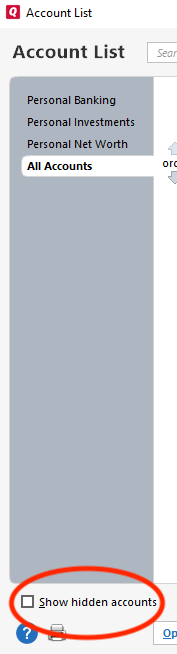
- Click the Edit button next to the account name.
- Click on the Online Services tab.
- Click on Deactivate.
- Do this on each account with this financial institution.
Second, reactivate the accounts using the same connection method
- Navigate to Tools>Add Account.
- In the Add Account window, search for the financial institution.
- Follow the prompts.
- On the Add/Link screen, carefully link the accounts with the correct nickname in Quicken.
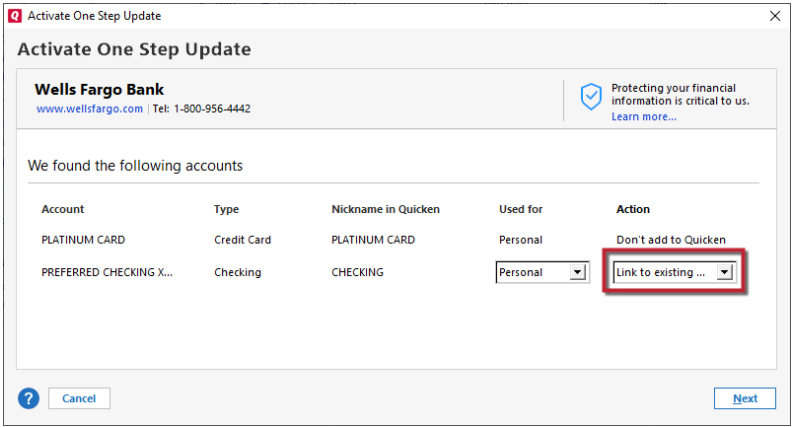
Please let me know how it goes!
Quicken Kristina
Make sure to sign up for the email digest to see a round up of your top posts.
0 -
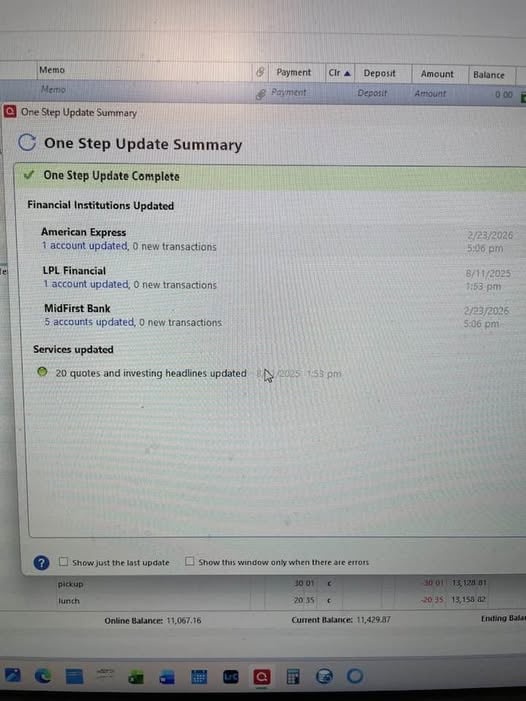
Hello Kristina, initial results are GOOD!! followed your instruction and look at the results, show "5 accounts updated under MidFirst and it was way faster!! The Log shows NO 409 error. I will update you Tuesday morning after I do the One-Step-Update, I should have several transactions to download then. Thanks!!
 0
0 -
Thank you for the follow-up,
I'm glad to hear that so far, it looks good!
Please let me know how it goes on Tuesday!
Quicken Kristina
Make sure to sign up for the email digest to see a round up of your top posts.
0 -
Good morning, and yes, it is a GOOD morning, it worked perfectly all 5 accounts for MidFirst updated!! Thank you, Kristina for all your help and patience getting my problem fixed. You provided real customer service, thanks again and have a good day.
1 -
Thank you for the follow-up,
I'm glad to hear that all 5 accounts are updating!
If you need further assistance, please feel free to reach out!
Quicken Kristina
Make sure to sign up for the email digest to see a round up of your top posts.
0 -
Well everything worked great for a week maybe a week and half, then the morning of March 2 it failed to update the 5 MidFirst accounts, giving me the CC-601 error, then it worked that afternoon. This morning got the same CC-601 failure, tried this afternoon and got the same error. Any Ideas??
0 -
Thank you for the follow-up,
Unfortunately, it's a widespread issue affecting more than one financial institution. It has been reported to our Development and Product teams for further investigation and resolution. Though we do not currently have an ETA, you can bookmark the Community Alert linked below to be notified of updates and to know when the issue is resolved:
Thank you!
(Ticket #12269329/ CTP-16510)
Quicken Kristina
Make sure to sign up for the email digest to see a round up of your top posts.
0 -
Looks like the software update from yesterday fixed this problem, it's work fine yesterday after installing the patch and it worked fine today. Thanks!!
1 -
Thank you for the follow-up,
I'm glad to hear it's working again!
Quicken Kristina
Make sure to sign up for the email digest to see a round up of your top posts.
0


Categories
- All Categories
- 6 Product Ideas
- 34 Announcements
- 249 Alerts, Online Banking & Known Product Issues
- 19 Product Alerts
- 266 Welcome to the Community!
- 301 Before you Buy
- 1.5K Product Ideas
- 55.8K Quicken Classic for Windows
- 16.9K Quicken Classic for Mac
- 1K Quicken Mobile
- 834 Quicken on the Web
- 129 Quicken LifeHub