Fidelity Account Balances Wrong and can No Longer Authorize

I check my Fidelity accounts occasionally online directly using the Fidelity website and app, and noticed that my accounts (IRAs and 401k) balances did not match. For my 401k I discovered that a few of the equities' prices were not correct. Tried online update of the prices but no change. So I went in and manually updated the few that were wrong and it then matched my Quicken 401k balance.
I moved on to my first IRA, and was going to manually update the equity prices but as I was doing that I discovered at least one equity that was new (shows added to my IRA Feb 17) but does not show up in Quicken. I download positions only for my IRAs and 401k and not individual transactions, so I couldn't simply add the missing fund.
Then I went to the problem IRA's "edit account details" and tried to "reset account". It took me through to the Fidelity authorization page, where I successfully logged in and it presented me with the list of my accounts to check off to include or not. All were checked and I hit submit, and a few seconds later a web page with a 404 error appeared, and did not complete the authorization.
I'm assuming there continues to be something wrong with Fidelity account downloads, even though the warning message received a few days ago about a 45 minute period downloads would not be available has long passed and no warnings when I update accounts yesterday and today.
Quicken Classic Deluxe Windows, version R66.12, running on up-to-date Windows 11 Pro
Comments
-
Hello @Gary E,
Thank you for letting us know you're encountering this issue. To help troubleshoot, please provide more information:
- Did you first notice this issue today?
- If not, then when did you first notice it?
- Is this the first time this problem has happened?
- What web browser were you using when you tried resetting the IRA (Chrome, Edge, FireFox, etc.)?
- Did you try using a different browser?
- Do you use a VPN?
I look forward to your reply!
Quicken Kristina
Make sure to sign up for the email digest to see a round up of your top posts.
0 - Did you first notice this issue today?
-
Noticed it a few days ago but assumed it was related to the recent 45-minute issue with Fidelity I saw in my updates a few days ago. Web browser is Edge which is all I ever use and has worked fine in the past for authorizing my accounts. Did not try a different browser as Quicken always brings up the default browser when authorizing with banks. No VPN.
Also the error I get is 400 not 404 as stated earlier.
0 -
Thank you for your reply,
You mentioned that you tried resetting the account. Sometimes, resetting instead of deactivating and re-adding/linking the account can cause that 400 error.
Please make sure any browser extensions (such as pop-up and ad blockers) are paused. Backup your Quicken file, then deactivate all your Fidelity accounts connected using the same login credentials as the problem accounts. Navigate to Tools>Add Account and follow the prompts. Once you get to the Add/Link screen, carefully link your accounts with the correct nickname in Quicken.
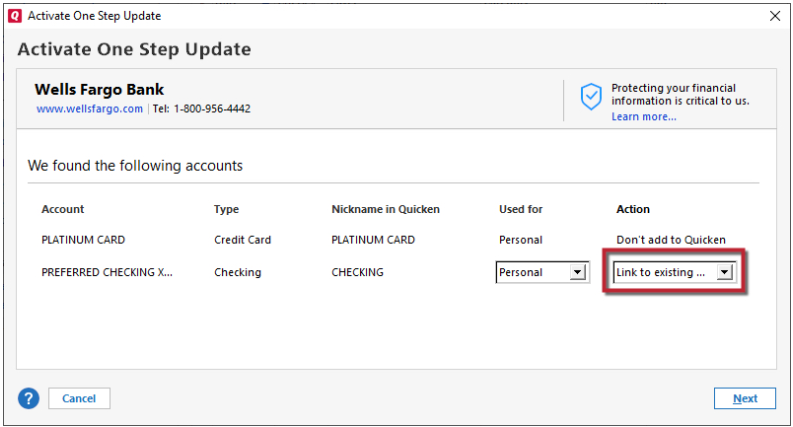
Please let me know how it goes!
Quicken Kristina
Make sure to sign up for the email digest to see a round up of your top posts.
0 -
All 6 Fidelity accounts have been deactivated. Popup blocking is off (always has been off). I followed the instructions to add an account, logged in successfully to the Fidelity authorization site, selected the 6 accounts, clicked on submit, and once again received the HTTP 400 error. I'm going to completely reboot and try to authorize again. Will reply once done.
1 -
Just rebooted and tried the add account instructions again, but cannot get past selecting the accounts on the Fidelity site—I hit submit and receive a blank page with
HTTP Status 400 – Bad Request0 -
Thank you for your replies,
Please try temporarily setting a different web browser as your default, and try reconnecting your accounts using that alternate browser. Avoid using Brave and DuckDuckGo, since those browsers are known to cause issues when authorizing accounts.
Thank you!
Quicken Kristina
Make sure to sign up for the email digest to see a round up of your top posts.
0 -
@Gary E I was getting the HTTP 400 also, when I used Firefox as my default browser.
I temporarily switched the default to MS Edge, and didn't get the HTTP 400, so I was able to authorize.
Then I switched the default back to Firefox
Q user since February, 1990. DOS Version 4
Now running Quicken Windows Subscription, Business & Personal
Retired "Certified Information Systems Auditor" & Bank Audit VP1 -
I only have Edge installed and it has always worked before. What has Quicken changed that would cause this?
0 -
Thanks for the advice but my default and only browser I use is Edge.
0 -
I have also just cleared the cache on Edge, closed it and restarted, tried the authorization again and still get the 400 error
0 -
I downloaded Chrome and made it my default temporarily. Did the reauthorization thru Fidelity and the authorization completed, and I was able to re-link my accounts and they now update with what look like the correct balances. Not sure what caused this problem (remember I initially noticed my 6 Fidelity account balances in Quicken were not matching significantly with what the Fidelity website showed). Seems to be fixed for now but now my trust in the balances Quicken syncs with and tracks is diminished.
0 -
Thank you for the follow-up,
I'm glad to hear you were able to use Chrome to get your accounts reconnected, and that the account balances are correct.
If you encounter the issue with incorrect balances again, please reach back out so we can troubleshoot further!
Quicken Kristina
Make sure to sign up for the email digest to see a round up of your top posts.
0

