Virginia Credit Union - One Step Update Issues

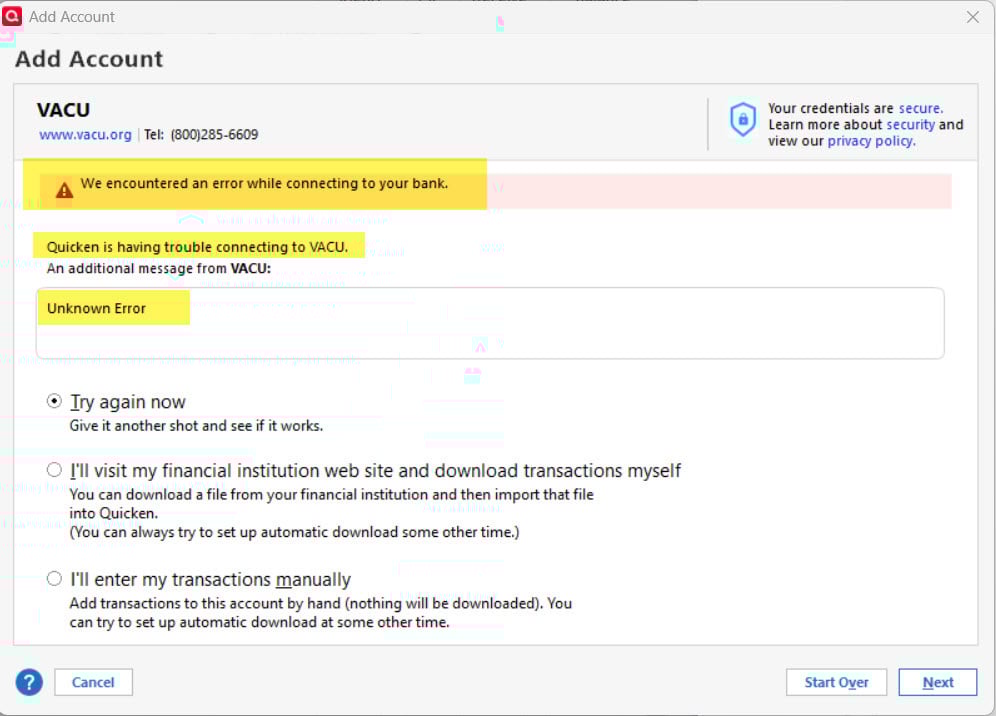
One Step Update no longer works for Virginia Credit Union. I removed the login credentials and tried to reconnect and get this error:
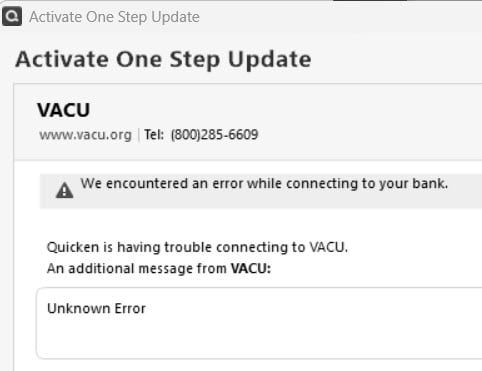
I called VACU last week and they said that they are aware of the issue and their tech team is working on it.
Is Quicken partnering with VACU?
Do we have an ETA for repairs?
Do we get an alert when the functionality is working again?
Best Answer
-
Hi @DDub,
Thanks for your reply and for sharing the additional details and screenshots of the steps you followed above. They’re very helpful.
In the backup file, we’re seeing a CC-800 error. To resolve this issue, please follow the steps below.
First, deactivate the affected accounts:
- Go to Tools > Account List
- If needed, check the Show Hidden Accounts box at the bottom of the Account List
- Select Edit for each account with this error, then go to the Online Services tab and click Deactivate
- Once done, close the Account List
Next, reactivate the accounts:
- Go to Tools > Add Account
- Search for VACU
- Click Advanced Options
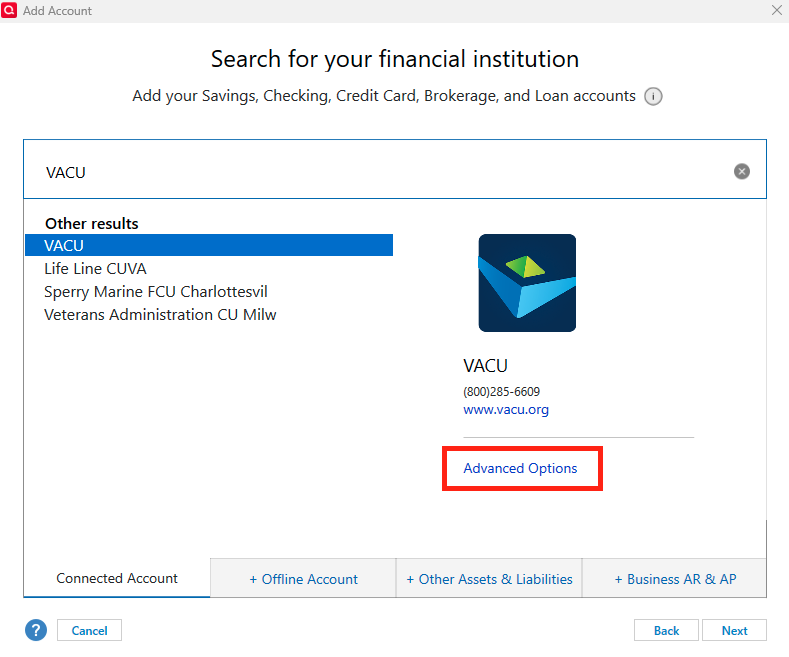
- Select Express Web Connect
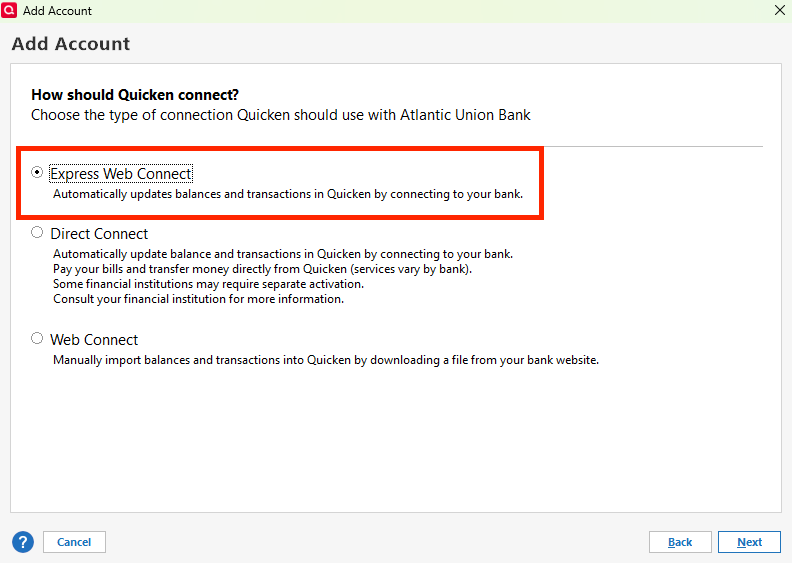
- Complete the process to re-add the deactivated accounts using your bank login credentials, and answer any security questions if prompted
Please let us know if you encounter any other errors. We’ll be waiting for your reply.
Quicken Carlos
Make sure to sign up for the email digest to see a round up of your top posts.
0

Answers
-
Curious if this was resolved for you.
0 -
Hello @DDub & @pstreicher,
Thank you for letting us know you're encountering this issue! To help troubleshoot, please provide more information:
- When did you first notice this issue?
- Are you seeing any error code?
- Are the affected accounts connected using Direct Connect?
- To check this, go to Tools>Account List and look in the Transaction Download column.
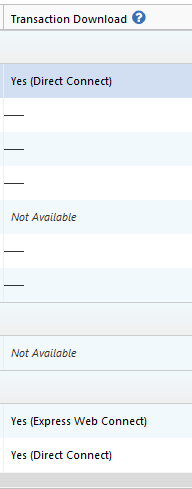
- To check this, go to Tools>Account List and look in the Transaction Download column.
- Are you seeing this error when trying to update the account(s), add the account(s), or both?
I look forward to your reply!
Quicken Kristina
Make sure to sign up for the email digest to see a round up of your top posts.
0 -
First time using Express Web Connect using one account. Upon the successful download of transactions a new account was made with the name provided from the provider. I have already been using a manually created named account for years. I had hoped that I would be given a pop-up to prompt me to what account I'd like these transactions to have these in.
In an earlier test download I had gotten the double entries but that has been fixed with the latest update. But, now we have this new problem above. I am not sure what to try next.
0 -
Me again. I just edited the accounts in the list that were set up for Web Express Connect and deactivated them. I then tried to 'improve the connection' in the one credit card account that I am using as a test. Upon the connection failing I went in the 'Edit' mode of this account from the account list and found that the institution that it was trying to connect with was not who I have the account with. What I have is an Elan Visa card set up through with Fidelity and that is where I get my transactions and statements from. This is why I was getting a different named account showing up, exactly as it is named in my Fidelity portfolio, along with the downloaded transactions to accept. I'm not sure what I can do now. I want to keep the same naming list of accounts but I find no way to move the downloaded transactions to my named account other than one by one. There has to be a better way than this.
0 -
Hi Quicken Kristen,
- When did you first notice this issue? I have had these accounts connected to the One Step Update for years. It stopped working a few weeks ago.
- Error Message: As you can see in the image in my original post, it says "We encountered an error while connecting to your bank. Unknown Error."
- Are the affected accounts connected using Direct Connect?
The accounts are not currently connected at all — A week or two after the error began, I disconnected the accounts and tried to reconnect to see if that might fix things. Cannot connect at all right now. The process I use to connect to the One Step Update is this: To do this I used this process: Right click account > Edit/Delete Account > Online Services > Online setup - Set Up Now > Add login credentials for bank > Connect > Get error message
I appreciate the help.
0 -
Thank you for your replies,
It sounds like the account got added as new instead of linked to the existing account.
If the problem account(s) is a regular banking or credit card account, then you should be able to bulk-select transactions using regular Windows shortcuts, such as clicking to select the first transaction, holding the Shift key, and while still holding that key, clicking the last transaction. That should select the entire batch. Note: It's a good idea to backup your Quicken file before copy/pasting transactions.
Alternatively, you could backup your Quicken file, make sure all accounts with the financial institution are deactivated, then go to Tools>Add Account and follow the prompts. When you get to the Add/Link screen, make sure to carefully link the accounts to the correct nickname in Quicken.
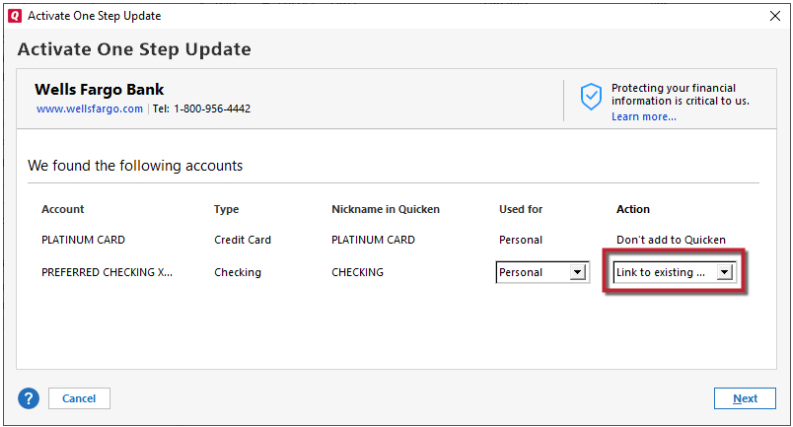
Once you confirm that the original accounts are connected and everything is correct, you can delete any duplicate accounts.
Instead of using the set up now button, please try following this process:
- Backup your Quicken file.
- Make sure all accounts with that financial institution are deactivated.
- Navigate to Tools>Add Account.
- Search for your financial institution, then follow the prompts.
- When you get to the Add/Link screen, carefully link each account to the correct nickname in Quicken.
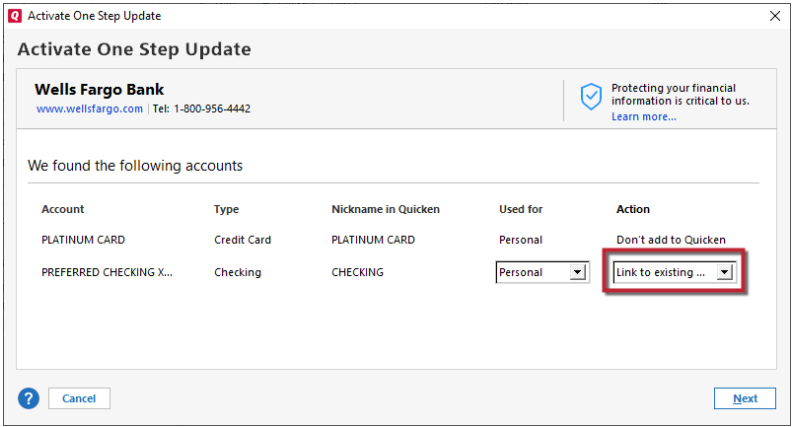
Please let me know how it goes!
Quicken Kristina
Make sure to sign up for the email digest to see a round up of your top posts.
0 -
Hi Quicken Kristina - I tried the suggested process using Tools > Add Account and get the exact same error message: "We encountered an error while connecting to your bank. Unknown Error."
Institution is listed as "VACU" in case you need that info.
0 -
VACU Contacted me stating: "Thank you for your email. We do currently have a ticket open for this issue. Are you able to provide the HAR, OFX and CONN logs? We do not have an alert on when this is fixed. There is currently no ETA."
Is this problem something that Quicken can assist them with??
0 -
Thank you for your reply,
To locate the OFX and Conn logs, go to Help>Contact Support>Log Files.
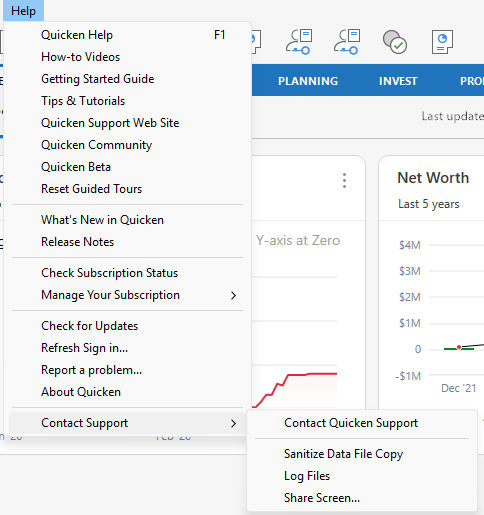
In the window that appears, you should see blue links for the OFX log and the Connection Log (Conn log).
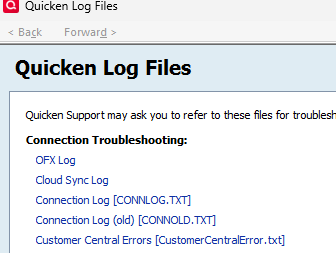
If those links don't work for any reason, you can also access the OFX and Conn logs by navigating to Help>Report a Problem. You can click the links to view the logs there.
I don't have any instructions for the HAR. Did the financial institution provide you with instructions? If they did not, then I recommend contacting Quicken Support directly for assistance, as they will need to reach out to a team that can assist. The Quicken Support phone number can be found through this link here. Phone support is available from 5:00 am PT to 5:00 pm PT, Monday through Friday.
I hope this helps!
Quicken Kristina
Make sure to sign up for the email digest to see a round up of your top posts.
0 -
Hi Quicken Kristina,
This is still an issue for me. I have been working with tech support at the credit union.
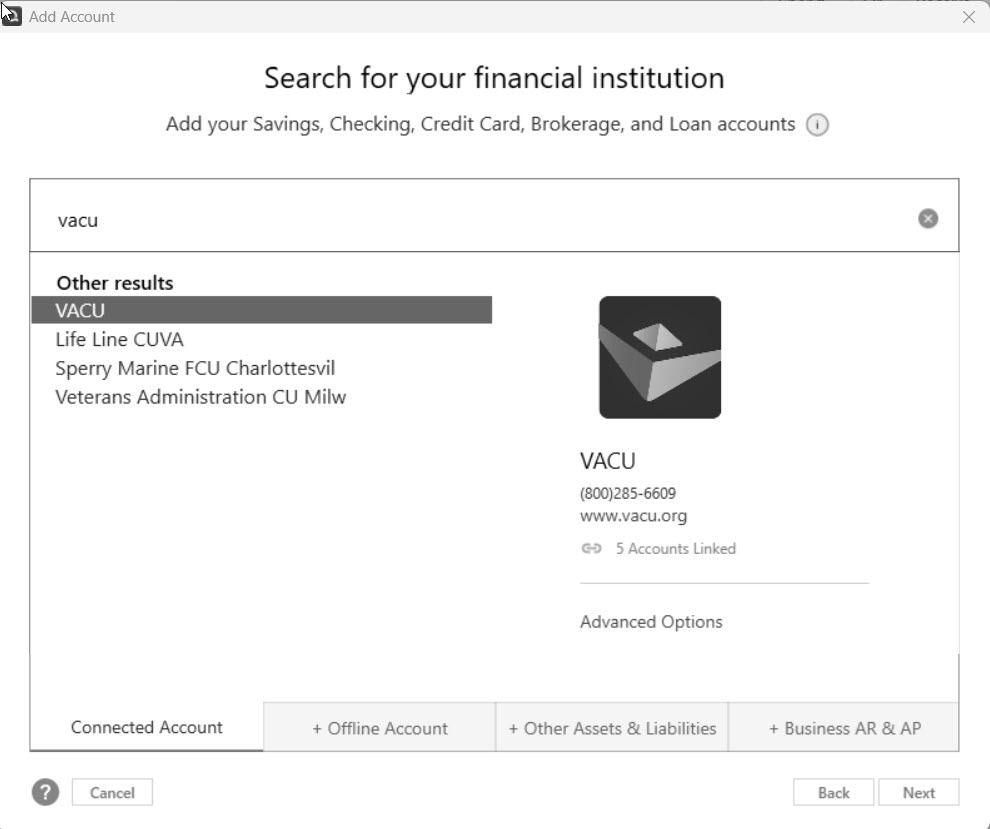
The one thing that caught my attention is that when trying to create the One Step Update connection and having to select a financial institution from the list of options, I used to select "Virginia Credit Union." That option no longer exists. Now the only option is "VACU."
Talking with tech support at the credit union, she said that this is a "old" option that is no longer used.
Was there a change on Quicken's end to this listing of financial institutions? Is it possible the wrong option was activated for Virginia Credit Union?
NOTE: I probably wouldn't have had a problem at all if I didn't need to reconnect to the financial institution. However, with the new year I used the FILE > COPY OR BACKUP to create a new copy of the file. I didn't truncate it or change it in any way. I simply created a full copy because I wanted to rehaul the way I use categories and wanted a full copy of the old file in case I messed things up. The problem started when I was using the "new" file. The One Step Update continued to work for two of the three financial institutions — it didn't work for the credit union.
Any thoughts?
 0
0 -
Thank you for your reply,
The financial institution determines which connection options to offer. If one of the options had been removed, it would have been due to the financial institution telling the aggregation partner to remove it.
What is the exact URL (web address) you use when logging into your accounts directly through the financial institution's website? Have there been any recent changes to their website?
Thank you!
Quicken Kristina
Make sure to sign up for the email digest to see a round up of your top posts.
0 -
They told me twice that the "VACU" option is an old option and the active one spells the name out as "Virginia Credit Union," which no longer appears on the listing.
Their URL has not changed, but it's a second click on the main homepage to get to a pop-up for the login: https://www.vacu.org/
The bank changed third-party vendors for the website in 2024, which is when they first had some issues with the connection. But things had been fine until I tried recently to reconnect my Quicken File with the bank when I created a new file.
I am unaware of any more recent changes, but that's certainly a possibility.
[Edited - Readability]
0 -
Thank you for your reply,
Their URL has not changed, but it's a second click on the main homepage to get to a pop-up for the login: https://www.vacu.org/
Is that additional click a relatively recent change? Was there anything that changed when they changed third-party vendors?
The information you provided makes it sound like something changed that didn't prevent you from updating an already-connected account, but it does cause issues when you try to reconnect the account. To test that theory, try restoring a backup from when the account was still connected, and verify whether it can still connect/update in the newly restored backup.
To restore a backup, please follow these steps from our article on backing up and restoring Quicken files:
Restore Quicken data
- Go to File > View/Restore Backups....
- Browse the Local and Online Backups tabs to find the backup file you want to restore. The Quicken backup file has the extension .QDF-Backup.
- Select the file to restore and click Restore Backup.
- Next, you will be given the option to overwrite the file you have open or to create a copy of the backup you're restoring.
- If you Create a copy, you will need to select a location to save the copy to and you will also need to give the copy a unique file name. After naming the file and selecting the location, click Save, then click Yes to open the restored file.
- What does it mean to overwrite a file?: Restoring a backup file replaces your current data with the data stored on the backup. Be aware that you'll lose any changes you made since the backup was created. If you want to preserve the current file, you must rename the current file or the file you are restoring. We recommend avoiding overwriting files.
If you don't have a manual backup, use the steps below to restore an automatic backup:
Restore an automatic backup
Quicken creates a copy of your data every seven days and stores five of these copies in a BACKUP folder. If the backup file you've created becomes damaged, you may be able to restore an automatic backup and save yourself the need to re-enter data.
First, check to see if automatic backups are turned on (this is on by default)
- In Quicken, go to Edit > Preferences.
- Under Setup on the left, choose Backup.
- Make sure there is a check mark next to Automatic Backups.
- To the right of Automatic Backups, there is an Open/Change backup directory link that goes directly to your BACKUP folder - a good way of finding them fast!
- Choose to back up your Quicken data file after running Quicken X times (between 1 - 99).
- Choose how many backup data files you would like to save (between 1 - 99 copies).
Then, restore the automatic backup
- Go to File > View/Restore Backups....
- Select the file to restore.
- Click Restore Backup.
- Next, you will be given the option to overwrite the file you have open or to create a copy of the backup you're restoring.
- If you Create a copy, you will need to select a location to save the copy to and you will also need to give the copy a unique file name. After naming the file and selecting the location, click Save, then click Yes to open the restored file.
- What does it mean to overwrite a file?: Restoring a backup file replaces your current data with the data stored on the backup. Be aware that you'll lose any changes you made since the backup was created. If you want to preserve the current file, you must rename the current file or the file you are restoring. We recommend avoiding overwriting files.
Please let me know how it goes!
Quicken Kristina
Make sure to sign up for the email digest to see a round up of your top posts.
0 -
You asked:
- Is that additional click a relatively recent change? NO. This has been in place for some time.
- Was there anything that changed when they changed third-party vendors? They changed third party vendors in 2024, from what I was told. The One Step Update was working during 2025. For "my" file, I started having issues when I created a copy of my original file to use for 2026.
- The information you provided makes it sound like something changed that didn't prevent you from updating an already-connected account, but it does cause issues when you try to reconnect the account. To test that theory, try restoring a backup from when the account was still connected, and verify whether it can still connect/update in the newly restored backup.
This is my theory, at this point, too. Especially since I can connect successfully to other financial institutions. Only the VACU one is unable to use the One Step Update functionality.
I followed the steps provided and restored a file from December 2025 which was functioning properly in December. Summary below. Details with screenshots attached.
1: using the restored copy, I checked to see if the VACU account » Online Services was set up. To do this: right-click account » Edit/Delete Account » Online Services tab. It states: "VACU CK is set up for transaction download."2: I also checked the Chase account (since this one IS working in my 2026 file) and Online Services is set up for this account, too.
3: I ran the One Step Update process. On the "One Step Update Summary" screen, I got an error message for ALL accounts reading: “It appears one or more accounts) at [FINANCIAL INSTITUTION[ have been deleted. This could happen if you have restored from a backup file. You must add the account(s) to Quicken again. Select Fix it to resolve this error. For more information see the FAQ.”
4: CHASE: I start with the Chase account since this account IS working in my new 2026 file.
On the "One Step Update Summary" screen, I click "Fix It" next to the error message for the Chase account. It steps me through the process and has me re-authenticate the account by logging in to my account on the financial institution's website.
Then I was able to relink Chase to my Chase CC account in Quicken,
The One Step Update proceeded as normal and 362 transactions were downloaded.
SUCCESS! Just like with my 2026 file.
5: VACU: Next I try the VACU account. This is the one that's NOT working on my new 2026 file.
On the "One Step Update Summary" screen, I click "Fix It" next to the error message for the Chase account. It steps me through the process….
HOWEVER, this process is slightly different that it was for Chase. With Chase, the process automatically opened the Chase website log in page. Once I logged in, it had me relink Chase to my account in Quicken.
With VACU, it does NOT automatically open the VACU website for me to log in.
INSTEAD, it has me select the financial institution from a long listing.
"Virginia Credit Union" used to be an option, but no longer is listed. Instead, I have to pick "VACU."
I pick VACU and continue with the wizard to add the account…
I enter my user name and password….
And I get the same error message that I'm getting in my new 2026 file:
A We encountered an error while connecting to your bank.Quicken is having trouble connecting to VACU.An additional message from VACU: Unknown Error
The fact that this restored file used to work in December 2025 and is not able to re-authenticate now suggests to me that something has changed.
0 - Is that additional click a relatively recent change? NO. This has been in place for some time.
-
Hi @DDub,
Thanks for your reply and for sharing the additional details and screenshots of the steps you followed above. They’re very helpful.
In the backup file, we’re seeing a CC-800 error. To resolve this issue, please follow the steps below.
First, deactivate the affected accounts:
- Go to Tools > Account List
- If needed, check the Show Hidden Accounts box at the bottom of the Account List
- Select Edit for each account with this error, then go to the Online Services tab and click Deactivate
- Once done, close the Account List
Next, reactivate the accounts:
- Go to Tools > Add Account
- Search for VACU
- Click Advanced Options
- Select Express Web Connect
- Complete the process to re-add the deactivated accounts using your bank login credentials, and answer any security questions if prompted
Please let us know if you encounter any other errors. We’ll be waiting for your reply.
Quicken Carlos
Make sure to sign up for the email digest to see a round up of your top posts.
0 -
Carlos — Thank you for the help — your feedback got it fixed!
A few comments:
- Update Guidance: We have done several things to troubleshoot this issue, even the "Add Account" approach. But this is the first time it was recommended that I click the "Advanced Options" after selecting a financial institution. This worked! The accounts are connected and transactions are being downloaded. No previous Quicken guide suggested this and this step is not mentioned on the page about the CC-600 Error.
- Root Cause: When reading the webpage for the CC-600 Error, the description doesn't really fit what happened in my situation. The page reads, "If you've deactivated or deleted an account and then restored a Quicken backup file, you'll receive a CC-800 error." In my case, this is not what happened. I did not restore a file. Instead, I created a full, new copy of a working file. It was at that point that the "One Step Update" failed. After this failure, I did deactivate the Online Services for the accounts as part of the troubleshooting process, but deactivating and deleting an account and restoring a backup file was not the root cause of this issue. Perhaps this needs to be reviewed.
- This is the first time that the CC-600 error was displayed. Over the last month(+) with the troubleshooting shown above in this thread, the error always said “Unknown Error.” It would have been helpful to get an error code using the other methods attempted.
Thanks for helping me to get this fixed! I appreciate the help!0 - Update Guidance: We have done several things to troubleshoot this issue, even the "Add Account" approach. But this is the first time it was recommended that I click the "Advanced Options" after selecting a financial institution. This worked! The accounts are connected and transactions are being downloaded. No previous Quicken guide suggested this and this step is not mentioned on the page about the CC-600 Error.
-
Hi @DDub,
Thanks for your reply and for sharing your feedback. I’m glad to hear that the steps above resolved the connection error with Virginia Credit Union—this will be helpful for other users experiencing the same issue.
We’re here to help!
Quicken Carlos
Make sure to sign up for the email digest to see a round up of your top posts.
0 -
Follow up question — because the financial institution has been looking into this, too, and it would be helpful to explain to them what's going on and how to diagnosis this in the future.
- Why didn't the CC-600 error show when we tried the other two procedures? It always just said "Unknown Error"?
- What caused this to happen in the first place?
0 -
Hi @DDub,
Thank you for following up.
The CC-800 error did not appear in previous attempts due to the connection type being used (Direct Connect), as this error is typically associated with Express Web Connect. At Quicken, we do not have access to Direct Connect, so we’re unable to confirm the cause of the error using that connection method.
If you prefer to continue using Direct Connect as your primary connection method, I recommend reaching out to an online banking specialist through your financial institution’s website for further assistance and details.
I hope this helps.
Quicken Carlos
Make sure to sign up for the email digest to see a round up of your top posts.
0 -
I have no idea what Direct Connect is… This isn't something I set up purposely and things were working prior in the original working file prior to creating a copy (File » Copy/Backup).
When I started using the copy, the One Step Update continued to work for 2 financial institutions (Chase and Capital One), but stopped working for VACU.
From there, I first "deactivated" online services and then tried to "reactive" them by going through the normal wizard — Right-click account, Online Services tab, Set Up Now….
The only difference is that I selected the financial institution without choosing "advanced options." This process has always worked in the past, but this now generated the "Unknown Error" message.
0 -
Hi @DDub,
Thank you for your reply!
We understand that connection methods in Quicken can sometimes be a bit confusing. After reviewing the issue on our end, it appears the "Unknown Error" was related to Direct Connect. It's possible that the financial institution has made Direct Connect the primary connection method, rather than using the previous method you were using.
I’m glad to hear that the steps we provided helped reconnect your accounts. If you encounter any further issues, let us know.
Quicken Carlos
Make sure to sign up for the email digest to see a round up of your top posts.
0
