Add account Lock up

Quicken Classic R66.23… Windows…. 2+months, all accounts or single account update. When I do one step update, after the accounts are queried, I get the "add account" screen (and I don't want to add an account). If I choose "Continue" the screen locks up and nothing will release it except task manager. So I've started just killing the add account screen. It just started happening about 2+ months ago. I figured somebody in tech might notice and they might fix it but no such luck.

Comments
-
Hello @SteveDogB3,
Thank you for letting us know you're encountering this problem. To help troubleshoot, please provide more information:
- Which financial institution(s) is this happening with?
- Do you see any error messages/codes?
The most common cause of an Add Account prompt coming up after you've started a One Step Update is if one or more financial institution that connects using Express Web Connect Plus (EWC+) needs to be reauthorized.
Do you have any accounts in your Quicken file that connect using EWC+? You can check this by navigating to Tools>Add Account and looking in the Transaction Download column.

I look forward to your reply!
Quicken Kristina
Make sure to sign up for the email digest to see a round up of your top posts.
0 -
Thank you so much for the response. Yes I have several that connect with EWC+ and upon further testing, it seems that if I eliminate all of those from the update inventory, the lock up does not occur. I do not get any error messages, it just locks up the program and nothing I do short of end task in task manager will stop it.
0 -
Thank you for your reply,
Which financial institutions connect using Express Web Connect Plus (EWC+)? Have you tried updating them one at a time to narrow down which ones are causing the the program to freeze?
Thank you!
Quicken Kristina
Make sure to sign up for the email digest to see a round up of your top posts.
1 -
I have multiple accounts with EWC and it seems each one individually causes the problem Every one presents the "add account screen" and clicking on "next", causes the program to lock up the computer. And doing the reset or deactivate and reactivate allows the process but it never finishes. Has this been reported to Quicken and escalated?
0 -
Thank you for your reply,
When you deactivated accounts, did you make sure to check for any hidden accounts, and deactivate those as well?
If you did not, please backup your Quicken file and follow these steps:
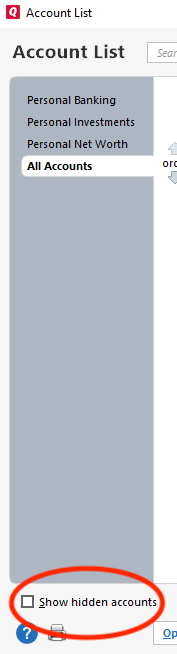
- Navigate to Tools>Account List
- If you see the Show hidden accounts option at the lower left, select it.
- Review the account list for any closed or inactive accounts that are still connected in Quicken.
- If they're still connected, it will show in the Transaction Download column.
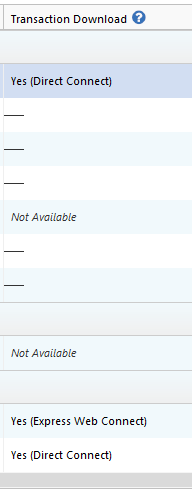
- If they're still connected, it will show in the Transaction Download column.
- If you find any inactive/closed accounts, please deactivate them.
- If you deactivated any inactive/closed accounts, try running One Step Update to confirm if the issue is resolved.
Please let me know how it goes!
Quicken Kristina
Make sure to sign up for the email digest to see a round up of your top posts.
-1 -
I reviewed the full list including hidden accounts. No hidden accounts have any connections. They all say "Not available".
0 -
Thank you for your reply,
The next step is to check for file-specific issues. I suggest that you try validating your data file. Please save a backup file prior to performing these steps.
Validate:
- File
- Validate and Repair File...
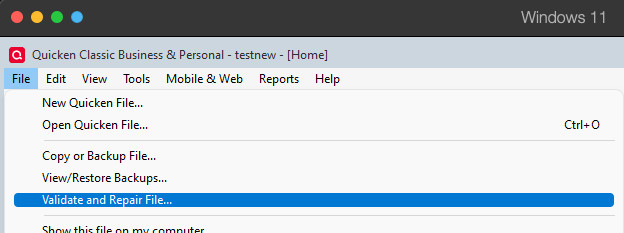
- Validate File
- Click OK
- Close the Data Log
- Close Quicken (leave it closed for at least 5 secs)
- Reopen Quicken and see if the issue persists.
Let me know how it goes!
Quicken Kristina
Make sure to sign up for the email digest to see a round up of your top posts.
-1 -
The file was validated with no errors. The lock up problem as described has not changed. Validation made no difference.
0 -
After you get the Add Account screen and you click Continue, a webpage will open your Windows default browser, to connect you to your bank and start a required reauthorization process. Once that has completed you should be returned to Quicken to a screen showing a list of accounts found at the bank so that you can LINK these accounts to your QUicken registers.
Which browser are you using?
It might be a good idea to define a different browser as your default browser, restart Quicken and see if that will allow the process to continue. Some browsers are known to cause problems. High security settings in your browser may do that, too …0 -
Please note my original post. I am presented the add account screen, when I click "continue" (next) the process stops, the screen locks up, and the ONLY way out is task manager, end process and nothing restarts. I have tried a different browser, but I've been using the same one for years without this issue, and I loaded the program on a brand new out of the box windows 11 PC. Opened my data file and the same thing happened. This is not user error.
0 -
Thank you for your reply,
Please try restoring a backup from before the issue started, then confirm if the issue is resolved in the newly restored file.
To restore a file, please follow these steps from our article on backing up and restoring data:
Restore Quicken data
- Go to File > View/Restore Backups....
- Browse the Local and Online Backups tabs to find the backup file you want to restore. The Quicken backup file has the extension .QDF-Backup.
- Select the file to restore and click Restore Backup.
- Next, you will be given the option to overwrite the file you have open or to create a copy of the backup you're restoring.
- If you Create a copy, you will need to select a location to save the copy to and you will also need to give the copy a unique file name. After naming the file and selecting the location, click Save, then click Yes to open the restored file.
- What does it mean to overwrite a file?: Restoring a backup file replaces your current data with the data stored on the backup. Be aware that you'll lose any changes you made since the backup was created. If you want to preserve the current file, you must rename the current file or the file you are restoring. We recommend to avoid overwriting files.
If you don't have a manual backup to restore from, then please see below for instructions on restoring an automatic backup:
Restore an automatic backup
Quicken creates a copy of your data every seven days and stores five of these copies in a BACKUP folder. If the backup file you've created becomes damaged, you may be able to restore an automatic backup and save yourself the need to reenter data.
First, check to see if automatic backups are turned on (this is on by default)
- In Quicken, go to Edit > Preferences.
- Under Setup on the left, choose Backup.
- Make sure there is a check mark next to Automatic Backups.
- To the right of Automatic Backups, there is an Open/Change backup directory link that goes directly to your BACKUP folder - a good way of finding them fast!
- Choose to back up your Quicken data file after running Quicken X times (between 1 - 99).
- Choose how many backup data files you would like to save (between 1 - 99 copies).
Then, restore the automatic backup
- Go to File > View/Restore Backups....
- Select the file to restore.
- Click Restore Backup.
- Next, you will be given the option to overwrite the file you have open or to create a copy of the backup you're restoring.
- If you Create a copy, you will need to select a location to save the copy to and you will also need to give the copy a unique file name. After naming the file and selecting the location, click Save, then click Yes to open the restored file.
- What does it mean to overwrite a file?: Restoring a backup file replaces your current data with the data stored on the backup. Be aware that you'll lose any changes you made since the backup was created. If you want to preserve the current file, you must rename the current file or the file you are restoring. We recommend to avoid overwriting files.
I hope this helps!
Quicken Kristina
Make sure to sign up for the email digest to see a round up of your top posts.
0 -
This started occurring AT Least 2 months ago. No back up exist that far back.
0 -
Thank you for your reply,
I suggest that you try creating a copy of your data file which will rebuild all of the internal lists and database tables. If successful, you would then move forward with the copied file. To create a copy, please navigate to File > Copy or Backup File... > Create a copy or template (see examples below) which will also allow you to select a date range to move forward with.
If you wish to move forward with your entire data file, please check the full date range of your entire data file before copying so you can enter the correct date range if you do not wish to "shrink" your file by eliminating certain dates. Note: Unless you believe the issue is being caused by older data, there is no need to "shrink" your file.
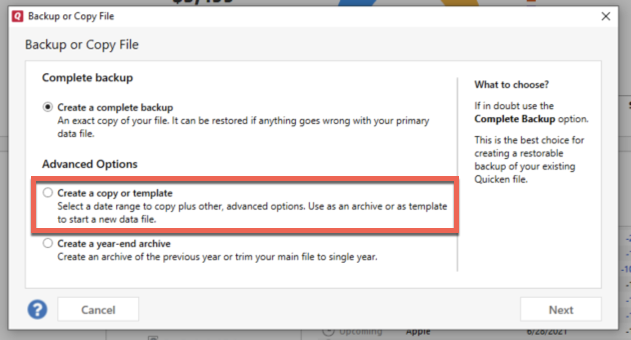
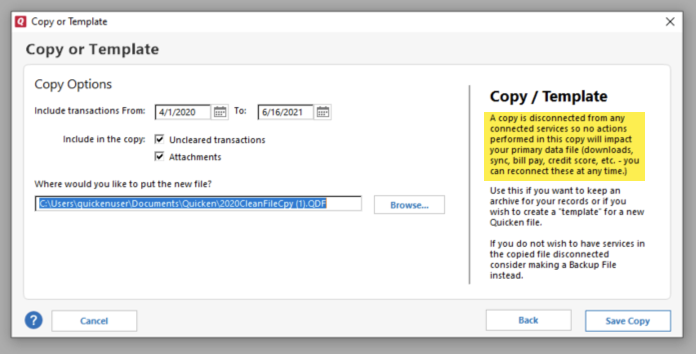
It's important to know that all online services will be disconnected in the copied file, and you will need to sign back in with your Quicken ID and reconnect all of your online accounts, online billers, Quicken Bill Manager services, etc if you plan to use that copied file going forward. The reason for this is that the new copy also creates a new and separate dataset ID.
Reconnect only the account(s) needed to confirm if the issue is resolved in the copied file. If the issue is resolved, then reconnect everything and use the copied file as your main file going forward.
If the issue is not resolved in the copied file either, then feel free to switch back to your original file. For instructions on switching between Quicken files, please click here.
Thank you!
Quicken Kristina
Make sure to sign up for the email digest to see a round up of your top posts.
1 -
thank you, will execute this tomorrow
0 -
I have started this process but TWICE during the copy process I got at box that said, "Something went Wring, please try again later". Once about halfway through the process and then again when I assigned a pass word. I will continue but this was, as you can imagine, concerning.
0 -
Thank you for your reply,
Did the copy complete, or did the error stop the process?
Thank you!
Quicken Kristina
Make sure to sign up for the email digest to see a round up of your top posts.
1 -
I assume since I was able to open the copy and execute a couple of account set up procedures the copy process worked. I'll do more accounts later today. So far so good.
0 -
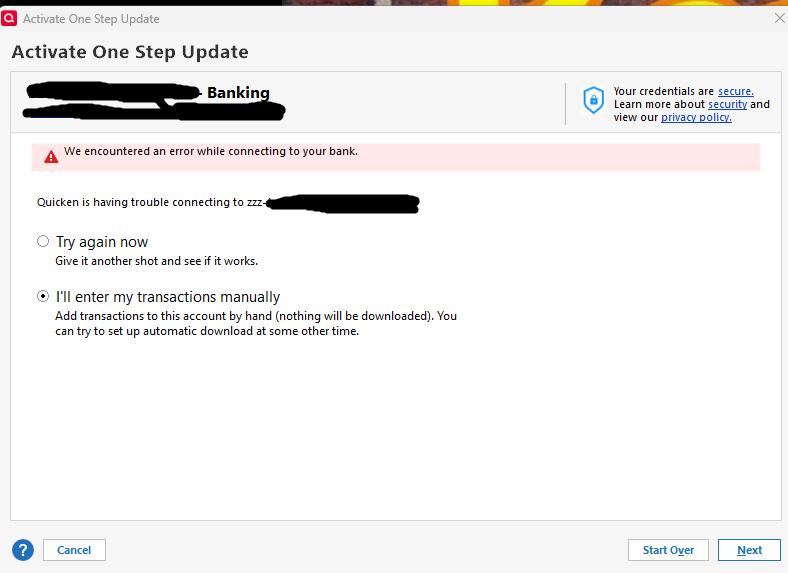
OK, so I did the copy creation thing and so far it seems to be working OK, I add a couple of accounts, test it, and it runs so this must be the answer. I gotta tell you, I appreciate the info but I shouldn't have to go through all this. And I have two accounts that will not connect. I get a screen that says zzz-Xacount.com will not connect, try again later.
0 -
Thank you for the follow-up,
I'm glad to hear that it has mostly corrected the issue.
Which financial institution(s) are the problem accounts with? If possible, please provide a screenshot of what you are seeing, with any personal information redacted. If needed, please refer to this Community FAQ for instructions on how to attach a screenshot. Alternatively, you can also drag and drop screenshots to your response if you are not given the option to add attachments.
Thank you!
Quicken Kristina
Make sure to sign up for the email digest to see a round up of your top posts.
0 -
I've attached a screen shot. I don't want to ID the bank but it is not a small bank, one of the larger banks in the US and the error I get for this example is exactly the same error I get for the other one. And, just as FYI, I reloaded the old file to test and both of these accounts updated with the same credentials I'm using for set up of the new version.
 0
0 -
Thank you for your reply,
I suspect you're seeing that error because the zzz in front of the financial institution name means that connection option is either no longer active, or about to be retired.
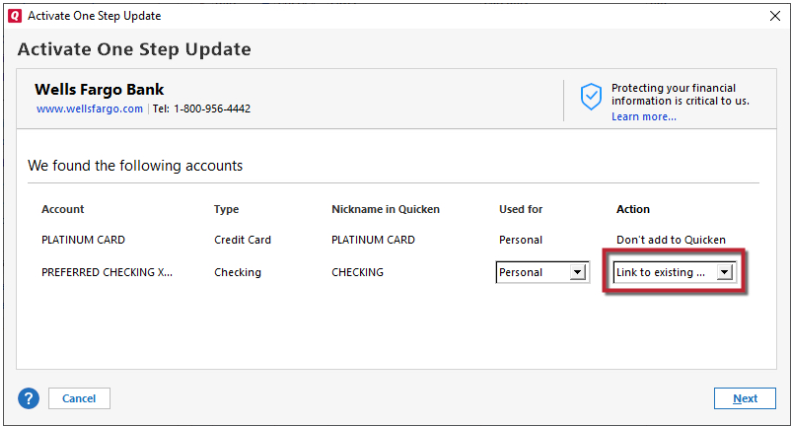
When reconnecting the problem accounts, please backup your file, then try going to Tools>Add Account and search for the financial institution, then select one of the current connection options for that institution and follow the prompts. Once you get to the Add/Link screen, carefully link to the existing accounts.
Thank you!
Quicken Kristina
Make sure to sign up for the email digest to see a round up of your top posts.
0


Categories
- All Categories
- 23 Product Ideas
- 34 Announcements
- 247 Alerts, Online Banking & Known Product Issues
- 19 Product Alerts
- 265 Welcome to the Community!
- 300 Before you Buy
- 1.5K Product Ideas
- 55.8K Quicken Classic for Windows
- 16.9K Quicken Classic for Mac
- 1K Quicken Mobile
- 834 Quicken on the Web
- 128 Quicken LifeHub