US Bank - US Bankcord Advisors issue

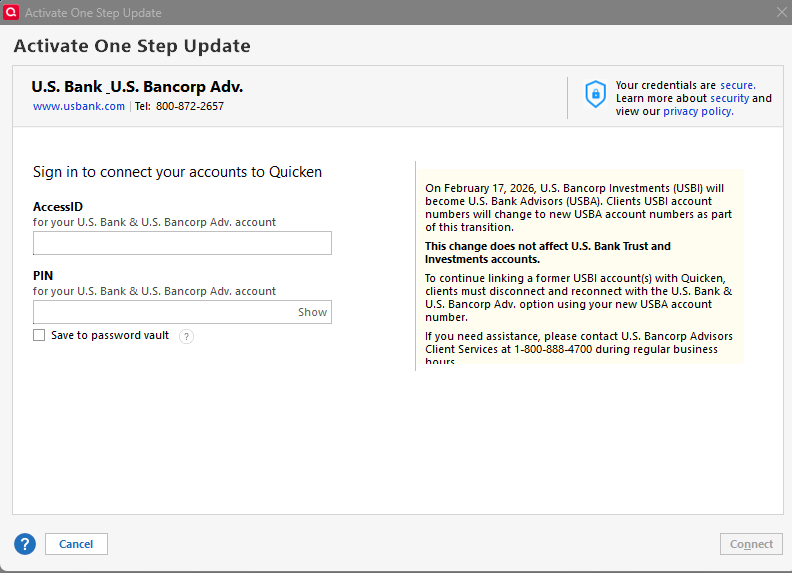
My US Bank IRA stopped downloading mid Feb. When I try to reconnects, the Quicken screen explains they changed their name. When I try my existing AccessID and PIN, it fails. I assume I need new AccessID and PIN.
In the past, the link to get this data was in the description, but the description is cut off, and there is no way to scroll. Do others see this issue? Can anyone post the URL to get the AccessID and PIN?
Comments
-
Have you seen this?
[Edited - Enabled Link]
Q user since February, 1990. DOS Version 4
Now running Quicken Windows Subscription, Business & Personal
Retired "Certified Information Systems Auditor" & Bank Audit VP0 -
whoops, nope. I missed that. I even called US Bank and asked them to check to see if there was maintenance, and they said there was not. thanks for the update.
0 -
Is this problem solved? I am still having the issues to connect my US bank Investment accounts.
0 -
The issue is marked "resolved" as Mar 6, but I cannot get it to work. I think I need a new AccessID and PIN, but I do not see any way to get them. I will call US Bank Advisors on Monday.
If anyone has it working, please post.
0 -
Hello @totogirl,
The issue was marked resolved yesterday.
What issue are you encountering when you try to add or update your US Bank Investment accounts? Are you seeing any specific error message/code?
I look forward to your response!
Quicken Kristina
Make sure to sign up for the email digest to see a round up of your top posts.
0 -
This is not fixed. Existing Access IDs and PINs don't work and creating a new one says there are no accounts eligible for this connection method with Quicken. The issue is also present on Quicken Mac, and attempting to use Quicken Connect there instead of Direct Connect doesn't show the brokerage account as an available account.
When I called US Bank Advisors, they were aware of the issue and said it was related to other issues with the migration including missing cost basis and they are working on it.
0 -
Hello @Andrew Hodes,
Thank you for sharing your experience!
Quicken Kristina
Make sure to sign up for the email digest to see a round up of your top posts.
0 -
@Quicken Kristina It would be really helpful if you published a step-by-step guide on how to make the connection work again.
0 -
I just spoke to US Bank Advisors and they also confirmed on-going issues with the migration to their new platform.
@Robert there are no instructions 'cuz it doesn't work yet. They said no ETA
@Quicken Kristina can you open the issue again with Support? Also, open the "UPDATE 2/27/26" posting as remove "resolved" as the issue is NOT resolved. Thanks.
0 -
Hello All,
If you are still encountering this issue, please contact Quicken Support directly, as they have tools we can't access on the Community and they're able to escalate the issue as needed. The Quicken Support phone number can be found through this link here. Phone support is available from 5:00 am PT to 5:00 pm PT, Monday through Friday.
I apologize that I could not be of more assistance!
Quicken Kristina
Make sure to sign up for the email digest to see a round up of your top posts.
0 -
Yesterday, a tech support supervisor at US Bank said it might be ready today. He wasn't optimistic. BUT….
it works now!
1 -
I got it to work (or at least appear to work) today as well. Here's what I did. My US Bank Brokerage has always been connected to "US Bank & Bancorp Adv" financial institution. When I originally connected, I remember I had to get a unique user ID and PIN. I forget how I got it. I made sure I copied this user ID and PIN before I started. Then I did the following steps:
- Do a complete quicken backup of my file — just in case — based on years of bad experiences doing changes like this in Quicken.
- De-Activate the connection for US Bank Brokerage.
- Set up on-line services from the "Online Services" tab within the "Edit Account Details" within the US Bank Brokerage Account.
- It went automatically for me to "US Bank & Bancorp Adv" institution (as that is what is was using before) and asked me for my user ID and PIN and I entered the one I had always used. AND IT WORKED. I just following the screens like I have done many times for many accounts.
- At one point it wanted to add the account as a new account, but it was easy to use the pull down menu to link it to an existing account and select the right account.
I say it seems to be working because I wasn't expecting any new transactions to download and thus I wasn't surprised that nothing was downloaded. This is an account that I rarely do transactions in. However, I do expect some ETF's to have quarterly dividend distributions sometime later in March and that will confirm whether it is really working.
Good luck!
0 -
you using it for the 4% credit card? Me too.
0 -
Yep, and that is the only reason as their web site is horrible. They seem now to be outsourcing it to National Financial Services which is basically Fidelity so maybe it will improve. But meanwhile it gives me the 4% credit so-called "Smartly" card.
0 -
I just got a notice about my checking and saving there having no activity. I just set up some auto transfers to ensure annual activity.
0


