Bill Reminders Being Automatically Entered and Duplicated AGAIN

I have bill reminders that I manually enter into the register when I confirm they are paid. Now they are automatically showing up in the register (without their categories) but not removed from the Bill Reminder section, so I'm still manually entering them. Then I end up with 2 entries in the register. If I did notice ahead of time, I'd have to Skip the Reminder to get it removed from the Bill Reminders Due (which will make for inaccurate tracking later). Someone else posted this behavior in late January, but the discussion was closed for some unknown reason.
Even worse, this is not the first time this has happened after an update. The last time, a few months ago, the problem was resolved by removing the option to see Pending Transactions. But now it's happening again. This is ridiculous for the amount of money we have to spend on this program. It should be considered a CRITICAL bug, as this makes reconciling accounts and ensuring that bills are paid on time extremely challenging. If I wanted to double-check everything manually, I'd just use a spreadsheet and a calculator. I reported a bug 2 days ago, but have received zero confirmation that it was even received.
I'm running Quicken Classic Deluxe on R66.23, 27.1.66.23. If anyone else is having this problem or has found a workaround, please pipe up. I'm so frustrated!! 😡
Comments
-
Hello @lorifun,
Thank you for reporting the issues you are seeing with bill reminders. I am sorry to hear that you have been affected by this issue.
We do currently have an open escalation ticket for this. Our teams are investigating, and we do not have an ETA as to when it will be resolved. If you would like to contribute to this investigation, you can go to Help>Report a problem>Send to Quicken to submit your log files.
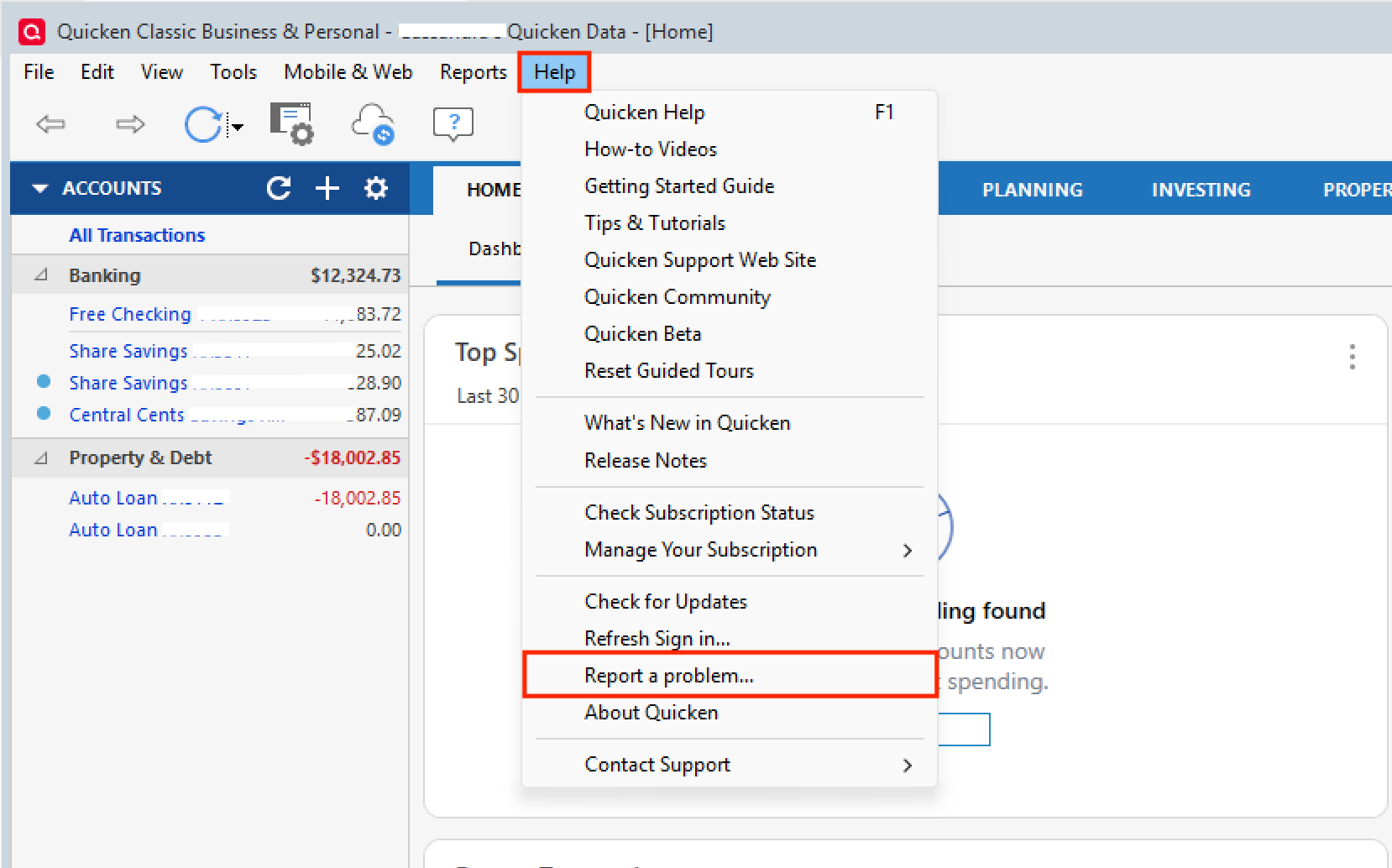
If you do send them over, let us know so we can get them added to the ticket.
Thank you!
[CTP-16297]
Quicken Alyssa
Make sure to sign up for the email digest to see a round up of your top posts.
0 -
I have started seeing the same issue with a blue pencil duplicate of a orange pencil entered reminder for a couple of weeks. I installed the newest software update yesterday and today, in a bank account and a credit card account, there were duplicates of orange pencil entries. I could tell which was duplicated because one of each had a blank category, all other information was duplicated. And of course the default MATCH was to the incorrect duplicate.
The register reminder blue pencil duplicates I had earlier were troubling because I almost matched a pay check transaction to it with no split category information. Also, a duplicate property tax transaction was showing my checking balance going negative. This is more than a little annoying.
1 -
I've been running into this same issue and just reported it to the black box. Duplicate entries showing up after I have done all of my bills. It did it to my paychecks also. I go to look at my balance with the bank and noticed three times now it didn't match. Go look in Quicken and sure enough multiple entries are being added for things I've already entered in manually. Also, I did notice that the suspect duplicates had no category information. So frustrating.
1 -
I am also experiencing the same issue. Duplicate entries with no category assigned after downloading transactions.
0 -
I'm also experiencing this problem. I reported in the application a few days ago but no response. You would think there'd at least be an acknowledgement email that the report was received. That seems like a reasonable minimum expectation anyway.
0 -
I'm having this issue as well and just realized that a bill reminder that I've had setup for about ten years (my monthly electricity bill) just randomly disappeared, no longer in the list of reminders. Also, when you run update, the match is always to the duplicated transaction that has no category. Super frustrating, bill reminders are one of the few reasons I continue to use Quicken rather than one of the many free tools that are available, and I've been using Quicken ever since Microsoft Money went away.
1 -
Same issue for me too.
Suprisingly, it is happening in my Datafiles that have Sync turned off so that is not the cause for a change.
0 -
I just had a reminder automatically entered as a transaction. I have seen others have this issue and it's the first for me. I don't let anything automatically enter, I download transactions and confirm them so that things don't get entered without me knowing.
0 -
Hello All,
Thank you for adding to this discussion.
Thank you for submitting your log files. I have added them to the ticket. While you do not receive responses for these submissions, they do get reviewed.
If anyone else would like to contribute to this investigation, you can go to Help>Report a problem>Send to Quicken to submit your log files.
If you do send them over, let us know so we can get them added to the ticket.
Thank you!
[CTP-16297]
Quicken Alyssa
Make sure to sign up for the email digest to see a round up of your top posts.
0 -
Just submitted a report a problem at aprox 7:47 PM EDT titled: Duplicates from reminders being entered into register
Got another duplicate entry which has been happening a lot lately. For me, it has been mainly in a datfile that does NOT use SYNC and Bank of America accounts
(I keep a duplicate datafile with SYNC on which suprisingly does NOT get the duplicate entries)
0 -
I posted this problem in another thread called "Quicken Duplicating Scheduled Transactions" and miklk directed me to this one. It's obvious that many users are experiencing this horrible bug. I also reported it as a problem from within the application but that was just earlier today, after installing a patch that "Quicken Kristina" said should fix it. We'll see but I'm not holding my breath.
0 -
I just reported and posted logs labeled as "Quicken Duplicating Scheduled Transactions Plus Additional"
The additional info to this issue is; while it is duplicating reminders when the entered transaction is downloaded I also had an occurrence where I manually entered a standalone transfer from savings to checking that the amount matched one that is part of my weekly paycheck reminder and it assumed & entered the full paycheck reminder in addition to duplicating the paycheck reminder. Which means it duplicated the paycheck TWICE in the same download. This occurrence is the only time that I have noticed it having a problem with non-reminder entries.
Also, when the duplicate entries are created, it will look like it made the transfer but in reality the matching side of the transfer is not created.
IE:
I make a transfer from 'Checking' to 'Credit Card'.
On download, it will see the 'Checking' transaction and the category will show 'Credit Card' reflecting a transfer. But since the transaction is delayed a day or two getting to the 'Credit Card' issuer it does not duplicate the entry in that account. When the payment shows up at the other end it may or may not duplicate it then.
I thought maybe it was not honoring the setting for not automatically creating entries that was set in my 'General Preferences'. So I set it on each individual account details>online services tab. No good….
Occasionally I see something to the effect 'Syncing Online' but I have not enabled SYNC.
0 -
Hello @miklk, @Randy Schmidt, and @brian7815,
Thank you for taking the time to submit your reports and log files—we appreciate you helping contribute to the investigation.
Your details and the files you submitted have been added to the ticket for our teams to review.
We appreciate your patience while this issue continues to be investigated! Thank you.
-Quicken Anja
Make sure to sign up for the email digest to see a round up of your top posts.0 -
Quicken Anja, thank you for the response. I hope that others who are dealing with this problem also report it with log files, etc. Today, as before, a transaction that was scheduled, entered, matched to a downloaded transaction AND reconciled showed up again as a past due reminder. This is one that I had attempted to work around in the several ways mentioned above. In addition, two reminders that had been originally scheduled as twice per year and since deleted multiple times appeared again. As noted above I tried three or four workarounds and nothing resolved the issue. Today, so I'm not looking at these bogus reminders all the time, I "skipped" them so they appear in 2027!
0 -
I am having the same issue. I just sent in a report.
1 -
It happened again. This is frustrating! It's very risky for Quicken to enter transactions automatically because you can't control it. What if they start entering random transactions from 2021, 2022, 2023, etc? It will be very difficult to manage.
Are the Quicken super users turning off "Reminders"? I've never had an issue with Quicken Reminders until recently and it has been a disaster.
30+ year user.
0 -
Yup, I have to create a backup every day because each time I download transactions that are related to automatically entered transactions things get hosed. Too bad Quicken won't fix this. Does anyone know a workaround for now?
0 -
My dupe appears when I run OSU and the transaction gets downloaded but not added to the register (my default setting). In the Downloaded Transaction window, it will appear as a match to the one previously created by the reminder. However, if I click on the matched, downloaded one, the duplicate appears in the register. Funny, the reminder entry has the category assigned, the "matched" one doesn't. The downloaded one is marked C (cleared). The reminder one is still blank in that column. This makes it easy to determine which is which. I simply delete the reminder one and add the category to the downloaded. Which one gets deleted likely doesn't matter. All of my reminders exist in one account and I run OSU daily, so it's quick to make the changes before reconciling.
Not sure this is a workaround, but if you automatically add transactions to the register upon download, you may want to turn this off. This should make it easier to spot the dupes.
1 -
Are the Quicken super users turning off "Reminders"? I've never had an issue with Quicken Reminders until recently and it has been a disaster.
@davidmarketing I use both "Auto enter" and "Remind me" Reminders extensively and have not had any problems, but I do not use the "Automatically add" options for the downloaded transactions. I review each transaction before accepting it to make sure it is matched to the correct transaction in the register if there is one, and has the correct Category assigned.
I also do not use automatic transfer detection, or if I do, I have it set to confirm before creating a transfer.
I do not use Quicken on the Web or the mobile apps and do not sync to the Quicken Cloud. That causes splits in Reminders to be reordered and sometimes causes the split amounts to get assigned to the wrong split lines.
Matching in banking accounts uses only the dates and amounts, not the Payee. For a match, the date in the register must be between 15 days before and 1 day after the date of the downloaded transaction. For investing accounts, the date must match exactly.
There are at least 3 ways to accept downloaded banking transactions: clicking on the Accept button in the downloaded transactions area, selecting the matching transaction in the register and hitting Enter, and selecting the transaction in the register and hitting the green Enter button on the right. Hitting the green Enter button is the only way that works reliably for me.
What I am seeing is that the first two of these methods sometimes create confusing duplicate transactions in the register. This appears to be a display issue, because if you select another transaction or go to another account and then back to the one you are working on, the duplicate disappears. It is only if you select and accept the duplicate that it is actually entered. It is not clear to me what conditions cause this phantom duplicate to appear. For example it may be only if the transaction you just accepted is the last one in the register or something.
To summarize, turning off the "Automatically add" options and accepting downloaded transactions by clicking on the green Enter button on the transaction in the register is what works for me.
QWin Premier subscription3 -
I do not, and never have, used the automatically add option for downloaded transactions. When I speak of automatically entering, I mean my reminder is set to auto-enter 3 days before the transaction is due. It seems to maybe only be these types of transactions that get "duplicated" when the issue occurs. I put duplicated in quotes because, while they look like dups most of the time, they are not. They are often corrupt because they do not appear as a matching transaction in the other account, and the category (which would be another account because they are transfers) are not valid, even if they appear to be. The duplicate (matching) transaction does not appear, and Quicken will give an error message saying the category is invalid if you try to follow to the matching transaction.
Not using cloud or syncing…I would never trust Quicken with that because Quicken breaks things too often. I cringe every time Quicken forces an software update because I wonder what is going to break this time.
There are other bugs related to downloaded transactions too. Today I had one come in that had already been matched and reconciled the day before. Also today, Quicken entered the downloaded transaction details twice. It is a mess.
My Quicken data file is clean and valid (did a validation). Also, I have a second data file because I maintain finances for an elderly family member. The same bug happens with that data file too. This is 110% a nasty Quicken bug that started fairly recently. It does not happen every time, but is frequent. I cannot say for certain yet, but it appears to maybe be related to reminder transactions that are entered x days before. The duplication happens when I download transactions for accounts, even before I begin doing matching/accepting.
Hopefully Quicken is seeing all our messages from those of us affected by this.
1 -
@QknUserSince90s You say this issue occurs with transfers. What is your setting at Edit > Preferences > Transfer detection?
I usually run with this set to "Scan downloaded transactions for possible transfers" and "Confirm possible transfers before entering in register." I never get warnings about potential transfers and I don't get duplicates like you describe, but recently I noticed that the setting had changed to "Automatically create transfers when detected."
QWin Premier subscription0





Categories
- All Categories
- 18 Product Ideas
- 34 Announcements
- 246 Alerts, Online Banking & Known Product Issues
- 19 Product Alerts
- 517 Welcome to the Community!
- 682 Before you Buy
- 1.5K Product Ideas
- 55.7K Quicken Classic for Windows
- 16.8K Quicken Classic for Mac
- 1K Quicken Mobile
- 834 Quicken on the Web
- 127 Quicken LifeHub