Budgeting - Quicken Mac [Edited]

Is it true that when building a budget, Quicken does the following: Quicken auto‑adds categories when:
- They have a prior‑year budget history
- They have prior‑year actuals
- They were ever included in a budget
- They are marked “include in budget”
- They have a non‑zero value in the current year
- They are used in a transaction
Is there anyway to keep it from doing this? I just want to select categories I want in the budget and enter numbers for each category that will stay the same unless I change it. Something that keeps happening is I have numbers for each category that if I add up manually totals a certain number, but the Quicken total is different. I just want: Only the categories I want
- No legacy categories
- No auto‑added categories
- No categories with budget history
- No categories with prior‑year values
No categories Quicken can resurrect
I want:
- A budget that stays stable
- A budget that updates automatically
- A budget that doesn’t require re‑entry
- A budget that doesn’t mix actuals and budget
- A budget that doesn’t resurrect old categories
- A budget that reflects changes instantly
- A budget that you can trust
I want a budget I can create without fighting Quicken’s broken UI.
Seems like there should be a setting or something somewhere that allows me to tell Quicken to just use the categories I select and the numbers I enter. I don't want Quicken randomly throwing stuff into my budget willy-nilly.
So frustrated with the budgeting logic that I just want to throw the budget out the window and do my own outside of Quicken, but that just creates work I shouldn't have to do. I should be able to create a clean budget with Quicken.
[Edited Readability]
Comments
-
Hi @Douglas E Clark,
Thank you for reaching out. I’m sorry to hear about your frustrating experience with the budget feature. I’d be happy to help you set it up with your preferred categories and amounts.
Steps to Create a Budget
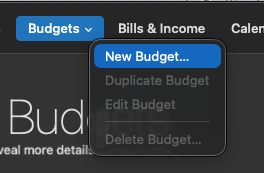
- Select the Budgets menu at the top.
- Click New Budget.
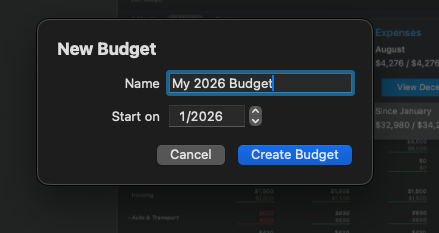
- Enter a name and choose the starting date.
- Click Create Budget.
If you already have an existing budget, you can skip these steps and simply modify it.
By default, Quicken will include a set of categories, so you’ll need to customize them to fit your needs:
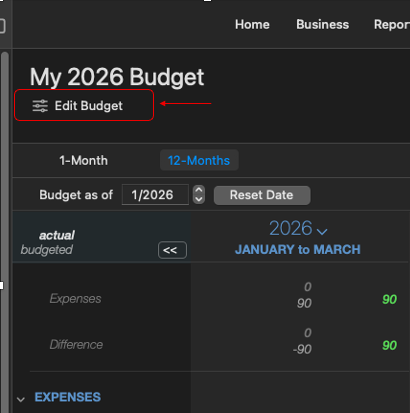
- Select Edit Budget in the upper left.
- Click Select Categories at the bottom left.
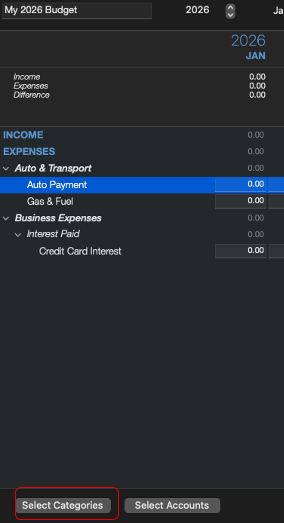
- In the “Select Categories to Budget” window, click None to clear all selections.
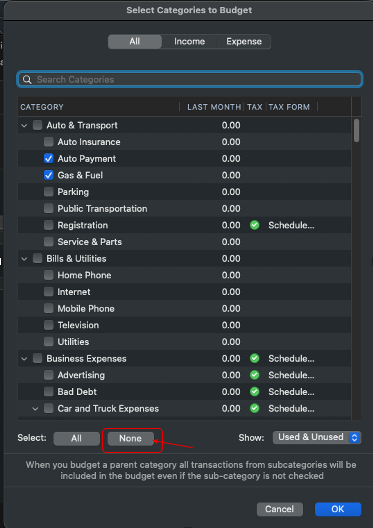
- Choose the categories you want to include.
- Click OK.
- Enter the desired budget amounts for each category.
- Save your changes.
You can also find more information in this article:
I hope this helps!
Quicken Laura
Make sure to sign up for the email digest to see a round up of your top posts.
0 -
Quicken Laura,
I have followed all the steps indicated. I still end up where the numbers I enter in my regular spending categories, which are the same for each month, end up with a total for regular that does not match the summed total of my categories. All I can gather is amounts are being brought in from categories I have not selected, or from previous years, or who knows where, and they don't show in the edit budget window. Again, I just want to be able to select categories I want and enter amounts. My total each month should be the same, but I cannot get that to happen. I am using accrued and regular categories.
0 -
Howdy, @Douglas E Clark
Thanks for being patient. Let's step back from instructions at this point and figure out what the source of your frustrations is. Is it :
- You are having issues selecting categories/setting budget Goals, or,
- Your calculated actuals (from your transactions) are not what you're expecting?
That said, the Quicken for Mac budget is pretty straightforward: you pick your categories, set your goals, and your actuals are either above/below those goals. Nothing fluctuates-categories and goals remain the same from what you set.
So, let's figure out what your pain points are.
0 -
@Douglas E Clark Can you clarify what you mean about "accrued and regular categories". It would also help to know if some of the categories you're having problems with are subcategories, or categories which have subcategories. There are some features in the budget regarding main and sub-categories which are powerful but are not intuitive or apparent. So it would help if you could pick one example of a problematic category and show screenshots of what's happening.
Quicken Mac Subscription • Quicken user since 19930 -
Regular expense categories are where the expenditure is consistent, monthly. For the most part, I know exactly or approximately how much we should be spending monthly in those categories. Accrued are for expenses that can fluctuate or come at different times throughout the year, but I want to try and budget for it. My annual estimate ends up being averaged out over the 12 months, so I have an amount each month. These are the expenses that aren’t monthly, but behave like they are…because they’re guaranteed to happen and guaranteed to cost money. That’s why accrual budgeting works so well: it turns unpredictable, lumpy expenses into a smooth, predictable monthly obligation. For example, Christmas, car maintenance, life insurance, vacations, etc.
The way it's set up is I have a regular category and an accrued category. Regular is the main category, and all categories under regular are a subcategory of "Regular". There are no other subcategories. Same for accrued - it is a main category, and then all accrued expenses are a subcategory of Accrued.
My issue is for every one of these categories, regular or accrued, I've entered the same amount across the board for all months. However, my total amount for Regular and Accrued are different for every month. If I manually add every category for Jan, what is loaded lets say is $5,000. Quicken will show something other $5,000, not just for Jan, but all months will be different (even though each category, each month is the same. My total for every month should be $5,000. It really should be that simple. Ideally, I'd like a setting that tells Quicken to just use the categories I've selected for my budget and just use the numbers I've entered. Don't bring other "random" stuff into the budget.[Edited readability]
0 -
Hi @Douglas E Clark,
Thank you for providing the additional details. I understand how frustrating it can be when the budget doesn’t behave as expected, and I’m happy to help.
The budget totals are tied to the category structure as well as the timing of your transactions. To correct the totals, you can reset the parent category amount and allow the system to recalculate it.
Steps to reset the totals
- Open the Budget tab
- Select Edit Budget
- Set the parent category amount to $0
- Apply the change to all months if those totals are affected
- Save your changes

After doing this, the correct totals should appear.
Example:
Before (wrong totals)

After (right totals)

Please let me know if this resolves the issue or if you need any further assistance.
Quicken Laura
Make sure to sign up for the email digest to see a round up of your top posts.
0 -
Hi, @Douglas E Clark
I think @Quicken Laura has done a great job explaining how to setup a new budget with your desired categories and goals. In my experience, the goals never change.
I have found the Quicken budget, albeit simple, works: you set a monthly goal and you are either above it/below it each month. Next month, the process begins anew.
Since you mention accruals, I suspect you are wanting to combine budgeting with savings goals. Similar, but different.
Are you asking for a "rollover" budget style that carries forward an unspent goal amount so it can be used in future months? (I.e., you earmark money Jan-Nov to be only spent for Christmas in Dec?)
The current QMac budget does not allow for this-it's cashed based accounting, so you can't spread an expense out across the year. Rollovers would help alleviate this for many of us.
You can express your concerns for future improvements here if this is what you would like:
0 -
I'll give it a shot. I guess start over and see how it goes. Wish me luck. I am doing accruals, but not expecting Quicken to do anything with that, just maintain amounts per category for each month. I'll handle the over/short in a separate spreadsheet to know how we're tracking.
0 -
In the edit budget I've selected my categories I want in the budget. For each category my amounts are the same for each month. Therefore, my total budgeted expenses should be the same for every month. If I manually add up all the amounts for each column for a month, the number matches what I expect. However, the monthly totals in Quicken are different for every month. The value varies somewhere plus/minus a couple thousand. Everything thing you're indicating is that this shouldn't be happening. I'm going to start over with a clean slate and see what happens. Maybe somehow I've just got something set up to come in that I'm unaware of.
0 -
There are some invisible features the Quicken Mac budget which can trip you up if you don't realize what you've entered. If you have a main category and one or more subcategories, and you enter anything in the main category box, it will get added to the sum of the subcategories. So if you enter $50 in the main category, and later enter values in two subcategories for $75 and $100, the main category will display $225 even though the subcategories add up to $175 and you can no longer see the underlying $50. The only way to "clear" this is to enter a zero in the main category, and it will then redisplay as $175. This is a nice little feature, but it can be problematic because you can't see the originally-entered main category values. So that might be an issue you're running into. You said you have only two main categories, and everything else is a sub-category of those? Do some of those sub-categories have sub-sub-categories (e.g. Auto:Fuel and Auto:Repairs)? if so, you need to zero out all those categories which have sub-categories under them, as Laura described above.
I also have a question about how you're budgeting. Why calculate an annual total and divide it evenly by 12 months, rather than trying to apportion at least certain categories when you expect the expenses to occur? That's the value of having 12 different months to enter individual values. You said:
That’s why accrual budgeting works so well: it turns unpredictable, lumpy expenses into a smooth, predictable monthly obligation. For example, Christmas, car maintenance, life insurance, vacations, etc.
The problem I find with this approach to budgeting is that you don't know until the end of the year if you're ahead or behind your budget. So I would put my budget for Christmas expenses in December, or November and December; I would put the entire annual amount for life insurance in the month my policy is paid. Of course, something like when a car repair occurs may not be predictable. For me, I take my car in for an annual inspection and an oil change about 6 months apart, and most of my other repairs (brakes, filters, etc.) usually are done at those times. But I understand if your repairs are done only when something breaks and you have no idea which month(s) those will hit; in those cases, using an averaged value for all 12 months might be the best approach. And then, there's nothing wrong with manually rolling budgeted expenses like this into the next month and then the next month until the actual expense hits. So if you take one vacation a year at different times, then when you have those vacation expenses, I'd shift all the budgeted amount to that month, rather than waiting until the end of the year to see how your budgeted amount compares to the actual expenses.
There's no right or wrong way of budgeting, and everyone needs to do what works best for them. Hopefully at some point in the future, Quicken Mac will offer some variations like envelope budgeting to help users who have different budgeting needs.
Quicken Mac Subscription • Quicken user since 19930 -
Thank you for everyone's help and comments. I appreciate it. I just started a new budget and entered everything like I had and it worked just fine. Must have done something before that created all my issues - user error I guess.
0 -
I am glad you got it working.
0


