OSU Downloaded transactions say "matched" but then create a new transaction

I enter most recurring transactions into my registers as scheduled transactions advance, and see them matched when I perform One Step Update. Recently, I have noted occasions where downloaded transactions show as "matched," and so I accept them, but then I see that a new transaction has been entered into the register, with the same date, payee, and amount, but (usually) no category. This transaction is now reconciled, and the original one that should have been the match is not reconciled.
I have only seen this on my two Bank of America credit card accounts so far, but I have more transactions on them than in accounts from other institutions.
Noticed this for maybe a month. Quicken subscription, Windows 11 latest updates.
Known issue?
[Edited Readability]
Comments
-
Hi @Joseph Witkin,
Thank you for sharing what you’re experiencing. I’d be happy to help.
I’ve seen similar reports from other users in the Community. In some cases, the duplicate isn’t an actual transaction but a “phantom” entry that disappears after accepting it and clicking Done in the Compare to Register window.
Another suggestion that has worked for some users is to click the green Save button to the right of the transaction in the register, instead of clicking Accept from the downloaded transactions section at the bottom.
Could you please give that a try and let me know if it resolves the issue?
Additionally, to help us better understand what’s happening, would you mind sharing a screenshot of the error message you mentioned? If needed, you can refer to the Community FAQ for instructions on attaching a screenshot, or simply drag and drop the image into your response if that option is available.
I look forward to your reply!
Quicken Laura
Make sure to sign up for the email digest to see a round up of your top posts.
0 -
Thanks Laura, I will upload a screenshot next time I see it happen. I have also (when I catch it before accepting) "unmatched" and then manually match to the correct transaction - but obviously we should not have to do any of that…
0 -
I would appreciate that. It will help us gather more information and determine whether escalation is needed.
Additionally, it would be very helpful if you could provide your log files so we can forward them to the appropriate team for further investigation.
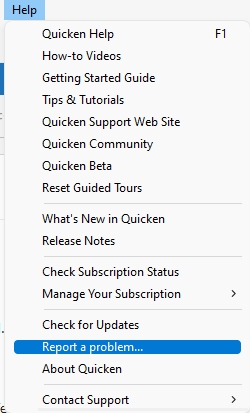
To send your logs:
- Open Quicken
- Click Help
- Select Report a Problem
- Select the Category
- Click Send to Quicken
Please let me know if you have any questions in the meantime.
Quicken Laura
Make sure to sign up for the email digest to see a round up of your top posts.
0 -


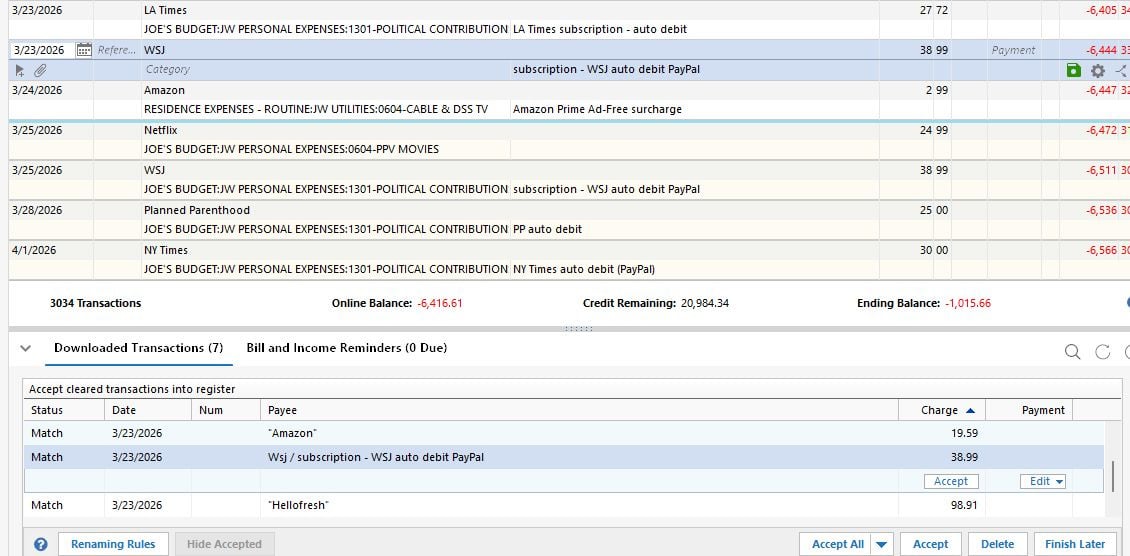
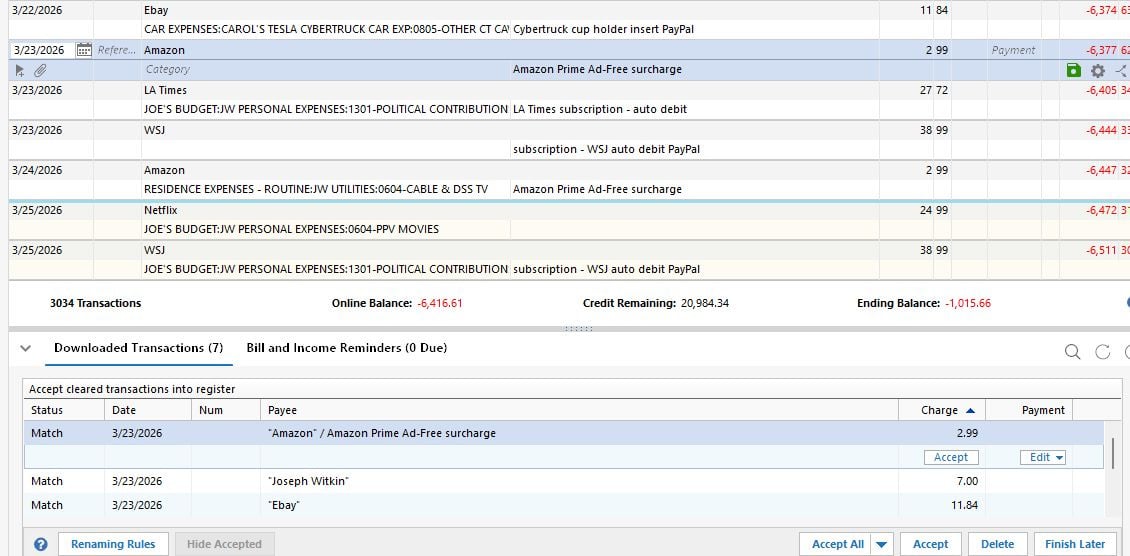
Here ya go. On completion of OSU, all downloaded transactions showed as "matched." However, in the register, it showed that they matched to newly created duplicate transactions (Amazon $2.99, WSJ $38.99- in both cases, the correct transaction is below the new bad transaction), same payee, amount, and comment, no category. Date may not have matched exactly, as bills come in randomly, but this never created a match problem before - if anything, the transaction would appear as "new" if the date was too far off. These category-less transactions were not in the register before the OSU. There are no transactions without a category in the memorized payee list.
Seems that if I delete the bad transactions before "accepting all", the downloads are then matched correctly. But that means I have to look and find them. If I just do the OSU, see that everything has matched, and hit "accept all" the way it should be, my register will be messed up.
I will upload log files. Thanks, J[Edited Readability]
0 -
Log files uploaded. I believe I have only seen this error on one account (Bank of America credit card *vj) - but possibly on our second BOA credit card *vc, really don't remember. Way fewer transactions on that card. -J
0 -
Hi @Joseph Witkin,
Thank you for taking the time to provide screenshots and log files; they’re very helpful in narrowing down the issue.
As mentioned earlier, this does appear to be affecting multiple users. I’ve forwarded your information to the appropriate team for further investigation.
Please feel free to reach out if you have any additional questions or need further assistance.
(CBT-1082)
Quicken Laura
Make sure to sign up for the email digest to see a round up of your top posts.
0

Categories
- All Categories
- 24 Product Ideas
- 34 Announcements
- 247 Alerts, Online Banking & Known Product Issues
- 19 Product Alerts
- 265 Welcome to the Community!
- 300 Before you Buy
- 1.5K Product Ideas
- 55.8K Quicken Classic for Windows
- 16.9K Quicken Classic for Mac
- 1K Quicken Mobile
- 834 Quicken on the Web
- 128 Quicken LifeHub