OSU Downloaded transactions say "matched" but then create a new transaction

I enter most recurring transactions into my registers as scheduled transactions advance, and see them matched when I perform One Step Update. Recently, I have noted occasions where downloaded transactions show as "matched," and so I accept them, but then I see that a new transaction has been entered into the register, with the same date, payee, and amount, but (usually) no category. This transaction is now reconciled, and the original one that should have been the match is not reconciled.
I have only seen this on my two Bank of America credit card accounts so far, but I have more transactions on them than in accounts from other institutions.
Noticed this for maybe a month. Quicken subscription, Windows 11 latest updates.
Known issue?
[Edited Readability]
Comments
-
Hi @Joseph Witkin,
Thank you for sharing what you’re experiencing. I’d be happy to help.
I’ve seen similar reports from other users in the Community. In some cases, the duplicate isn’t an actual transaction but a “phantom” entry that disappears after accepting it and clicking Done in the Compare to Register window.
Another suggestion that has worked for some users is to click the green Save button to the right of the transaction in the register, instead of clicking Accept from the downloaded transactions section at the bottom.
Could you please give that a try and let me know if it resolves the issue?
Additionally, to help us better understand what’s happening, would you mind sharing a screenshot of the error message you mentioned? If needed, you can refer to the Community FAQ for instructions on attaching a screenshot, or simply drag and drop the image into your response if that option is available.
I look forward to your reply!
Quicken Laura
Make sure to sign up for the email digest to see a round up of your top posts.
0 -
Thanks Laura, I will upload a screenshot next time I see it happen. I have also (when I catch it before accepting) "unmatched" and then manually match to the correct transaction - but obviously we should not have to do any of that…
0 -
I would appreciate that. It will help us gather more information and determine whether escalation is needed.
Additionally, it would be very helpful if you could provide your log files so we can forward them to the appropriate team for further investigation.
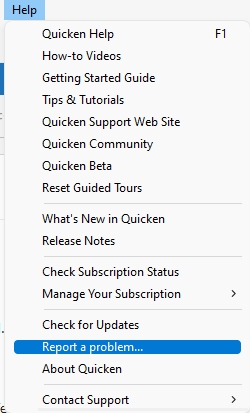
To send your logs:
- Open Quicken
- Click Help
- Select Report a Problem
- Select the Category
- Click Send to Quicken
Please let me know if you have any questions in the meantime.
Quicken Laura
Make sure to sign up for the email digest to see a round up of your top posts.
0 -


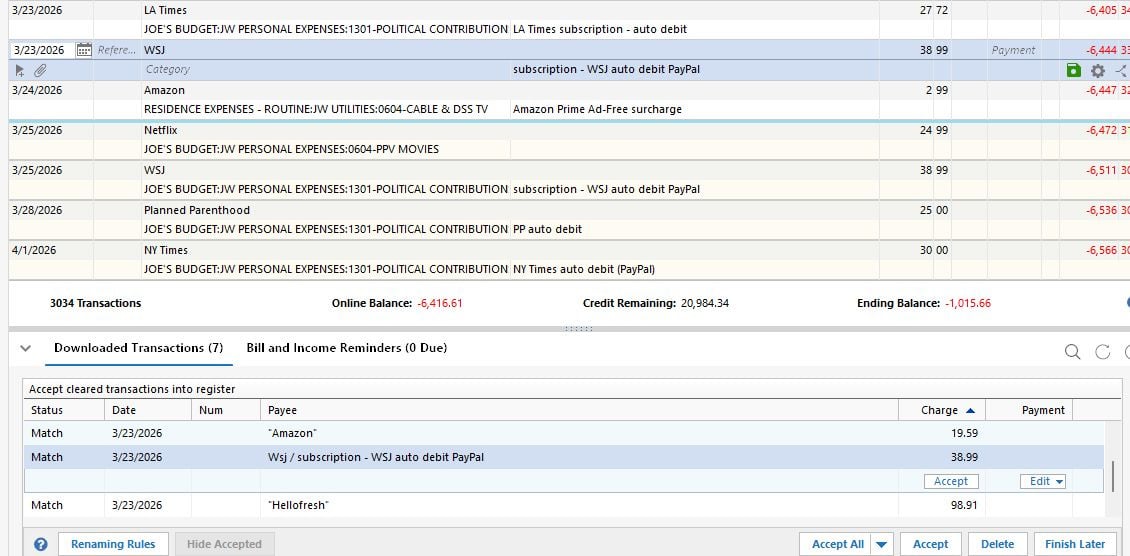
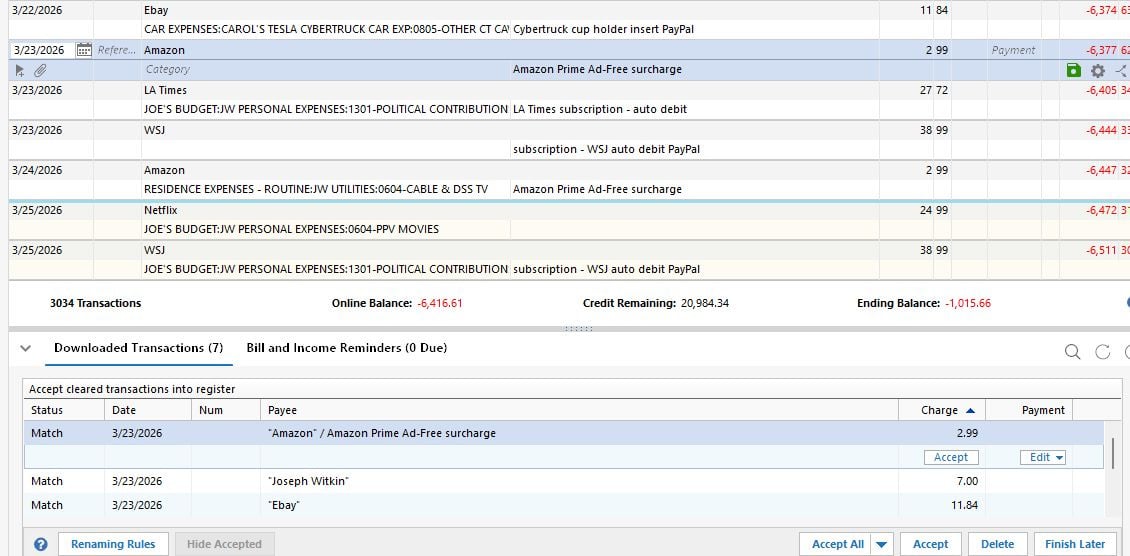
Here ya go. On completion of OSU, all downloaded transactions showed as "matched." However, in the register, it showed that they matched to newly created duplicate transactions (Amazon $2.99, WSJ $38.99- in both cases, the correct transaction is below the new bad transaction), same payee, amount, and comment, no category. Date may not have matched exactly, as bills come in randomly, but this never created a match problem before - if anything, the transaction would appear as "new" if the date was too far off. These category-less transactions were not in the register before the OSU. There are no transactions without a category in the memorized payee list.
Seems that if I delete the bad transactions before "accepting all", the downloads are then matched correctly. But that means I have to look and find them. If I just do the OSU, see that everything has matched, and hit "accept all" the way it should be, my register will be messed up.
I will upload log files. Thanks, J[Edited Readability]
0 -
Log files uploaded. I believe I have only seen this error on one account (Bank of America credit card *vj) - but possibly on our second BOA credit card *vc, really don't remember. Way fewer transactions on that card. -J
0 -
Hi @Joseph Witkin,
Thank you for taking the time to provide screenshots and log files; they’re very helpful in narrowing down the issue.
As mentioned earlier, this does appear to be affecting multiple users. I’ve forwarded your information to the appropriate team for further investigation.
Please feel free to reach out if you have any additional questions or need further assistance.
(CTP-16752)
Quicken Laura
Make sure to sign up for the email digest to see a round up of your top posts.
0 -
Additional wrinkle, though separate- when a downloaded transaction is new (not previously entered into the register) and you click on it in the downloaded transactions list, the proposed transaction (presumably from memorized payees) that appears in the register virtually always has the wrong category in it. If I click on the payee and the list of transactions with that payee pops up, the top one is almost always the desired one that has the category that is usually or most recently used for that payee - why doesn't Quicken choose the top transaction by default? This happens in all accounts.
0 -
Hi @Joseph Witkin,
Thank you for coming back. This may be related to a settings issue, so let’s start by checking your global preferences:
- Go to Edit > Preferences
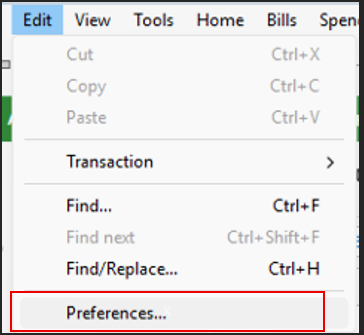
- Select Data Entry & QuickFill
- Ensure Complete fields using previous entries is checked
- Also, check Recall memorized payees
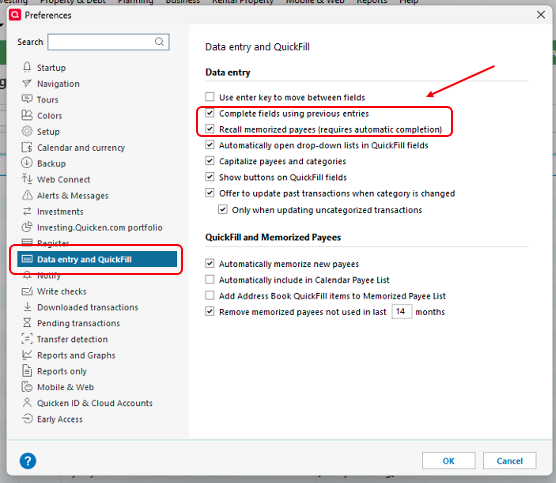
- Next, select Downloaded Transactions from the left menu
- Make sure Automatically categorize transactions is checked
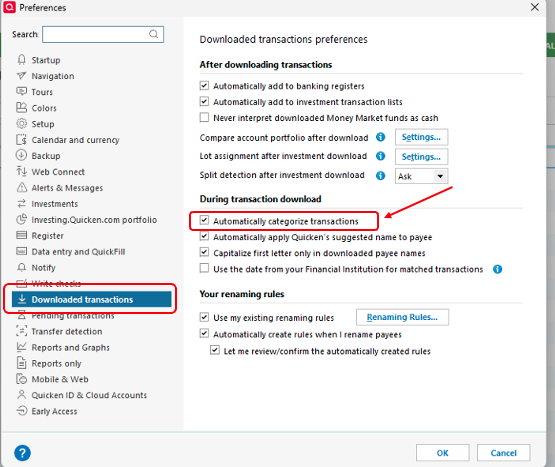
- Make sure Automatically categorize transactions is checked
- Click OK to save changes
After that, please review your memorized payee list:
- Go to Tools > Memorized Payee List
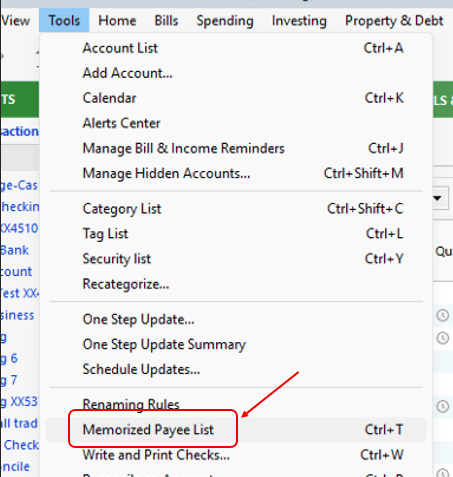
- Verify that the payees in question have the correct categories assigned
Finally, test a transaction and let me know how it goes.
Quicken Laura
Make sure to sign up for the email digest to see a round up of your top posts.
0 - Go to Edit > Preferences
-
Hi Laura,
I have all my prefs set that way except "automatically categorize transaction". Sounds suspicious for the erroneous transaction with no category… but then it shouldn't say "matched" and create a dupe, right? And if I check that pref, but have a category already entered in the transaction it is matching, will it "automatically" change what I entered? Don't want that!Again, never had a problem with these settings until recently.
My prefs say to remove memorized payees not used for 24 months.0 -
Thank you for checking your preferences. It appears this may be related to a known issue where Quicken sometimes duplicates matched transactions.
Just to confirm, this behavior only occurs for transactions that match existing manual entries, which are already categorized, correct?
Quicken Laura
Make sure to sign up for the email digest to see a round up of your top posts.
0 -
Yes. Doesn’t happen to all downloaded transactions, some match correctly. I believe the date in the register and the date of the downloaded transaction are different when the duplication error occurs. I could be wrong about that…
0 -
Hi @Joseph Witkin,
Thank you for the clarification. As mentioned earlier, the issue with duplicate transactions is currently under internal investigation.
For the issue with new transactions (those not previously entered into the register), there’s another setting we can review in your Memorized Payee List:
- Go to Tools and select Memorized Payee List
- Locate the affected payees and confirm that only one category is assigned
- Right-click the payee and ensure “Never auto-categorize this payee” is unchecked
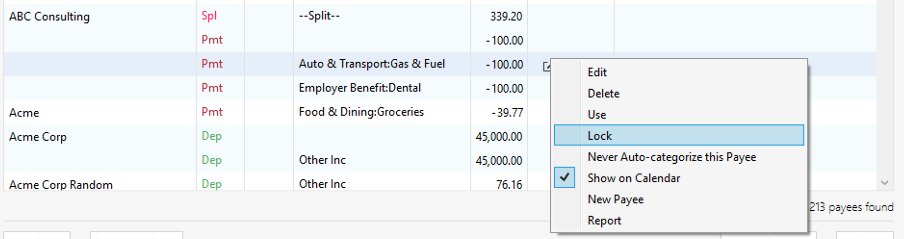
- Make sure the Lock option is checked
- Click Done, then test by entering a new transaction
If this issue is occurring with multiple transactions, please try these steps with a few of them and let me know the results.
Additionally, since you mentioned this started recently, you may want to try restoring a backup from before the issue began to see if that resolves the behavior.
I’ll be looking forward to your reply!
Quicken Laura
Make sure to sign up for the email digest to see a round up of your top posts.
0 -
Many categories will always have multiple categories assigned in the Memorized Payees list (Amazon…) This is not a big problem, just would be nicer if the category that got filled in was the category most recently used with that payee. It is the category in the top transaction in the list that pops up clicking on the payee, so Quicken knows what it is. Thanks.
0 -
No problem at all. I’ll be sure to share any updates regarding the duplicate transactions here as soon as they become available.
Thank you so much for your patience while we continue working on this.
Quicken Laura
Make sure to sign up for the email digest to see a round up of your top posts.
0 -
A little more info, I am noticing as I pay attention. The duplicate transactions with no category are already present in the register when OSU completes. Those transactions say "match" in the list of downloaded transactions below. I click on the transaction in the downloaded transactions list, and the category-less transaction highlights in the register. If I "unmatch" the transaction in the list, the highlight immediately jumps to the correct transaction with the category. The category-less duplicate remains, though, and I have to delete it manually.
Still only seeing the error in one account…[Edited - Readability]
0 -
Thank you for the follow-up,
Thank you for sharing your observations. I forwarded that information to our teams.
Thank you!
Quicken Kristina
Make sure to sign up for the email digest to see a round up of your top posts.
0 -
Today same error in a different account - checking account from different institution. Date different by 2 days from the transaction I had previously entered, same payee and amount, but despite saying "match", created a new transaction with no category. I wasn't sure I had seen it in more than one account before.
1 -
I've been experiencing the same issue for a couple of weeks now. Thanks very much for your very comprehensive, detailed reporting over the past week or so.
Windows, Quicken Classic, R66.28
1 -
Hello @jtgdc,
Thank you for letting us know you're also seeing this issue. I added you to the ticket.
Thank you!
Quicken Kristina
Make sure to sign up for the email digest to see a round up of your top posts.
0 -
I've also have the same problem for about the last month. The existing transaction was created by an auto entry from my bill and income reminders with category. The downloaded transaction showed status matched. When I accepted it, a new duplicate transaction is created with no category.
I haven't always noticed right away, usually noticed when my home page spending pane shows a warning that I have uncategorized transactions. Or I catch them in my next reconcile.
Windows 10
Version R66.28, build 27.1.66.28
0 -
Hello @Mark Coil,
Thank you for letting us know you're also affected by this issue. I added you to the ticket.
Thank you!
Quicken Kristina
Make sure to sign up for the email digest to see a round up of your top posts.
0 -
I also see this issue. But the problem for me is not that the category is empty (although it often is), it is that it creates the duplicate entry at all. This occurs frequently for me with paychecks; the memorized transactions contain split details, but the duplicate does not (or if it does, the split details are empty/unknown). This is definitely a recent regression and needs to be fixed ASAP.
0 -
Absolutely agree!
0 -
Hello @ddemoney,
Thank you for letting us know you're seeing this issue. I added you to the ticket.
Thank you!
Quicken Kristina
Make sure to sign up for the email digest to see a round up of your top posts.
0 -
I have been having this issue for a few weeks now, so beginning around the end of March. A downloaded transaction says it is matched (to a scheduled transaction that was previously auto-entered). I click on accept all, and a new un-categorized transaction is entered right next to the one already in the register. The new transaction is then auto-reconciled. I believe this is just happening with my B of A checking account. I have verified all the settings earlier in this thread are as indicated. Has any cause been identified?
0 -
Hello @Charlie@,
Thank you for letting us know you're also affected by this. I added you to the ticket.
Does this happen only when you click Accept All, or do you still see duplication when accepting one transaction at a time?
Thank you!
Quicken Kristina
Make sure to sign up for the email digest to see a round up of your top posts.
0 -
Hmmm. I can't definitively say. Most of the time there is only a single transaction so I accept all. Since it is "matched" I typically don't look at the register entries before clicking on accept all. I'll be more vigilant.
1 -
Any progress on getting this bug fixed?
0 -
Thank you for the follow-up,
The issue is still in work. I'm not seeing any new updates yet.
Thank you!
Quicken Kristina
Make sure to sign up for the email digest to see a round up of your top posts.
0 -
HI, is this issue fixed in R67.7?
0


