Hanscom Federal Credit Union new web platform and password update required

Today HFCU activated a new online platform and required a password update. When I try to download transactions in Quicken it says invalid password. I have entered the new password in Quicken by resetting connection and deactivating to no avail. For some reason I can't download from HFCU since they changed their web platform and required a password update. Please investigate!
Comments
-
You'll get a faster response if you directly contact Q Support via the link at the top of this page.
This forum is primarily user-to-user, and we can't investigate anything.
Q user since February, 1990. DOS Version 4
Now running Quicken Windows Subscription, Business & Personal
Retired "Certified Information Systems Auditor" & Bank Audit VP0 -
Just spoke to a human tech support person at Quicken and they are aware of issues with credit unions changing platforms and passwords and said to try login in a few days as they work to fix hopefully problem!
0 -
Today I was able to authenticate and add all accounts to automatic update!
0 -
The dreaded cc-503 invalid login message has returned today and I was not presented with the authentication pop up when I tried to reauthorize after de-authorizing all HFCU accounts! Yikes!
0 -
Hi @chestrenu,
Before we follow any troubleshooting steps. I suggest creating a backup file.
If you haven’t tried this yet, I recommend deactivating and reactivating all accounts associated with this financial institution.To Deactivate an Account:
- Go to the Tools menu and select Account List…
- If you have a hidden account, check the box in the lower left to display it.
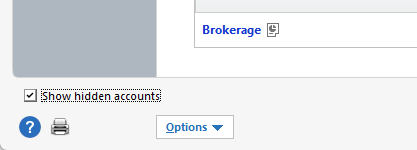
- If you have a hidden account, check the box in the lower left to display it.
- In the Account List, select the account you want to deactivate, then click Edit.
- In the Account Details window, go to the Online Services tab.
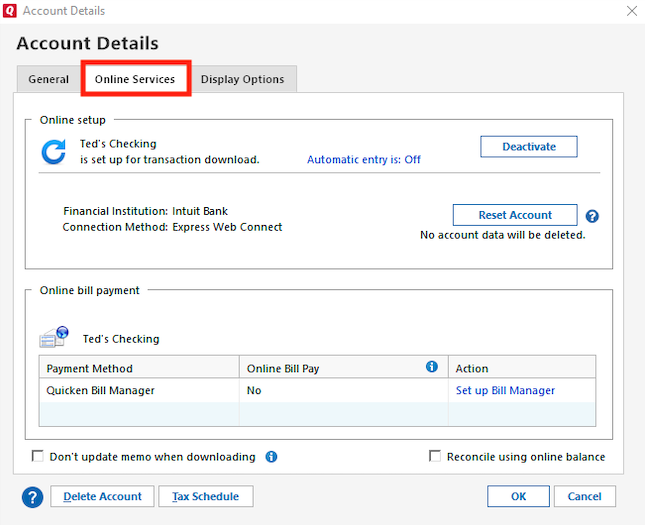
- Click Deactivate next to the service you want to disable.

- Confirm by clicking Yes.
- Repeat this process for all accounts related to this financial institution.
To Reactivate Account(s):
- Go to Tools > Add Account.
- Select the bank for the deactivated account(s). If prompted, choose the connection method.
- Enter your credentials and click Connect.
- When the list of located accounts appears, click LINK next to each account you want to reactivate.
- Click Next, then Done on the final prompt.
Let me know how it goes! I’ll be looking forward to your reply.
Quicken Carlos
Make sure to sign up for the email digest to see a round up of your top posts.
0 - Go to the Tools menu and select Account List…
-
I went through ALL of the steps you advised today and still get CC-503 and never get to the authentication screen. When Hanscom FCU updated their online platform last week requiring a password change, I had the same issue with Quicken and the CC-503 message. Contacted Quicken support and they got access to my screen and went through the same steps to no avail. Then on March 26 I tried again and got through authentication and added download for all Hanscom accounts. Everything was downloading fine until yesterday when the CC-503 came back for only Hanscom. It seems to me that there must be a software issue somewhere that is related to Hanscom's new online platform and password change that is at fault. I am 100% sure I have done all that has been requested and entered all of my login info correctly. Maybe this issue should be elevated? I am growing frustrated with this issue. I can't recall ever having this issue with Hanscom until they did this major change to their online platform which I can log into directly from their web site without a problem.
0 -
Hi @chestrenu,
I just sent you a direct message so we can continue with the process to escalate the CC-503 issue.
To check your messages, please click the envelope icon.
I hope this helps!
Quicken Carlos
Make sure to sign up for the email digest to see a round up of your top posts.
0 -
I am having the exact same problem as chestrenu. Initially after the update, I was able to download transactions, but at some point it stopped letting me connect and is giving the CC-503. This has been going on for over a week, so waiting a few days doesn't help. Trying HFCU support now.
0 -
Solved! Deactivate all of your Hanscom accounts in Quicken. Add back but choose Hanscom FCU Retail instead of Hanscom Federal Credit Union.
0 -
So far that has been working for me too. Hope it keeps working!
0 -
Thanks for following up, @chestrenu and @rhinmass,
I’m glad to hear that deactivating and reactivating the accounts worked for you and that everything is still running smoothly.
If you run into any issues, please don’t hesitate to reach out to us!
Quicken Carlos
Make sure to sign up for the email digest to see a round up of your top posts.
0 -
Thanks — this worked — finally! No help so far from my repeated messages with HFCU. However — I ran into a problem with the Visa card account I have at HFCU. Quicken would not recognize that it's a CREDIT card .. not a LOAN. Therefore, I was unable to link it to my existing HFCU Visa account. Just to see what would happen if I let quicken add that as an account — I discovered a "loan" account is treated completely differently than a credit card account. So I deleted and resigned myself — for now — to managing my HFCU Visa account in quicken manually. I actually wondered when I saw that the new web site has two different kinds of logins - business and retail — whether that was the issue. If anybody has any suggestions for how to address why Quicken doesn't recognize my Visa account as a credit account — I'm all "ears". Or could it be that the error is on HFCU's end?
0 -
Hi @QuickWingz,
I’m glad to hear that the steps above worked for you as well!The account type is provided by your financial institution, as they determine how the account is classified.
I suggest contacting your financial institution and asking to speak with an online banking specialist for further clarification. If they’re unable to assist, I recommend contacting Quicken Support for further assistance. They can guide you through additional troubleshooting steps in real time or escalate the case if necessary.
Phone support is available Monday through Friday, from 5:00 AM PT to 5:00 PM PT.
I hope this helps!
Quicken Carlos
Make sure to sign up for the email digest to see a round up of your top posts.
0 -
I did send a message to HFCU informing them about this issue and my speculation that it traces back to when — before launching their new web interface — the ability to pay my visa card was moved from the simple transfer functionality to an area associated with loan payments. Just checked the new web page again .. and it looks like the "old way" of transferring money between accounts is back. Once again .. paying my credit card is back to transfer from account a to account b. I think I'll wait a while and see if maybe .. hopefully .. quicken will be able to treat my Visa card account at HFCU as a credit card. If wishes were fishes.😉
0 -
Thanks for following up, @QuickWingz .
I’m glad to hear they were able to restore the Visa back to how it was working before.
Please continue to monitor it, and if you need any further assistance, don’t hesitate to reach out again.
We’re here to help!
Quicken Carlos
Make sure to sign up for the email digest to see a round up of your top posts.
0 -
All I've done is told them about the issue. I don't think they've done a thing about it. Well .. that's not true. Just checked. The only change I see now is that name of the account received from HFCU now has a prefix of "Credit Card" whereas before it was "Loan". But…the pull down for picking the account type is still various kinds of Loans and Quicken won't let me link to my existing HFCU Visa account. So I don't know if this is a Quicken issue or if there's some other metadata that HFCU has not yet fixed to properly identify it as a Credit Card and not a Loan. I'm leaning towards the latter. And yes .. I do know about things like metadata.
0 -
Hi @QuickWingz,
Thanks for letting me know and for following up.
It’s possible that this issue is happening because the financial institution is reporting the account as a loan instead of a credit card. Since you’ve already reached out to your financial institution, if the issue persists after speaking with them.
I recommend contacting Quicken Support for further assistance. They can guide you through additional troubleshooting steps in real time or escalate the case if necessary.Phone support is available Monday through Friday, from 5:00 AM PT to 5:00 PM PT.
I hope this helps!Quicken Carlos
Make sure to sign up for the email digest to see a round up of your top posts.
0 -
FYI — I'm in an active dialog with HFCU — made them aware of the issue regarding how credit card accounts (and maybe others — I have no idea — just concerned with my specific issue) are not being identified correctly to Quicken. That it takes more than simply adding 'Credit Card' as the prefix to the account name isn't enough. Metadata is required — the stuff Quicken uses to identify the type of account. Will update you on my progress with HFCU.
0 -
Hi @QuickWingz,
Thank you for your reply and for letting me know.
I look forward to hearing any updates from you.
Quicken Carlos
Make sure to sign up for the email digest to see a round up of your top posts.
0 -
Hanscom EWC download appears down today!
0 -
Hi @chestrenu,
Thank you for reaching out to the Quicken Community!I checked my internal tools and noticed that the error is related to FDP-102. In Quicken, this issue may display as a CC-502 error. This error is typically caused by maintenance on the bank’s servers that Quicken uses to download transactions.
I recommend following the steps in our support article:
- Open the transaction register for the account showing the error message.
- Click the Gear icon in the upper-right corner of the register and select Update Now.
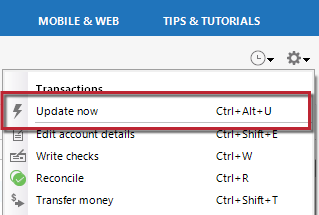
- Follow the on-screen instructions to complete the update.
- Repeat these steps for each account experiencing the error.
If the steps above do not resolve the issue, I suggest waiting 24 hours and trying again. If the error persists beyond 24 hours, I recommend contacting Quicken Support so they can further investigate and escalate if necessary.
I hope this helps!
Quicken Carlos
Make sure to sign up for the email digest to see a round up of your top posts.
0

