American Express downloading problem

I am using Quicken for Windows and for about a week, I am unable to download transactions. No error shows up on Windows, but when I log in to Quicken Classic on the Web, it shows error code FDP-101. Is this a known problem? When is this expected to be repaired? I have tried to deactivate and reactivate online services and also simply reset online services, but this does not help.
Answers
-
I notice that when i reset online services, the online balance does update, but transactions are not downloaded. This did not happen when i deactivated and reactivated online services.
0 -
is there a cost to contact quicken support
0 -
Hello @dmcomite,
Thanks for reaching out! I checked your account on our end, and it looks like you’re also receiving an internal FDP-101 (CC-601) error.
This is currently considered a known issue with American Express that has been escalated internally, though we do not have an ETA on resolution at this time. While the investigation remains ongoing, please refer to this Community Alert for any and all available updates and information.
We appreciate your patience in the meantime! Thank you.
-Quicken Anja
Make sure to sign up for the email digest to see a round up of your top posts.1 -
@dmcomite Apologies for any confusion—I deleted my previous response after realizing that there is an open Alert on this issue. There’s no need to contact Quicken Support at this time.
For future reference, having an active subscription does include access to Quicken Support at no additional cost.
Hope this helps!
-Quicken Anja
Make sure to sign up for the email digest to see a round up of your top posts.0 -
thank you. i will follow the open alert
0 -
You’re welcome!
-Quicken Anja
Make sure to sign up for the email digest to see a round up of your top posts.0 -
I have been experiencing the same issue. No errors, no download of tracks, resets and delete/adds works but has no effect.
Also logged into AMEX account and removed multiple Quicken 3rd party authorizations before attempting to reconnect account, reconnect/reauthorization seemed ok, but still no transactions downloaded.Just for the record, so I will set an alert on this issue/thread and monitor.
[Edited-Readability]
0 -
Thank you for chiming in on this discussion to share your experience.
Interesting that you are not receiving any errors. Are you seeing a $0 balance in your American Express accounts?
If so, we have a separate Open Alert for this issue as well. Just wanted to point this out so you can track/bookmark this alert if it applies to your situation.
Hope this helps!
Quicken Alyssa
Make sure to sign up for the email digest to see a round up of your top posts.
0 -
No, the Online balance is not updating and as a result it does not match my actual register balance since I typically manually enter most of my transactions.
The update process that occurs at the end of the reauthorization process appears to be working but does not actually bring in any new transactions to match.
In my case I have both am AMEX Credit Card and an AMEX High Yield Savings acct. Neither are bringing in recent transactions.
I think initially there was an error message on several days of doing the one-step update. I don't remember the error number,, Maybe CC-601 no transactions found error message. After a a few days of this, I was sure that there were transactions that did not download, so i reset the Credit Card Account and it authorized etc without any issues. after that, not error messages but also no transactions downloaded. Subsequently I reset the Saving Acct as well, but there was no change in the results.
1 -
Follow-up to my most recent post. After posting I was able to solve this issue as follows ( Note that I have TWO American Express Accounts; Credit Card and High Yield Savings Account that were not downloading transactions. Previously I attempted to reset these individually without resolution.
Solved as follows:
- I Logged into my American Express account on web Browser;
- Selected one of my AMEX Accounts
- Went to 'Account Services" in the menu.
- Then selected 'Security & Privacy"
- Scroll down and click on 'Manage Third Party Authorizations"
- Delete ALL Authorizations listed ( I only had Quicken Authorizations, but I had multiples )
- Log Out on your American Express account ( I logged out of both my account in my Browser and in my AMEX App
- RETURN TO QUICKEN ( I use Quicken on my desktop )
- For each of my American Express Accounts, I went to the gear icon and selected 'Edit Account Details'
- On the 'Online Services' Tab. I deactivated the Online Services FOR EACH ACCOUNT that I have.
- Give this process time to complete the process on each account.
- This may take 1-3 Minutes - Do Not get impatient on this item.
- This does not delete any transactions, it just completely removes the online update link for the account.
- Once ALL American Express Accounts Online Services were Deactivated in Quicken. I Closed Quicken completely.
- Re_open Quicken;
- Go to the '+" icon that is under the tool bar above 'Accounts' to Add back your American Express Accounts ( Do not use the process in the individual Accounts to re-add the accounts. I have found in the past that is not always reliable )
- Go through the process to "Add a new account".
- This will force you to log into your American Express account and select the AMEX Accounts that you want to Authorize. Be sure you have your AMEX login information and access to whatever 2FA you use.
- After Selecting the desired AMEX accounts that Quicken finds, work through the rest of the process.
- Typically its just verifying the accounts in Quicken that you had linked before.
- Again, this may take several minutes and BE PATIENT.
NOTE:
All missing & unmatched transactions downloaded during this process and I was able to match or accept them.
There was a placeholder transaction that also automatically downloaded with an amount. After I verified that I had all the Transactions and my Online Balances would match without this place holder transactions, I deleted it.
Hope this helps/works for you. It found and downloaded two weeks of Transactions.
2 -
Thank you for coming back to let us know what steps you took to resolve the issue you were running into. This information may be helpful to others.
If you need more help, don't hesitate to reach back out!
Thanks again!
Quicken Alyssa
Make sure to sign up for the email digest to see a round up of your top posts.
-1 -
i tried zot 100 solution (I also have 2 accounts with AMEX) and it did not work for me. Is there an ETA on when Quicken will have this issue resolved?
2 -
Thank you for adding to this discussion.
I am sorry to hear those steps didn't resolve the issue for you.
No, we do not have an ETA as to when this issue will be resolved. You can bookmark the Open Alert to stay updated on progress/changes as they occur.
Hope this helps!
Quicken Alyssa
Make sure to sign up for the email digest to see a round up of your top posts.
-1 -
Regarding Zot 100 solution: I have multiple decades on Quicken, and multiple AMEX accounts. Anyone entering most of their stuff manually is not in the same accounting world as I; and I am suspect of a process that requires me to re-add an existing account as a new one: re-downloading years of transactions and manually re-entering years of manual categorizations (not to mention splits) is a dealbreaker from the start. Anyway, I had the authentication problem last year (2025) - where re-authenticating one connection would trash the other account's connection. They did seem to fix it last year but now it looks re-broken. I also have multiple investment accounts at 1 broker, and multiple bank accounts at 1 bank. So far I have been able to limit each Quicken database to 1 account per institution (except for my 2 AMEX accounts). But why should we have to do that. [Removed-Rant/Language]
OK done venting. If anyone has a solution to the new (old) problem without trashing the data in accounts please post , thanks!0 -
Thank you for adding to this discussion with your comments and concerns.
While I cannot offer a solution at this time, we do have an Open Alert for the $0 balance issue, and you can bookmark it to be notified when the issue is resolved.
It sounds like the issue you are describing is different. Are you seeing a $0 balnace? If so, the alert linked above applies to your situation. Are you having trouble connecting multiple sets of credentials for AMEX in Quicken? If so, that is a separate issue.
We also have alerts for a couple of different errors with AMEX. Let us know exactly what you are experiencing, and we will do our best to help.
Thanks again!
Quicken Alyssa
Make sure to sign up for the email digest to see a round up of your top posts.
0 -
I am also having this same issue. Is there still an ongoing issue with American Express downloads? I tried the process from Zot100 above and it did not work for me.
I have multiple accounts with AmEx and 2 logins that are both getting the same result. No error messages on OSU, but also no indication that the accounts have been updated. I believe this just started a couple of days ago.
I also have another AmEx login that seems to downloading the one acount associated with it properly.
0 -
Thank you for adding to this discussion.
Yes, we do have a Known Issue with American Express. Please bookmark the linked article to stay up to date on progress/changes as they occur.
We do not have an ETA as to when this will be resolved, and we apologize for the inconvenience.
Thanks again!
Quicken Alyssa
Make sure to sign up for the email digest to see a round up of your top posts.
-1 -
Just started this morning. Maybe connected. Latest Quicken Premier for Windows. Receiving CC-901, Your bank is requesting that you reauthorize your account, on both of my AMEX accounts. Click Reauthorize. I select my two accounts in my AMEX account and I receive an error. Just spinning. However, I go into my Amex account and under third party permissions it shows that I have reauthorized them but somehow that new status is not being communicated back to Quicken. Let me know if you need additional info.
0 -
The error I receive is 'This page is not working right now. If the problem continues, contact the site owner. HTTP Error 431. Refresh button displays. I click that and nothing happens. In Quicken the sign into American Express just keeps spinning.
0 -
I cannot reauthorize my AMEX accounts. I revoked my authorizations for Quicken in my AMEX account and removed ability to download into Quicken. Started fresh. I can't reauthorize. I cannot download transactions into both of my AMEX accounts.
0 -
I just went through this same problem. You may have done this, but just to make sure - You need to go into Quicken and "deactivate" all the Amex related accounts in Quicken, in addition to revoking all authorizations on the Amex website (I think it is under Account Services - Security and Privacy). Once those items are complete, you can start the "activation" process for the account(s) in Quicken. It should then allow you to "authorize" each account in Amex and then you need to assign the Amex accounts to the existing accounts in Quicken. One thing I did run into was that it seemed that Quicken was having trouble contacting Amex to "authorize" the accounts. So when the screen said "set up as manual", I hit the back button until the list of Financial institutions came up. I then highlighted "American Express" and it appeared to update Quicken to the right Amex website. Give that a try if you still can't "authorize" at Amex through Quicken and see if that helps…
PGAVON
Quicken Premier - Windows Subscription
1 -
I tried solution recommended by Zot 100 and it didn't work. (same result as dmcomite). I tried again, but only re-activated my credit card account (I seldom use the other savings account). This time it worked and downloaded my transactions. Not going to try my other account until I hear that there has been a general fix for this problem.
2 -
Hello All,
I am happy to hear some of you have found success using the workaround posted by @zot100.
For anyone still experiencing errors when trying to connect to American Express, please bookmark this Open Alert.
If you are not getting the error, but have a $0 balance, we have an Alert for that, too.
If you bookmark the alert for the issue you are experiencing, you will be notified of any progress or changes to it.
Thank you!
Quicken Alyssa
Make sure to sign up for the email digest to see a round up of your top posts.
0 -
The last download date/time appears correct, but the cc-601 persists…

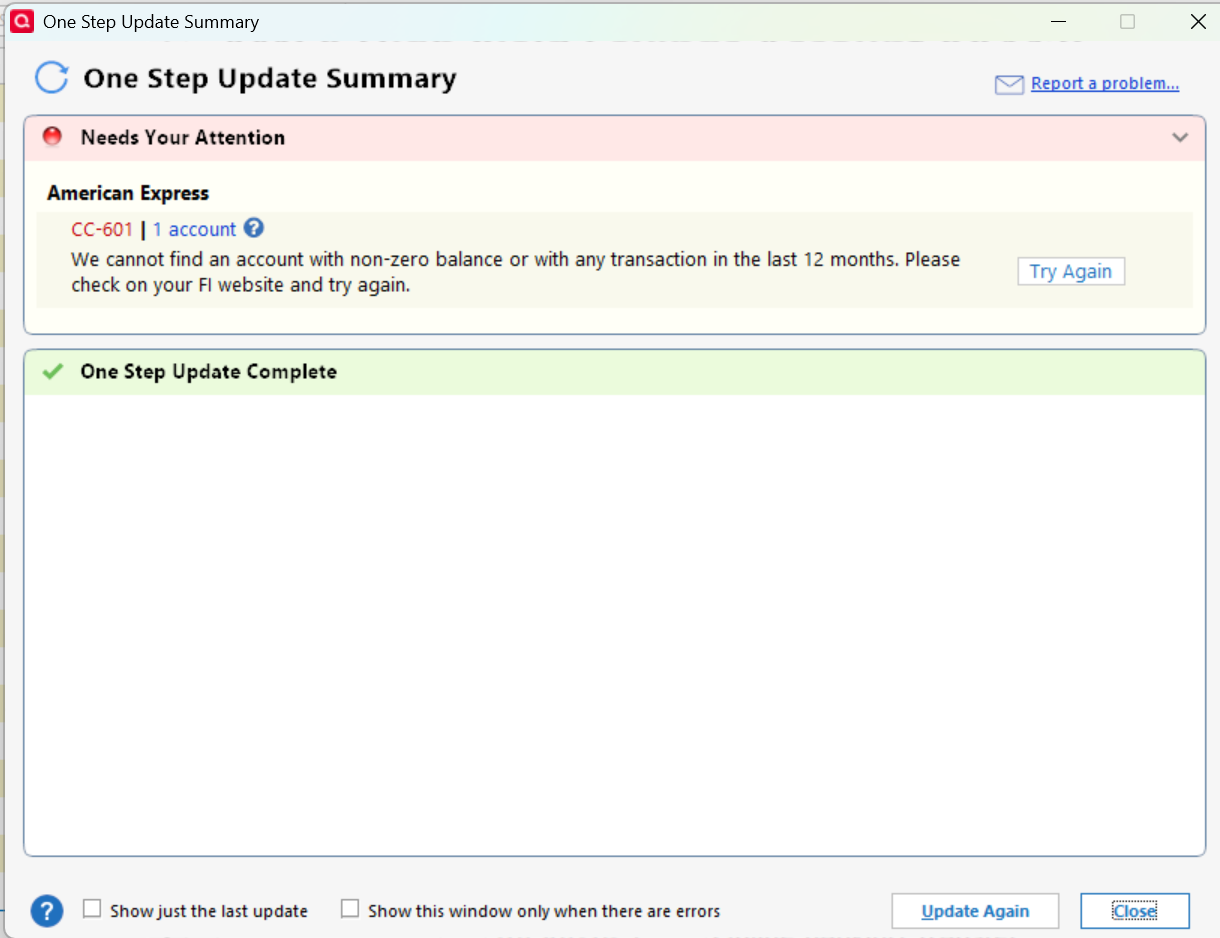
Quicken Classic - R67.7, Windows 11 PRO current on updates
My data file is NOT being synced nor backed up.
1 -
Thank you for chiming in!
Please continue to refer to the Open Alert for this issue. Make sure you have it bookmarked in order to receive updates as they occur.
Thanks again!
Quicken Alyssa
Make sure to sign up for the email digest to see a round up of your top posts.
0 -
This also worked for me for activating only the credit card… I'm afraid to try savings and checking!
1 -
Thank you for updating the discussion with your progress.
You can always save a backup before trying the checking and savings accounts. This way, if it doesn't go as expected, you can get back to where you started.
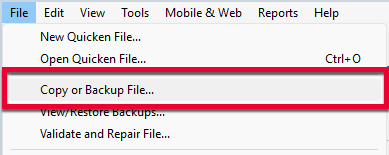
Back up in Quicken for Windows
1. Select File > Copy or Backup File...
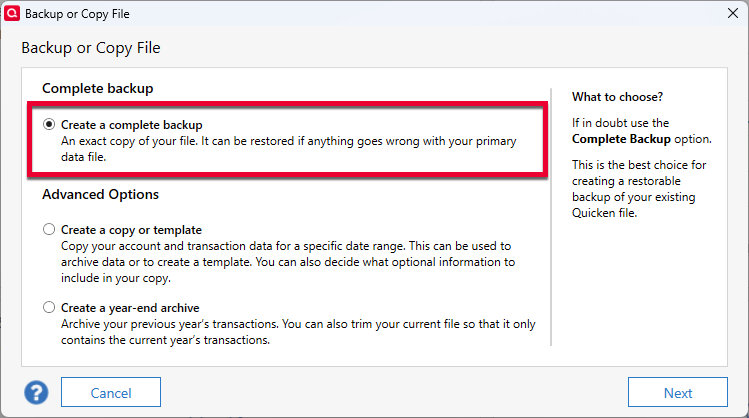
2. Select Create a complete backup and click Next.
3. To make it easier to identify your latest backup, you can put a check next to Add date to backup file name.
4. Quicken will show you the location where your backup will be saved, along with the name of the backup file (this is typically your Quicken file name, followed by .QDF-backup).
- The default save location for backup files is C:\Users\[your name]\Documents\Quicken\BACKUP, and we recommend leaving this unchanged.
- If you need to change this location, click Change... then select a folder to save the backup to. After making your selection, click Save.
5. Click Create Backup
If you encounter the CC-601 Error, please refer to the Open Alert for that issue.
Thanks again!
Quicken Alyssa
Make sure to sign up for the email digest to see a round up of your top posts.
0 -
Quicken keeps saying they are working closely with AMEX to resolve the problem but have no ETA for resolution. Without AMEX download, Quicken is of no use to me. I won't be renewing my subscription.
0 -
This is interesting. I clicked on Report a Problem in the OSU Summary and I get this…
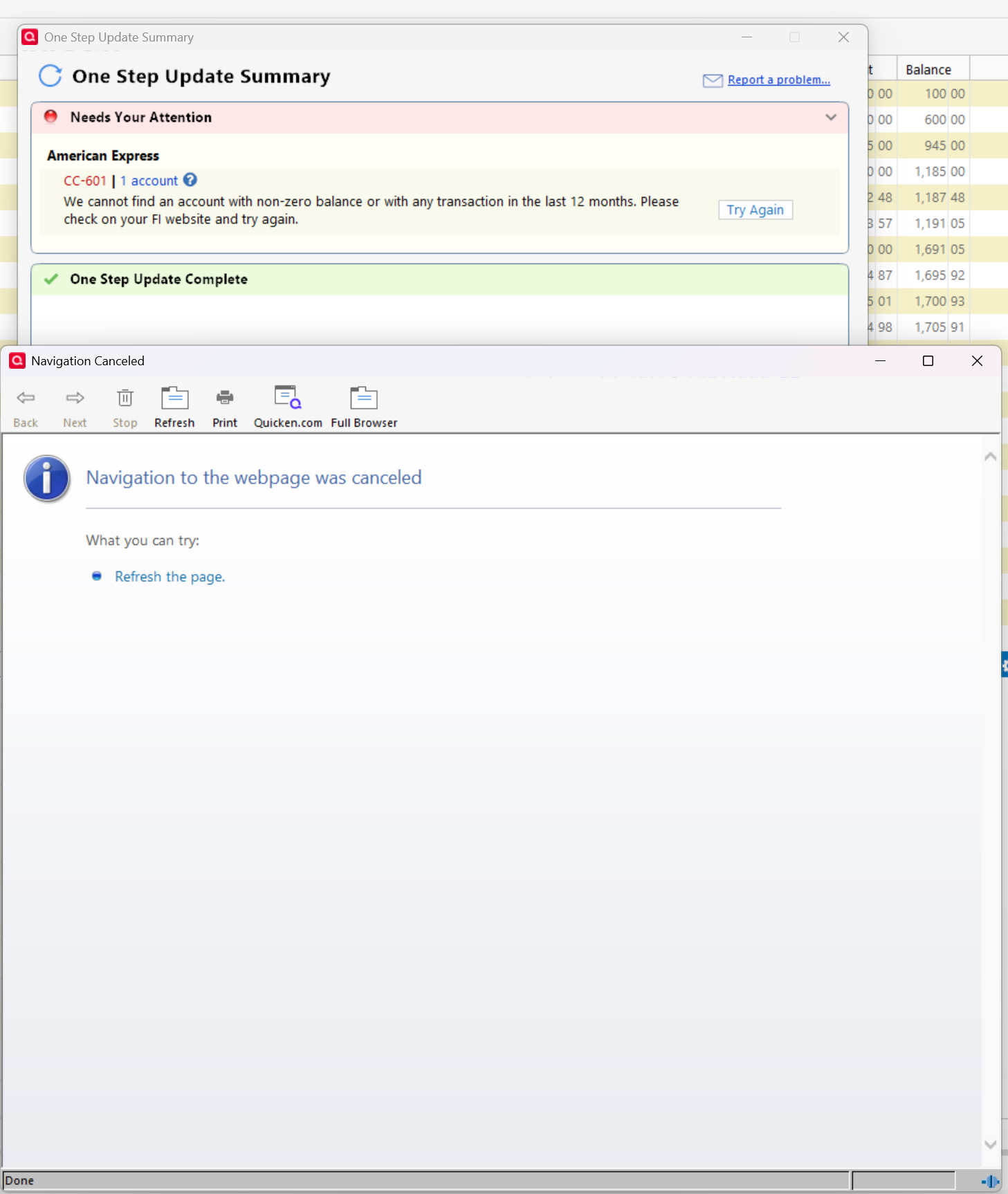
Quicken Classic - R67.7, Windows 11 PRO current on updates
My data file is NOT being synced nor backed up.
0

