Error in Category reports

Recently, I created a Transaction report where only the Category Restaurant was chosen. The problem results from a split transaction. In the transaction there were four entries only one of which was the category Restaurant. The Restaurant amount was $262.08 while the total split transaction was for $1,574.08. In the report which was for just the Restaurant category the total for that payee was $1,574.08 while it should have been $262.08.
I found this issue occurred frequently for split transactions. Has anyone else noticed this? Should I report it as a problem or did I do something incorrectly in creating the report?
Comments
-
I just took a spin at creating a Category report with a Category that I knew had come out of lots of split transactions (version R65.29) and didn't encounter that problem.
You might see if a file Validation clears up the issue.
0 -
I ran a validation which was clean. I have two reports where the problem is evident. Both reports have splits where only one of the transactions in the split have a Grocery or Restaurant ( depending on the report). The reports are sorted by Payee and in total there are about 7-10 split transactions among about 5 payees where the total reported is incorrect.
0 -
Hi @acs2,
Thank you for sharing the steps you’ve taken so far. I’d appreciate it if you could provide a bit more information so we can better understand the issue:
- Are you using saved reports or creating new ones?
- What specific type(s) of reports are you running?
- When did you first notice the issue?
I look forward to your response!
Quicken Laura
Make sure to sign up for the email digest to see a round up of your top posts.
0 -
I created new ones recently and then saved them. Transaction reports for with custom date 1/12025 thru 12/31/2025. I selected specific categories > Restaurant for one and Grocery for the other. I sorted by payee. I just noticed it in the last few days. I often run transaction reports but did not notice it earlier but it could have been happening. It became evident since the total expense for payees with split transaction were too high.
I run Windows 11 and keep Quicken up to date.
BTW I have a few Quicken files. I just opened another one and ran a similar report. Exactly the same problem occurred.
0 -
Thank you for clarifying that. In some cases, Early Access features can affect report performance, so it’s worth checking if that setting is enabled. If it is, please try disabling it and then running a new report.
Steps to disable early access
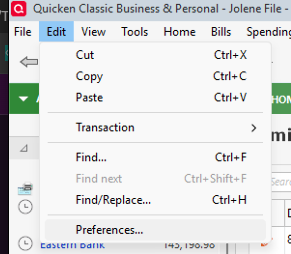
- Go to Edit (top left)
- Select Preferences
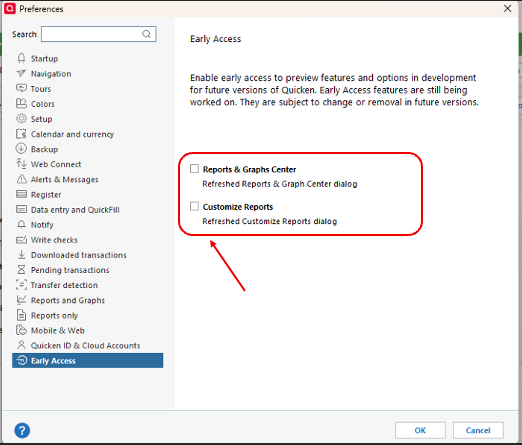
- Click Early Access (bottom of the left panel)
- Uncheck Reports & Graphs Center and Customize Reports
- Click OK
- After that, please try running a new transaction report and see if the issue persists.
Please let me know how it goes!
Quicken Laura
Make sure to sign up for the email digest to see a round up of your top posts.
0 -
I was recently having problems with split transactions as well. I was developing reports from the menu: select Reports, then Spending. This gives a list of different report types. I was running a report from both "Itemized Categories" and "Spending By Category". One report included the portions of split transaction that matched the selected category, which was good. The other omitted the transaction completely. I believe the Itemized category report was the one that omitted it. It's really frustrating when you discover you have been working with faulty reports.
0 -
Hi @dkdavis1,
I’m sorry to hear that you’re experiencing this issue as well. Could you please check if “Early Access” is enabled? If it is, try disabling it as outlined above, then run the new reports again.
Additionally, would you be able to run a new Spending Itemized Categories report and customize it to display only the categories related to the split transaction? Here’s how:
- Create a new Itemized Categories report
- Click Customize in the upper-right corner of the report
- Adjust the date range to include the date of the split transaction
- In the Categories tab, click Clear All

- Select only the split categories
- Click OK
Please let me know how it goes!
Quicken Laura
Make sure to sign up for the email digest to see a round up of your top posts.
0 -
It's been my experience that, if you want to create a "How much have I spent on a selected Category" report, you need to create a Category Report, not a Transaction Report.
Itemized Category Reports pick up all transactions, with or without Splits, and show the correct amount assigned to each category.
Transaction Reports are better suited to show Transactions by Account, with or without Split detail.0 -
Thank you all for comments and suggestions.
I) did have early access enabled. I unchecked the options and recreated the reports using Banking Transaction. It worked! It removed splits from the report but did include the individual appropriate items from splits.
I assume this means early access developers need to know this so determine the issue. True?
0 -
Hi @acs2,
I’m glad to hear everything is working now. Thanks for the update!
I also appreciate you pointing that out. Early Access provides a preview of features that are still in development for future releases. Because of this, you may occasionally encounter bugs, and some features or functionality may change before the final version is released.
Please feel free to reach out if you have any additional questions!
Quicken Laura
Make sure to sign up for the email digest to see a round up of your top posts.
0 -
To Quicken Laura,
Thanks for your replies.
You asked me to run a new Spending Itemized Category report with a specific instruction to "select only the split categories". I'm puzzled by that, I don't know how to do this. Is there a way to produce a report that shows only split transactions? I couldn't find it.
Dan
0 -
Hi @dkdavis1,
Thank you for following up. To clarify, I meant selecting only the categories in question, in this case, those related to your split transactions, to ensure they are properly included in the report.
To select specific categories:
- Run the Spending Itemized Categories report
- Click on Customize
- Go to the Categories tab
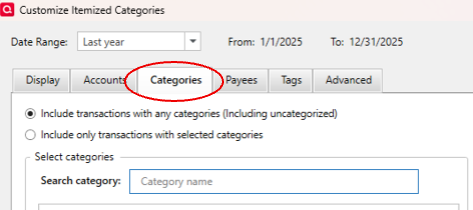
- Select the affected categories that may have been omitted previously to confirm they are now included in the report
Please feel free to reach out if you have any additional questions.
Quicken Laura
Make sure to sign up for the email digest to see a round up of your top posts.
0 -
All,
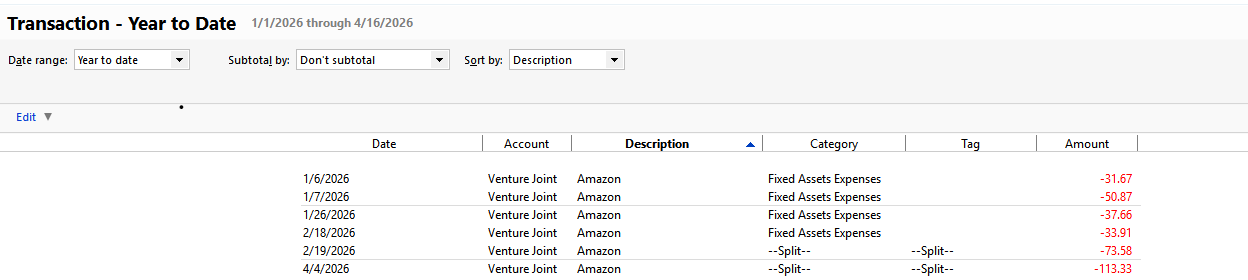
I reported in a recent comment that removing Early Access eliminated the problem with Splits appearing in a report. I'm sorry to say that I just ran a report and the problem still exists. This is a transaction report with Only the Category Fixed Asset Expenses selected. You can see from below that there are two split transactions. One of these Splits has categories other than Fixed Asset Expenses
 0
0 -
Hi @acs2,
Thank you for testing the category filter again and confirming that the issue persists.
I would appreciate it if you could submit your log files so we can forward them to the appropriate team for further investigation.
To send your logs:
- Open Quicken
- Click Help
- Select Report a Problem
- Click Send to Quicken
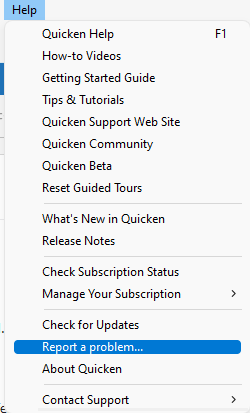
Once submitted, please let us know. I look forward to your response!
(CTP-16752)
Quicken Laura
Make sure to sign up for the email digest to see a round up of your top posts.
0 -
Laura
How do i find or create log files?
0 -
Hi @acs2,
To find the logs, please go to Help > Report a Problem.
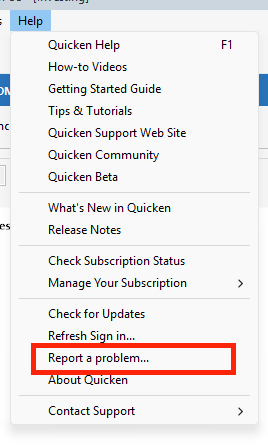
Once you do that, a pop-up window will appear. You’ll have the option to describe the issue. Also, make sure all the log files are selected, then click Send to Quicken.
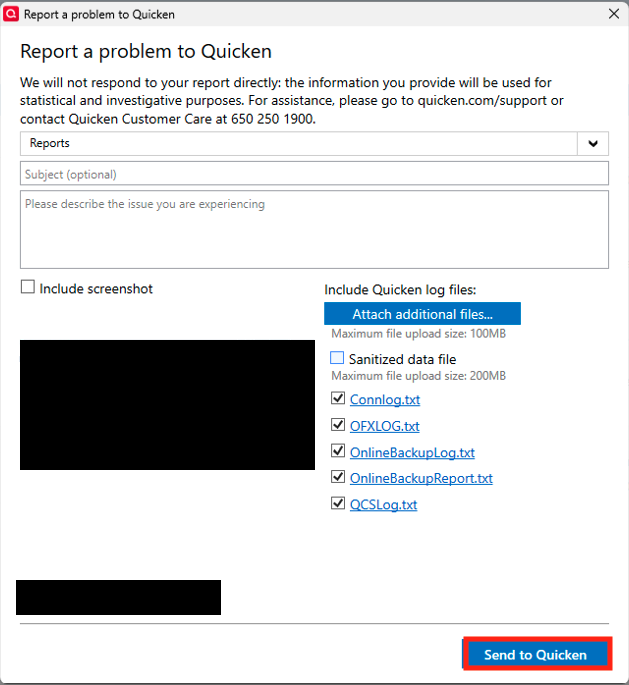
Please let us know once the logs have been submitted so I can add the information to the investigation ticket.
I look forward to your reply.
Quicken Carlos
Make sure to sign up for the email digest to see a round up of your top posts.
0


