Discover authorize

When I go to download in Quicken, I get that Discover needs to be reauthorized. When I do that, I get a completely new Discover account, with a few recent transactions and correct balance. I do not want a new account. I want to keep the one I had. So, I delete the new account. But I still get the reauthorize message. When I go online and manually sign in to Discover, I have no problem. How do I get rid of the reauthorizing message and download into my (old) Quicken Account?
Comments
-
When you reauthorized and data was downloaded you should have gotten a popup asking what you want to do with that downloaded data. One of the options in the drop-down in that popup is to Link the download to the existing account in Quicken. Did you do that?
Quicken Classic Premier (US) Subscription: R67.7 on Windows 11 Home
0 -
Hi @plm868,
Thank you for reaching out! As @Boatnmaniac mentioned, reauthorizing your account and linking it to your existing one can help prevent duplicate accounts and ensure everything stays properly connected.
Please follow the steps below to deactivate and then reactivate the account:
Deactivate the affected account
- Go to Tools > Account List.
- In the Account List, select the account and click Edit.
- In the Account Details window, open the Online Services tab.
- Click Deactivate next to the online service.
- Confirm by clicking Yes.
- Repeat these steps for each affected account.
- Log in to your bank’s website and revoke Quicken’s third-party access (if applicable).
Reactivate account
- Go to Tools > Add Account.
- Search for and select the Financial Institution.
- If prompted, choose the appropriate connection method.
- Follow the on-screen instructions to sign in.
- When the list of found accounts appears, make sure to select Link to connect them to your existing accounts (do not choose Add, as that would create duplicates).

I hope this helps! Please let us know how it goes or if you have any questions along the way.
Quicken Laura
Make sure to sign up for the email digest to see a round up of your top posts.
0 -
We have been having the same issue for the last month or two. I have 3 accounts that are linked. Almost every time I click the update button to get transactions from the bank, I need to re-authorize them. I need to go through the process twice. The first time it looks like it is re-authorizing and relinking them but it actually disconnects them. I need to use one of my Discover accounts and reconnect it. This allows me to reconnect all of them again. This didn't used to act like this. It is since one of the recent updates. This is becoming a nuisance.
[Edited Readability]
0 -
Hi @stsh8925,
I’m sorry to hear you’re experiencing issues when updating your Discover accounts; I understand how frustrating that can be.
I’ve refreshed your accounts on our end, and they appear to be properly connected at this time. Please try refreshing your sign-in session and updating again by following these steps:
- Go to Help > Refresh Sign-In.
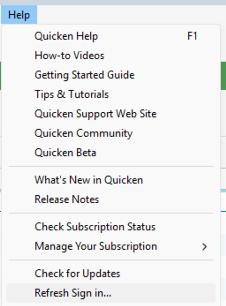
- Complete the login process.
- Run One Step Update again.
Please let me know how it goes!
Quicken Laura
Make sure to sign up for the email digest to see a round up of your top posts.
0 - Go to Help > Refresh Sign-In.
-
I just wanted to follow up since I haven’t heard back from you. I’m checking in to see if you still need assistance.
Quicken Laura
Make sure to sign up for the email digest to see a round up of your top posts.
0

