RMD - Trouble Creating Split For Taxes

My first year RMD.
I tried to follow some other threads and can't seem to get Quicken to work per Jim Harman's instructions. My problem is simple. It's an investment account rollover that I took 5K out of the IRA to my cash account and paid $750 in Federal tax and $250 in state tax - both of which are categories I track and use in Quicken. I could easily transfer the whole 5K from one account to the other, but can't find a way to "split" the transfer so only 4K goes to my cash account and then categorize the taxes in their proper category. The only option I have is accounts and no categories show up.
Answers
-
Tax related transactions (those withholdings) can't be recorded in a non-taxable (retirement) account in Q.
SO, transfer the entire $5k to your cash account, split the transaction to show the $5k in the 1st line as a positive number as a transfer and the 2 tax amounts on the succeeding lines as negative amounts using your Fed & state tax categories.
Then "adjust" the deposit amount to $4k
Q user since February, 1990. DOS Version 4
Now running Quicken Windows Subscription, Business & Personal
Retired "Certified Information Systems Auditor" & Bank Audit VP0 -
The transaction needs to be manually entered into a taxable receiving account (checking?), not in the investment account.
Enter a deposit (income) transaction into the checking account register for $4000.
Then split the category as follows. The sum of the splits must equal the $4000 transaction dollar amount.:
- LINE 1: Enter a transfer category….[name of the IRA]….with $5000 for the amount (a positive number).
- LINE 2: Enter the Fed tax category with the amount being -$750 (a negative number).
- LINE 3: Enter the State tax category with the amount being -$250 (a negative number).
For me, one of my RMD transactions looks like this:

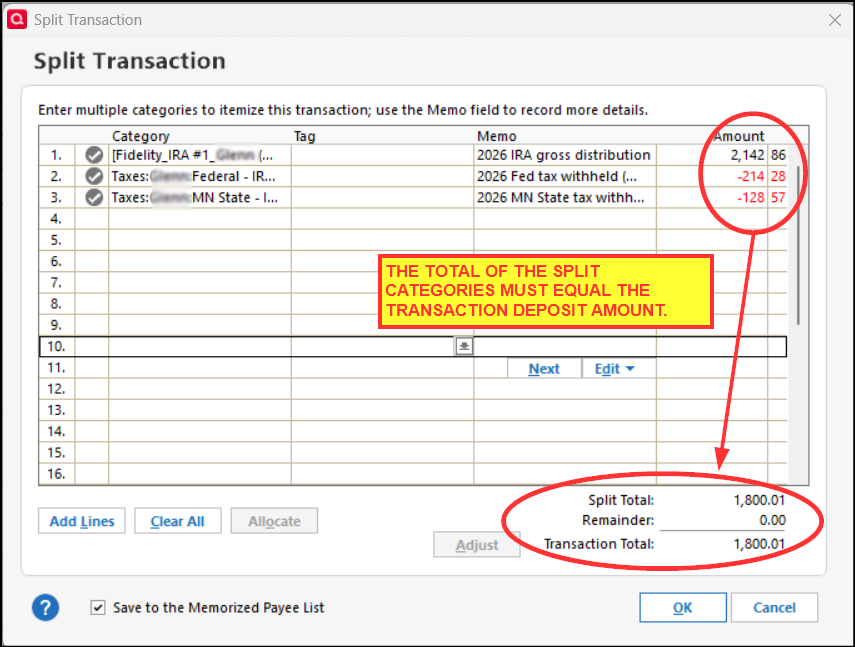
Since I have a couple of fixed dollar amount IRA distributions each month, I set up a recurring Income Reminder (NOT a Transfer Reminder) for each one. It works really well in capturing the total taxable distributions and taxes withheld in the Tax Schedule and Tax Summary reports as well as in the Tax Planner tool.
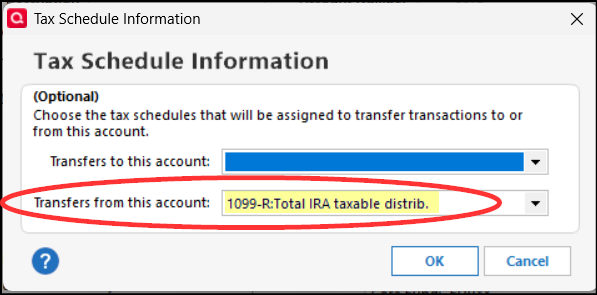
Note: If the taxable distribution amount is not being captured in these reports and in Tax Planner, go to the General Tab of Account Details for the IRA account. Click on the Tax Schedule tab and make sure that the Tax Line Item for Transfers from this account = 1099-R:Total IRA taxable distrib. I have sometimes seen this default to 1099-R:Total IRA Gross distrib. which is wrong and must be corrected if that is what is shown.
One last thing: The transactions the brokerage downloads into your IRA will likely be:
- A security Sell transaction for $4000 with the cash transferred to your checking account
- A security Sell transaction for $750 with the cash withheld for Fed tax.
- A security Sell transaction for $250 with the cash withheld for State tax.
Each of these 3 transactions will need to be edited to have the cash generated from them deposited to the IRA account's cash balance. If this is not done, the RMD transaction will effectively be duplicated in the the IRA account causing an account imbalance.
Quicken Classic Premier (US) Subscription: R67.7 on Windows 11 Home
1 -
The account I'm sending it to is a taxable brokerage account. I see NO option for splits.
0 -
I just subtracted out each (state & Fed) as MISCEXP. That'll do it. Very cumbersome…
-1 -
The account I'm sending it to is a taxable brokerage account. I see NO option for splits.
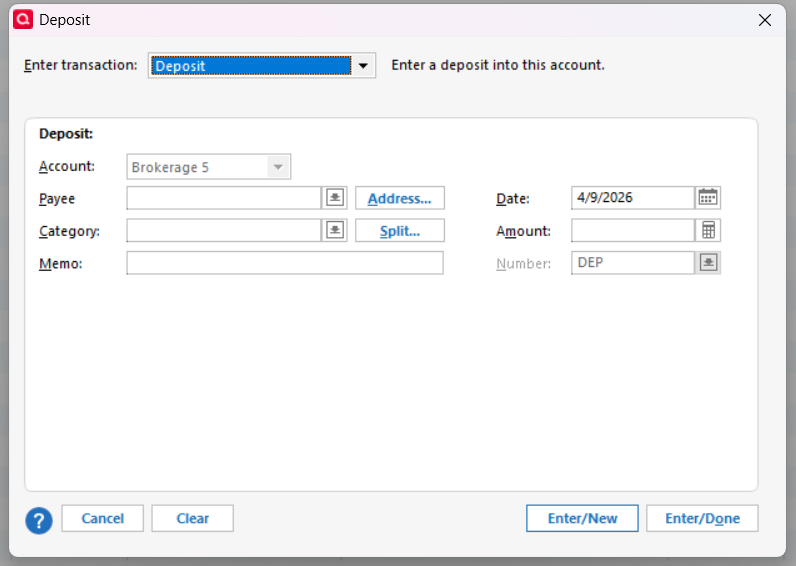
If you go the the taxable account, click on Enter Transactions, and select Deposit, you can split the transaction by clicking on the Split… button
 QWin Premier subscription1
 -
Thank you all. Got it now!
0


