Fidelity Investments - 401(k) Unidentified Security

@Quicken Anja @Quicken Kristina @Quicken Alyssa
Not sure who from Quicken was the lead on this topic so copying all 3 of you.
I am still experiencing this issue. Been experiencing it since (I think October 2025). Seems all the posts regarding this issue have been closed yet the problem for me continues. I even had a 1 on 1 call with Quicken escalation tech support (Ticket ID:12157155) back in late January 2026. They confirmed the issue and were going to follow up with me on a resolution but I never heard back from them again. From my point of view it appears this issues is being ignored by Quicken.
Can someone from Quicken please update me and let me know if I will ever see a resolution. And if tech support can't help who can? I think it has been long enough.
Comments
-
Hello @cjim,
Thank you for reaching out! When I check that ticket, I can see they sent you a secure link, so they must have needed some sort of file or screenshot from you to continue the investigation.
I'm not able to see the notes from the most recent contact. Do you recall which file or screenshot they asked you for?
I look forward to your reply!
Quicken Kristina
Make sure to sign up for the email digest to see a round up of your top posts.
0 -
@Quicken Kristina Thank you for the quick response.
The call (Ticket ID:12157155) was originally scheduled for Jan 23 and then rescheduled for Jan 29, 2026. On the 29th I explained the issue in detail. I seem to recall that the rep knew it was a known issue already with no resolution yet. I was asked to provide a few screen shots which I did but unfortunately I did not keep copies of what I provided but they were basically of what the transactions look like. I did keep a copy of the data file from that day so I am able to recreate and have attached some screen prints below of what I recall I provided on that day. I was also asked provide a number of the log files from my Quicken data file which I did but I am sorry I do not remember which log files I was asked to provide. Anyhow, I was told that I would hear back when they had a resolution but have yet to hear back from anyone.
This is what I typically see after downloading transactions:

Note below that after accepting an 'unidentified securities' transaction it is logged as a bond purchase of an unidentified security. The actual symbol for the transaction in this example should have been FXAIX which is the FID 500 INDEX and has CUSIP ID: 315911750.
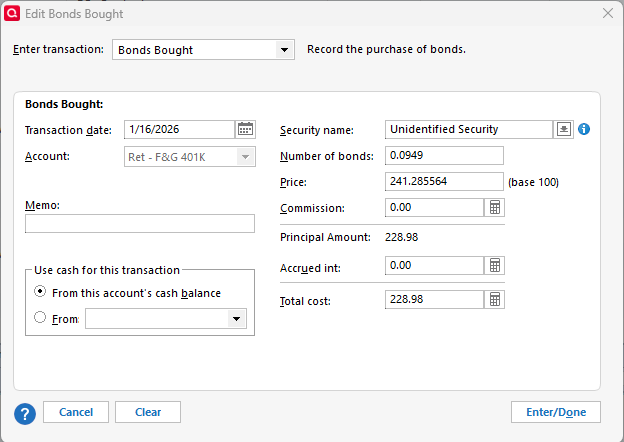
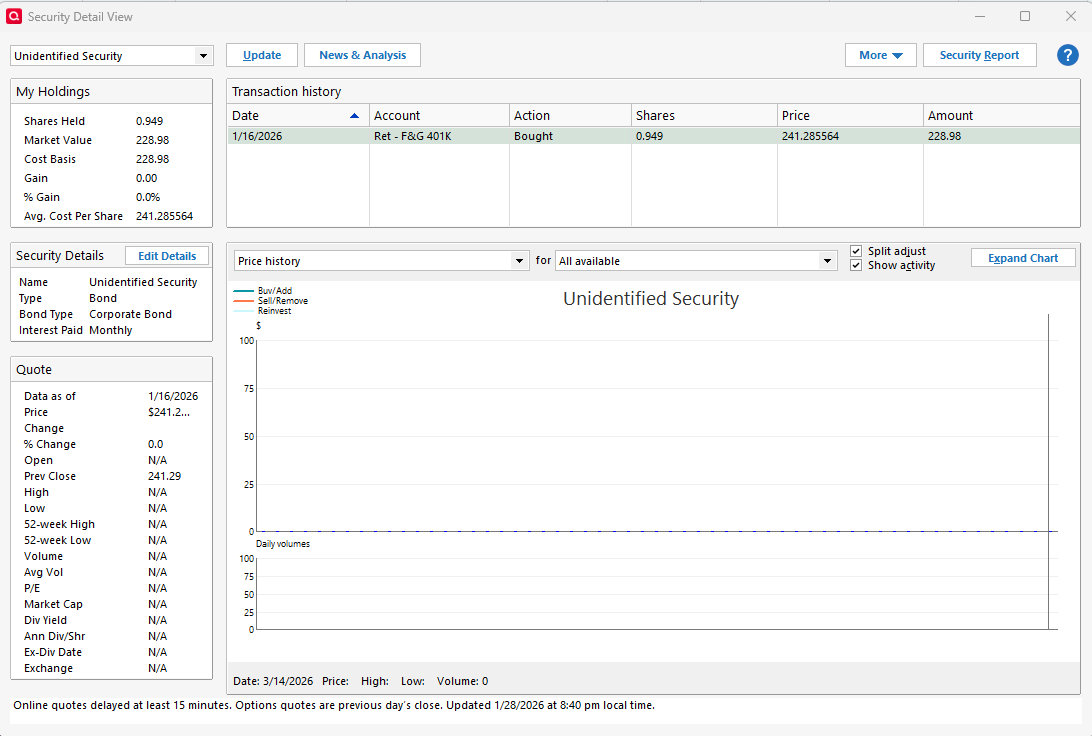
Each time this happens I have to manually change the transaction to the proper security and change the purchase type from a bond to an equity purchase and adjust the number of shares purchased.
0 -
Thank you for providing those screenshots!
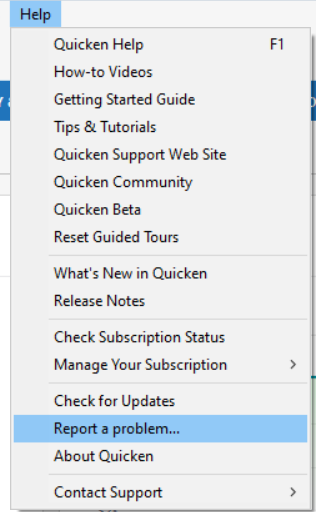
I forwarded them to the team working on the issue. They request that you please send updated logs. To do that, navigate to Help>Report a Problem and send a problem report with log files attached.
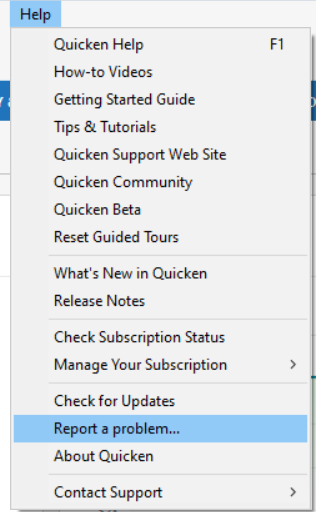
Please post to let me know when the problem report is submitted, so I can forward it to our teams.
Thank you!
Quicken Kristina
Make sure to sign up for the email digest to see a round up of your top posts.
0 -
@Quicken Kristina I just submitted all the logs using the "Report a Problem" process. Hopefully someone will take a look at them this time and find a fix to this problem. Thank you for helping.
1 -
Thank you for sending those logs!
They will help our teams investigate the issue.
Quicken Kristina
Make sure to sign up for the email digest to see a round up of your top posts.
0 -
@Quicken Kristina Thank you for helping me with this.
How will I know if someone really works on resolving this issue this time? As I mentioned previously, I provided pretty much the same information (screen prints and logs) back in late January and I never heard back from anyone at all.
0 -
Thank you for your reply,
For escalated tickets, they should typically reach out to you by email when they need more information or when they believe the issue is resolved. Depending on how long the issue takes to resolve, there may be a long period of silence before they reach out.
To check the status of the issue, there are a couple of options:
- Call Quicken Support directly to follow up on the ticket. It helps if you have the ticket number (12157155) handy, so they can find it more easily.
- Post to the Community to ask about the status. It isn't real-time, so the response will be slower, but we can look up the ticket for you.
I hope this helps!
Quicken Kristina
Make sure to sign up for the email digest to see a round up of your top posts.
0 -
Thank you @Quicken Kristina
I also want to let you know that on 3/20/26 Quicken downloaded a purchase transaction into my brokerage account (not the 401K that I have been having the issues with). It was for an "Unidentified Security" in the amount of $45.43. The interesting thing is that I did not make purchase for this amount on 3/20/26. The only activity on that day were 2 dividend distributions and those downloaded correctly and were accepted correctly.
Maybe this information should also be shared with whomever is working the issue.
 1
1 -
Thank you for the additional information,
I added it to the ticket, just in case the team finds the information useful.
Thank you!
Quicken Kristina
Make sure to sign up for the email digest to see a round up of your top posts.
0 -
@Quicken Kristina - In the most recent update on Fidelity related issues (3/30/26) there is no mention of anything related to the Unidentified Security issues I and others have reported. Just curious to understand why there is no mention of the Unidentified Security issues given that these issues have been around more than 6 months based on my recollection. If the Unidentified Security issue is truly being worked why is it not listed?
I am still experiencing the issue:
 0
0 -
Thank you for your reply,
That issue was tracked in a separate alert, and is resolved for most customers. Those who are still affected by the issue have individual tickets.
Thank you!
Quicken Kristina
Make sure to sign up for the email digest to see a round up of your top posts.
0 -
this issue remains unresolved for many of us still.
0 -
I also have the unidentified security issue in a Fidelity 401k account. It affects only certain holdings on transactions such as fees charged and reinvested dividends and has been occurring for several months.
I believe the issue is on Fidelity's side. Drilling down in the Cloud Sync Log, in the transaction report for the unidentified securities there is no field "securityIdType":"CUSIP" while the correct holdings do have that field. Also the securityID for the unidentified securities does not match the CUSIP ID while the correct holdings do match. Interestingly, in the holdings report of the same Cloud Sync Log this discrepancy is not present. In effect, unidentified securities are ID'd differently in transactions.
1 -
quicken team - how and when will you coordinate with Fidelity to fix this issue? It really has been long enough.
0 -
Hello @prombult & @dp_go_blue,
Thank you for letting us know you're seeing an issue with unidentified securities. Please follow these steps to troubleshoot:
- Edit each affected transaction
- Open the register for the 401(k) account.
- For every transaction tied to Unidentified Security, edit the Security field to the actual security name shown on the bank website.
- Remove the placeholder
- After all affected transactions are corrected, delete the “Unidentified Security” from your Security List.
- Re-match holdings
- Go to Tools > Online Center and choose Fidelity Investments.
- Select the 401(k) account, then open the Holdings tab.
- Click Compare to Portfolio.
- When prompted, proceed with Compare to Portfolio and match to the correct security.
Ensure every transaction previously pointing to “Unidentified Security” is corrected before deleting it. If the correct security name isn’t obvious, then confirm it from your Fidelity website holdings page.
If the steps above do not resolve the issue, then we ask that you please contact Quicken Support directly for further assistance and escalation if needed.
Thank you!
Quicken Kristina
Make sure to sign up for the email digest to see a round up of your top posts.
0 - Edit each affected transaction
-
@Quicken Kristina - I have followed the directions you posted above before and just went through the same steps just now with the same results as before…
After clicking on "Compare to Portfolio" I get a pop up stating "Your Quicken account and your Brokerage Holdings are in agreement".
These steps have not corrected the problem.
Given that there are a number of people experiencing this problem and the fact that this problem has been around for so long I don't understand why the resolution is being treated at the individual level. I submitted a ticket on this months ago and still no one has yet to even acknowledge receipt not to mention provide any updates.
1 -
Hi Kristina - thank you for the steps you recommended. Similar to CJIM I have had this same issue for far too long and had also called the support center and had a ticket opened with no results. In fact the support person told me to call Fidelity technical support and give them my quicken ticket # which really makes no sense. I have completed the steps similar to CJIM and no improvement. Please continue to escalate this issue internally as it should not be handled at the individual level, but most likely needs a patch from Quicken or Fidelity or both. Thank you.
0 -
Thank you for your replies,
Are you seeing this happening with a specific security?
If this is happening with FXAIX, then that is a known issue that was recently reported (CTP-16940).
Thank you!
Quicken Kristina
Make sure to sign up for the email digest to see a round up of your top posts.
0 -
@Quicken Kristina In my case it is happening with FXAIX and FSMDX.
0 -
Consistently FXNAX and FRGXX for me.
0 -
it is safe to say it happens with all Fidelity funds.
0 -
Thank you for your replies @cjim, @prombult, and @dp_go_blue,
To ensure our teams are aware that you are still experiencing this issue, I have forwarded it to the appropriate channels. To contribute to the investigation, please navigate to Help > Report a Problem and submit a problem report with logs attached.
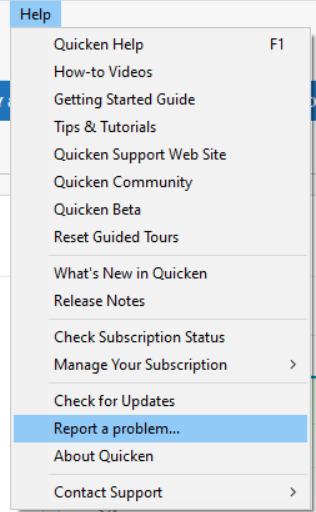
While you will not receive a response to this submission, these reports will help our teams further investigate the issue. The more problem reports we receive, the better.
If you're not comfortable listing the affected securities here, please include that information in the problem report.
We apologize for any inconvenience! Thank you.
(CTP-16956)
Quicken Kristina
Make sure to sign up for the email digest to see a round up of your top posts.
0 -
I cannot believe that this issue has existed since last year.
All of my securities are labeled as "Unidentified Security".
I have tried the steps mentioned above.
Why are we paying so much for this inconvenience?
Please fix this immediately!
0 -
Yeah, me too. In my case it's only 1 security in my 401K, so I went to Fidelity's site to see what security matched the value of the transaction. Once identified, I manually edit the entry to match. For me, it's not too bad since the only contribution is the dividend distribution which only happens once per quarter and it's the same security every time. Oddly enough, the other securities in the same 401K are not affected.
This happened some time after the Fidelity switch from DC to EWC+.
0 -
Hello @tregina & @nmestanas,
Thank you for letting us know you're also encountering this issue. To add you to the ticket, please provide more information. Which securities are you seeing this happen with? Please also navigate to Help>Report a Problem and send a problem report with log files attached.
Thank you!
Quicken Kristina
Make sure to sign up for the email digest to see a round up of your top posts.
0 -
The securities are:
FSNPX
FSNQX
FXAIX
0 -
Mine is an odd one. It's in an IBM 401k. It's a stock fund. So it's shares in a fund that only has IBM stock in it (not an ESPP). There's no ticker.
It worked fine when Fidelity used the DC method. I kept using DC until they pulled the plug. Once I switched over (don't recall exactly when I did), the issue didn't appear until the next dividend distribution about a month or two later.
0 -
Thank you for your replies,
I added you to the ticket.
Thank you!
Quicken Kristina
Make sure to sign up for the email digest to see a round up of your top posts.
0 -
The suggested steps do not resolve the issue. For me, It is not simply renaming the security. The Unidentified Security thinks it is a bond purchase so all of the units are off. I added a new investment to my 401k in March and it has been wrong every time. Existing securities have been OK.
I have called Quicken twice on this and was told they were aware of this issue.
0 -
Hi @BarryMo,
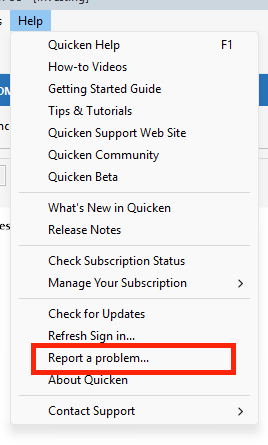
Thanks for joining this thread and for trying the steps above. I suggest sending the logs via Help > Report a Problem so the information can be added to the investigation ticket.
I look forward to your reply.
Quicken Carlos
Make sure to sign up for the email digest to see a round up of your top posts.
0


