Renaming rules not being created when I rename payee

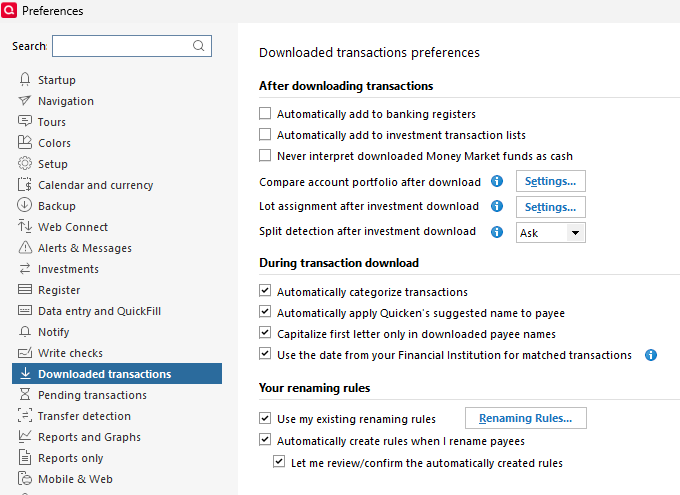
I have used renaming rules for years without problem, but within the last month or two they seem to have stopped working for renaming payees during the download. I have the option selected to Automatically create rules when I rename payees, and Let me review/confirm the automatically created rules. But I have recently renamed a couple of payees on multiple occasions, and it has stopped creating a new rule and asking me to confirm it.
It may be that it started after I went through my list a few weeks ago to remove or correct some outdated rules. At the same time, I removed a lot of Memorized Transactions that were no longer needed.
One of the failed rules involves a Payee that is downloaded with a hyphen at the beginning (-akvaruom), which is supposed to rename to Akvaruom, but it does not. I tried manually adding -akvaruom, but it wouldn't add to the existing Akvaruom entry. The transaction downloads as -akvaruom without renaming.

I am using R66.28 27.1.66.28
Comments
-
Hi @tspencer,
Thank you for taking the time to contact the Quicken Community and for sharing the screenshots. They are very helpful!
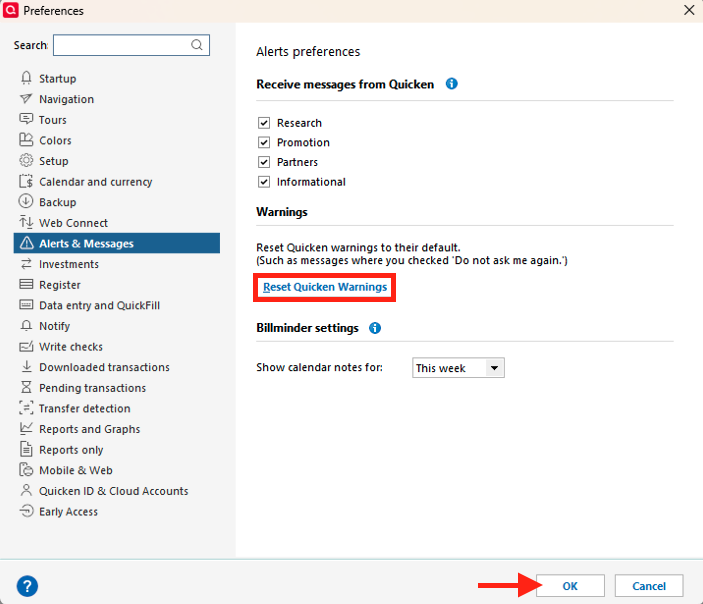
If you haven’t tried this yet, I recommend resetting Quicken warnings.
To do so:
- Go to Edit > Preferences
- Click Alerts & Messages
- Select Reset Quicken Warnings
Once completed, please sign out and sign back in:
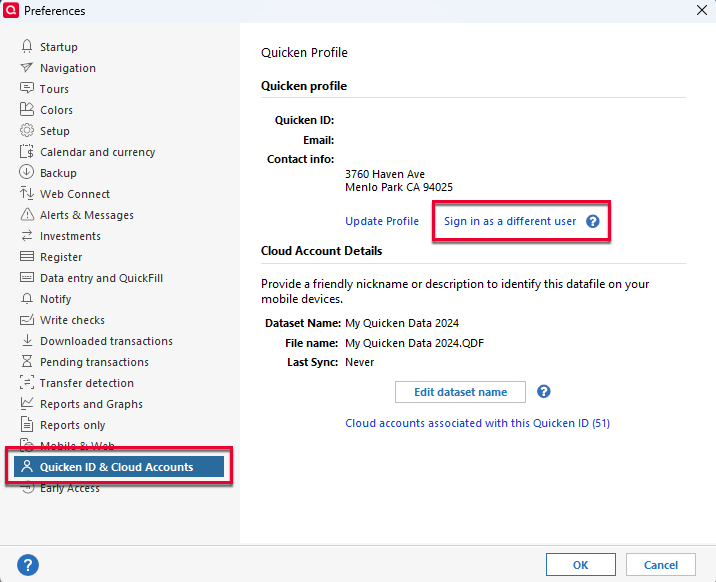
- Go to Edit > Preferences
- Select Quicken ID & Cloud Accounts
- Click Sign in as a different user
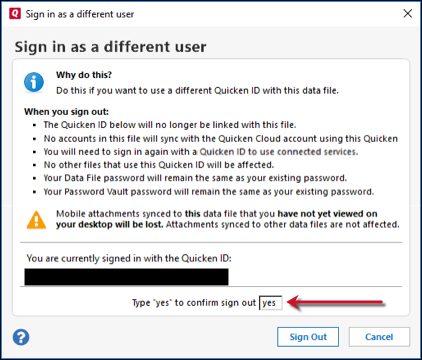
- Type yes to confirm and sign out
- Then sign back in.
Please try creating a renaming rule again to confirm whether the pop-up message asking for confirmation appears. Please note that rules apply only to future downloads and do not affect existing transactions. If this issue is occurring with new downloads where the rule is not being applied, please let me know so I can share additional troubleshooting steps.
I look forward to your reply!
Quicken Carlos
Make sure to sign up for the email digest to see a round up of your top posts.
0 -
Hi @tspencer,
I just wanted to follow up since I haven’t heard back from you. I’m checking in to see if you still need assistance.
Quicken Carlos
Make sure to sign up for the email digest to see a round up of your top posts.
0 -
Used to be that when I would change the Payee name of an accepted transaction, it would pop up a window asking me if I wanted to create a new Renaming Rule. This no longer happens, starting w/an update in early 2026. The pop-up included an option to select keywords from the downloaded Payee Name so I could "fine-tune" the Renaming Rule. I have all of the settings like this:
Frustrated w/this I Reset Quicken Warnings, Signed in as a Different User as per this post.I logged back in, Renamed an existing Accepted Payee Name, and still nothing. No popup to save a new Renaming Rule. Quicken broke it, but won't admit it.
I also had a half hour shared-screen session w/Quicken Help and they had no clue why it wasn't working and their only solution is to manually enter each Renaming Rule. That's not the answer.
[Edited - Readability]
0 -
Hello @QnkFox,
Thank you for letting us know you're seeing this issue. Since this started shortly after your program was updated, I recommend checking to make sure your preferences haven't changed. To do this, navigate to Edit>Preferences>Downloaded transactions.
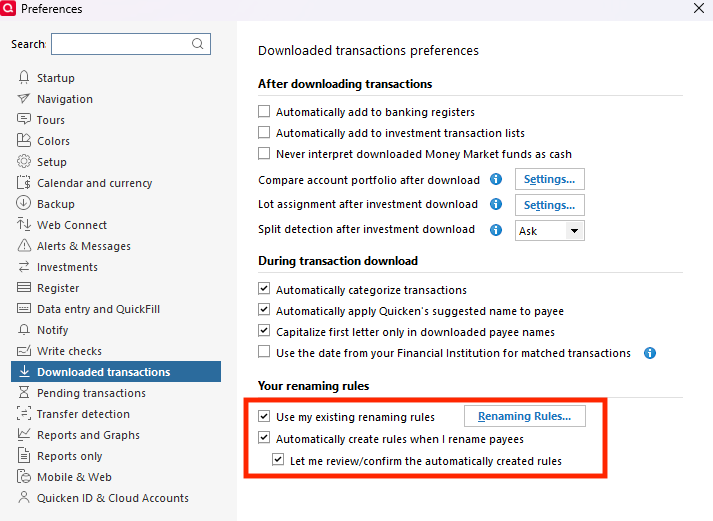
If your preferences were changed, please revert them and verify whether that resolves the issue.
I hope this helps!
Quicken Kristina
Make sure to sign up for the email digest to see a round up of your top posts.
0 -
Hi Kristina, As another check, I toggled those 3 Renaming Rule settings off restarted Quicken, toggled them on and restarted Quicken again, but still there are no Renaming popups.
0

