Have multiple accounts, one won't reconcile

Answers
-
Two things can prevent transactions from showing up in the reconcile window even if the transaction data is before the statement date you entered.
Transactions that are already marked reconciled will not be included.
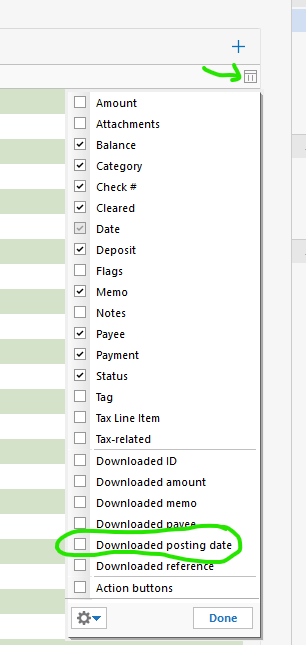
The second is if the posting date (which is the date that was downloaded from the financial institution) is after the date you entered for statement ending date.
If you click on this menu and select Downloaded posting date, you can see if that is the case.
 0
0 -
Comments inline below:
Two things can prevent transactions from showing up in the reconcile window even if the transaction data is before the statement date you entered.
Transactions that are already marked reconciled will not be included.
Transactions are not marked reconciled
The second is if the posting date (which is the date that was downloaded from the financial institution) is after the date you entered for statement ending date.
Posting date is before the statement ending date.
If you click on this menu and select Downloaded posting date, you can see if that is the case.
Not sure how to get the menu referenced but I don't download transactions, I still enter manually.
0 -
Hi @Robert Baskerville,
Thanks for your reply!I wasn’t able to replicate the issue on my end, so to better understand what’s happening, could you help me by answering a few questions?
- When was the last time you were able to reconcile the account without any issues?
- Are the transaction dates correct as they appear on your statement (Month/Day/Year)?
- Are the transactions within the last 30 days, or are they older than that?
- Is your Quicken file being backed up or synced by any third-party services like Carbonite, OneDrive, or Backblaze?
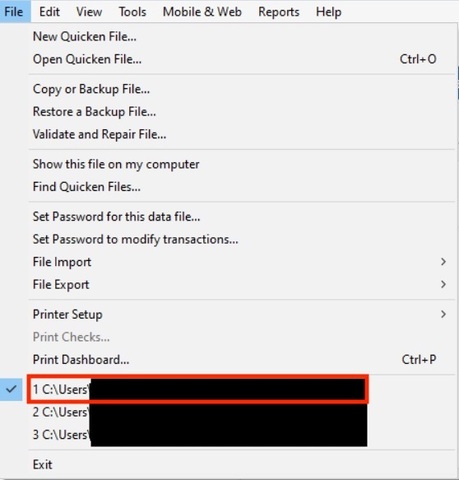
- Where is your Quicken data file located? To check, please open Quicken and go to File. At the bottom of the menu (above the Exit button), the file with the check mark next to it is the one currently open. Please share the full file path shown there.
I look forward to your reply!
Quicken Carlos
Make sure to sign up for the email digest to see a round up of your top posts.
0 -
I just wanted to follow up since we haven’t heard back from you. I’m checking in to see if you still need assistance.
Quicken Carlos
Make sure to sign up for the email digest to see a round up of your top posts.
0 -
Thanks to "Quicken Carlos" for replies. I've had some things going on keeping me from checking here. Before I answer the questions inline I thought I would add another tidbit. This account is the account with the least activity, sometimes months between transactions so getting the reconcile date up to current date at times was interesting.
Here are the questions with my answers bolded inline:
- When was the last time you were able to reconcile the account without any issues?
- December 2024
- Are the transaction dates correct as they appear on your statement (Month/Day/Year)?
- I enter manually, tbh sometimes the date on the receipt don't match the transaction date when I reconcile. But this doesn't matter on other accounts.
- Are the transactions within the last 30 days, or are they older than that?
- December 2024-January 2025 and March-April 2025 had transactions and so were within the 30 day window. No transactions in February 2025 statement and no transaction for May 2025.
- Is your Quicken file being backed up or synced by any third-party services like Carbonite, OneDrive, or Backblaze?
- I do manual backups and store online on desktop and near online in a thumb drive
- Where is your Quicken data file located? To check, please open Quicken and go to File. At the bottom of the menu (above the Exit button), the file with the check mark next to it is the one currently open. Please share the full file path shown there.
C:\Quicken Backups
Hope this helps,
0 -
Thank you for your reply and for providing the details.
It sounds like the transactions are present in your Quicken register; however, they may not appear in the reconciliation screen because they fall outside the statement period you are currently reconciling.
The reconciliation screen only displays transactions that fall within the date range of the statement you selected. If a transaction has been entered in the register but belongs to a different statement period, it will remain in your register but will not be included in that reconciliation view.
I suggest reconciling month by month using your bank statements. I also recommend ensuring you are using the correct statement dates so that all relevant transactions are included.
For example, if you are reconciling your April statement (April 1–April 30), Quicken will only display transactions dated within that period in the reconciliation screen. Therefore, if a transaction was entered on March 30 but cleared on April 2 and does not belong to the selected April statement period, it will not appear in the reconciliation screen even though it is still recorded in your register.
You can also review our support article on Reconcile Troubleshooting for additional guidance.
I hope this helps! Let us know how it goes!Quicken Carlos
Make sure to sign up for the email digest to see a round up of your top posts.
0 -
I make sure that the statement ending date is the current statement but the transactions during that statement show up on the register but not the reconciliation window.
0 -
Thank you for following up.
Since you have verified the ending date and confirmed that the transactions are not marked as reconciled, and based on your description, this may indicate an issue with the credit card account or the file itself.
I recommend first creating a backup file before continuing with any troubleshooting steps.
Once the backup is created, please validate your file:
Go to File > Validate and Repair File
Check Validate file
Click OK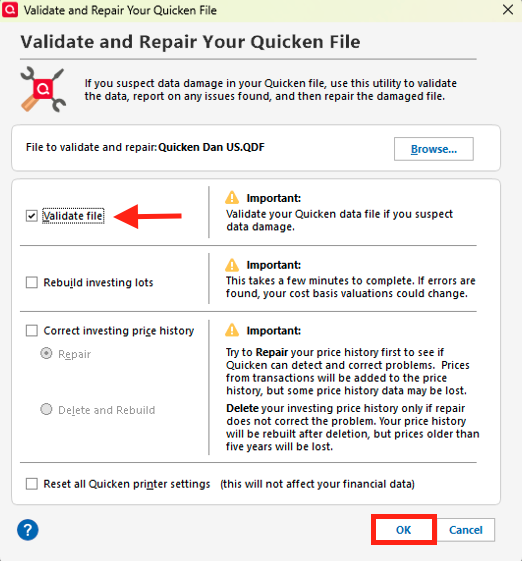
When the process completes, review any reported errors and then try reconciling again.If the transactions are still missing, I suggest creating a new manual account and moving the transactions from the existing account.
To do this:
- Click the “+” sign in the upper-left corner.
- Select Offline Accounts
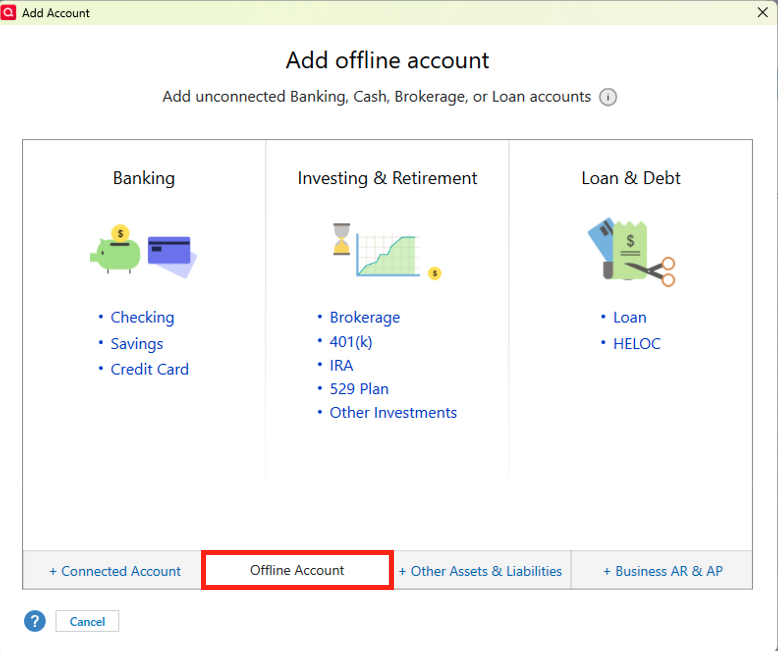
- Choose the account type
- Enter a custom name and follow the prompts to create the account
Once the new account is created:
- Go to the original account
- Select the transactions using Ctrl + Shift
- Right-click and choose Move Transaction(s)
- Select the new account from the dropdown menu
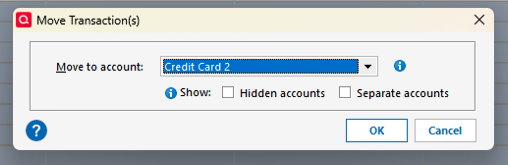
Then try reconciling again.
Please let us know how it goes!
Quicken Carlos
Make sure to sign up for the email digest to see a round up of your top posts.
0 -
Validated file (I had done this multiple times before) with the following results:
File: "C:\Quicken Backups\BaskerAfterRestoreToFixTabsProblem"
"QDF:
Validating your data.
No errors.QEL:
No read errors.QEL:
All internal consistency checks passed.[Mon Apr 27 09:05:25 2026]
Corrected scheduled transaction: Safeco Car & Umbrella Insurance
1 scheduled transactions corrected
Maximum security reference: 26, number of securities: 26.
All security references are within the normal range.Validation has completed."
Then backed up file
Then created new account. I think I'm gonna wait until I have new transactions to see how it goes before I move all the transactions from old account to new.
0 -
Thanks for following up and for trying the steps above.
If you run into any issues, please don’t hesitate to reach out to us again.
We are happy to help!Quicken Carlos
Make sure to sign up for the email digest to see a round up of your top posts.
0

