Quicken very slow to open and even slower to change data files

For the last few days, Quicken is very slow to open the first file. It freezes for 50 seconds when I use File to open another data file.
Cloud backup used to show a popup that it was backing up with a percentage completed, but that's absent now. I could also change data files within a few seconds. even while it was backing up the previous data file.
Disabling cloud backup shortened the time to changes files to 5 - 15 seconds.
Comments
-
Hello @Ray,
Thanks for reaching out to tell us about this issue!
To better assist you, could you please provide the following details?
- Where is your Quicken data file stored? Is it on your local hard drive (C: Drive) or a cloud-based/external drive (e.g.: OneDrive, DropBox, USB, etc.)?
- Please provide the exact file path as shown in the example below.

- Please provide the exact file path as shown in the example below.
- Have you attempted any troubleshooting steps so far? If so, what were they?
- When did this issue first start occurring?
- Were there any significant changes to your system or software before the issue began (updates, new installations, etc.)?
Your answers will help us diagnose the issue more effectively.
Looking forward to your response!
-Quicken Anja
Make sure to sign up for the email digest to see a round up of your top posts.0 - Where is your Quicken data file stored? Is it on your local hard drive (C: Drive) or a cloud-based/external drive (e.g.: OneDrive, DropBox, USB, etc.)?
-
I am having the same problem as Ray. It started about a one and a half months ago. My data file is located on a SSD D drive and the program is on a TB C drive. (D:\Documents\Quicken Current) and (C:\Program Files (x86)\Quicken).
I have activated the "Performance" view of the "Task Manager" while loading Quicken, the results are attached in the annotated PDF. Due to the loading of Quicken, I can not take screen shots of the other performance indicators.
There were only program updates to both Quicken and Windows 11, no new installations.
In addition to long Quicken load times and second file loads, keyboard and mouse responses during loading are greatly slowed. While in Quicken and filling in category information from the keyboard, there is a very noticeable lag (2+ secs).
0 -
Hello @EJHoeft,
Thank you for letting us know you're also encountering this issue. You mentioned that the file is stored on the D drive and the program is stored on the C drive. It is recommended that you keep the program and file both on the same local hard drive.
Please make sure your Quicken file is closed, then move it to the C drive and open the file from that new location.
Please let me know how it goes!
Quicken Kristina
Make sure to sign up for the email digest to see a round up of your top posts.
0 -
- My files are in C:\Users\ray\Documents\Quicken. Support has told me storing them on another drive can be a problem. This makes no sense to me unless the drive isn't local. I update 4 data files. Once I have a file open, I switch to another by selecting it from the 4-file dropdown list in File. Today, switching to a different one took 5 seconds, but switching back took 33 seconds.
- I do know that when opening Quicken it uses both the browser and internet. If the internet is down, it takes around half a minute to open. When closing a file, either by switching or closing Quicken, it can create backups depending on Edit > Preferences, Backup. Local HD backup of my largest file, 2.8 GB, completes in less than 3 seconds. Backup to the cloud today took 45 seconds. (My download/upload speeds are 700/60 Mbps.)
I've disabled cloud backup in all data files. I also have Mobile & Web sync preferences OFF. I haven't received a Quicken update for a few weeks. I have a high-end system and it's not the cause. Quicken has made changes, as the cloud back up popup disappeared a few days ago.
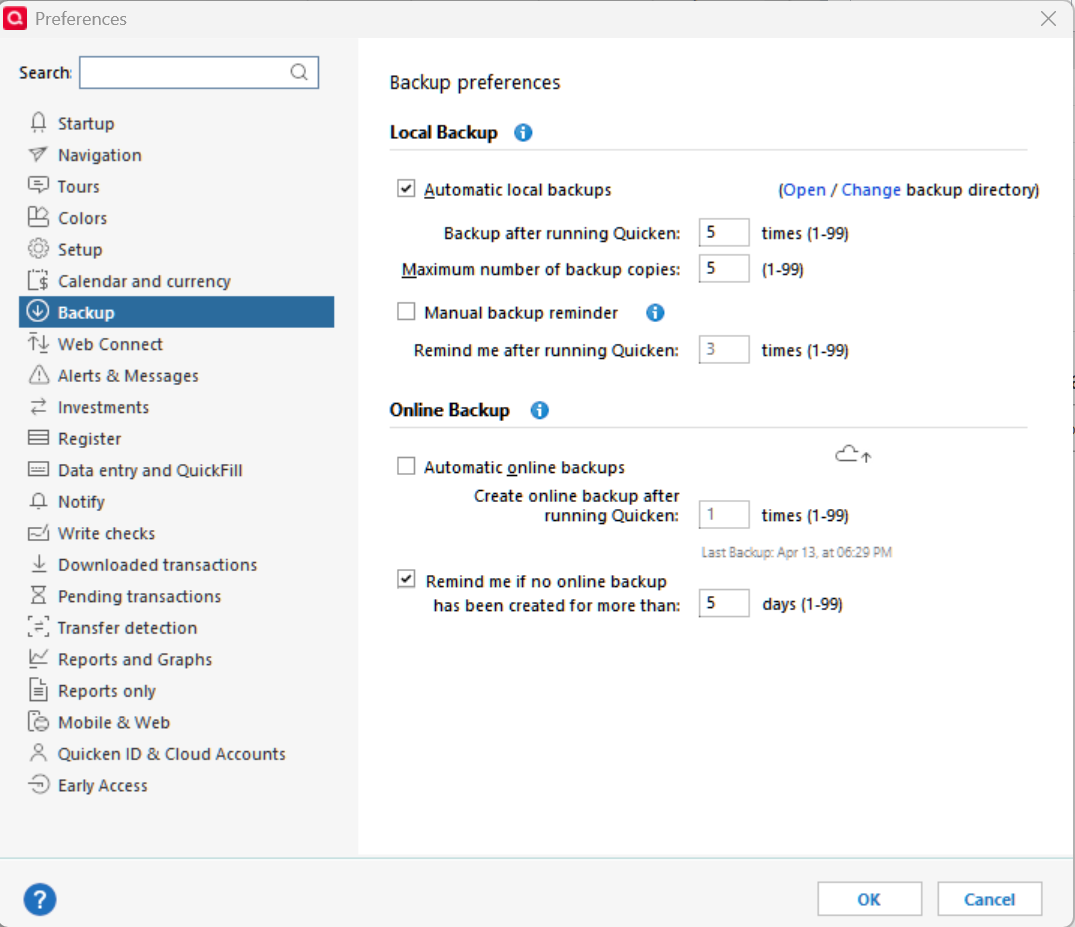 0
0 -
@Ray Thanks for following up! Before you perform any troubleshooting, please be sure to save a backup (just in case).
Have you tried uninstalling/reinstalling Quicken? Please refer to the following support articles for instructions on uninstalling here and reinstalling here.
However, after you have uninstalled and before you proceed with reinstalling, please open your Windows File Explorer and navigate to This PC > C: Drive > Program Files (x86) and delete the folder titled "Quicken" (doing so does not affect your data files).

After you have deleted this folder, go ahead and try reinstalling.
Let us know how it goes!
-Quicken Anja
Make sure to sign up for the email digest to see a round up of your top posts.0 -
Unfortunately, this isn't a high priority in my many problems with Quicken. It currently takes about 5 seconds to open Quicken. Closing it takes from about 5 to 15 seconds, likely from writing to the cloud. I've been told not to switch account within Quicken as it might corrupt the cloud which has happened to me.
0


