Voya - Can Login but Quicken Cannot Find Accounts to Add

I've had issues with accessing Voya since January 2026 and am now finally frustrated enough to ask for support. The Quicken version I'm using is Quicken Classic Deluxe - Version 8.5.2 (Build 805.60133.100) on Mac OS 26.4.1
Quicken downloads stopped in late January - I thought because my company was getting ready to update with year end info. Not unusual. What is unusual is I've not been able to receive downloads since then. To resolve the issue I've followed all the standard troubleshooting as recommended in numerous boards and chats. I've disconnected accounts. I've reset cloud links. I've changed default browsers. I've cleared cookies. I've cleared passwords and logged in 'fresh'. I've changed the default browser. .All of which leads to getting through setup and a connection made (per screenshots) only to then get the same message that Quicken couldn't find any accounts to add (per screenshots). The accounts are most definitely there - that I've confirmed. But Quicken can't find them.
Attached is everything I've got to help resolve the issue. I really want to get my accounts back to downloading. Help!
Answers
-
Hello @elle dubya,
Thanks for the detailed information and for outlining the troubleshooting steps you’ve already completed.
This is a known issue (CTP-16515) which has been reported by multiple users and is currently under investigation. At this time, there is no ETA for a resolution.
To assist with the investigation, please submit your logs via Help > Report a Problem in Quicken and include screenshots of what you’re seeing, if possible. These reports are very helpful in tracking down the root cause.
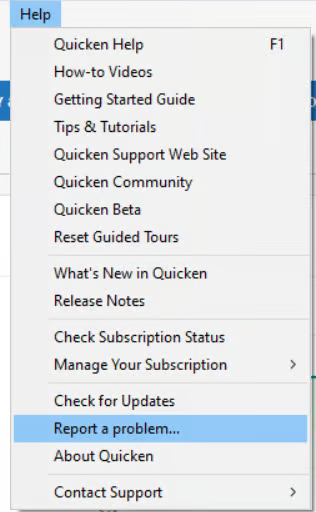
Please let us know once you have done so! Thank you for your patience.
-Quicken Anja
Make sure to sign up for the email digest to see a round up of your top posts.0 -
Done - crossing fingers maybe the info I'm sending will finally resolve the problem. I really miss my Voya downloads.
0 -
Thanks for submitting! Your details and files have been added to the ticket.
Thank you!
-Quicken Anja
Make sure to sign up for the email digest to see a round up of your top posts.0 -
I am having the same issue. I removed my VOYA account from quicken then tried re-adding it. I can connect to VOYA and it says my account is authorized for quicken. When I am sent back to quicken, I get a "no account found to add"
0 -
I'm having the same issue - have for the past several weeks, started some time in Feb 2026. I have Quicken Classic Premier desktop on a Mac. Just to register with the moderators that yet another person is having the same issue. I've also done all the tips the OP mentioned. Resulting message is "no account found to add".
0 -
Me too. Same issue. I can authorize my accounts but in the last stage it can't find any accounts
0 -
Same issues. I called Voya, and they said that Quicken is no longer an authorized partner to allow transaction downloads. I asked what software is, and they did not share this. I hope this is only a temporary issue.
0 -
I'm having the same issue. Running the same version of Quicken and same Mac OS version as elle Dubya.
0 -
Hello everyone,
Thank you all for continuing to share your experiences and updates.
I took a look at the current status of this issue, and it is still an actively being worked on. At this time, the investigation involves our service providers and/or the financial institution, which means resolution is dependent on updates outside of Quicken directly.
While we don’t have an ETA to share yet, the issue remains under active investigation.
If you haven’t already done so, please submit your logs via Help > Report a Problem in Quicken. Be sure to include screenshots and a brief description of what you’re experiencing—these reports help contribute to the ongoing investigation.
We appreciate your continued patience.
Thank you!
-Quicken Anja
Make sure to sign up for the email digest to see a round up of your top posts.0 -
@Quicken Anja Any updates on this?
0 -
Hello @cmeyer76,
Thanks for checking in.
At this time, there are still no new updates to share. The issue remains open and under active investigation, and as mentioned previously, it involves our service providers and/or the financial institution, so resolution is dependent on updates from those channels as well.
We understand this has been ongoing and appreciate your patience while it’s being worked on.
Thank you!
-Quicken Anja
Make sure to sign up for the email digest to see a round up of your top posts.0 -
Windows desktop, Quicken subscription. Last time it was able to download from Voya was April 29, 2026. Not anymore. When I try to reset my account, I locks up Quicken to where I have to go to Task Manager and end the process. I haven’t tried to deactivate.
Financial Institution: Voya Institutional Plan Services.
Just my $0.02.
0 -
Hello @RichardM3,
Thank you for sharing your experience.
The ongoing Voya issue involving accounts not being found after authorization remains under investigation under ticket CTP-16515. However, the Quicken program freezing during the reset process might be a separate issue.
To help us better understand what's happening, could you please clarify if Quicken only freezes when attempting to reset the Voya account, or if you see similar freezing behavior with any other financial institutions/actions as well?
Also, could you please provide the following details:
- Where is your Quicken data file stored? Is it on your local hard drive (C: Drive) or a cloud-based/external drive (e.g.: OneDrive, DropBox, USB, etc.)?
- Please provide the exact file path as shown in the example below.

- Please provide the exact file path as shown in the example below.
Thank you!
-Quicken Anja
Make sure to sign up for the email digest to see a round up of your top posts.0 - Where is your Quicken data file stored? Is it on your local hard drive (C: Drive) or a cloud-based/external drive (e.g.: OneDrive, DropBox, USB, etc.)?



