"Matching" transaction no longer match existing entries
Answers
-
Hello @cyberphile & @burgie66,
Thank you for adding to this discussion.
Thank you for sending in your log files. I have added them to the ticket.
Thanks again!
Quicken Alyssa
Make sure to sign up for the email digest to see a round up of your top posts.
0 -
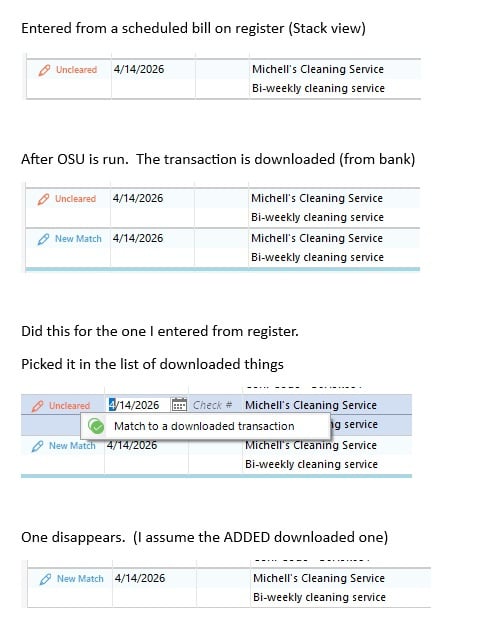
@Quicken Kristina To add some more detail, the problem @Axe21 described below about having to manually delete after matching does NOT happen to me. If I "match to a downloaded transaction" on the unmatched entered one, the downloaded (and "matched") one goes away. This issue only exists (for me) for register entries from the re-occuring bills (or things with reminders), not one off entries that I put in registers.
Attached is a pic from today of how it went down.
I see that a seemingly duplicate issue managed by @Quicken Anja is currently open.
I have done the "report a problem to quicken" thing.
 0
0 -
Thank you for your reply,
Thank you for sharing that additional information! I'm glad to hear that you're able to remove the duplicate transaction by manually matching it. It is interesting that it showed as a new match before you manually matched it.
Thank you!
Quicken Kristina
Make sure to sign up for the email digest to see a round up of your top posts.
0 -
For kicks & giggles, I decided to go through each of my banking/credit institutions and reauthorize each login & OSU download permissions.
Quicken finally changed the date for "last download March 4" to "last download April 18" but that's the only improvement I observed. (I've downloaded transactions every few days from March 4 to April 18 and in most cases, downloaded the same transactions each & every time since March 4.) In other words, it's still broken.
Tonight's OSU downloaded most, if not all, of my transactions across all banks for the last 1.5 months. AGAIN. As well as some Target credit card transactions that were over 6 months old, already recorded, cleared & reconciled. OSU deleted the transactions already in placed, redownloaded them and marked them "new".
Submitted logs for multiple accounts.
0 -
Thank you for providing additional context.
The escalation ticket for this issue is still open and being investigated. We do not have an ETA as to when it will be fully resolved.
We apologize for the inconvenience in the meantime, and appreciate your continued patience.
Thanks again!
[CTP-16657]
Quicken Alyssa
Make sure to sign up for the email digest to see a round up of your top posts.
0 -
Same problem for me for the last month or so. Now running Quicken Classic Deluxe, R67.7/Build 27.1.67.7. It happens with expense entries posted from Bill and Income Reminders. Update is run, transactions are downloaded and shown as matched, but when accepted they create a new entry without an expense category. To fix this I mark the original transaction as cleared and delete the new entry. This happens with Chase, Citibank and Amex credit cards as well as UMB Bank.
0 -
@JRR,
Thank you for adding to this discussion and sharing how you have been working around this issue.
If you would like to contribute to the investigation of this issue, you can do so by going to Help>Report a Problem from within your Quicken.
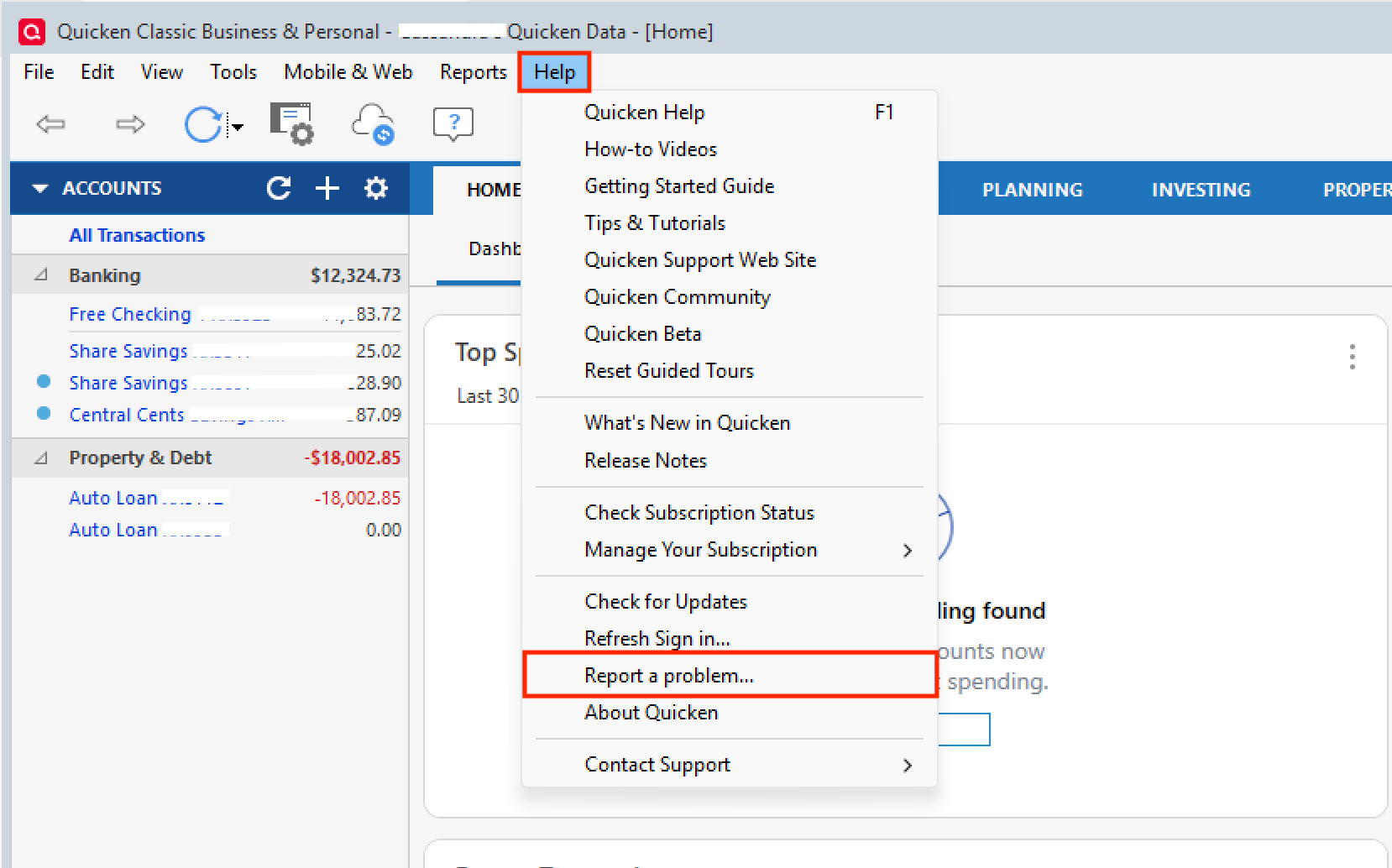
Once there, leave all log files checked. Adding a sanitized data file can be helpful, too, but it is not required. Click Send to Quicken once you are done.
If you do send anything over, please let us know so we can add it to the escalation ticket.
Thanks again!
[CTP-16657]
Quicken Alyssa
Make sure to sign up for the email digest to see a round up of your top posts.
0 -
I have been seeing the same issue on my Quicken. This is happening for weeks including the new version 27.1.67.7. It is very annoying and looking forward to this being fixed.
1 -
Thank you for chiming in!
If you would like to contribute to the investigation of this issue, please follow the steps here to do so:
Thanks again!
Quicken Alyssa
Make sure to sign up for the email digest to see a round up of your top posts.
0 -
This morning I did the OSU and the bills entered from the stack view / calendar were properly matched with downloaded transactions. This was CapitalOne where it worked. I can't say it worked as I wasn't looking for it to work, but noticed that the transactions were matched. I'll keep an eye on it for future OSUs.
1 -
Quicken Alyssa
Make sure to sign up for the email digest to see a round up of your top posts.
0 -
@Quicken Alyssa Well, this morning back to the usual in my Schwab Checking. Unsure if last time was a fluke or the account, but this morning downloaded a transaction and didn't automatically match to my already-in-register-from-calendar transaction.
1 -
I am sorry to hear the issue resurfaced.
The escalation ticket is still open and being worked on. I hope they can find a resolution to this soon.
Thank you!
[CTP-16657]
Quicken Alyssa
Make sure to sign up for the email digest to see a round up of your top posts.
0


