Bank America Accounts CC-505/FDP-105 - No Quicken Connection to Bank America (Windows & Mac)

Bank America accounts not connecting. Did reset. sign in process advised Bank America needed my consent to share data. went through consent reauthorization process successfully when directed to Bank America website with message that accounts had been reauthorized and was being redirected to Q;uicken. THEN RECEIVED MESSAGE THAT SIGN IN FAILED. It appears Quicken connection to Bank America is being blocked. I am running Quicken Classic Business & Personal R67.7 Build 27.167.7 on Windows 11
Comments
-
Ditto…..
Actually I didn't reset anything.
According to the info displayed after OSU the server took an extended coffee break.
My other 7 Financial Institutions are updating just fine.
You Don't Have to Have a Point, To Have A Point [Oblio, The Point!]
I sync with OneDrive at my own risk….. ⚠️
0 -
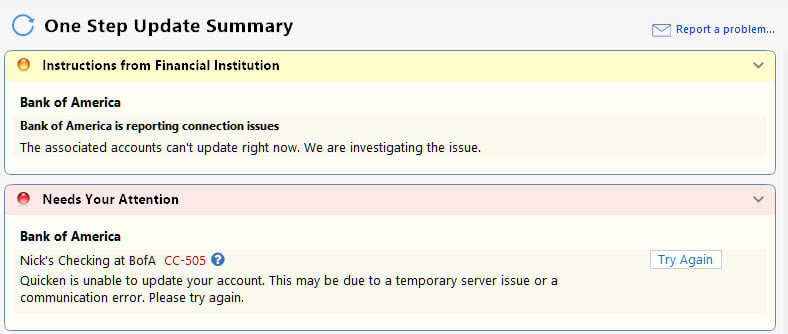
I receive this message:
"Sign in to Bank of America failed. Try again
Sorry, the sign in failed due to time our or a connection error.
Select Sign in to authenticate via your web browser."I receive the same message for every attempt to sign in, even though BOA returns this message for each attempt. " Your accounts have been authorized successfully!
You will now be redirected back to Quicken. If are not redirected in a few seconds, you can close this window and return to Quicken."0 -
I cannot connect to Bank of America either. What is going on?
0 -
Same here. Running Quicken Mac v9.0.1
0 -
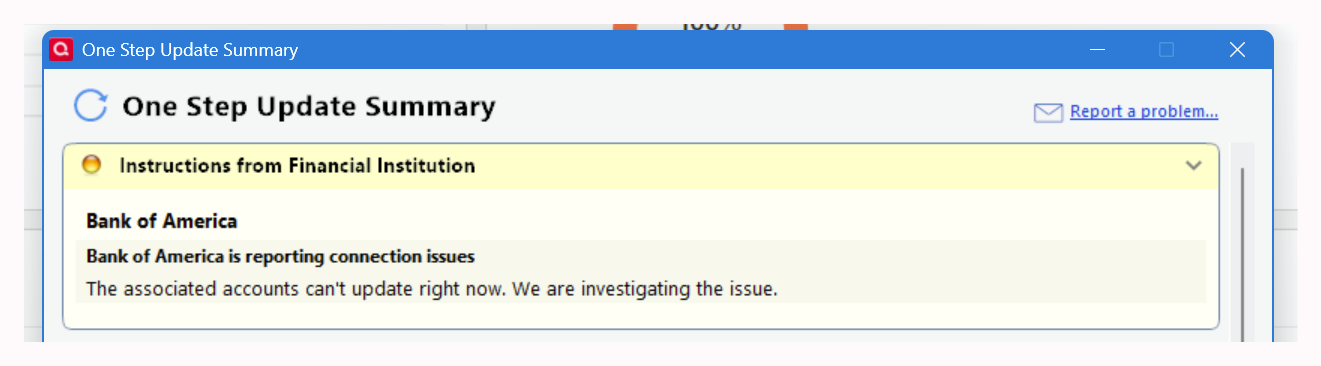
Got the same error. I find the "Instructions from Financial Institution" interesting as I've never seen that particular message before.
I logged directly into my Bofa account. It did ask for 2FA with the option to "trust" this device. I checked it. Then tried again with the same result. Did not bother to reauthorize as it's a pretty static account and no new transactions since my last OSU run (yesterday). I will simply wait and try again later.
 1
1 -
Problem Reported as requested.
You Don't Have to Have a Point, To Have A Point [Oblio, The Point!]
I sync with OneDrive at my own risk….. ⚠️
1 -
Hello All,
Thank you for taking the time to report this issue!
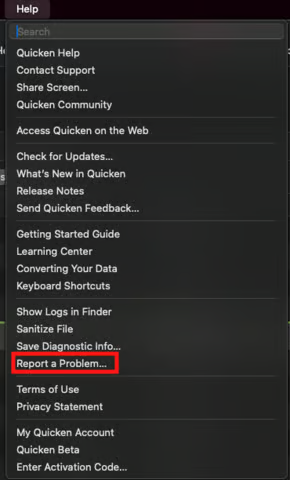
We will be forwarding this issue to the proper channels to have this further investigated. However, we request that you please navigate to Help > Report a problem within your Quicken program and submit a problem report with log files and screenshots attached in order to contribute to the investigation.Windows:

Mac:
It would also aid the investigation to include a sanitized file when submitting the problem report. A sanitized file is a data file that removes personally identifiable information so you can comfortably share this file with the Quicken team.
While you will not receive a response through this submission, these reports will help our teams in further investigating the issue. The more problem reports we receive, the better.
Please let us know once that's done, and we apologize for any inconvenience in the meantime! Thank you.
(CBT-1127)-Quicken Anja
Make sure to sign up for the email digest to see a round up of your top posts.0 -
That's what I did, hopefully you see the official problem report
You Don't Have to Have a Point, To Have A Point [Oblio, The Point!]
I sync with OneDrive at my own risk….. ⚠️
1 -
submitted
0 -
I've had a reliable connection to BoA for 2 years. Now this morning it would not download transactions.
Max Miller, Ph.D.
Quicken Mac
0 -
Same issue here. Sent a problem report…
Quicken Classic - R67.7, Windows 11 PRO current on updates
My data file is NOT being synced nor backed up.
0 -
Same issue (MacOS - CC-505) - also reported.
0 -
Same issue, started today Wednesday, May 6, 2026
0 -
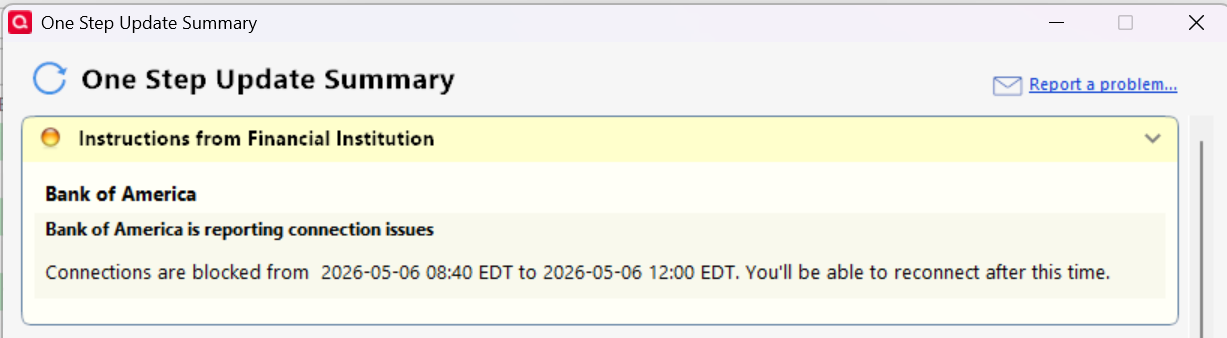
I just tried again for "fun" and got an updated "Instruction" message. Note, the times listed are Pacific Daylight Time (my curent timezone). Your message may vary.

I'll try again later today.
0 -
I just did the same thing and got a similar message, in EDT. So supposedly after 12:00 EDT I guess it will work?🤔
Quicken Classic - R67.7, Windows 11 PRO current on updates
My data file is NOT being synced nor backed up.
2 -
I may give it an extra hour or so. Often when I get these "connection" related errors, I wait a few hours and try again. Most times, the problem clears up by the next morning.
0 -
Yep, I agree
Quicken Classic - R67.7, Windows 11 PRO current on updates
My data file is NOT being synced nor backed up.
0 -
Hello again,
Thank you to those who have already taken the time to submit problem reports—we really appreciate it. Those reports are very helpful for our teams in digging into what’s going on.
This issue has been escalated, and our teams are aware and actively working on it. At this time, we do not have an ETA for resolution.
We understand how disruptive this is, especially when it’s affecting multiple accounts, and we appreciate your patience while this is being investigated. We’ll share updates here as soon as more information becomes available.
Thank you!
-Quicken Anja
Make sure to sign up for the email digest to see a round up of your top posts.1 -
Also affecting Merrill Lynch.
Quicken Classic - R67.7, Windows 11 PRO current on updates
My data file is NOT being synced nor backed up.
0 -
Hello again,
Thank you again for all the reports and updates—it really helped us get this in front of the right teams quickly.
We now have a Community Alert set up for this issue. For the latest updates and any new information as it becomes available, please refer to the Alert.
We recommend bookmarking the Alert so you’ll be notified of any progress or changes.
We appreciate your patience while this is being worked on! Thank you.
-Quicken Anja
Make sure to sign up for the email digest to see a round up of your top posts.0 -
I have not received any error messages and my OSUs at 8:40 am and again at 12:35 Eastern time were successful, but the FI for my accounts has been changed to the dreaded zzz-Bank of America- All Other States.
QWin Premier subscription0 -
I just ran OSU and BofA connected without error. The FI still shows Bank of America (no zzz) with EWC+.
0 -
FI from connections today continue to display Bank of America EWC+
All is well for the moment!
You Don't Have to Have a Point, To Have A Point [Oblio, The Point!]
I sync with OneDrive at my own risk….. ⚠️
0 -
Hello All,
Thank you all for taking the time to report this issue!
The Community Alert has been marked as Resolved. If you’re still encountering the issue, we recommend reaching out to Quicken Support for further assistance.
Thank you!
-Quicken Anja
Make sure to sign up for the email digest to see a round up of your top posts.1 -
Bank of America still not downloading transactions. Had reset my Bank America accounts in Quicken and went through Bank America sign in process completely, relinked all Bank America Accounts to Quicken and received message that my accounts had been authorized successfully. However no transactions downloaded and now the error returned during attempted download is 506. —-
0 -
retracting my comment posted at 4:45PM , tried again, reset all Bank America accounts again and reauthorized all accounts successfully. Transactions downloaded and no error 506. I think I mapped one of the accounts to Quicken incorrectly in the previous attempt. So all good
0 -
As of 8:20 pm Eastern time, I was able to deactivate and Add/Reauthorize/Relink my BoA accounts successfully.
The FI has changed from xxx-Bank of America-All Other States to Bank of America. All went smoothly; the only different thing I noticed was that when relinking it no longer says "Downloaded transactions for the past <huge number> days, now it says 0 days for the accounts that last had new transactions to download today and 5 days for the account that last downloaded new transactions on 5/1. There were no duplicates and the starting balances were not changed.
QWin Premier subscription0 -
I did the whole Bank of America reauthorization and linked accounts but still seeing the CC-505 error. Please help
0 -
I also submitted a Help > Report a problem… request.
0