Hello @RickNY,
Thank you for reaching out to the Quicken Community, though I do apologize that you are experiencing this issue.
If you don’t mind, could you please provide a screenshot of the error message you described receiving? If needed, please refer to this Community FAQ for instructions on how to attach a screenshot. Alternatively, you can also drag and drop screenshots to your response if you are not given the option to add attachments. Please remember to redact any personal information as needed.
I look forward to your response.
Hello @motjebben,
Thank you for reaching out to the Community and telling us about this issue. I'm sorry to hear you're running into this problem. When I check on our server side, it shows an error code CC-503, indicating that when Quicken tries to connect with the financial institution, the financial institution servers are saying the login info is incorrect. To troubleshoot this issue, first backup your file. Then, go to Tools>Account List. Look near the lower left of the Account List window. If you have hidden accounts, there will be a Show hidden accounts checkbox; check that box if it is there. Review the list. If it says "yes" in the Transaction Download column, that means Quicken thinks the account is connected.
Do you see any inactive or closed accounts that are still connected? If you do, please deactivate or close those accounts, then check to see if the active accounts are now able to successfully connect.
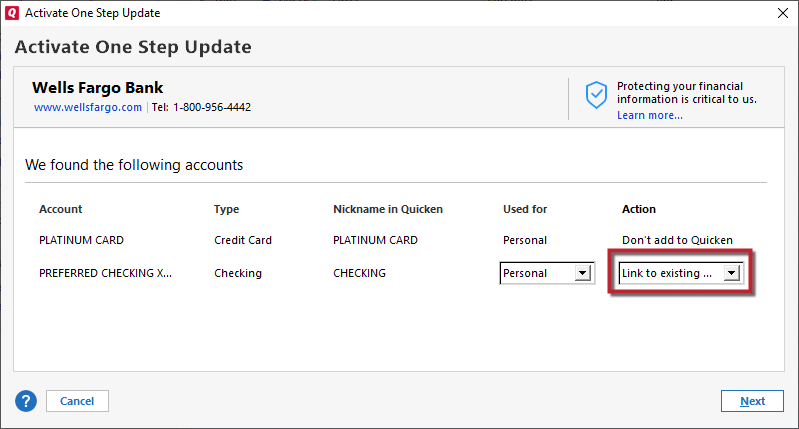
Verify on the financial institution website that your account is not locked and that you are using the correct login information. Then, in your Quicken, deactivate the problem accounts. Once you have deactivated those accounts, go to Edit>Add Account and search for the financial institution. Follow the prompts to reconnect your accounts. When you get to the Add/Link screen, check to make sure Quicken is seeing the correct nicknames to link your accounts to.
Thank you.
Thank you for your response,
Since the troubleshooting above did not correct the issue, I recommend that you contact Quicken Support directly for further assistance as they can walk you through troubleshooting steps in real-time and escalate the situation as needed. The Quicken Support phone number can be found through this link here. Phone support is available from 5:00 am PT to 5:00 pm PT, Monday through Friday.
I apologize that I could not be of more assistance!
Thank you for the update,
If the issue in Quicken persists after the issue on Payflex's website is resolved, please let us know.
Thank you for reaching back out.
Due to the nature of the error message that you are receiving, we recommend that you contact Quicken Support directly for further assistance as an escalation may be in order.
The Quicken Support phone number can be found through this link here. Phone support is available from 5:00 am PT to 5:00 pm PT, Monday through Friday.
I apologize that we could not be of more assistance.
I am having the same issue with connecting to PayFlex. This started about a week ago after Payflex stated requiring two factor authentication that doesn't seem to be an option to turn off.