How can I sync all account transactions on my desktop with my laptop?

The accounts appear to have the correct totals on my laptop using Quicken Classic online. The problem is two fold, first I can't access individual transactions in my brokerage checking account online. I see the correct totals but cannot see individual entries like I can for my credit card accounts. Second, on one credit card account I want to delete a duplicate entry but I cannot check the box next to the entry. Nothing happens. Any suggestions on how to refresh the syncing option?
Answers
-
Hello @CraigT,
Thank you for letting us know you're encountering these issues. The companion apps (Quicken on the Web and Quicken Mobile) will show investment accounts, but not the transactions.
Are you encountering the problem with being unable to select the duplicate entry in Quicken Mobile or Quicken on the Web? Do you see this duplicate entry in the Quicken program on your computer, or only in the companion apps?
Are you trying to refresh the sync to Quicken Mobile app or to Quicken on the Web? Depending on which you are trying to sync, you may find one of these articles helpful:
I look forward to your response!
Quicken Kristina
Make sure to sign up for the email digest to see a round up of your top posts.
0 -
Quicken Kristina, I think you may have answered my question if I'm reading you right. My checking account is a money market checking account inside a brokerage account. You're saying that since it is brokerage it won't show transactions.
On the second issue, I'm trying to do Quicken on the Web. On my primary computer I clicked sync to mobile. I think I just didn't give it enough time to actually sync. I can see today that it resolved itself correctly.
I'm disappointed that I can't follow my mny mkt account remotely but I guess I can live with it.
Thanks for your quick response. Craig
0 -
@Quicken Kristina Does "no investment transactions" rule also apply if the "Show Cash in a checking account" option for taxable investments is used?
If not, then @CraigT you could turn that option on via TOOLS, Account List, click Edit adjacent to the taxable brokerage account and check YES next to that option.
A separate pseudo-checking account will be created with an account type of "Checking". It will contain all of the cash transactions that were previously in your brokerage account and, even though it doesn't really exist, it acts in Q as if it were a real checking account.
Q user since February, 1990. DOS Version 4
Now running Quicken Windows Subscription, Business & Personal
Retired "Certified Information Systems Auditor" & Bank Audit VP1 -
Thank you for your reply @NotACPA,
Great idea! I just tested it, and it seems to work, although there is one additional step required: You need to add the pseudo-checking account to the list of accounts that you sync with the cloud.
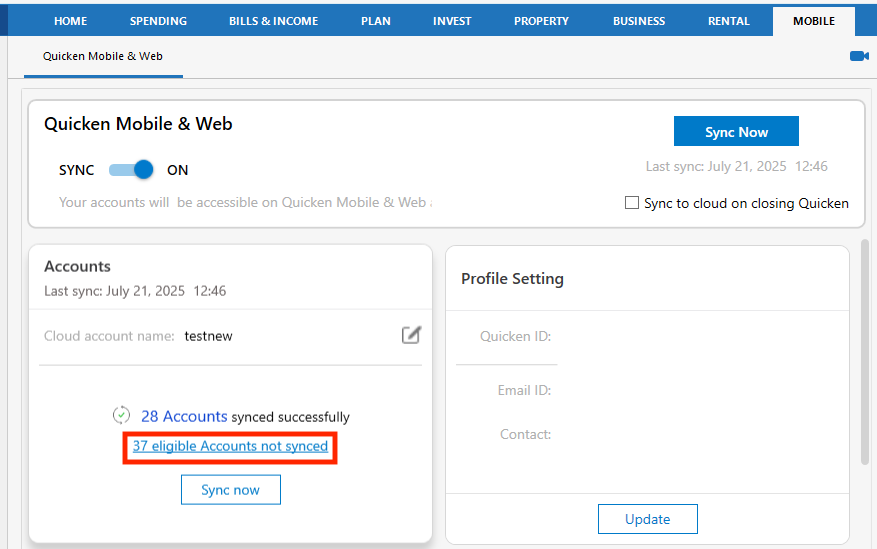
To do that, in the desktop application, click on the Mobile tab, then in the accounts section, click the blue link that says how many eligible accounts are not synced.
In the list of accounts that comes up, find the pseudo-checking account and select it. (It is listed with Checking accounts and Cash accounts.)
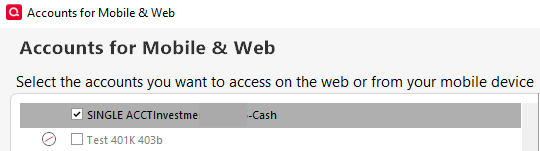
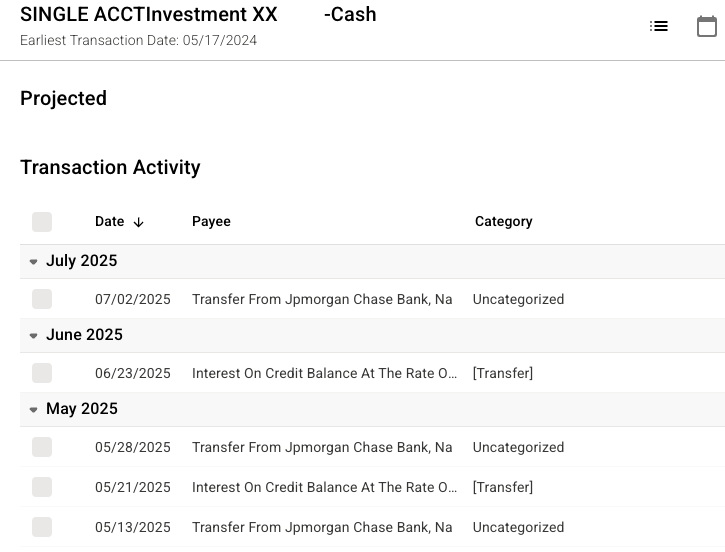
Then click the Update Accounts button and wait for it to finish syncing. Once the sync completes, you should be able to log into Quicken on the Web and view that pseudo-checking account.
Thank you!
Quicken Kristina
Make sure to sign up for the email digest to see a round up of your top posts.
0

