zzz-Fidelity Updates
Comments
-
OK, just had time to look and there is not COPY in Mac, just backup. So, no good.
0 -
This is a QWin discussion thread so my comments, for the most part, are related to QWin. There are some comments that are or can be applicable to QMac, as well, but you appear to have found out that making a Quicken Copy of a data file is not applicable to QMac and that is more than I could have confirmed.
The Quicken Copy function is different from the Windows copy function. Making a Windows copy makes an exact copy of the data file in just about every way. So the Windows copy will have the same Quicken file ID, the same Quicken Cloud Account ID, the same runtime.dat file and, if Mobile and/or Web are used, they will also be shared between the primary data file and the Windows copied data file. It can become quite risky to make and use a Windows copy of a data file while the original data file is still in existence and still being used because the two data files will cross-talk with each other on some things but not on others ultimately resulting in data corruption that might not be possible to fix.
A Quicken copy is a copy of the original data file but it has it's own file ID, its own Cloud Account ID and its own runtime.dat file. Also, the copied file will not have any access to the original file's Mobile and/or Web data. So a Quicken copy is a truly unique data file that will not cross-talk with the original primary data file.
When making a Quicken copy, the DC connection(s) usually remains intact. This is likely because the setup (login info) resides solely within the data file (in PW Vault). So, just open the copied file and run OSU to download the DC accounts, again. Sometimes (not often) I've needed to Reset a DC account but from my experience that is not the norm.
However, the EWC connections are always broken. I'm thinking this is because the setup resides not in the data file but in the original data file Cloud Account that the Quicken copy no longer has access to. So when the Quicken copy makes a new Cloud Account it does not have any of the EWC login and authorization information.
I've experienced mixed results with EWC+ accounts in Quicken copied files. Sometimes the EWC+ connection remains intact but other times it needs to be reauthorized. I'm thinking that's because it has something to do with security tokens being managed differently from EWC logins but I'm no expert on that.
In summary, a Quicken copy is not a backup file and is essentially a brand new unique data file that is not linked in any way to the original data file. So, yes, using a QWin copy will not destabilize your primary data file.
On the other hand, a backup file is essentially a copy (kind of like a Windows copy) of the original data file with all data and features left intact. So playing around with a restored backup file, even if it is renamed, can wreak havoc on your primary data file if you go back to using that.
Make sense?
Quicken Classic Premier (US) Subscription: R66.28 on Windows 11 Home
2 -
This sounds like something I will try once it looks like the EWC+ is working and Quicken announces a date for forced transition. This will help me get confidence that it won't be a disaster to switch connection methods (like it was when I mistakenly thought the "fix it flow" was mandatory and spent several days before I bit the bullet and restored a backup from before I switch — this whole fiasco was an incredible waste of time). I start an extended vacation in Asia in about 5 weeks and I really won't want to deal with problems while traveling (and half the trip is in China so that "great firewall" always presents many challenges especially logging into financial institutions most of whom really don't have business in China).
0 -
It does indeed. Interesting information. A shame no File Copy in Quicken Mac.
You know, I am thinking at this point I will just remove Wells from online billers and put the card in a drawer :) It has been too many problems.
Once again, apologies for getting off topic. But, once again, learned a bunch from @Boatnmaniac .
1 -
Deleted - I had posted duplicate information not seeing that @Boatnmaniac had already answered.
Barry Graham
Quicken H&B Subscription0 -
I don't know if this applies or not, but just 2 cents.
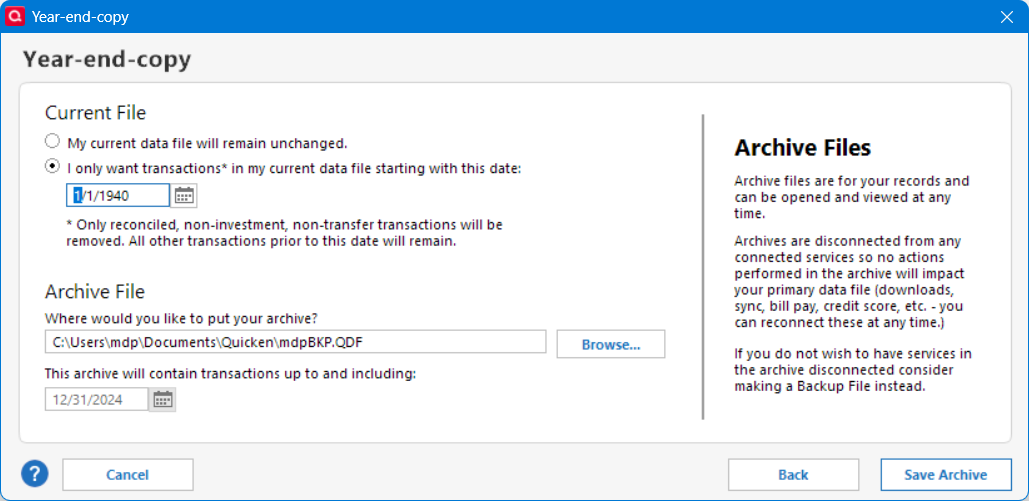
When I want to reorganize my Quicken datafile, I use Year_end-copy with a very early Current File date so all transactions are copied to the current file but is has been reorganized and usually reduces in size. However, all connections are kept. As for the archived file, I discard it since I already make regular backups.
Deluxe R66.23, Windows 11 Pro
1 -
I haven't use Year-End-Copy archiving for many years since I always keep full history backups and I don't find much benefit to archiving. In fact, while archiving is still permitted Quicken actually does not recommend doing it anymore. Here is what Quicken Help says about it:
Quicken doesn't require or recommend that you archive or close out your data file at the end of the year.
In fact, not archiving your data at the end of the year lets you run comparison reports on income and expenses from previous years. Year-end backups were a standard process back when floppy drives were a common backup device and their size limitations meant that it was best to store a year at a time. We still provide this functionality, but it is no longer necessary or encouraged.
You stated that archiving preserves the connections. Please confirm because that is contrary to what it says on the right side of the popup. Is it just DC connections that are preserved or is it all connections that you find are preserved?
Quicken Classic Premier (US) Subscription: R66.28 on Windows 11 Home
0 -
Fidelity downloads continue to be in error. For example, one account, 5 buy transactions, only one gets downloaded, and it shows as "deposit" (!!!). Deactivating and reactivating the accounts doesn't fix anything. Resetting the accounts doesn't help either.
I'm running QWin 64.19.
I posted again a few days ago. My post was deleted: unacceptable behavior from Quicken. Feel free to delete again.
0 -
Let me be clearer about that. When doing year-end-copy, Quicken reorganizes the current datafile database and also creates a year-end archive. I discard the year-end archive, which loses the connections, and use the function just to reorganize the current datafile, which keeps the connections. I use a very early date so that all transactions are kept in the reorganized current datafile. I only do this action every few years to remove deleted entries from the database and reduce its size, usually by about 5MB. I usually do the action to a copy of the current datafile, just to verify totals and transaction counts remain the same as in the original datafile.
Deluxe R66.23, Windows 11 Pro
0 -
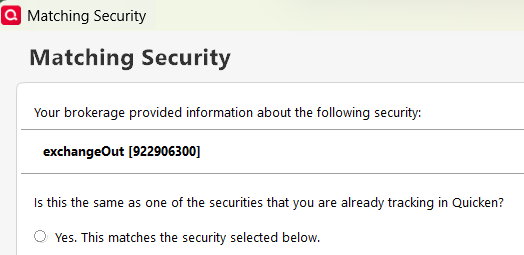
Today I started getting even worse behavior from EWC+ when going to my flagged account:
…
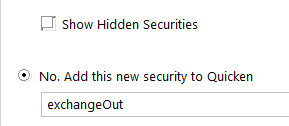
Though I suppose it could be progress toward correct implementation of Complete investment tracking. Previously I didn't get this dialog, and the transfer just showed up in the downloaded transactions. After canceling the dialog (makes me do it twice), I have no downloaded transactions, but the Delete button is active (but does nothing), and the flag is still there.
0 -
I recently used a different type of copy, the template copy, to eliminate data file errors that Validate and Super Validate couldn't fix. I copied all dates. Unlike the archive, this cleared all my connections, both DC and EWC+, and I had to recreate them. Unfortunately I did it during the Fidelity migration not realizing it had changed to EWC+ which is how I ended up in this thread.
By the way, since you were previously asking about backups, I wanted to make the point that making a backup (not a copy) in Quicken and restoring it does maintain connections, cloud file and the file ID, so it has the same limitations as doing a Windows copy in that you can't switch back and forth between a restored backup and the original simply by opening them back and forth. If you do, they will interfere with each other. The only way to be able to switch back and forth between two copies of the same file is to make a (template) copy.
Barry Graham
Quicken H&B Subscription0 -
This seems to be working again today!
0 -
Yes, Template copy (which I've been calling Quicken Copy) can sometimes fix data file, runtime.dat and Cloud Account issues that have not been fixable by other troubleshooting methods. One of the big ones it can often fix are when there is are persistent CC-800 error codes across all EWC/EWC+ financial institutions and accounts.
And now we understand how you came to realize the Fidelity EWC+ connection issue.
But my understanding is that, Year-End-Copy and Template Copy are two different things. Template Copy copy produces a data file ID, Cloud Account ID and runtime.dat file that are totally unique and separate from the original data file. Year-End-Copy does not do that. At least that is my understanding.
Quicken Classic Premier (US) Subscription: R66.28 on Windows 11 Home
1 -
Yes, sorry, you caught me between edits. I have updated my post, do you agree with it now? You are correct and very fast!
Barry Graham
Quicken H&B Subscription1 -
Ah, thanks for the clarification. I think I only used the Year-End-Copy feature 1X back in 2010 or 2011. After reviewing the results I didn't see any significant benefit for me since I backup frequently and also save all of my end of year backup data files to a cloud backup storage site. So, I decided after that to do as Quicken recommends and not use this feature.
Quicken Classic Premier (US) Subscription: R66.28 on Windows 11 Home
0 -
I did a year end copy once, 25 years ago, and started using the new file, and regretted it later as it stopped me having a complete view of my finances since I started using Quicken. I agree, no need to do it any more and best not to.
Barry Graham
Quicken H&B Subscription0 -
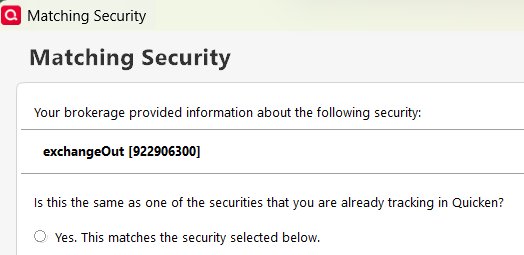
@EvDob Yes, I encountered the same issue today. Presumably, it results from the fact that Netbenefits accounts continue to be downloaded into Quicken as Simple (instead of Complete) transactions.
The only way I found to resolve: delete Simple downloads, manually add respective Complete transactions (in my case a "Sold" shares and "MiscExp" transaction, for 401(k) Fees. Hopefully, earlier or later, the Complete transaction download of Fidelity Netbenefits 401(k)/403(b) accounts will work again, until then the only way to go for us are manual corrections, I am afraid.
1 -
"Fidelity downloads continue to be in error. For example, one account, 5 buy transactions, only one gets downloaded, and it shows as "deposit" (!!!). Deactivating and reactivating the accounts doesn't fix anything. Resetting the accounts doesn't help either.
I'm running QWin 64.19."
Is the account you are referring to a Brokerage/IRA account, downloaded through EWC+ Fidelity Investments, or a 401(k)/403(b) account, downloaded through EWC+ Fidelity Netbenefits?
0 -
Yes. Nicely edited.
Quicken Classic Premier (US) Subscription: R66.28 on Windows 11 Home
1 -
Fidelity's bond quotes are nuts. Some of my bonds flip every day, from $1 to $100. My bond positions also flip, sometimes showing I have 10,000 shares at $1, and then changing to 100 shares at $100. It sure is fun watching my net worth change every day. They also can't reconcile to my Quicken holdings, showing I still own a bond that had matured, and not showing one that I bought. Lastly their downloaded bond info is terrible. It does show the cusip, but the bond name, maturity date, etc. is missing or incomplete. It's been a problem for quite a while, and should've been corrected by now.
0 -
"… can't reconcile to my Quicken holdings, showing I still own a bond that had matured, and not showing one that I bought."
Has the matured bond been reported "Sold" in the register and is the new bond listed there as "Bought", irrespective of your current Fidelity OSU download method?
Have you migrated to EWC+ or are still downloading under DC? If you moved the account to EWC+ transaction downloads, did you experience the "Reconcile Shares" issues previously under DC, also?
0 -
Quicken just gave me a prompt to upgrade from R63.21 to R64.23 HF1 (Sep, 2025).
Does anyone know if it's OK to upgrade to the new version without impacting my existing zzz Fidelity connection?
0 -
The upgrade introduces these changes and doesn't affect the Fidelity Connection.
Barry Graham
Quicken H&B Subscription1 -
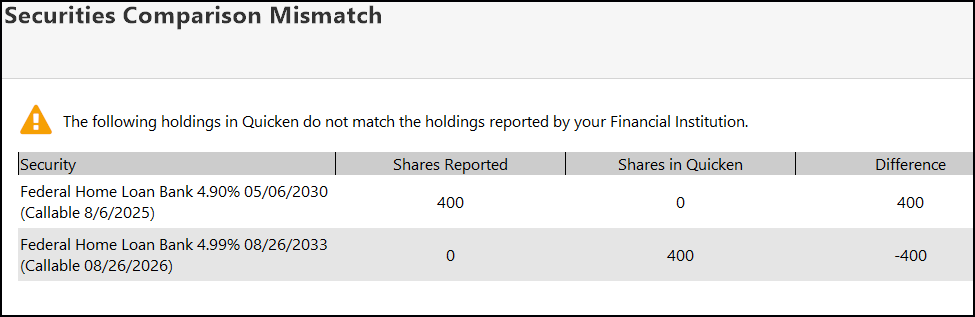
@HKB I migrated to EWC a couple of months ago. Yep, I ended up with a lot of duplicated transactions in several accounts. The bond issues all started with the new connection. Initially I changed my bond purchases to use a $1 per share value, but changed them back since Fidelity's pricing changes so much. I called Fidelity today and allowed them to view my screen. They didn't see it, but my Fidelity.com positions for bonds changed twice this morning, with some bonds showing 10,000 shares @ $1, and then flipping to 100 shares at $100. As for the holdings mismatch, my cash is correct, my Q transactions are correct, but Fidelity must be reporting incorrect holdings to Q. I'm ignoring these errors. Both the bonds below were called.
 0
0 -
@mrhenry1 Thank you for the additional info! It is unfortunate that it might be necessary, yet if I were in your shoes, I personally would simply add to the account register a manual "Added" transaction dated 08/06/2025 for the 400 Shares Federal Home 4.90% and an additional "Removed" transaction dated 08/26/2025 for 400 Shares Federal Home 4.99%. This will take care of the Quicken reported mismatch above and will have no impact on your cash balance which, as you mentioned, is correct.
I am facing the CD pricing issue, which started with the EWC+ migration, and decided to adjust the number of shares and using the new adjusted price/share downloads. We'll see where we'll end up, once EWC+ adjustments will be complete, eventually I possibly might have to change back. What I have not experienced, on this end, are the share price format changes you mentioned.
Best of luck and success!
0 -
To remove the flag on the account I ended up creating a new "exchangeOut" security to get this:
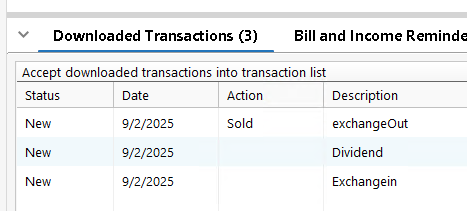
What it should have been is a SoldX transaction on my VMFXX money market fund (whose dividend is also shown).
1 -
deleted post
0 -
Yesterday, Quicken popped up saying an update was available. I cancel it as there are too many issues with Fidelity and Citibank to add to the confusion. I'm still using DC for Fidelity. I update my other accounts daily but only update Fidelity if there are enough changes the day before.
This afternoon, I opened Quicken and it immediately installed R64.23 Build 27.1.64.23. There was no option to skip or decline the update. Then it asked me to log into my Quicken account. This was unusual, but I logged in. I updated all my accounts, including Fidelity without any issues.
2