Budget Disappeared (No Planning tabs)
Windows
Quicken R63.21
I backed my file to my local drive 8-8-25. Today 8-16-25, I opened Quicken, and my file has lost my Budget and all Planning Tabs. How do I Get them back? It expects me to Create a budget and I cannot go through all of that work. Please help with the fix for this error.
Edited to Add: I backed up file with new name, Clicked create a budget. Backed up this new copy and the Budget disappeared again. I then restored the file and the budget was still gone.
Comments
-
Hello @NicoA,
Thanks for getting in touch about this! To help us better understand the issue, could you provide a few details?
- Where is your Quicken data file located? Is it on your local drive (C: Drive) or stored in a cloud/external location (e.g., OneDrive, Dropbox, USB drive, etc.)?
- Besides restoring a backup, have you tried any other troubleshooting steps? If so, what did you try?
- When did this problem first start happening?
- Were there any recent changes to your system or software before the issue began (updates, new programs, etc.)?
Additionally, could you please provide a screenshot of what you are seeing. If needed, please review this Community FAQ for instructions on how to attach a screenshot. Alternatively, you can also drag and drop screenshots to your response if you are not given the option to add attachments.
Your answers will help us pinpoint the cause more effectively.
Looking forward to your reply!
-Quicken Anja
Make sure to sign up for the email digest to see a round up of your top posts.0 -
- Where is your Quicken data file located? Is it on your local drive (C: Drive) or stored in a cloud/external location (e.g., OneDrive, Dropbox, USB drive, etc.)?
Answer: Quicken file is located on my local (C: Drive. I also back up to a USB drive for a second copy. I also have not used Quicken Mobile due to an unresolved issue from about two years ago. Now my only concern is retrieving my Budget.
- Besides restoring a backup, have you tried any other troubleshooting steps? If so, what did you try?
Answer: I tried Validate and Restore. I renamed a backup copy, created a quick budget, saved and closed it. Re-opened the file and Budget was gone there as well.
- When did this problem first start happening?
Answer: The day I contacted Quicken, 8-16-25.
- Were there any recent changes to your system or software before the issue began (updates, new programs, etc.)?
Answer: I don't believe so, I have not downloaded any new programs. I hadn't been on my Laptop for several days prior. This is the first time Budgets have disappeared. I've tried "create budgets" with a copy and after backing it up, those budgets have also disappeared. I did notice my Toolbar wasn't visible anymore so I simply adjusted it to be viewable again. This laptop is primarily used only for Quicken.
I don't know what type of screenshot you need. I created a new budget, saved a copy of file to C drive. Re-opened it and Budget / Savings Goals sections are gone. In setup, "Create Budgets" is again checked off.
Edited to Add: I re-opened my Backup. I noticed there was a small Dashboard option at the bottom. When I clicked "Full Budget" my budget re-appeared; however, after doing a back up copy, then restoring the same file, the budget is gone along with the Dashboard/Full budget option. Did Quicken make some changes since my Tool Bar at the top was hidden as well the same time the budgets disappeared. The Toolbar was easily fixed to view again.
0 -
I don't know what type of screenshot you need.
A screenshot of the top portion of your Quicken window, from the top down to just below the ACCOUNTS Sidebar title would be helpful. It'll show us if all the menu bars are visible on your Quicken window or if something's missing.
1 -
@NicoA Thank you for following up with all those details — that’s really helpful for us in trying to narrow down what’s happening.
As @UKR mentioned—a screenshot of the top portion of your Quicken window would be especially useful. That will help us see if all of the menus and toolbars are visible, or if something is missing that could explain why your Budget and Planning tabs aren’t appearing consistently.
Looking forward to your update!
-Quicken Anja
Make sure to sign up for the email digest to see a round up of your top posts.0 -
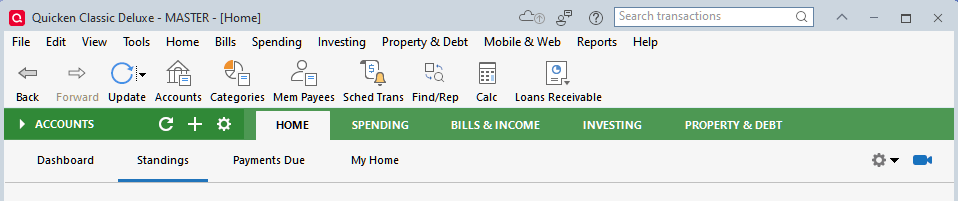
Having the same problem here. Same version, same symptoms. The budget does show on Home > Standings page. But clicking on "go to full budget" does nothing.
0 -
Hello @MrsRTC,
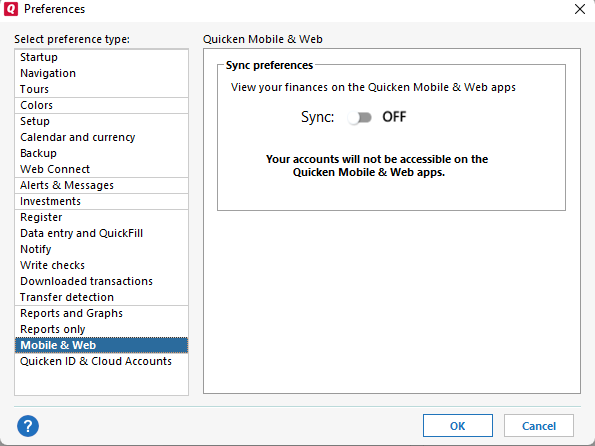
Thank you for letting us know you're seeing the same issue and providing a screenshot. To help troubleshoot, please provide more information. Do you keep your Quicken file directly on your local hard drive? Is it synced to any cloud service? Do you sync with the Quicken Cloud (You can check this by navigating to Edit>Preferences>Mobile & Web.)
I look forward to your reply!
Quicken Kristina
Make sure to sign up for the email digest to see a round up of your top posts.
0 -
@MrsRTC your Planning tab needs to be visible to see the full budget. Click View | Tabs to Show | Planning.
Quicken user since Q1999. Currently using QW2017.
Questions? Check out the Quicken Windows FAQ list0 -
This is a huge "duh" on my part! Apparently someone in our household turned off the Planning tab. I wasn't aware that it could be done. Thank you @mshiggins!
2 -
We all have our “duh” moments :-)
Kudos, though, for including the screenshot. That made it easy to diagnose the issue!
Quicken user since Q1999. Currently using QW2017.
Questions? Check out the Quicken Windows FAQ list1
Categories
- All Categories
- 56 Product Ideas
- 36 Announcements
- 223 Alerts, Online Banking & Known Product Issues
- 22 Product Alerts
- 701 Welcome to the Community!
- 671 Before you Buy
- 1.2K Product Ideas
- 53.7K Quicken Classic for Windows
- 16.3K Quicken Classic for Mac
- 1K Quicken Mobile
- 813 Quicken on the Web
- 111 Quicken LifeHub