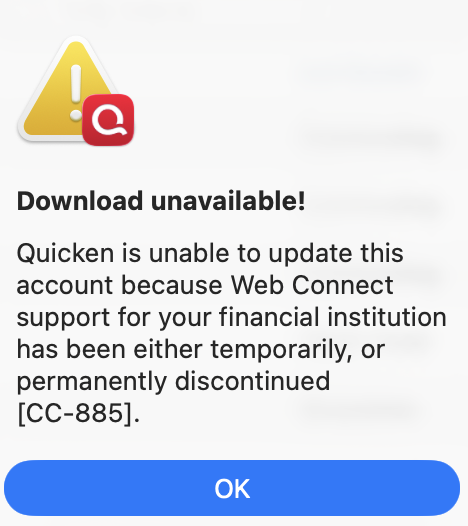
Why does Quicken say this account is not set up for downloads when trying to import an OFX file. It's a manual account, of course it's not set up for downloads, that's why I am trying to import a file.
This is HSBC UK. Quicken Mac 8.2
Hello @Zoolook,
Thank you for sharing the details and screenshot — I can see how that would be confusing! I’d like to ask a couple of clarifying questions to narrow this down:
The reason I ask is that Quicken Mac treats OFX files differently than QFX (Quicken format) — and in some cases, an OFX file can trigger that CC-885 error because Quicken sees it as a “download attempt” from a financial institution that doesn’t actually support Quicken connections.
If HSBC only provides OFX files (and not QFX), Quicken may not be able to map those correctly to a manual account, which is why you’re seeing this behavior.
Looking forward to your response!
Hi - thanks for the response @Quicken Jasmine
In my experience (and from what I have seen from others), if the bank isn't partnered with Quicken, then OFX import is a no go. So, manually transaction entry it is.
QFX is a Quicken (originally Intuit) very, very minor tweak to the OFX standard. It consists of just a line of code which contains the Intuit Bank Identifying Number, or INTU.BID. You can manually edit an OFX file to insert a valid INTU.BID number from a valid financial institution, and Quicken will then be able to import it. Since this goes against supported Quicken practices, I'm not going to include more information here so this post doesn't get deleted; you can Google INTU.BID if you want to learn more and experiment on your own.
There are also some third-party utilities (paid software) which convert OFX files or CSV files into QFX files. As these are also not sanctioned by Quicken, and I've never personally used one, I can't comment further, but you can Google OFX to QFX or CSV to QFX to learn more.
It's a manual account, of course it's not set up for downloads, that's why I am trying to import a file.
This is a common misconception: importing a downloaded file is considered part of Quicken's connected services. That's in part because the transactions in an imported file are processed through Quicken's Auto Categorization and Auto Renaming servers.
You said the institution is HSBC UK. If this is a US bank, you might also contact them to encourage that they support Quoin by providing a QFX file. If this is a UK bank, there is little chance of success at getting official Quicken support, as Quicken only supports US and Canadian financial institutions.
HSBC does business both in the US and the UK (I had a US based account there many years ago). Since OP mentioned GBP I would assume this is indeed a UK based account.
From what I read the Op didn’t mention GBP, but mentioned UK, which might amount to the same thing.
And that ads an extra twist the people might not understand and that the OFX/QFX standard encodes the currency in the file and as such the application must know how to support various currencies. In fact, the same standard allows for different languages, so all of this can get quite complicated.
»
In the past, Quicken Essentials did import OFX without question/verification. But, that back door was closed to only partnered banks.
I never investigated into how they did that, but the program wouldn't import non-supported banks from then on, and I can see Quicken's motive.
I’m sorry I missed that comment.
And yes, the original Mac developers that rewrote Quicken Mac seem to have snuck in two things that Intuit really didn’t want. Importing OFX files and downloading from both US and Canadian financial institutions.
To this day I wonder if it was Inuit that forced Quicken Inc to close the hole on importing OFX files, but it probably was a joint agreement. It is important to understand that one of the reasons Quicken Inc considers importing a QFX a “connected service” is because it definitely is to them. They pay Intuit for this service and when a financial institution is sending an incorrect QFX it is Intuit that is tasked with working with the financial institution to get it fixed. If Quicken Inc allows OFX files than Intuit would most likely wash their hands of it and it would be on Quicken Inc to somehow fix it.
But as I was alluding to before importing foreign QFX/OFX files comes at a risk. Right now Quicken Mac basically has no multiple currency support other than a currency symbol. As such it wouldn’t even look at the currency in the file, but as it starts to get that support it might pop up in places as a problem.
Note that I believe that the Quicken Windows idea to get support for downloading from both US and Canada in the planned state it hasn’t actually got it, and it has been in that state for years.
I agree, Chris. Even if the import was allowed, we know how conversions/imports from foreign banks with different currencies, date formats, etc. goes. Usually it never ends well.
That is why I kept my first response short and suggested to simply type in the transactions :-)
OK so I have solved this issue. @Chris_QPW @John_in_NC @jacobs FYI if you're interested.
Jacobs was pretty much on the nail. In the OFX file, there is a line which declares which institution the file is from. For HSBC UK it's the following:
<INTU.BID>01267</INTU.BID>
This allows quicken to refuse to import a bank's OFX file they don't have a relationship with, and currently they don't have any relationship with any bank outside of the US and Canada. So if you edit this to something Quicken supports, I chose Apple Card because that's another account I manually import:
<INTU.BID>18940</INTU.BID>
It now manually imports flawlessly. BTW the comments about date incompatibility were a red herring, because OFX is a global standard, not a US one, so the dates are all international and look like this:
                <DTSTART>20250801000000</DTSTART>
                <DTEND>20250916000000</DTEND>
It would be great if Quicken lifted this restriction, although I understand commercially they don't think that's in their best interest, but as someone who has been paying for the software for 30+ years it's not really like I am trying to get something for nothing. My alternative would be going elsewhere. Manually keying in the transactions gets cumbersome with all the pre-authorsations, things like tips, EV charging (which is done incrementally on top of the pre-auth) and multiple users, it's not practical I and keep making mistakes.