Bills & Income Reminders Issues After R64.23 Update (Past Due, Duplicates, etc)
Comments
-
I'm not having as bad a problem as others, but reminders are definitely hosed. Reminders I've paid are reappearing as a new reminder and changes to the reminder amount are lost after a restart. I don't even use the bill pay 'feature' so this is separate from that.
1 -
Hello as of today (9/8/2025) I am still being offered 64.23. I do not use bill pay, all my entries are just reminders which are manually paid. Am sufficiently spooked by the all the reported problems related to billing entries so have been avoiding/declining the install of 64.23. Have the developers determined there actually is a problem that needs to be fixed in a subsequent release? Obviously 64.23 has not been pulled. Thanks
0 -
There was an update. Of course there are problems with Quicken.
SO FAR for me, the issue is multiple reminders showing as overdue — but that were paid on time — from 2023 and earlier in 2025.
Never forget the golden rule of using Quicken: Backup every time you open it.
Looking forward to a correction.
[Merged Post]
1 -
@Mike409 ,
looking at these reminders using Tools / Manage Bill & Income Reminders, do these entries show up as "Done" or "Complete" with dates in the past and/or $0.00?If so, run both Validate and Supervalidate on your data file. This should get rid of these hung reminders or make it possible for you to Delete them from the Manage Bills & Income Reminders view, thus solving the problem.
0 -
So what is the solution if the entries in Bills & Income get mangled after update to 64.23? Keep 64.23 and manually fix everything? Restore a pre-update backup data file (keeping 64.23 installed?). Restore a pre-update backup data file AND rollback to previous version 64.19?
1 -
Your latest update, which just so happened a little after your price increase, has totally messed up my bill and income reminders. No backup will fix them - all of my backups are doing the same thing after your update!! I don't know what you guys did, but I now have old reminders showing up all over the place. I read that some others are experiencing this as well. This is for update 27.1.64.25, but it may have taken place on an earlier update as I haven't logged into Quicken since 9/4. This bill reminder issue is going to take HOURS to fix!!! My balances are all over the place and I have no idea what reminders are correct and what's not.
[Removed - Rant]
0 -
Installed 64.25 which allegedly fixes the bills and income problems. It doesn't. I still get reminders for accounts I haven't had in years. Try again Quicken. I've kept 64.19 on aother machine because I don't trust 64.23 or greater.
1 -
Validate and Supervalidate fixed it for me! Hopefully it will still be working tomorrow.
1 -
Not for me! The Qkn recognition to these billing & reminder issues was 9/11. There is still no solution to the problem(s).
0 -
I had the bill reminder problem as well. Seems like that's already been reported.
However, I'm also having an issue where my paycheck reminder is showing the incorrect amount on my upcoming paychecks. If I "Edit this and all future instances", make no changes, and hit done, the amount updates to the correct amount, but if I close and re-open Quicken, the amount is messed up again.
When I opened my Quicken for the first time today, my weekly paycheck amount showed for $0 and the next scheduled occurrence was for 9/25/2025. That amount is not correct, and the next scheduled date should have been for 9/18/2025. I changed the "start on" date to the correct date and hit done, and now everything appeared correctly. Then I closed and re-opened Quicken. The reminder amount changed to a different incorrect amount (the amount of my 401K contribution), and the next scheduled paycheck reverted to 9/25/2025 again. I've closed, opened, and corrected 5 different times now, and each time, the same exact thing keeps happening.
2 -
I'm with @BrianK on this: R64.25 did NOT FIX the problem. So what is Quicken's solution? What should we do: Restore an August backup data file AND roll back to R64.19?
I didn't notice issues in R64.23 because I was preoccupied for awhile. So not knowing, I then I've since installed R64.25 — and noticed that my 9/15/2025 IRS estimated tax payment reminder wasn't showing up in my business bank account, when it was clearly in my Monthly Bills & reminders — so I MISSED PAYING THAT ON TIME. OH what a MESS I then found in Bill and Income Reminders "Monthly Bills & Deposits!" Also in "All Bills & Deposits!" The Accounts with which the bills were to be paid are all messed up as well, which means the bill reminders ARE NOT showing up in the correct accounts' "Bills & Reminders" tab at the bottom. I wondered what was going on yesterday or the day before when I just paid a few bills by clicking on the GO prompt (always then paying them manually on biller's website), when after making each payment, a pop-up came up saying, "Is this the $0 payment due for , ?" or something to that effect. After a few of these, I just clicked "YES" to get rid of it. I wonder what happened then?
@mrbill 's above comment that "Installed 64.25 which allegedly fixes the bills and income problems. It doesn't" appears to be correct, as I can confirm it. In fact, as far back as you want to go in "Monthly Bills & Deposits" (I went back to Dec 2024), many bills are still showing a Status of "Overdue" Due of 12/xx/2024, with $0 in Payments column, and the wrong "Account to Use" in that column.
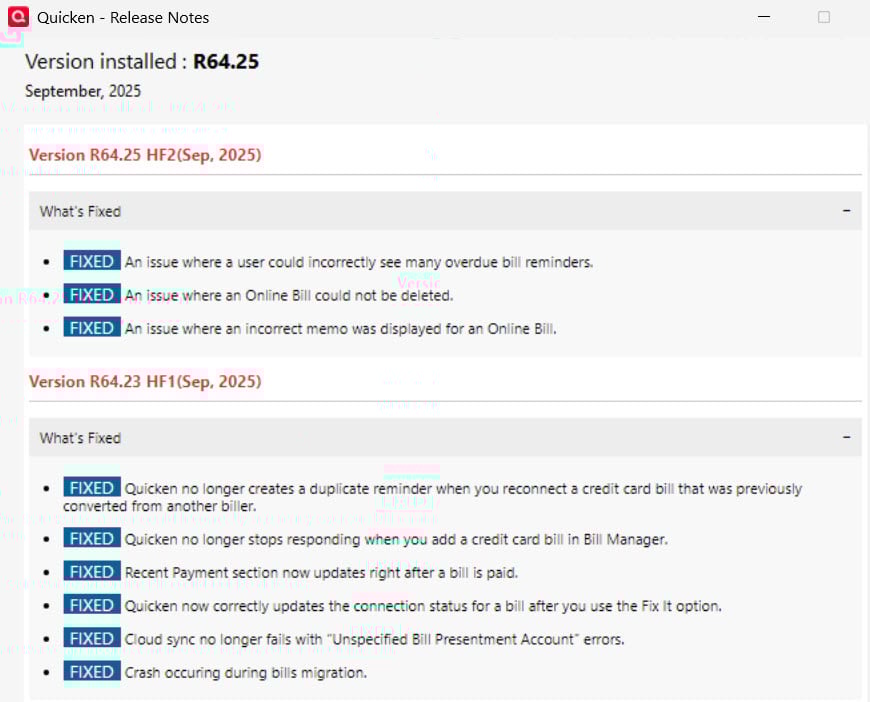
Per Quicken's Release Notes (see attached) it doesn't seem like the issue of seeing many incorrect overdue bill reminders has been fixed for the existing database.
I'm afraid of doing a Validate & Supervalidate until Quicken recommends a fix. What should we do now, Quicken?
Quicken user since the DOS days back in 1986, when I graduated from UCLA's MBA program. Struggling but still using Windows 11 Enterprise RPM to manage my 50-space mobile home park…so far. :-/
0 -
Upon further investigation, my last known good version was 27.1.63.21 which was a software update Quicken posted on 6/13/25. I do not know about versions between that one and the one that I know for sure was messed up, 27.1.64.25 - which was automatically installed by Quicken. I can say, however, that I did reinstall version 27.1.63.21 on another computer (and restored a known good backup) and compared the results against the newer update, 27.1.64.25 to attempt to fix the issues. But, the Bill and Income Reminder problems were SO BAD that I gave up and just uninstalled Quicken and went back to version 27.1.63.21, which was a known good update. I then restored from a backup.
I feel bad for anyone that doesn't have recent backups because this update messed up my data so bad that I saw no way at all to fix it. Is the data permanently messed up? I tried to open a more recent file (the one that got messed up) into the known good version of Quicken, and the Bill and Reminders were totally messed up. So this update permanently seems to make changes to the reminders. We're talking dates that made absolutely no sense and it wasn't just one, it was dozens of them. For people that don't use Bill and Income Reminders, this may not be a big issue. But for me, who uses them a lot, it's a major issue.
Anyway, I will be attempting to block any more updates until this is resolved. I'm staying with version 27.1.63.21 for as long as I can.
3 -
Quicken, please, what are you doing about this "Bills and Income Reminders mess," starting apparently with R64.23 and continuing with R64.25 and, per this post
apparently continuing with R64.29. What is a user with a TON OF ACCOUNTS to do now? I don't have the luxury to do what @wildnut is doing, which is rolling back to 27.1.63.21 & re-entering everything since June 13, 2025. And, Quicken, please don't just CLOSE THIS discussion until you post the solution — that's very frustrating. We need a solution. And R64.29 isn't it. What do you expect your users to do now?
Quicken user since the DOS days back in 1986, when I graduated from UCLA's MBA program. Struggling but still using Windows 11 Enterprise RPM to manage my 50-space mobile home park…so far. :-/
1 -
Hi @NoCouth, just to clear up my post, I didn't mean I re-entered everything from June 13, 2025, what I meant is I uninstalled Quicken and reinstalled it which installed that June 13 version and then I just restored from my last known good backup which, for me, was 9/4/25. Sorry for the confusion.
1 -
@wildnut — OIC, maybe I'll try that then. Thanks for that. I wish one could copy perfectly good transactions in the messed up file, and import them into a new install of 27.1.63.21 with the last good backup. I have a mobile home park with 50 tenants — I dread even having to use a "recent" backup :-/
Quicken user since the DOS days back in 1986, when I graduated from UCLA's MBA program. Struggling but still using Windows 11 Enterprise RPM to manage my 50-space mobile home park…so far. :-/
0 -
@NoCouth, I totally understand and it shouldn't be this way! But, that's the only way I knew how to fix it because opening the file that was clearly messed up, even in the old version that had been working, still resulted in a totally messed up file. So, that was my only solution. Hopefully you've not entered much since the "upgrade."
1 -
Regarding the QuickPay vs Enter button, I agree, bad move. If you press Quick Pay, it prompts you to upgrade. If you keep pressing Next, it walks you though reasons to upgrade. Only way out is to click the [X]. Having to select the drop down to get to Enter is just bad UI design.
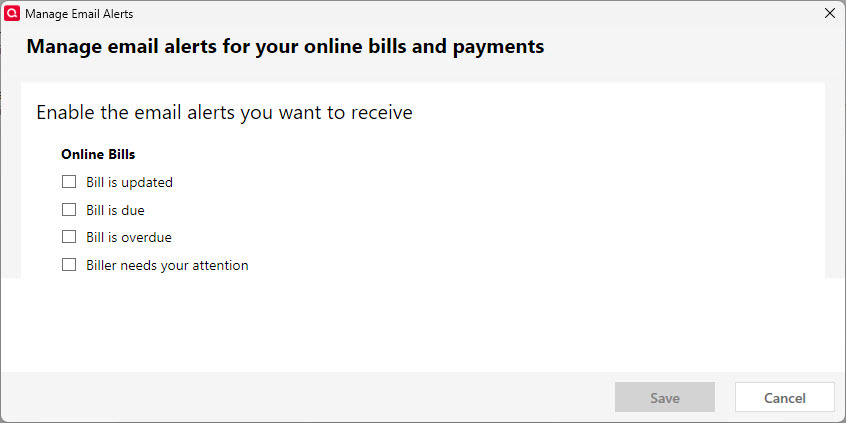
Regarding the notification emails, you can turn these off. In Bills and Income, press the Gear icon in the upper right corner. Select "Manage Bill Email Alerts". Uncheck any alert you don't want via email (I unchecked them all).
 0
0 -
Can you please list which companies are supported by the new billing provider so we know what to expect?
As of Sep 21, I stopped getting bills for all of them 🤔
1 -
More on the QUICK PAY vs ENTER. I do not think ANYONE who is not enrolled in QUICK PAY should EVER see that on a button. This is a VERY bad choice by the developers / marketers / product managers.
And for me, the ONLY way to correct the billers broken by this update was to remove and readd causing them to have no history and now "awaiting first bill". Another bad move.
And a bill that formerly had no issue and is an EFT from my Debit Card now has a button called "PAY" which is a first and incorrect.
Look, I truly appreciate @Quicken Anja @Quicken Kristina and few others @Quicken that I have had a chance to work more in dept with. But I TRULY cannot imagine that any amount of decent testing has been done with releases like this and they are allowed to be released to PAYING users!! There is no evidence of quality testing in So many cases these last months.
I'm going to copy this over to my thread on these broken billers.
2 -
I am having the same issue as well. I am using 64.29 and after running Validate 3x, still having the issue. Deleted reminders reappear, matched entries after One Step update are resetting next reminder 1 extra month out, but only sometimes.
0 -
I will second this paycheck issue. I have the exact same problem and have submitted a "report a problem" with the associated log files.
0 -
Today's date: 10/04/2025. I have not updated further since the R64.25 update I mentioned above. (I may have skipped over the notorious R64.23 bad update). R64.25 hosed my reminders, randomly truncated or changed many reminders' Payee names, made several of them $0 due, and brought back several that had been deleted (due to having been paid off), or which had already been paid months ago.
NOW, I just discovered that this R64.25 update ALSO brought back at least one 2013 MEMORIZED PAYEE, (YES, FROM 2013 !!) to my current MEMORIZED PAYEE LIST — and in the "LAST USED" COLUMN, Quicken listed "12/29/2023" for that payee, "Arctic Pump & Well." While fixing another Memorized Payee, I saw & didn't recognize "Arctic Pump & Well," especially not from just 2 years ago. Mind you, I had archived my windows Quicken Data file from its beginning in 2010 to 12/31/2016, so only had transactions & payees from 1/1/2017 forward. So I clicked on that icon on that purportedly 12/29/2023 transaction to display the Payee Report — and saw that QRPM listed this transaction as having ACTUALLY occurred on 3/4/2013. That made sense because I repaired my brother Gary's well during that time frame.
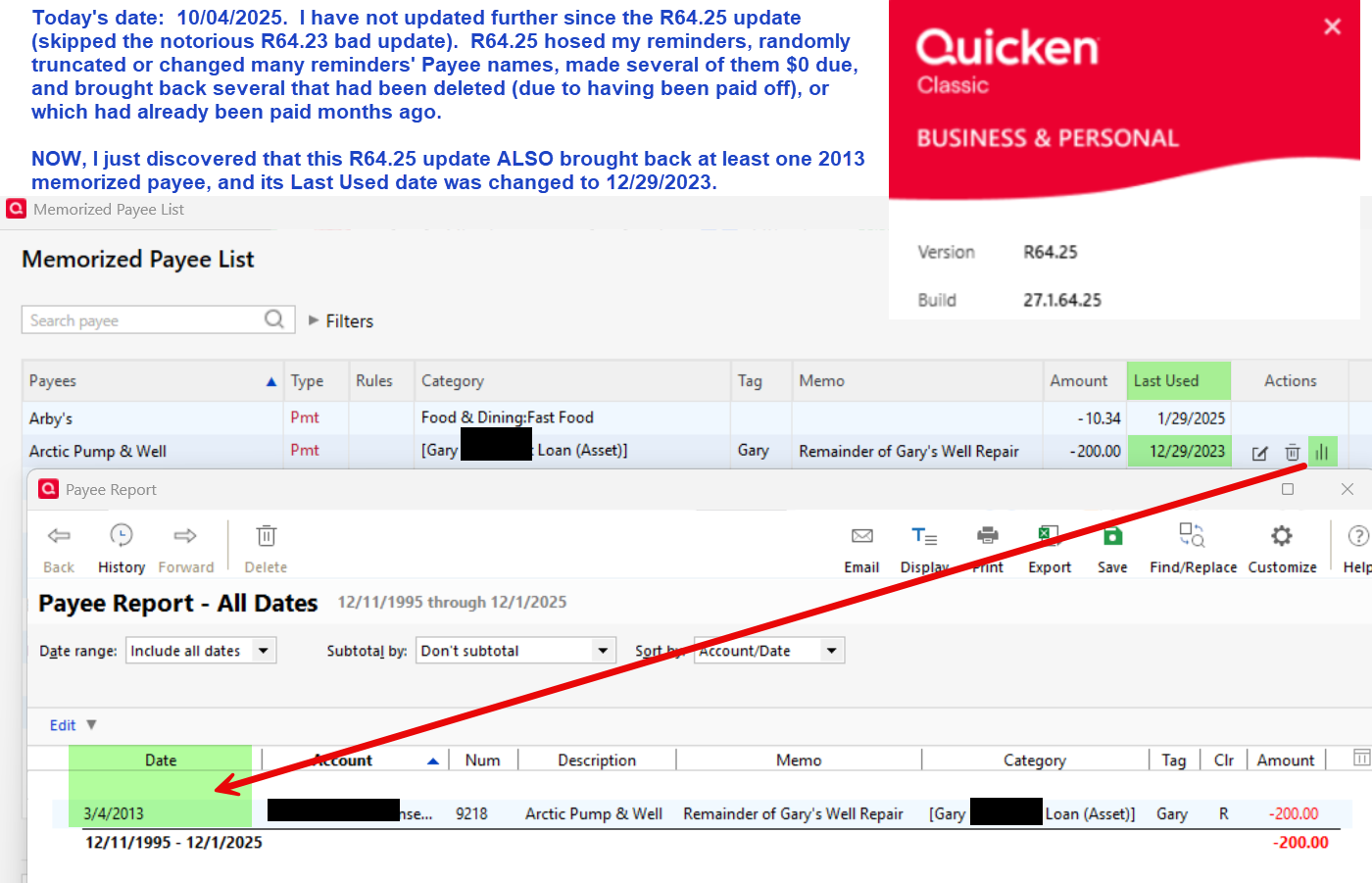
Which begs the question: WHY was this 2013 Payee re-added to my 2025 Memorized Payee List, and WHY did QRPM R64.25 arbitrarily change this transaction's Last Used date to 12/29/2023? I haven't had the time to further explore for additional damage yet, to see what other memorized payees from 10+ years ago were added — but wanted to report this issue because I haven't seen it anywhere else. When Quicken releases an update to "fix" a prior update's problems, it doesn't really fix anything. It may prevent additional problems along that vein from occurring from then forward, but it cannot and does not restore anything that the bad update caused. Quicken expects its paying users to figure out how to fix the problems its updates caused. For instance, remember when one of Quicken's updates changed tax category descriptions recently? Then Quicken announced it fixed the issue with another update? It didn't "fix" the issue. Several of my tax category descriptions STILL look ridiculous a few updates later: For instance, see the green-highlighted descriptions below. "Raj Oil Company" is the description Quicken decided upon for several of my tax categories, and "Sanitary Survey Reminder" was a description from my Bill Reminders for my mobile home park's every-3-year sanitary survey, but somehow ended up in the Tax Line Items as the description for my Refuse tax, which is part of my Schedule A: Real estate taxes.
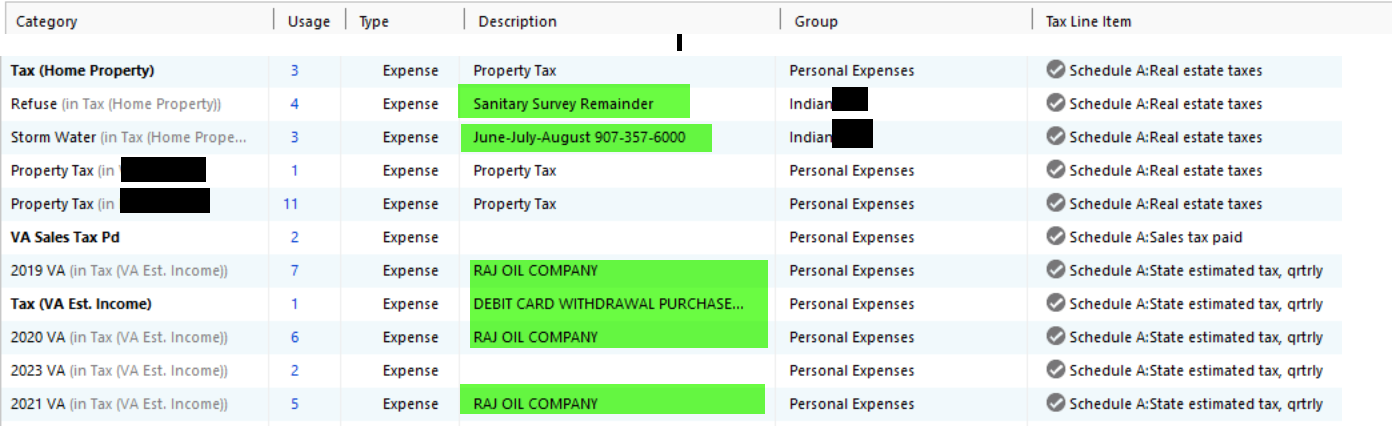
So BEWARE when Quicken launches an update that "fixes" a past update's problems. You still have to fix those yourself, as @wildnut mentions above. (BTW, @wildnut , have you found any recent Quicken updates that you can use with your self-repaired data file yet? Thanks.)
QUICKEN TAKE NOTE: I'd be happy to lend you a copy of my sanitized data file as of this date, to examine these issues.
Quicken user since the DOS days back in 1986, when I graduated from UCLA's MBA program. Struggling but still using Windows 11 Enterprise RPM to manage my 50-space mobile home park…so far. :-/
0 -
Hi @NoCouth,
On my secondary computer, I decided to update to the latest Quicken and then open two files: my original Quicken file that's working just fine on Build 27.1.63.21 along with the same original file but only this time doing a validation within the Build 27.1.63.21. Quicken still managed to totally mess up Bill and Income Reminders for both files. It says I have 26 bills due today, which is totally incorrect as I have zero due today. Quicken did the same thing the last time I updated: moved several bills to being due the same day as the file is updated. That's on top of all the other dates and amounts it messes up.
So, to answer your question, the updates that have been released fix absolutely nothing at all when it comes to Bill and Income Reminders amounts and the dates. It's still just as bad now as it was. So, I'm staying with the old version until Quicken decides to get their act together and fix this disaster.
2 -
Is there acknowledgement from Quicken of this problem? Doesn't seem like it would be that difficult to fix and push an update. This is happening for me, too, and driving me bananas.
0 -
@wildnut Could you let me know where you found Build 27.1.63.21? I'm about to try the internet's way-back machine, lol!
Quicken user since the DOS days back in 1986, when I graduated from UCLA's MBA program. Struggling but still using Windows 11 Enterprise RPM to manage my 50-space mobile home park…so far. :-/
0 -
Hi @NoCouth, so basically all that I did was download the copy directly from Quicken's website here:
It installed the older version. That was a few weeks ago though, so I'm not sure it'll still install the older version now.
However, they also have a Patch website here which I assume you can just select the version you want to download . . . I didn't try this, however:
Also, just remember: I used a backup copy that was fine BEFORE the update. Just installing any older patch will not fix the problem if you use a Quicken accounting file from a newer version . . . as the data itself seems to have been altered with the recent updates.
Lastly, I set Windows to not allow any installs for programs unless I specifically allow the install. Directions are here:
Adjust User Account Control (UAC) settings
Open the Control Panel. The quickest way is to press theWindows key + Rto open the Run dialog, type control, and press Enter.ClickSystem and Security, then clickChange User Account Control settings.Move the slider to the top setting:"Always notify me when: Programs try to make changes to my computer".ClickOKto save the changes. This will cause the screen to dim and show a confirmation prompt whenever a program attempts to install or make changes to your system.
1 -
@wildnut I'm sorry to be a pain, but how did the Quicken.exe download from know to install Build 27.1.63.21? I'm about ready to give up & just try to transfer everything to QuickBooks Online — because I'm doubting whether or not our pre-build 27.1.63.21 backups will EVER work with ANY future update. Your thoughts?
In the meantime, I DID find that one post reinstalling and patching your Quicken subscription - and that seems very useful, as well.
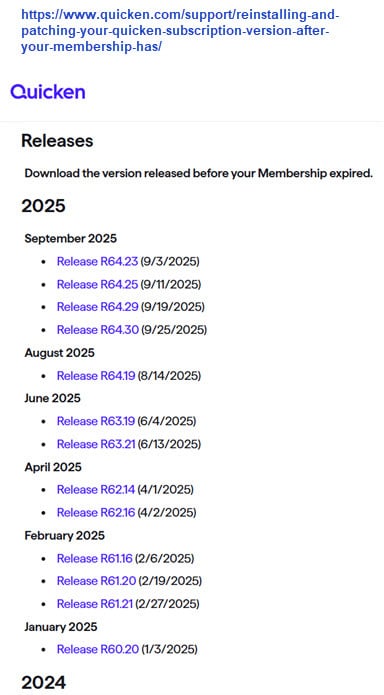
Quicken user since the DOS days back in 1986, when I graduated from UCLA's MBA program. Struggling but still using Windows 11 Enterprise RPM to manage my 50-space mobile home park…so far. :-/
0 -
@NoCouth Honestly, I didn't know until it was installed and then I checked the version under Help and then About and it showed the older version. But, that's the only way I know. I'd probably just try the patch website myself after uninstalling the current version.
As to a future fix? Well, the damage has been done and they don't seem to be in any hurry. Plus, it just doesn't seem like many people are posting about the issue . . . other than some commenting about paychecks messed up, online bills messed up, but those may or may not be related to our issue.
So, I don't know the answer to that. I'm really not expecting a fix, honestly, since it's been so long. But, I did want a way to see my old data accurately in case I should upgrade and fix it for the more recent versions . . . I'd have something to compare it to. Plus, it was such a disaster that I didn't know positive from negative.
Who would've thought we'd be having to pay for THIS??!!??
2 -
After updated to version R64.30 (build 27.1.64.30, Windows 11), the Bill and income reminders will no longer record. I try to enter the transaction and the window disappears suggesting success but the reminder remains in the list and does not record in my register. I have hundreds of old "overdue" transactions which are not even for the correct account. This entire thing is a mess and has caused me a lot of distress. How could Quicken not know this was an issue? Do you just roll out an update without testing? I did not receive the recommendation to back up either. Fortunately I have a fairly recent back up but I don't want to open it on this version. I don't know what I am going to do.
1 -
@TerriM, I would make a copy of the backup just to perhaps have an extra copy, but I don't believe restoring affects the original backup as the data gets put into a new file. But, it never hurts to have an extra copy of a good backup, so you might want to just copy and paste it somewhere to have.
To fix the problem, you'll need to uninstall Quicken and install one of the older patches that are located here:
Of course, a lot of times people aren't sure of the version that was working fine . . . I know that the June version R63.21 has been working fine for me. Quicken doesn't always prompt to update to the latest and greatest. And so for me, I had been using the June update for a while until Quicken installed an update in early September that totally messed up the bill reminders. So which version of Quicken after R63.21 (but before early September) that started messing things up, I'm not entirely sure due to the lag time for automatic updates . . . I just know R63.21 works for me. Preferably, however, you'd pick the same Quicken version as the backup file was created from.
Anyway, once you've installed a Quicken version that worked fine previously, then you can restore from your backup file. If the backup file was created after the bill & income reminder issue, then nothing will be fixed. So, just make sure the backup is a known good backup taken before this issue popped up.
Anyway, once you restore to a Quicken version that doesn't have the show-stopping Bill Reminders issue, then your bill and income reminders should be back to normal.
Additionally, to make it so that Windows prompts you to approve the installation of new updates so that you aren't automatically updated to something that once again royally messes up the Bill and Income Reminders, you need to do this:
Adjust User Account Control (UAC) settings
Open the Control Panel. The quickest way is to press theWindows key + Rto open the Run dialog, type control, and press Enter.ClickSystem and Security, then clickChange User Account Control settings.Move the slider to the top setting:"Always notify me when: Programs try to make changes to my computer".ClickOKto save the changes. This will cause the screen to dim and show a confirmation prompt whenever a program attempts to install or make changes to your system.
Also, @NoCouth, what did you end up doing?
1






