Bills & Income Reminders Issues After R64.23 Update (Past Due, Duplicates, etc)

jammerdjc
jammerdjc Quicken Windows Subscription Member ✭✭

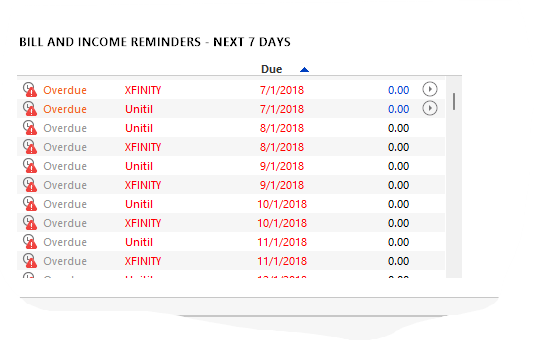
I was just prompted to upgrade quicken and when restarting all my bills and income are showing as past due back to the first of the year. I did a bill update and they are still showing that way. I'm also seeing a couple of blank bills with todays date. Any one else seeing issues after the latest update?

Quicken Classic Premier

Version R64.23
Build 27.1.64.23

«13

Comments

  • jammerdjc
    jammerdjc Quicken Windows Subscription Member ✭✭

    Reconnecting caused some bills to be updated, but I had to manually skip a bunch and deleting the blank bills seems to have been successful.

  • jammerdjc
    jammerdjc Quicken Windows Subscription Member ✭✭

    More info… all the bills have had their source payment account reset to one of the first banks in my list (not sure why that one and it's my HSA account, so definitely not correct). Also, I'm seeing this "Quick Pay" which I never use and don't want to use for all the bills. I don't use Quicken to make payments. It appears it's done a real number on the bills.

  • Chris_QPW
    Chris_QPW Quicken Windows Subscription Member ✭✭✭✭
    edited September 3

    @jammerdjc Starting in R64.19 Quicken Inc is switching to a different provider for Bills, and as such that is the reason everything is changing. The new provider is supposed to be more robust but doesn't support as many billers. On top of that Quicken Inc has definitely added new functions to try to make that change over less painful, but I suspect some of that "automatic change over" isn't working as planned.

    Note that the old Bill provider is getting out of the business, so this is a mandatory change over, but seems to be there is some overlap between the old and the new systems coming and going. I do believe some people have switched back to the old system by installing an older patch, but that would be a temporary solution and maybe cause more problems than it is worth.

    Signature:
    This is my website (ImportQIF is free to use):

    http://www.quicknperlwiz.com/

  • Chris_QPW
    Chris_QPW Quicken Windows Subscription Member ✭✭✭✭
    edited September 4

    Signature:
    This is my website (ImportQIF is free to use):

    http://www.quicknperlwiz.com/

  • Jerry_qtz
    Jerry_qtz --Select One-- Member ✭✭✭

    Same problem: "Bills and Income" completely broken. I'd recommend just using Bill and Income Reminders instead. The Online Bill Pay feature has never worked very well for me, and this bug doesn't give me any comfort that it's been improved.

    Do Quicken coders not double check their software?

    BTW, I didn't see any of the warnings listed by Chris_QPW before doing the upgrade.

  • Keith Davis
    Keith Davis Quicken Windows Subscription Member ✭✭✭

    The update even deleted all of my recurring paycheck information!!!!

  • Keith Davis
    Keith Davis Quicken Windows Subscription Member ✭✭✭

    Oh, and it "duplicated" some scheduled bills - seemed to have "resurrect" old versions of bills that I had long ago reconfigured.

  • StealthD16
    StealthD16 Quicken Windows Other Member
    edited September 4

    After installing R64.23 I now have HUNDREDS of old Bill Reminders dating back to 2019. These are also associated to incorrect payment accounts that didn't even exist back then. This is such a database corruption that I have no confidence anything is right and I have no idea how to resolve it. I can't believe this bug wasn't caught before pushing the update on us. It's been over 24 hours, no patch. I have lost all confidence in Quicken and am afraid to use it until I see a resolution. Sloppy!!!

    Update: I Backed up and validated my data file, Skipped All the old bill reminders, losing latest in the process, but this appears to have fixed it.

  • regnarg
    regnarg Quicken Windows Subscription Member ✭✭

    R64.23 screwed up the Home Dashboard, Bill and Income Reminders page. It now shows an overdue payment to the same payee for the same amount on the same day month after month from May, 2022 to the present (The bill was paid BTW). At the bottom of the list it does finally correctly show some current bills. The Manage Bill and Income Reminders is correct with the exception of 4 paid "overdue" bills at the top of the list (including the one from May,2022) which were paid. Tried reinstalling the update. Didn't fix the problem.

  • craigaboyce
    craigaboyce Member ✭✭✭

    Same issue as others reported after forced update to R64.23 - hundreds of past due bills, duplicate future bills.

  • Quicken Anja
    Quicken Anja Moderator mod

    Hello All,

    Thanks for sharing all the details about the issues you’re experiencing after upgrading to R64.23. We understand that many of you are seeing past due bills, duplicate reminders, incorrect payment accounts, and missing recurring transactions. We appreciate your patience while we investigate these problems.

    To help our team diagnose and resolve these issues, could you please provide a bit more information:

    1. Online Biller Failures: What exactly happens when a bill fails to update with the online biller? Are there error messages, failed connections, or missing amounts?
    2. Duplicate/Past Due Bills: Are the duplicates or past due entries appearing after performing any particular actions, such as refreshing your bills, reconnecting accounts, or performing a One Step Update?

    Gathering these details will help us identify patterns and determine the cause of the issues.

    Thank you for your help in providing this information!

    -Quicken Anja
    Make sure to sign up for the email digest to see a round up of your top posts.

  • regnarg
    regnarg Quicken Windows Subscription Member ✭✭

    First, this problem started when I restarted Quicken after install of R64.23. No transaction updates, no bills paid, just appeared on startup. Transaction updates from my bank and CC appear to enter correctly in the accounts but do not appear on the Home Dashboard Bill and Income Reminders. Some upcoming payments appear correct at the bottom of the looong list, but that "overdue" payment from 2022 is still there for each coming month.

  • Quicken Anja
    Quicken Anja Moderator mod

    Hello All,

    This is now considered a known issue and has been escalated internally, though we do not have an ETA on resolution at this time. While the investigation remains ongoing, please refer to this Community Alert for any and all available updates and information.

    However, our teams still need to gather more information, so please also refer to my previous response and provide the information requested there:

    Thank you!

    -Quicken Anja
    Make sure to sign up for the email digest to see a round up of your top posts.

  • 45MPHK9
    45MPHK9 Quicken Windows Subscription Member ✭✭

    I was prompted to update to R64.23 this morning, after doing so, it asked me to log in and I had no issue with that. Next, I did a one step update. Entered a new transaction in my checking account, and then opened up my Bill & Income Reminders and found about 50 overdue scheduled payments of $0.00 each to the same payee. No category is filled in.

    NOTE: If it makes any difference, I do not use online bill payments through Quicken - I manually set up each reminder.

    Should I delete each of these one by one or will that cause a larger problem? Is it possible to revert to the last stable version of Quicken? What would happen if I stayed on R64.23 and then restored a backup copy from yesterday before the update?

    Thanks in advance!

    Quicken R64.23
    Build 27.1.64.23
    Windows 10

  • 45MPHK9
    45MPHK9 Quicken Windows Subscription Member ✭✭

    I was prompted to update to R64.23 this morning, after doing so, it asked me to log in and I had no issue with that. Next, I did a one step update. Entered a new transaction in my checking account, and then opened up my Bill & Income Reminders and found about 50 overdue scheduled payments of $0.00 each to the same payee. No category is filled in.

    NOTE: If it makes any difference, I do not use online bill payments through Quicken - I manually set up each reminder.

    Should I delete each of these one by one or will that cause a larger problem? Is it possible to revert to the last stable version of Quicken? What would happen if I stayed on R64.23 and then restored a backup copy from yesterday before the update?

    Thanks in advance!

    Quicken R64.23
    Build 27.1.64.23
    Windows 10

  • LogmisterB
    LogmisterB Quicken Windows Subscription Member

    Is there any fix for this yet? I did the update and am now confronted with this very frustrating mess. Deleting or skipping isn't even working for me. Very frustrating. I have several zero amount reminders going back years.

  • Quicken Anja
    Quicken Anja Moderator mod

    Hello again,

    As our teams investigate the Bill & Income Reminder issues after the R64.23 update, the Product and Development teams have asked if anyone might have a copy of their original Quicken data file from before the update that they would be willing to share. This would help them better understand the issue and work toward a fix.

    If you have one and are willing to share, it would be greatly appreciated! Please let us know.

    -Quicken Anja
    Make sure to sign up for the email digest to see a round up of your top posts.

  • MSRivard
    MSRivard Quicken Windows Subscription Member
    edited September 4

    [Removed - Violation of Community Guidelines/Rant]

  • cejacksoniii
    cejacksoniii Quicken Windows Subscription Member ✭✭

    I have a quicken file backup as of last night before the software update. I can share it, as well as the file immediately post update

  • TopShelf Investing
    TopShelf Investing Quicken Windows Subscription Member ✭✭

    I am also seeing this issue but far worse. My file is 20+ years old and after the update I saw the old reminder,billers and transfers issue. It froze my application with a blue spinning disk for 20 minutes before I killed the application. I can reload the application but it locks up with a spinning disk with whatever I attempt to do on the bills & income screen.

  • cejacksoniii
    cejacksoniii Quicken Windows Subscription Member ✭✭
    edited September 4

    I used the "add bills from connected accounts" option. My bills are all bank draft. it added the credit card bills but when I go to the "Enter" option to look at what it will do, it has defaulted the account to pay from to an account that has been marked as closed for 15 years, and is hidden from my account lists and transactions. It's just that alphabetically it's the first checking account in my overall account list.

    There are also two credit card bills from prior to the update that it will not allow me to delete or reconnect. a duplicate was added during the above process

  • mrbill
    mrbill Quicken Windows Subscription Member ✭✭✭
    Screenshot 2025-09-05 090355.png

    Same issue here. Ran quicken on another computer and did not allow update and everything is fine. Called help line and had to give up because I coudn't understand the person. I recommend that you run Quicken on at least 2 computers and only let one update. Then run on the updated one for a week before updating the other computer. This is how we tested new software before letting it into the wild.

  • Quicken Anja
    Quicken Anja Moderator mod

    Hi @cejacksoniii,

    Yes, we would greatly appreciate it if you could share those files.

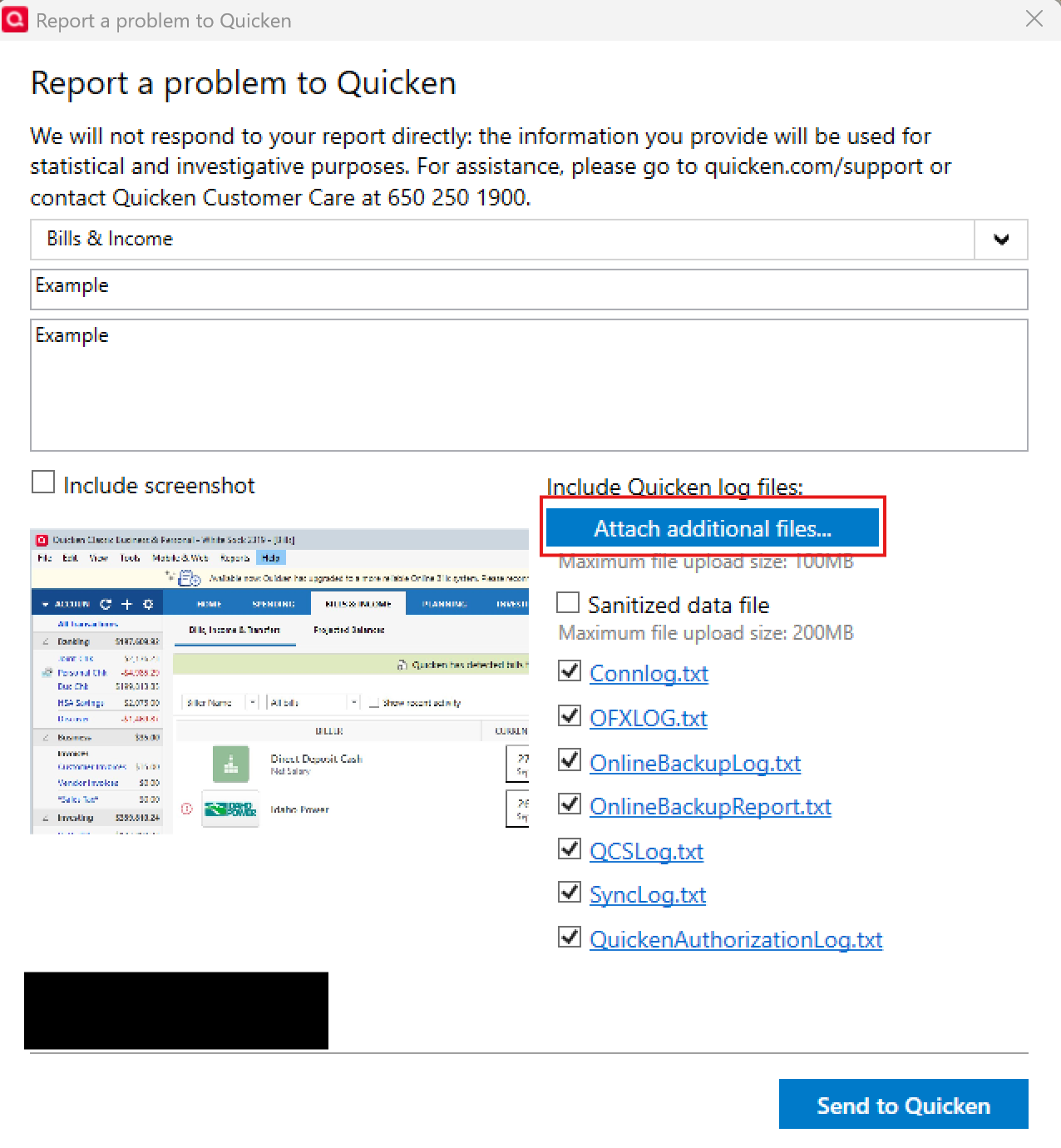
    The easiest way to do this is by going to Help > Report a problem in Quicken, then using the Attach additional files option.

    image.png

    Please let us know once that is done. If you run into any issues with this process, let us know, and we’ll work with you to collect the files another way.

    Thank you so much for your willingness to help!

    -Quicken Anja
    Make sure to sign up for the email digest to see a round up of your top posts.

  • tmRoth
    tmRoth Quicken Windows Subscription Member ✭✭

    Quicken updated this morning to R64.23 27.1.64.23 and created 323 zero-balance overdue reminders dating back to November 2021. I restored a manual backup from yesterday morning, created before the update, but the restored file opened with the same erroneous reminders.

    For a long time I have used only manually-created bill reminders, but it appears that Quicken created the erroneous reminders from a half-dozen or so billers that I had set up in Quicken for automatic downloading at some point in the past.

    When I go to Bills & Income from the main menu, Quicken asks me to reconnect to these billers, some of which I no longer have accounts with. When I tried to reconnect two of the accounts (Lowe's and Amazon), Quicken would not display the existing accounts to link the downloads to - I could only create new accounts in Quicken or link to wrong accounts. So, I'll have to stick with manually-created reminders and won't be using Quicken's "More Reliable Online Bills."

  • Joe4Qkn
    Joe4Qkn Quicken Windows Subscription Member

    How to revert, re-install Quicken application before R64.23?

    I noticed the issue with past dated transitions with $0 and wrong accounts with overdue status after the R64.23 update. I have not entered any new transactions. Restored last backup but that does not revert the application. Issue with overdue past wrong information persists and came to the community to see if others saw this.

    Where can I get a copy of Quicken before R64.23 to install and then restore my backup to get back to functional Quicken?

    How to move my subscription to re-installed application?

    Will Quicken pull the R64.23 upgrade now 2 days after the community started posting about this issue!

  • fun1000000
    fun1000000 Quicken Windows Subscription Member ✭✭✭✭
    edited September 10

    @Joe4Qkn

    You can install a previous update using the Mondo Patch. There is a Community member who has a website that lists all the previous update patches.

    You can find it at quicknperlwiz.com./quickenpatches

    scroll down to Quicken Patches US or Canada

    Scroll down to quicken subscription

    all the release patches are listed

    Be sure and make a backup of your current file before you proceed.

  • nmestanas
    nmestanas Member ✭✭✭✭

    You can "roll back" your version of Quicken but the trick is to prevent it from upgrading again.

    You can get them from the link above or from Quicken's site:

    https://www.quicken.com/support/reinstalling-and-patching-your-quicken-subscription-version-after-your-membership-has/

    One way to do it, is to make sure you have Window's User Account Control (UAC) enabled in Control Panel. When Q (or any other app) tries to upgrade, you'll get a prompt to allow/disallow it (Yes/No). While I don't do this, others have reported it can stop the autoupdate.

    You can read about the UAC settings here:

    https://support.microsoft.com/en-us/windows/user-account-control-settings-d5b2046b-dcb8-54eb-f732-059f321afe18

    Based on what I read in other threads, Quicken will soon release updates to address some of the current issues. Other updates will follow.

  • craigaboyce
    craigaboyce Member ✭✭✭

    I disabled auto-update by changing the file inside the Quicken program directory from quickenpatch.exe to quickenpatch.bak.

  • This content has been removed.