Bills & Income Reminders Issues After R64.23 Update (Past Due, Duplicates, etc)
Comments
-
I have the problem with multiple bill and income reminders appearing on my two checking accounts. And yes, I did the Quicken update to the latest version. I manually deleted all of the reminders in one checking account (300 or so), but the next day another couple hundred appeared. I've tried deleting the reminder, but this did not seem to work. I want to delete all Bill and Income Reminders - what I've tried does not work. Any suggestions on how to delete them permanently so that every time I download transactions to my accounts, I don't get hundreds of duplicate / incorrect Bill and Income Reminders. Thank you in advance for any help you can give me.
0 -
I rolled back to version 62.16 which make the reminder problem go away. 64.19 with all the change in bill payer information started the problem for me.
1 -
@wildnut I had a hellava time! WARNING: I'm verbose. I have at least 30 Quicken Hm & Biz accounts (chkg, svgs, cards, mortgages, retirement accts, college-savings accts for the kids, brokerage accts, loans — combined with a several pages of Schedule E's for my Rental Property and 3 Schedule C businesses) in which to update & categorize transactions. I learned generally not to rely on using the infamous "One Step Update" (OSU) to download EVERYTHING all at once, because it always stubs it toes on something. But I do heavily rely on individual account downloads and occasionally OSUs. So I was straddling the question of:
*** Do I go with the old version to get all my reminders (which in addition to the 30 accounts, contain about 50 tenant invoice reminders which I rigged via the "Business" section of Quicken), or
*** Struggle through fixing with the data in the current version that will probably keep updating my accounts?
I decided I really needed to keep current with Quicken updates, so I wouldn't have to manually update all these accounts, because Qkn was talking about having changed the way it handled billers to a "paypal format," whatever that means. (I hate Paypal).
But that was no easy chore. I was starting from R64.25.
Spoiler: I'm still not done "fixing" everything, but generally, after clenching my teeth & updating to R64.30, Build 27.1.64.30, my data COPY from 10/09/25 seems to be holding steady and not creating new problem or resurrecting old problems, after a surprise "re-boot" of my laptop.
BEFORE updating to R64.30, while still using R64.25, on 10/6/25 I tried to salvage my data. I went through several gyrations, once ending up with unchangeable, uneditable, undeletable weird transactions with ASCII characters that turned my running balance column in an important account, INTO ASTERISKS. RED ASTERISKS:
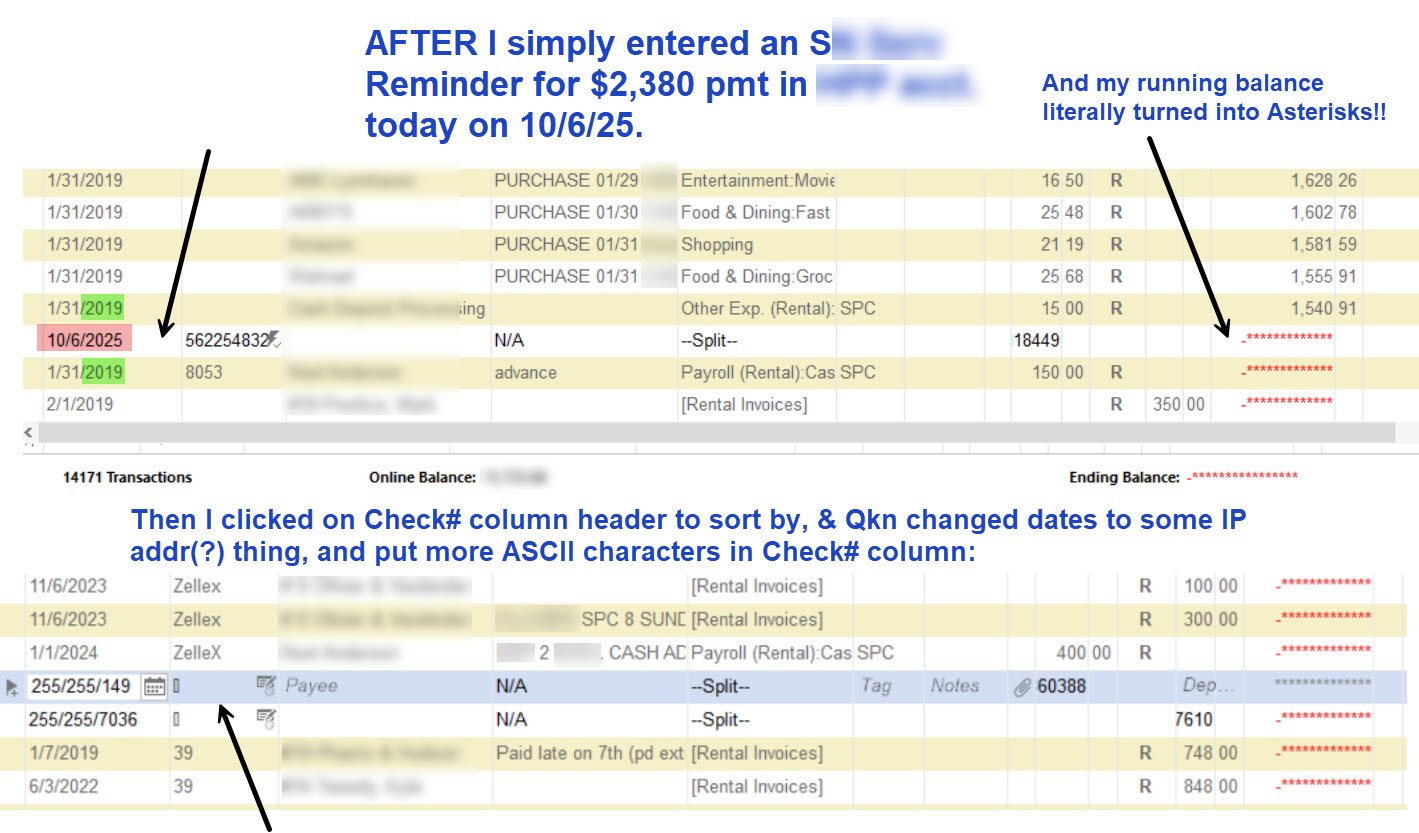
I tried everything to delete those transactions, from 'VOIDing' them, editing them, changing them (but couldn't save). Stunned but determined, I tried "Validate," and "SuperValidate." No joy. Kept finding the same 5 or 6 "damaged transactions" to delete and "reenter," but NOT the ones with the ASCII characters causing the Asterisks. (By the way Quicken, it's NOT HELPFUL when the validate twins provide this in the log file: "Repaired your data file by removing a damaged category. Please check your category list for missing categories by going to Tools>Category List." Duh, like a normal user has a blueprint of all their categories on a chip in their brain or dutifully copied somewhere from some point in time (not current) & can instantly spot the MISSING ONE! 😫 It would be more helpful for Q to print some characters from WHICH category it "removed.")
At some point in here, I think I remember starting with a "no asterisks" restored backup with Bills & Reminders still hosed. I ran a Validate & Super V, and it seemed like the Asterisks returned! But it's fuzzy because I was trying a whole bunch of things.
So then I decided to try making a TEMPLATE COPY of the non-astricsized data, that had been Validated & Super V'd, but did not have any asterisks or strange transactions with ASCII characters inserted randomly that caused the asterisks, still using R24.25 The first one I tried was from 10/5/25.
I was starting from a 10/5/25 COPY of the data, not BACKUP of the data. And here's just a sample of what my Mthly Bill and Income Reminders looked like with crazy dates due like 1/1/2001 and dates from earlier in 2025 which had already been paid:
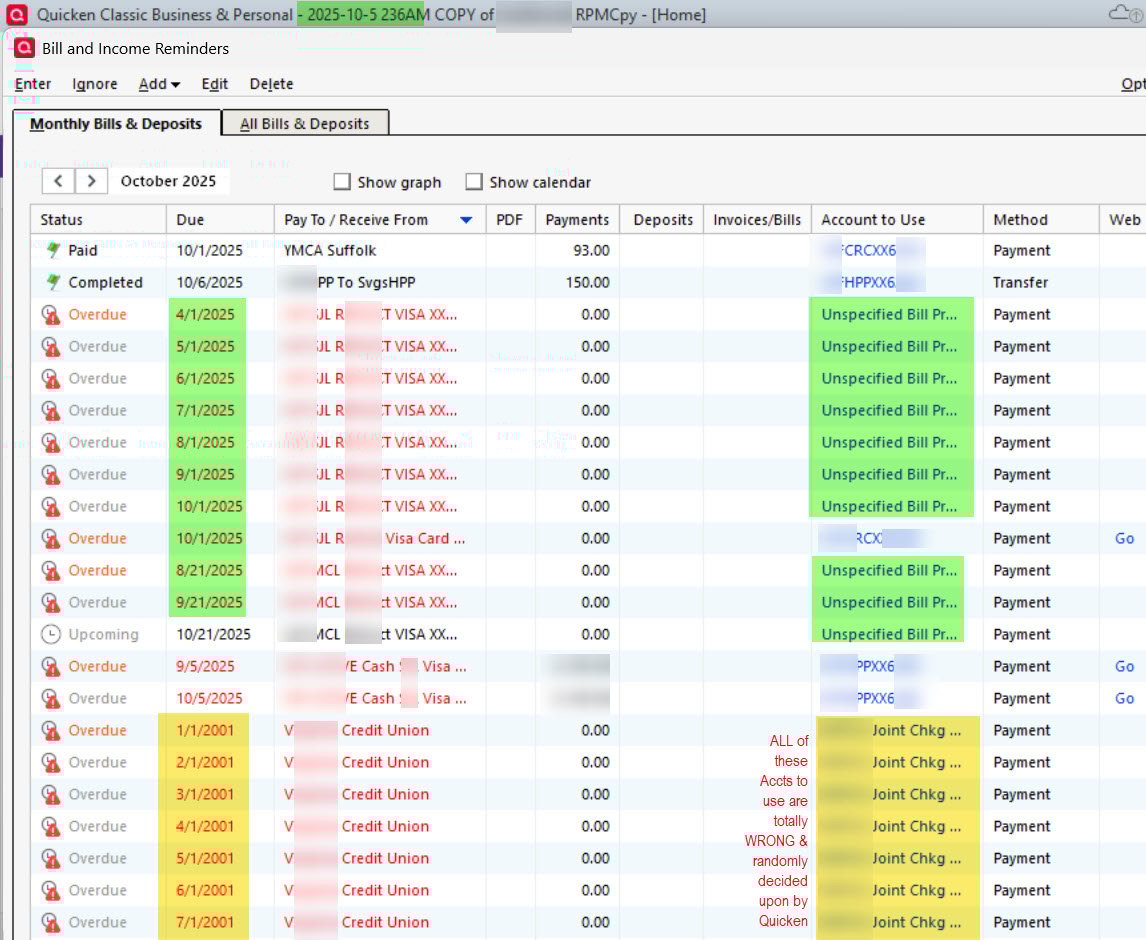
Still no good.
******** THAT WAS THE TICKET!!! ******* But I didn't know it at the time.
I started checking Quicken logs, under C:\Users\yourname\AppData\Roaming\Quicken. There were errors in some of the update logs, some of which I didn't understand. I would recommend other users do the same. It's interesting.
So by Oct 12th, I decided to take the plunge and update to R25.30. Then I double-clicked on a known "validated" & "super validated" TEMPLATE COPY of my 10/9/25 restored backup that had no asterisks (they were removed by making the TEMPLATE COPY). Almost miraculously, many of the errors and old transactions with $0's in the Bills and Income REMINDERS were gone — so R25.30 DID DO SOMETHING after all. Sure, the Reminders were still a little weird, some from the past with $0 due, but they can be edited, and my running balance in my main rental property account kept all of my September deposits from tenants, a real blessing - with NO ASTERISKS.
So far, my Cap One accounts are updating with new transactions. I'm going to start re-connecting my other accounts and updating them (because creating a TEMPLATE COPY of your data purposefully disconnects all "online services") and see if they are working. So far, so good.
However, in my 10/12/2025 C:\Users\yourname\AppData\Roaming\Quicken\Log\quickenPatch.txt there was this:
10/12/2025 00:09:14:724 AM: Error: quickenPatch needs administrative privileges to update Quicken. You can do this one of two ways:
- When prompted, enter an administrator's username and password.
- In Windows Explorer right click quickenPatch.exe and click "Run as Administrator"-The operation was canceled by the user, File: , Line: 0
However, when I check "About Quicken," it says it's R25.30. As Sonny & Cher sang, "The beat goes on." I hope this was helpful, I tried hard not to confuse everyone, but make a template copy of your last good restored backup, take the plunge & update to R25.30, double-click that template copy, and report back!!
Quicken user since the DOS days back in 1986, when I graduated from UCLA's MBA program. Struggling but still using Windows 11 Enterprise RPM to manage my 50-space mobile home park…so far. :-/
0 -
@wildnut — 🚨CAUTION 🚨 TREAD CAREFULLY, if you use ONLINE UPDATES! (I forget if you use those or not to update your transactions — I know you use reminders).
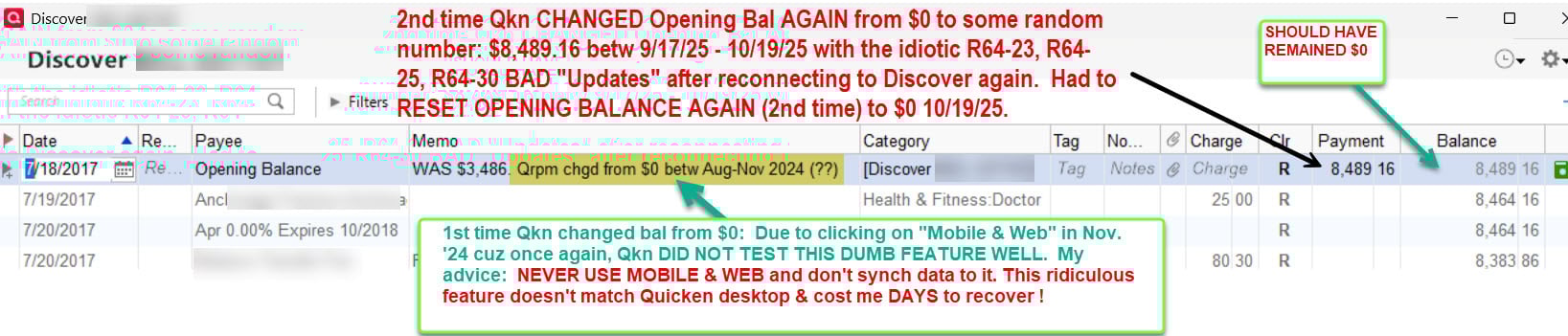
As I got to reconnecting other credit card accounts, I found that Quicken was CHANGING the beginning balances AGAIN (just like it did when I clicked on "Mobile & Web" ONE (1) TIME in Nov. of 2024 & it hosed ALL the beginning balances of my accounts!) I realize this statement is off-topic, but very important: WARNING: NEVER USE "Mobile & Web," because it only mirrors PART of your Quicken Desktop installation, and WILL CHANGE YOUR BEGINNING BALANCES, leaving you wondering why your "Running Balances" are all off! In fact, turn off "Synch" in Edit/Preferences/Mobile & Web to avoid more problems.
Ok, back to using the COPY TEMPLATE in R64.30 to try to restore your once-working Q data, reminders, etc. …. It makes you reconnect EACH account individually under the GEAR Icon in accounts, under the Account Details/Online Services, which normally would be fine — except for Quicken changing the beginning balances from $0 or whatever they were if you truncated your data, to some random number — which makes all of your RUNNING BALANCES off by a LOT.
Also as I'm reconnecting, sometimes the "Link to existing account" IS NOT ALLOWING ME ANY OPTION when I click the Down Arrow to select which account. I click the down arrow,,, and NOTHING. So I clicked "Next" and it sets up an entirely new Quicken Acct with a slightly changed name! (Which now has to be deleted) — along with changing the beginning balance again. So be cautious using my technique outlined in last post above, and be aware!
Quicken user since the DOS days back in 1986, when I graduated from UCLA's MBA program. Struggling but still using Windows 11 Enterprise RPM to manage my 50-space mobile home park…so far. :-/
0 -
Apologies for posting here, but I cannot find the thread I WAS posting in for QWIN Online Biller issues. WIsh I could. Did search.
Now I have billers that change the amount due in the reminder by itself. I have all variable reminders set to 0.00. The latest changes to 40.00. And it sets the next bill due a month further in the future.
It will accept editing and look right, then change again after next OSU. I can watch it change!
Tonight I unlinked, deleted the reminder and created a new one. Will see if that sticks.
0 -
Hello @Bob.,
When I check, I can see your discussion on windows online biller issues got closed due to being inactive for over 30 days. Here's the link, if you need it:
Are the reminders that are changing linked to the online biller, or are these manual reminders that are getting changed? When did you notice this change in behavior? Did this start immediately after a Quicken program update? If so, which update?
I look forward to your response!
Quicken Kristina
Make sure to sign up for the email digest to see a round up of your top posts.
0 -
Hi @Quicken Kristina That's why I couldn't find it :)
These reminders ARE linked to Online Billers. In fact, same billers as when and if a bill comes in, it will have the wrong amounts in QMAC. This is QWIN though and a different issue with same biller.
I just don't recall. Pretty sure started from update that introduced the new bill provider. But did not see it until a bill had been paid and next awaiting started showing this error.
I can correct the reminder, or even create a new one and either:
- The due date will jump forward a month, or
- The 0.00 amount will change to the last paid amount
- Both
Willing to bet this is another example of this biller (Chase) being broken (mis-mapped?) with the new bill provider. It shows differently in Qmac and Qwin. But both are date and amount issues.
0 -
Thank you for your reply,
If possible, would you please provide screenshots of what you're seeing (the manually corrected value, and the new value that's getting populated after it changes)?
I'll see if I can get my Quicken to misbehave the same way, but since I have only one biller supported by the new provider, it'll take a few days to get a balance to reflect and see if it changes my linked reminder.
Thank you!
Quicken Kristina
Make sure to sign up for the email digest to see a round up of your top posts.
0 -
I think this is specific to Chase, Kristina.
Before you asked I deleted the biller and reminder and recreated from scratch. I'll go see if it is sticking. If so, will take another billing cycle to fail.
In my (limited) experience, the new biller issues are account specific. Fidelity has not come in at all, no matter what tricks I try. Chase has date and amount issues. For now, three have come in correctly. I will stay on top of them, but we're two weeks or so away from next bill coming in.
Back in a bit if I have any screenshots to show.
1 -
Its sticking for now after the rebuild of biller and reminder. Will see for next month.
0 -
Bob,
Just for info, I could NOT get any linked reminders to work permanently with Online Billers. I just use non linked reminders to not miss the Bill.
Linked reminders had many issues for me including advancing a month, making entries in register when it shouldn't have etc..
I would suggest you not working too much on the linked reminders until some future fixes.
0 -
Online Billers / Reminders have had issues for years. They do change from time to time. I do have 6 or 7 that were working as expected before new biller and 3 post new biller.
Will see what November brings.
1 -
I had the old ones mostly working. Since the new system, I tried for a long time in several data files and could not get any working for any length of time and gave up trying. Hopefully they will fix it in future release as they address the Billers tab changes.
1 -
[Removed - Rant]
1 -
@NoCouth: I still haven't bothered to try to manually fix this disaster. I'm still on an old version that is working fine . . . but I'm paying for updates that I can't get due to Quicken's apparent inability to not only appropriately test their updates, but also fix the problems associated with those updates.
[Removed - Rant] For me, this bill and income reminder issue has been an ongoing issue for 2 months and there still isn't a fix. I just tried the latest software update and the issue continues to be just a total mess-up of the bill and income reminders that are working fine in an older version. Dozens and dozens of entries, including old deleted entries re-appearing, with just random dates and amounts.
[Removed - Rant/Speculation]
For me, Quicken has until close to the end of the year to fix this mess their update created and, after that, goodbye Quicken. [Removed - Rant]
2 -
Hello @wildnut,
The issue with old/deleted entries reappearing should have been fixed in R64.25 (to see the release notes, click here). If you have tried R64.25 or a more recent version and that issue is still happening, I recommend that you contact Quicken Support directly for further assistance. Quicken Support's contact information can be found through this link here. Phone support is available from 5:00 am PT to 5:00 pm PT, Monday through Friday. Chat support is available from 5:00 am PT to 5:00 pm PT, 7 days a week.
I apologize that I could not be of more assistance!
Quicken Kristina
Make sure to sign up for the email digest to see a round up of your top posts.
0 -
It turned out that syncing online was active even though I didn't use it. Once it was completely shut down the issue stopped. It was apparently reacquiring the old reminders from the online cloud data.
0 -
Hello @MajorEvent,
Thank you for sharing your experience. I'm glad to hear that turning off sync resolved the issue for you.
To clarify, did you have sync turned off, and it came back on without your input/knowledge, or was it likely just on by default, and you didn't notice until you were troubleshooting this issue?
I look forward to your response!
Quicken Kristina
Make sure to sign up for the email digest to see a round up of your top posts.
0 -
yes, i had some issues with Reminders and the last 2 updates. All details were sent thru "Report a Problem:
0 -
I actually have a similar but opposite effect with sync. My reminders were also either auto skipping after due date or reverting amounts just like you and I had sync off.
I'm not sure if I ever had sync on in the past or how any data actually is out there. I even turned sync on temporarily so I could reset the cloud data and signed in under a different file so I could completely delete the data for the file I was having trouble with. None of that helped.
I had to turn sync on (unchecked all accounts so none would be available on the cloud), delete the reminders, sync, re-add the reminders, sync again and for now at least the two I did were not auto skipping. We'll see if this holds up.
It seems that maybe some programing routines are not talking into account the highest level flag that Sync is turned off completely and is still getting some info from the cloud whether sync is on or off. Just a theory.
0





