Latest update broke all future paycheck reminders - somehow web synch messed things up
Comments
-
Hello @Michael Jones,
Thank you for sharing your experience!
Hopefully this helps others encountering this issue.
Quicken Kristina
Make sure to sign up for the email digest to see a round up of your top posts.
0 -
Here's an additional twist to the situation. If I add an income reminder, not as a paycheck, I will have the same result after running the update. All the splits are a removed. Only 1 category is displayed. The projected balances graph and the tax planner no longer recognizes the reminder after the update.
0 -
Thank you for the update @Tungue,
I can see that you spoke to Support earlier this month. In your chat with them, reverting to R64.19 seemed to correct the issue. Is that still the case, or did the issue start happening even in R64.19?
Thank you!
Quicken Kristina
Make sure to sign up for the email digest to see a round up of your top posts.
-1 -
Same issue here. After OSU (One Step Update), my paycheck shows $0 on the "Bills, Income & Transfers" screen and in "Projected Balances", which screws up my forecasting. If I click "Edit this instance and all future instances" and simply click "Done" without making any changes, the correct amount is shown on the screens. Rerunning OSU changes it back to $0. So, the workaround for now is to click "Edit this instance and all future instances" and click "Done".
1 -
I have this problem as well, exactly as @xlnja described. I'm on R64.25 as I've refused further updates because of all the issue reports.
I've also noticed that all my bill reminders for October have gone missing. They start up again in November. I haven't seen that reported either, but seems to follow the same general issue.
0 -
@Quicken Kristina The issue seemed to be resolved R64.19 for about a week. Then the problem re-occurred with the R64.19 version.
0 -
This is driving me nuts. Today I found that it auto recorded some of the split up paycheck categories into my register, thus doubling my projected income. It makes forecasting really unreliable.
But I have myself to blame for not calling support yet. I just haven't had the time.
0 -
So I reinstalled version R64.19 yesterday. Recreated my income reminder. I set it up as splits rather than a paycheck. Performed the One Step Update this morning. All the splits from my income reminder were replaced with just "salary". The projected balance and tax planner do not even recognize there is an income reminder.
0 -
This problem is exactly why I stopped syncing my bank accounts. Cash and credit card sync issues I can deal with, messing with my bank account, no way!
0 -
This has been a continuous problem for some time. The sync corrupts paychecks. I created a fresh Quicken file, moved all my stuff over, it solved the issue for like a day, and then it happened again. So clearly syncing just corrupts the Quicken paycheck feature automatically now. Every time I sync I have to go back, edit all paychecks, then reset my tax tab to get things correct. It's insane. Worst part is, I don't even use Quicken for web. So it's not like I'm trying to sync data to the cloud. But somehow just doing one step update to sync your accounts causes this issue.
1 -
I decided to go back to R63.21 and restore my backup from before the update (which was a month ago almost). Had to spend a few hours syncing, reauthorizing accounts, but at least I know my split transactions and paychecks are correct.
0 -
I'll chime in here as well. On version R64.30 and seeing essentially the same problems as others are describing here:
OSU makes paycheck amount drop to zero or some other low number that makes no sense
editing, but changing nothing and saving fixes it until the next OSU, breaking it again
Also, projected balances never take into account scheduled payments downloaded from online sources. They just aren't there.
I'm not interested in rolling back and spending hours re-entering data. This needs a fix. It has gone on too long. They went to this annual SaaS model that we have to continually pay for to use year after year and the program has more bugs now than it ever did. I've been using Quicken since the 90's. It just doesn't get any better.
0 -
Well, I'm on R64.19. I ran the OSU about 10 min ago. The splits on my income reminder didn't get blown away today. Keeping my fingers crossed it doesn't break tomorrow.
1 -
Thank you for the update @Tungue,
I'm glad to hear it's still behaving, so far.
Hello @jmk0001,
Thank you for letting us know you're seeing an issue with your paychecks getting messed up when One Step Update runs. What exactly are you seeing after the paycheck reminders get messed up? Do they retain the Paycheck reminder formatting, or do they look like a regular split transaction? You mentioned that the amount drops significantly; are lines missing from the paycheck reminder?
I look forward to your response!
Quicken Kristina
Make sure to sign up for the email digest to see a round up of your top posts.
0 -
Well that was short lived. Ran the OSU today at 7:10. My income reminders are messed up again. Same issue as previously reported.
[Edited - Language]
0 -
Thank you for the follow-up @Tungue,
If you haven't already done so, I recommend trying this process that another user said has helped them resolve issues with reminders getting scrambled:
If the issue persists, please let me know!
Quicken Kristina
Make sure to sign up for the email digest to see a round up of your top posts.
0 -
This is BS and Quicken needs to provide a clear and concise fix for this. I went to enter my paycheck info and it is only doing the net amount. I don't sync with Mobile & Web. Going back to a previous backup is not feasible as I have made way to many changes since then. How do I get my payroll entries to be be gross again instead of net?
0 -
@Quicken Kristina I tried going thru those steps. After step 4, my income reminder was corrupted again. I did no have a "super" validate option. Throughout all this, I do not sync any of my data to the web. Everything is local. For now, I have to recreate the reminder every time I run the update.
0 -
An update since the info everyone posted here was very helpful to me. The CloudSync-ing proved to be the issue for me. I followed above advice to enable syncing, uncheck all of the accounts, and then disable syncing. I had no issues with splits in paycheck reminders since. However . . . in the past week the issue returned. Returning to this process I found that I had recently added an account and that account was enabled for syncing on the CloudSync screen. Once I disabled syncing for that account the issue again ceased to occur.
3 -
Alright. So keeping my fingers crossed, I might be good to go. I re-enabled the mobile & web sync. I noticed in the Accounts tile that there was 1 account being synced. I opened up setting window to disable at, but the account being synced was not displayed. I proceeded to website to view the data. I had to go into settings to actually see what account was "being synced". I found an old closed account. I deleted from the website. I disabled and re-enabled mobile & web to ensure that there are no accounts flagged to sync. Then I disabled the sync. I've run the One Step Update twice now. My income reminders seem to be ok. Keeping my fingers crossed this is a permanent fix.
3 -
Thank you for the update,
I'm glad to hear that it seems to be behaving now.
If the issue returns, or if you need further assistance, please reach out!
Quicken Kristina
Make sure to sign up for the email digest to see a round up of your top posts.
0 -
Well, today after several weeks, mine are now messed up again.
When I open the reminder from the 'clock' on the left of my register (edit this and all future entries) everything looks normal. When I hover over the split for the reminder transaction, however, I only see 3 lines all for debits and every account is shown as Unspecified Account.
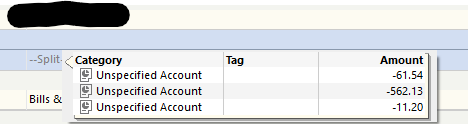
Those amounts are in a random order from the 'pre-tax deductions' part of my pay stub. Nothing from Taxes or After-Tax Deductions is shown.
I went and checked my previous 'fix', which was to turn on Quicken Mobile & Web and validate that nothing was set to sync. It's not.
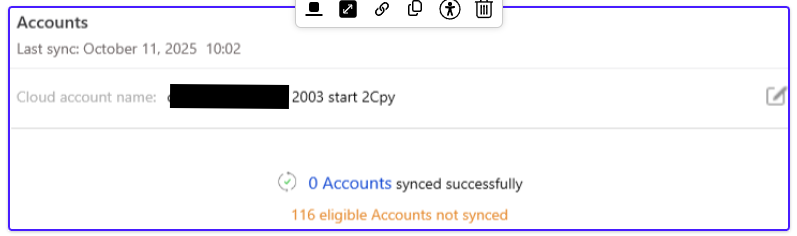
As I noted in my original posting, it appears that Quicken is not honoring syncing to the web, even when it's turned off as there is a data file showing as being synced for this file, even though I've never turned it on until now. That should not be happening.
EDIT:
It's my opinion that Quicken is much too aggressive about trying to sync when you play with any setting in that panel. It should NOT try to automatically sync when I turn the toggle on, for instance, if I make a bunch of changes, it's just going to have to sync all those changes again. I should also have the option to delete my current web file for the file I'm in and have a resync initiated from in the same file. Having to create a dummy file and then enable web sync only to delete it and then go back to my other file to do that is a bit ridiculous.
I restored a backup, which required me to redownload and catch up on approximately four weeks' worth of transactions, including a month-end. Very annoying. I loaded another dummy file I had, which has absolutely nothing in it. I used that file to delete my only Quicken web file for my primary file. Now, I have nothing enabled in this updated file, and there is no Quicken cloud history whatsoever. We will see how long that takes to mess up again, but I'm going to have to do more frequent backups in the meantime than monthly.
0 -
@Michael Jones Did you log into the website dashboard to see if there is any account listed?
While I had mine turned off, there was an old account on the website. I suspect somehow that was causing issues. I deleted it thru the website. I've been good since that completing that task.
0 -
I didn't, and I didn't think I had to, as the file had already been shut off from syncing and never turned on after the last time I fixed it that started this thread.
Here, I created an empty dummy file with nothing in it and ensured after turning synch on for that file, that there were absolutely no files in my cloud account. For whatever reason, my main file had once again tried to sync with the web, even though I've never turned it on in that file after my first recovery that started this whole thread.
So I think there are 2 problems.
- My original post at the bottom said - "Seems like Quicken may not be completely respecting the global Mobile & Web sync setting, causing files and other information to get out of whack with one another and overwriting future reminders in the active Quicken file." I KNOW that happened here between the first time I posted and now as I spent 4 hours on Saturday recovering my data from a 4-week-old backup.
- Something is not right in the current sync process between Quicken desktop and the web specific to paycheck reminders. I provided pictures in the last post showing what I think a lot of us are seeing when it happens. I don't know how the website is overwriting things in the desktop file. The desktop file SHOULD be the source of truth and not the website.
0 -
Until the developers can figure out what's going on, I'm throwing stuff against the wall to see what sticks, so to speak. My "solution" turned out to be a partial solution. The updates are now blowing away the splits. The splits are replaced with the Salary category. But at least now the project balance graph takes into account the income reminder. The tax planner is then messed up.
0 -
@Tungue does this temporary work around still work?
1 -
It does for me.
0 -
@markus1957 Unfortunately that did not work for me. 😥
My reminders do not get zero'ed out. For me, I lose all my splits. The splits are replaced with just the Salary category. The tax planner and forecast planner do not recognize the income reminder after it's been corrupted.
0 -
Thank you for the follow-up @Tungue,
If this is a file-specific issue causing the problem, then you may be able to correct the issue by exporting your data to a QIF file, creating a new Quicken file, and importing your data into the new file. To import into the new file, you would navigate to File>File Import>Quicken Interchange Format (>QIF) File….
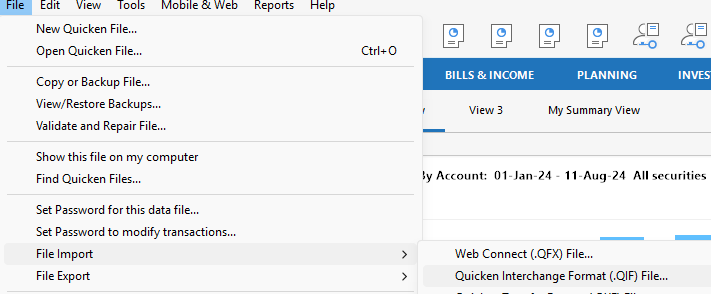
I recommend reconnecting/setting up just enough to test if the issue persists.
If the issue is resolved, then you may want to set everything up in the new file and use it as your main file going forward. If the issue persists, then return to your original file.
I hope this helps!
Quicken Kristina
Make sure to sign up for the email digest to see a round up of your top posts.
0 -
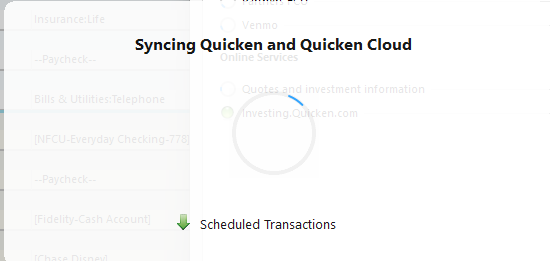
I tried this again just now, as once again, when I started Quicken tonight, all my future reminders were once again messed up. It was probably like this over the weekend after doing multiple OSU's as Quicken also helpfully forgot all my connections to my accounts and I've been methodically restoring them one at a time.
I'm not going back to another backup file to try and figure out where it went wrong. Though suddenly it's now again trying to synch to the Quick Cloud as well! Insantity!
 0
0



