Bank of America/Merrill Lynch Cut-Over Migration: keeps prompting to reauthorize [Edited]
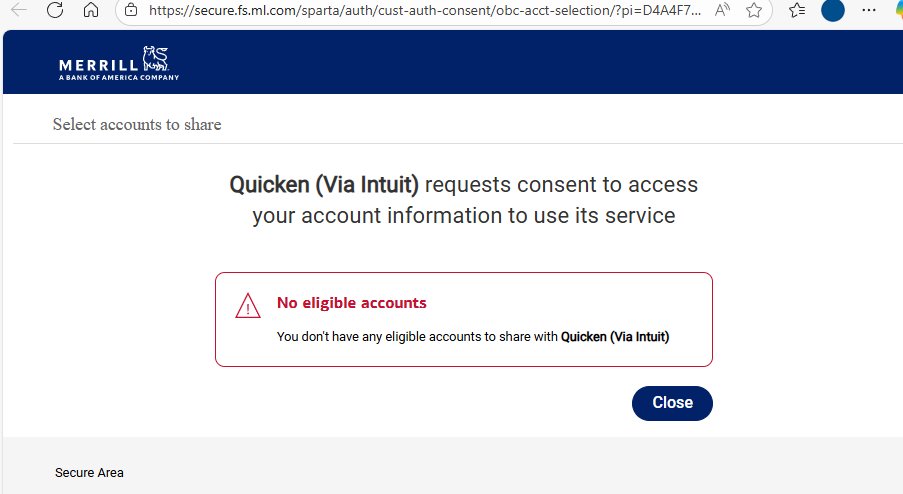
Click on reauthorize link. Sign into merrill account. Get message: 'No Elegible Accounts'. Same as a month ago. Then deactivated online setup. Reactivate via 'add account' or 'setup' (Account Details/Online Services tab). Quicken allows me to successfully re-establishes the link to the accounts, but uses direct connect, not the new style. Quicken again prompts me to re-authorize for new connection method. Merrill again says: "No eligible accounts".
Quicken…when will this be addressed? Anyone in the community have solution?
Thanks!
Comments
-
I successfully completed the reauthorization when I first received the notice and immediately started noticing errors & anomalies in the data downloaded from ML. On advice found in this forum I switched ML back to Direct Connect, which worked fine for a few days. Now I get the reauthorize message every time I update & if I click 'remind me later' it appears to just skip ML transactions altogether. Tried going through with the reauthorization again & now after I log into ML & complete the authorization I get an error on the Quicken side saying the authorization did not work (despite confirmation messages both online & in email from ML that it worked successfully). Tried removing all online services from my ML accounts & re-adding, but it only added as Direct Connect so I still get the 'reauthorize' messages.
0 -
Quicken keeps asking me to "reauthorize" Bank of America. I tried deactivating each account individually and reactivating them. Then, I tried deactivating all Bank of America Accounts and reactivating them all at one time and same result.
In Tools, Online Center → I can see a blank account with zero transactions and Online Balance is N/A.
So, this is the problem that it created an account somehow that is not showing up in my account list.
I also see this account in One Step Update "Bank of America - All Other States"
It has to be a bug.
Thanks,
David
0 -
Look in your "Online Center" under the financial institution and it seems Bank of America and maybe Merrill Lynch, there is an extra blank account there that is blank. Most likely it is remnants of the old account before reauthorization.
I am having the same problems with Bank of America and created a separate topic in this community board but it sounds like the same issue.
Merrill/Bank of America update — Quicken
I called customer service who always says "repair" file which I don't want to do as that creates other issues. This is an issue with Bank of America/Merrill and Quicken and I hope gets resolved. I am a 30 year user of Quicken.
0 -
Hello @taitelh,
Thank you for letting us know you're seeing this issue. To clarify, are you seeing the "no eligible accounts" message on Merrill Lynch's website, or in Quicken? What kind of account are you trying to reauthorize (brokerage, 401k, checking, etc.)? Please provide a screenshot of the exact error message you are seeing. If needed, please refer to this Community FAQ for instructions on how to attach a screenshot. Alternatively, you can also drag and drop screenshots to your response if you are not given the option to add attachments.
Hello @stmalia,
Thank you for letting us know you're seeing this problem. To help troubleshoot this, I checked our internal tools, and can see that you are getting a CC-505 error, and have been for over 48 hours. Per our article on CC-505 errors, please contact Quicken Support directly for further assistance, as they have access to tools that we can't access on the Community, and they can escalate the issue as needed. The Quicken Support phone number can be found through this link here. Phone support is available from 5:00 am PT to 5:00 pm PT, Monday through Friday.
Hello @davidmarketing,
Thank you for sharing your experience! To clarify, you were able to track the problem down to a blank account that is not showing in your Account List, but is visible in the Online Center? I can see that you contacted Quicken Support about this issue, but declined to follow the recommended troubleshooting (Validate and Repair file). If you know roughly when the phantom account appeared, I suggest that you try restoring a backup from before the phantom account appeared, and test to see if that resolves the issue.
I hope this helps!
Quicken Kristina
Make sure to sign up for the email digest to see a round up of your top posts.
0 -
Hello @Quicken Kristina ,
I have been using Quicken for 30 years and my experience with Validate and Repair causes more problems and I don't believe has ever solved any issues. Quicken has to fix the problem. There are many people posting issues with Bank of America and Merrill Lynch so it's obviously not a problem with my specific file, but a common problem.
Yes, I have isolated the issue. I have a file opened on an old computer and I don't see this random account, which started when Bank of America updated the file download and we had to reauthorize accounts. Quicken needs to fix this with Bank of America.
I really don't want to restore from a Backup since I have entered a lot of data in the last few days. And restoring from a Backup causes problems too.
David
1 -
Adding @Quicken Anja who has helped before. Thanks.
btw, my four Bank of America accounts seem to be working fine.
David
0 -
I am not sure if I should keep using Quicken or wait for an update. I have 30 years of data so I am very sensitive to my data file.
What about "refreshing" my financial institution? I am not sure what this does.
- Hold down Ctrl+F3, then click Contact Info at the top of the window.
Thanks,
David
0 -
Hello @davidmarketing ,
Thanks for your question! The “Refresh” option for your financial institution essentially re-establishes the connection between Quicken and your bank. It refreshes the authentication tokens and account information, which can help resolve issues like delayed updates or connection errors.
It is not the same as restoring a backup or reauthorizing accounts, and it does not affect your historical data—it only refreshes the link between Quicken and the bank for online updates.
Hope this helps!
-Quicken Anja
Make sure to sign up for the email digest to see a round up of your top posts.0 -
Thanks @Quicken Anja. I don't think that will help then.
My assessment is that Bank of America updated the data transfer protocols. The "blank account" is the old Bank of America - All Other states accounts that wasn't cleared out. It created the new protocols but it needs to clear out the old link if that makes sense.
What I don't know is whether the next Quicken update will solve this issue or whether I actually have to go back to an old file and reenter all the data since that file was saved.
David
0 -
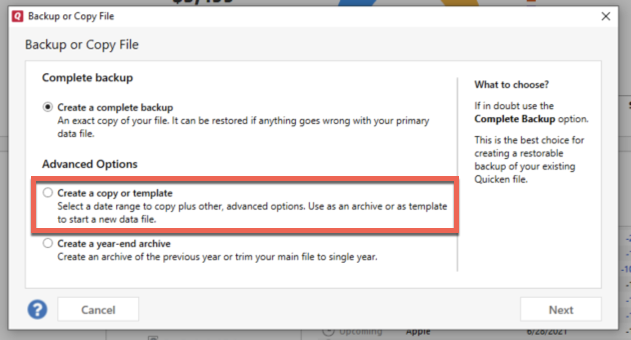
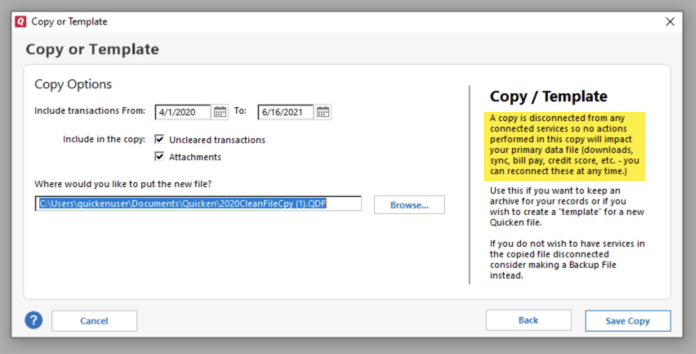
@davidmarketing Thanks for the additional details. Since validating or restoring a backup isn’t an option for you, the next step I would suggest is creating a copy of your data file. This process rebuilds all internal lists and database tables, which may allow the blank account to be resolved or become removable.
To do this:
- Go to File > Copy or Backup File… > Create a copy or template.
- Select the date range you want to carry forward—if you want your entire file, ensure the full date range is selected.
Keep in mind that all online services will be disconnected in the copied file. You will need to sign back in with your Quicken ID and reconnect your accounts, billers, and Quicken Bill Manager services. This is because the copy creates a new, separate dataset ID.
If the blank account issue is not resolved in the copied file, you can return to using your original file.
Thank you!
-Quicken Anja
Make sure to sign up for the email digest to see a round up of your top posts.0 -
I think Quicken needs to fix the "Reauthorize" feature. It should remove the blank account that doesn't exist in my account list nor did I setup this account. Obviously Bank of America created it and Quicken should not have allowed this.
There are too many issues with R64.25 update. And there are too many unknowns to do this create a copy or template that it surely will create other issues. I assume the next revision of Quicken will fix this problem but it's never known when the next version of Quicken will be released. Sometimes it's quick and sometimes it's weeks.
David
0 -
Thank you for the follow-up,
If the issue persists after the next release comes out, please let us know.
Thank you!
Quicken Kristina
Make sure to sign up for the email digest to see a round up of your top posts.
0 -
Thanks @Quicken Kristina. I was thinking of going back to an old backup but it's just a lot of work as I entered a lot of transactions and reconciled all my monthly accounts in the last few days.
I am curious if I am the only one with this problem. I see other people have other issues with Bank of America and I am sure it's all related.
I just don't know if the Quicken update will fix the problem and fix the damage it caused. That's two different issues.
David
0 -
Any thoughts when the Quicken update will happen? I am trying to figure out what to do to move forward. I'd like to wait and then if that doesn't work, then go back to an older file. But kind of depends if a release will happen this week.
David
0 -
@Quicken Kristina, any update on the new launch date?
0 -
Thanks for following up. Unfortunately, Quicken’s product development teams do not provide an estimate for when new updates will be completed and released.
I apologize as I understand this isn’t the answer you were hoping for, but we appreciate your patience!
-Quicken Anja
Make sure to sign up for the email digest to see a round up of your top posts.0 -
Regarding the 'No Elegible Accounts' message it comes from Merrill after signing in to reauthorize. These are brokerage accounts.
0 -
Hi @Quicken Anja,
I saw your note on the other message board recommending users "fix" Bank of America. I am a little surprised you would make the recommendation to update Bank of America when it causes so many problems. I have not used Quicken since I did this so I am SORRY that I did this "fix".
David
0 -
@davidmarketing I understand your concern about the “Fix” recommendation and the issues you experienced. I want to clarify that this recommendation is part of the standard guidance provided in the ongoing Bank of America/Merrill Lynch cut-over migration alert. It’s intended to help users reconnect their accounts, and while some users—like yourself—may experience issues, many others complete the process successfully without any problems.
Thank you for sharing your feedback and for your patience while this transition is being managed.
-Quicken Anja
Make sure to sign up for the email digest to see a round up of your top posts.1 -
Regarding the Eligible account problem, please do not discontinue direct connect updating until this is resolved. Merrill one-step update is imperative to my daily work. Quicken must keep this core functionality operating.
1 -
I guess no update today.
I looked at the other posts and it's crazy the amount of online banking problems, which explains why the product team is overwhelmed. For a product that is 40 years old, it's shocking. I've been using since 1994 but for a company that is fighting to get new customers, it's also shocking.
David
0 -
Quicken now demands that I re-authorize my Merrill Lynch accounts. Last time I tried this, several months ago, the results were a disaster, necessitating restoring from a backup multiple times. Is this thing any better and is it safe to go ahead with the re-authorization? I'm tired of making a backup .QDF every time I use the program. For a product that's 40 years old, it simply isn't very competent.
Quicken user since the day after Microsoft abandoned its superb Microsoft Money product.
0 -
I've been trying to figure out what I did wrong after being prompted to re-authorize my Merrill accounts for EWC+ and out of Direct Connect. It's been several days now and I haven't found a solution. Now I see this community thread that the problem was systemic. Seems testing wasn't sufficient. And not getting a push notification from Quicken to Merrill users seems to be a shortfall forcing users to seek out and find issues like this are going on.
Q. Quicken (i.e. Eric Dunn): Why does this have to be this problematic and painful every time? Dorking-up peoples financial data is not acceptable. Sure, I keep backups and have occasionally restored things. But why not get it right the first time instead of having hundreds if not thousands of people going through all of this hassle.
0 -
Hi @GSW,
I agree - they have precedence to send out communications when you open Quicken on issues. [Removed - Speculation] And as I mentioned before, it's not just Bank of America and Merrill but several banks having the same issue.
I have tried several troubleshooting steps and quickly realized that Quicken added a "blank account" which it is trying to reauthorize. I temporarily stopped using Quicken for the first time in 31 years because I am not sure whether Quicken is going to fix the problem and fix the damage it caused (i.e. removing the blank account) or if we are going to have to go to a backup. The blank account doesn't show up in Accounts, only in the online center. Also, opening a backup also has problems and I try to avoid.
I understand software has issues but there should have been a software update within 72 hours. We are at a week from 9/11.
David
0 -
There was a Quicken software update today but no update regarding Bank of America. Very disappointing.
David
0 -
Now running R64.29, installed an hour ago (9/19/2025). Ok, next issue…
The first OSU screen says that ML account data download for the listed accounts would be changing, but mentioned nothing about BoA accounts. On the ensuing "which accounts do you want to authorize for sharing data" screen, there were two sections. One listed my ML accounts. I did leave these all checked. The second section listed my BofA checking, savings, and VISA accounts. I UNCHECKED the sharing permissions box for those. To quote George Constanza: "Was that wrong?"
I was able to link the five ML accounts to the existing accounts in Quicken. After going through all that, I'm back in Quicken and perform an OSU. Everything seems ok, but since I have no new data today for checking, savings, or VISA, nothing seems amiss. I guess I have to wait until there is new data to download to find out if the BofA accounts are ok or broken. My checking account register contains more than 5,000 transactions, going back to Jan. 1, 2000. I'd hate for that to become unusable.
Finally, all of my ML accounts have been WILDLY inaccurate for, well, forever, it seems. I do the detailed download and have NEVER, EVER manually entered anything in the registers. I fail to understand the crazy, gigantic inaccuracies and have no clue how to fix any of it.
Quicken user since the day after Microsoft abandoned its superb Microsoft Money product.
0 -
Hello @DotCom,
Thank you for sharing your experience. Merrill Lynch is owned by Bank of America, which is likely why you see Bank of America accounts listed in the authorization screen as well.
The second section listed my BofA checking, savings, and VISA accounts. I UNCHECKED the sharing permissions box for those.
If you are referring to unselecting those accounts on the financial institution website, then you may have revoked permission for Bank of America to share information about those accounts with Quicken. If you start getting error messages for those accounts or if nothing downloads, you should be able to correct the issue by authorizing them again (backup your file, deactivate the accounts, then navigate to Tools>Add Account and follow the prompts, making sure to carefully re-link them to the correct nickname in Quicken).
Finally, all of my ML accounts have been WILDLY inaccurate for, well, forever, it seems.
If the issue with the accounts being wildly inaccurate predates the conversion to Express Web Connect+, then it is unlikely to be the result of a recent change. If you add the accounts as new, rather than linking to the existing, does the information reflect correctly?
I look forward to your response!
Quicken Kristina
Make sure to sign up for the email digest to see a round up of your top posts.
0 -
All of my Merrill data is updated correcting but having now correctly and completely re-authorized at least three times I'm getting mighty sick of being asked to re-authorized every time I use Quicken.
0 -
Thank you, @Quicken Kristina
Yes, of course I'm aware that ML is a subsidiary of BofA. The difficulty occurred because, during the required re-authorization process for ML accounts, if I left the displayed list BofA accounts selected for sharing, in the subsequent steps they could not be linked to existing Quicken BofA accounts, because those accounts did not appear in the dropdown list of linkable accounts (perhaps because they were already connecting via EWC+, enabled a long time ago). That's why I canceled, then repeated the process, being sure to NOT select the BofA accounts. I'm currently not getting any messages indicating a problem with the BofA accounts connecting during OSU, but I'll know for sure in a couple of days when there are new transactions to download.
As for ML accounts being wildly inaccurate, they have been this way for years, so yes, this is from long before EWC+ entered the picture. I don't have a clue how to even add correct types of dummy transactions to get things to reconcile to the ML website's current account totals. I see many Quicken-created placeholder transactions, and mismatches of holdings. I dare not touch them. Deleting and re-adding these accounts as new would ignore transactional data that goes back nearly 20 years for some ML accounts. That would be very disappointing. I can't be the only person in this situation!
Thank you for your assistance!
Quicken user since the day after Microsoft abandoned its superb Microsoft Money product.
1 -
I am having the same problem with reauthorization and it's most likely because Merrill created a "blank account" in your Online Services menu which it is trying to authorize. I haven't touched Quicken since this happened because I fear that the Quicken solution will be to go back to an old file - when the data is corrupt, this is their solution. I am not sure Quicken will remove this account once the fix is made and I don't have confidence in the team anymore. I've been using the software for 31 years and this is bad.
0
Categories
- All Categories
- 56 Product Ideas
- 36 Announcements
- 223 Alerts, Online Banking & Known Product Issues
- 22 Product Alerts
- 701 Welcome to the Community!
- 671 Before you Buy
- 1.2K Product Ideas
- 53.7K Quicken Classic for Windows
- 16.3K Quicken Classic for Mac
- 1K Quicken Mobile
- 813 Quicken on the Web
- 111 Quicken LifeHub