My list of broken Fidelity EWC+ functions
Comments
-
BTW, if anyone experiences problems with the way Quicken handles any transfer of shares (not cash) between accounts please be aware this has not been recorded as a problem yet (see Share Transfer between Fidelity Accounts Mishandled). I've been trying to get this recorded as an issue for over a month but evidently have been unsuccessful so far. Now the instability of updates between Quicken and Fidelity are preventing me from capturing adequate documentation so Quicken will believe this is an real problem.
I'll continue trying to get Quicken to be useful to me as I still have a couple months left on my subscription. However, I'm struggling to figure out what real benefit Quicken provides me since I cannot trust the data in the majority of our financial accounts. Quicken is definitely more time consuming for me than doing everything manually this year.
— — — — — — — — — — — —
Quicken Classic Deluxe; Ver R64.35, Build 27.1.64.35; Windows 11 Home – Quicken user since the Windows 3 version
1 -
Fidelity NetBenefits 401k Mutual Funds No Longer Download Quotes.
I spoke today with both Quicken Support and Fidelity support. The short answer is. If you have Fidelity NetBenefits and the funds are private non-publicly traded funds you will NO LONGER get quotes downloaded.
The change from Direct Connect to Express Web Connect fundamentally changed in that Direct Connect downloaded number of shares AND the share price. The Express Web Connect only downloads transactions. Fidelity expects quicken to update mutual fund prices from MorningStar based on the fund Symbol. But there is the problem. Private mutual funds in NetBenefits do not have symbols (never have never will) Therefore, its safe to say that Quicken no longer supports Fidelity NetBenefits. I assume Quicken will eventually admit this but for now they have open incident to fix this but I doubt it will ever be fixed.
Thanks Fidelity! How Lame.1 -
I got yesterday's non-public prices this morning. Seems like it depends on which 401(k) you have.
0 -
@Kevinky I have private mutual funds in Fidelity 529 accounts and the prices are still updated after the EWC+ conversion, so this is not an EWC+ limitation.
The lack of price updates for private funds in NetBenefits accounts is recognized in this Alert and I would expect that the issue will eventually be resolved. Quicken's tracking number is CTP-14996. Scroll to the 10/28 update at the bottom to see the latest.
QWin Premier subscription0 -
Unfortunately I'm still experiencing problems with NetBenefits. Although it is working for the most part, it does not correctly understand what is commonly referred to as the "mega backdoor Roth" transaction. This is where you move money from the after tax portion of your 401k into your Roth IRA.
In the Direct Connect method, it simply downloaded the transactions as a sell transaction into cash. And then in the Roth IRA it downloaded the actual transfer transactions to move the cash into the Roth. It has worked perfectly for years.
This new method simply downloads the transaction as a "withdrawal" of cash. There is no associated shares with the transaction so the cash appears out of nowhere. And then the share balance is incorrect because it did not sell any of the shares to generate the cash.
Right now I work around this by changing each withdrawal transaction to a sold and using the Fidelity website to match up the number of shares and sell price. I'm basically now having to do something manually that worked perfectly for many years with Direct Connect.
I know this type of transaction is not super common. But curious if anyone else has the same issue?
0 -
It seems like once per week I need to reset or reconnect my Netbenefits account. If I don't it stops downloading share prices and transactions. Is anyone having this issue?
0 -
Hi,
My Cash Account is being treated like a brokerage account. So I see 'SoldX' and 'BoughtX' instead of a register of checks and payments.
Quicken is useless to me without this working right! Please fix as soon as possible.
Is it possible to get an alert when the issue is fixed?
Thank you!
PS-I think this is the same as item #2 in this post CTP-13955, but it seems to have been marked closed.
0 -
I have been using Quicken for over 25 years. I am so disgusted with Quicken in the last 3-4 years implementing changes without sufficient testing that I'm really close terminating my subscription. Do they have a quality control team? Do they even care about the importance of sufficient testing before deploying updates, or do they realize that they are using us for beta testing. I lost my 25 years of data when I was told that the CURRENT file could not be fixed even though I had daily/weekly backups for at least 5 years. All of my Fidelity accounts are so corrupted that I given up of fixing hundreds of transactions. I simply use adjusting entries to keep the current quicken balance to within several thousands of dollars of accuracy. I have zero trust in Quicken now. I used to love Quicken, but now I hate it, and would never recommend it to anyone. Thanks for letting me vent my frustration.
2 -
@Steve Allain Many of the initial issues of the Fidelity cutover have been resolved. A few remain. However, I had the most success "cutting over" by starting with a Template backup. It requires reestablishing connections to all accounts again. If you could somehow create a Template backup from a datafile that was prior to the EWC+ conversion you did. You may be able to recover lost data. It will be time consuming to do because there will be a few months of downloaded transactions to accept and some transactions that need correcting after the EWC+ cutover. There should not be as many transaction issues as prior to the fixes that have been implemented in R65.17. But I found the time to be worthwhile, because I have a working datafile that has lost no data. I have recently discovered the capability to create a "Windows Sandbox" in Windows (which is basically a virtual instance of Windows) that allows me to install a different version of Quicken in the Sandbox with a copy of the datafile I want to try out and checkout features while not disturbing my real version of Quicken and the datafile. Prior to using the Sandbox, I relied on using a template copy to test, but that used the same version of Quicken for the template copy and the real copy. It has been a very frustrating few months with this cutover.
Deluxe R66.23, Windows 11 Pro
2 -
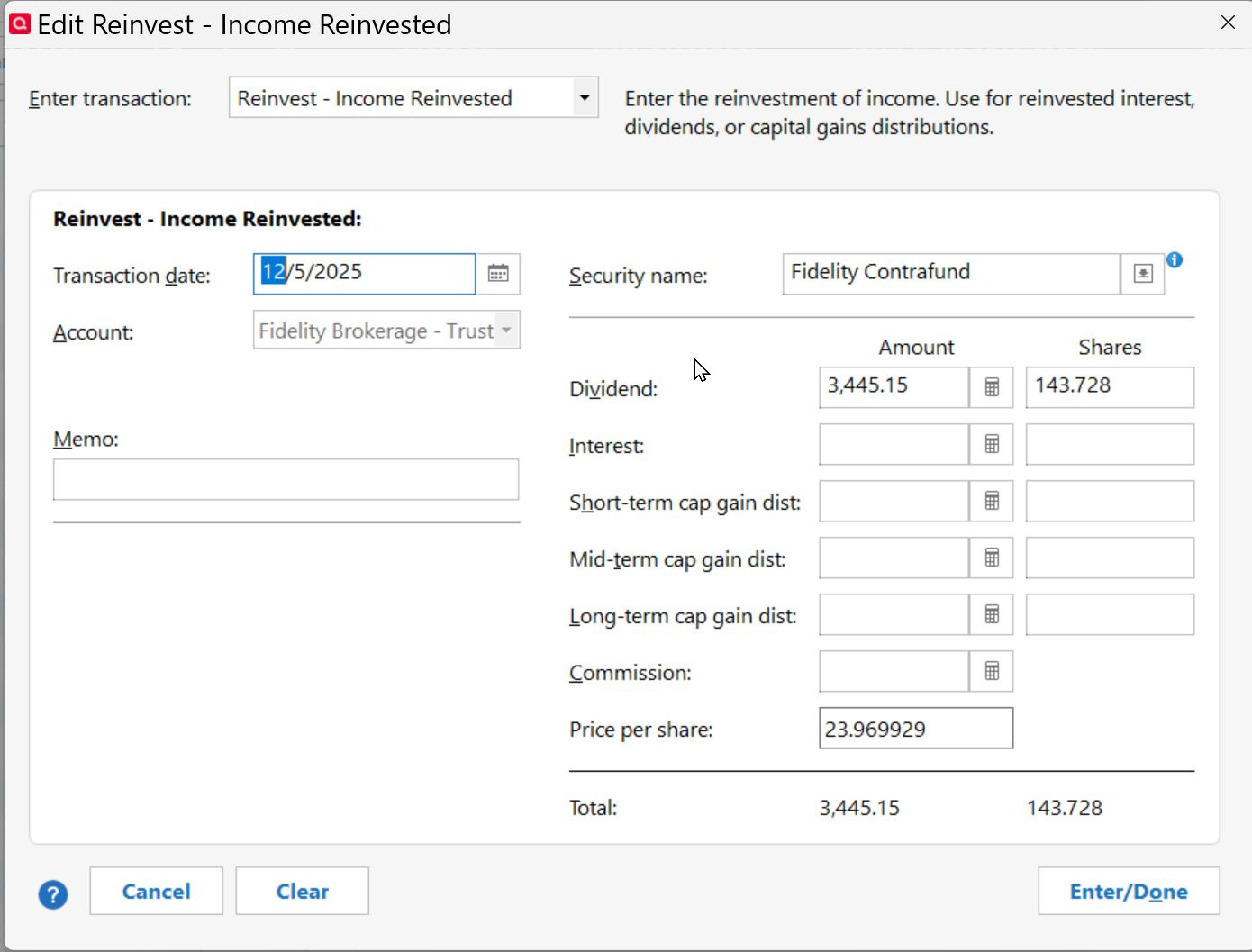
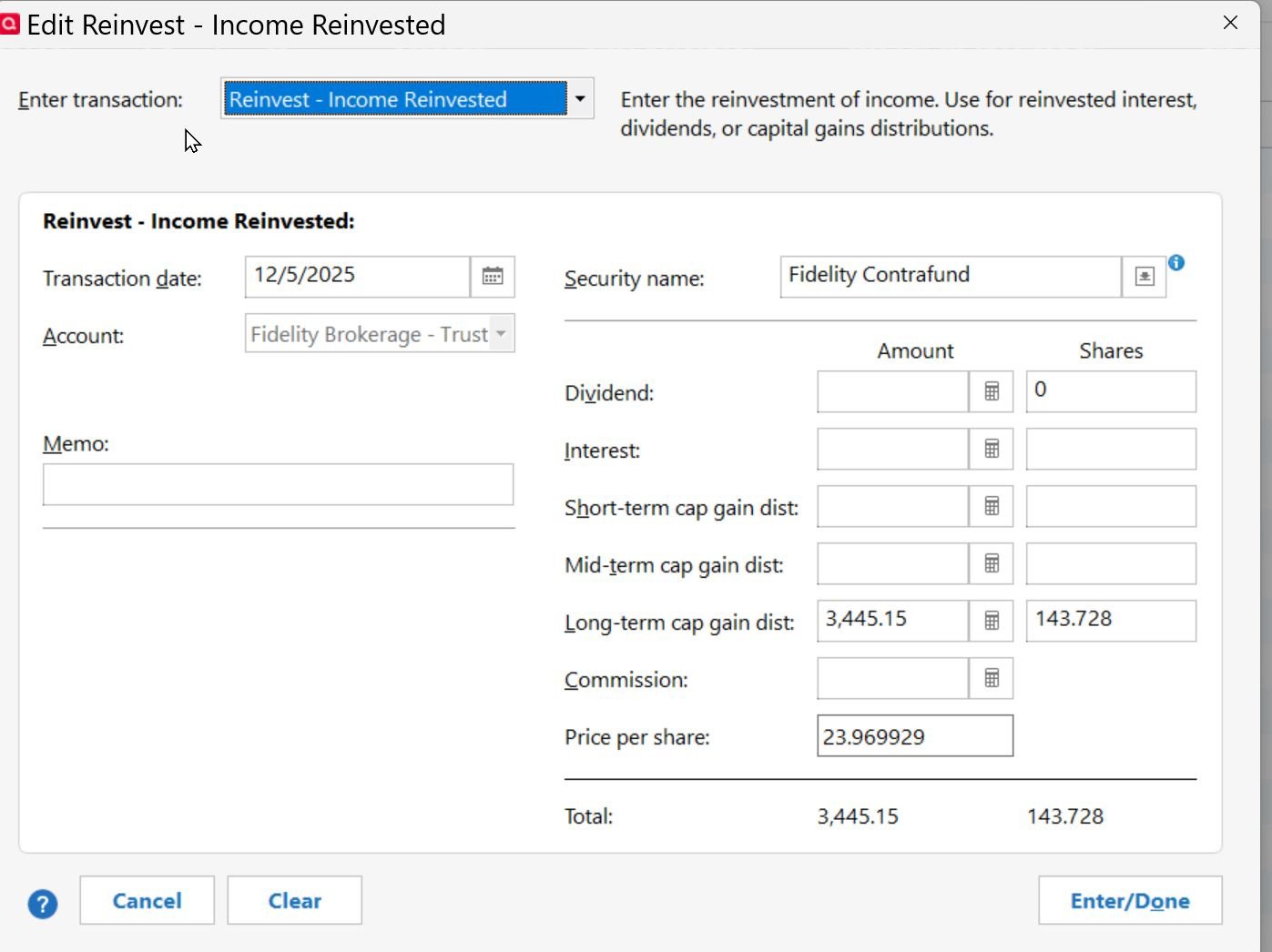
Still some issues persist with Fidelity EWC+. Most recent is a Downloaded Transaction posted as Reinvest Dividend. This should have been a Reinvest Long Term Cap Gain. I submitted an error report with these screenshots of the posted trans and my edits to match Fidelity:
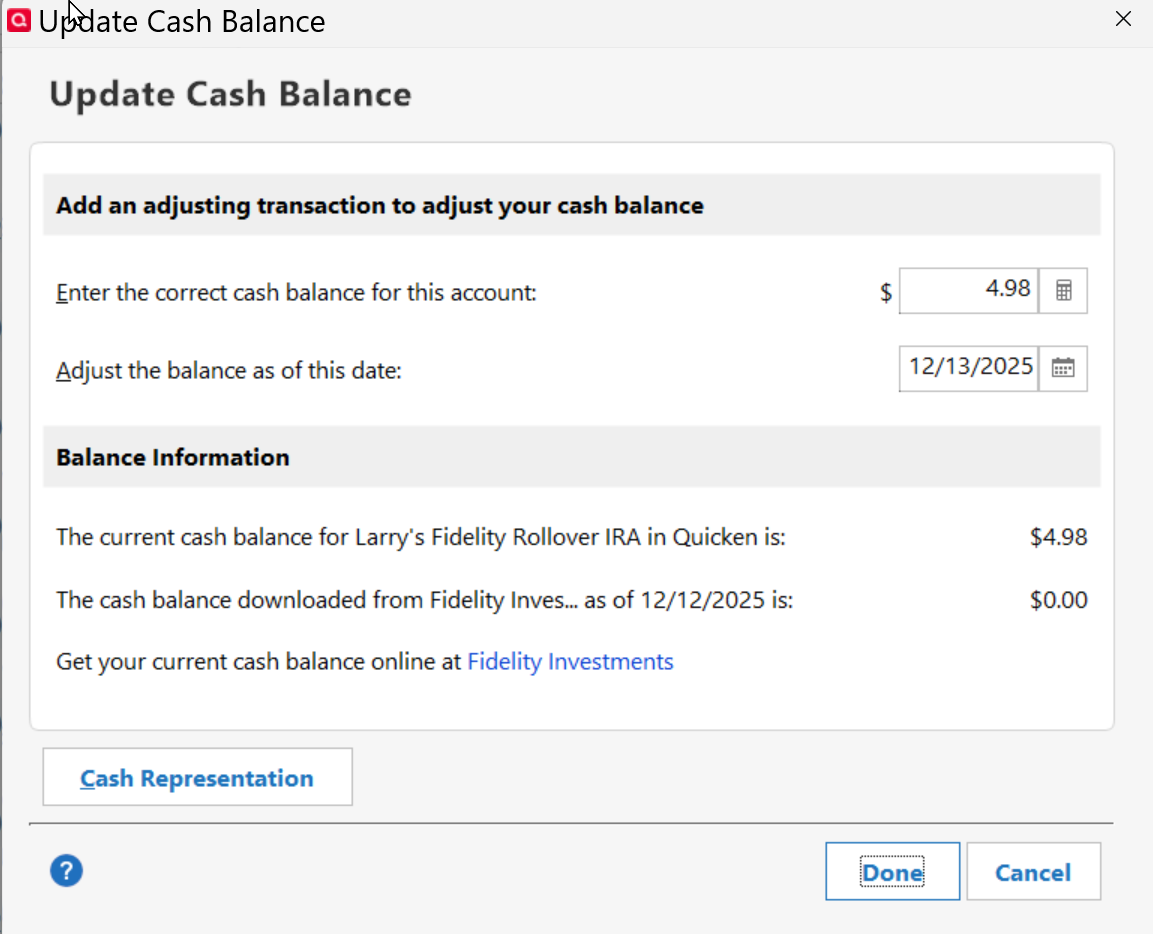
I still do not see an amount for the "Cash Downloaded from Fidelity Investments". I have ensured all my MMFs are updated on all my Fidelity accounts and I have deactivated and then added back all Fidelity accounts. One account screenshot below:
 "No Matter Where You Go, There You Are"Windows 11 Pro, Quicken SubscriptionIntel Core i7-12700, 32GB Ram1
 -
Downloaded Transaction posted as Reinvest Dividend. This should have been a Reinvest Long Term Cap Gain
FWIW that's been an issue in Quicken for a very long time. Some accounts/brokerages do better than others. Fortunately, most have a text label showing what it really is.
My feedback on the Fidelity changeover:
As with the Chase change it took 45+ minutes to complete.
As before I'd strongly recommend anyone take a screenshot of account balances and run a Validate on their file afterwards. Several balances changed, even though I I only updated Fidelity accounts. For instance in our checking account it added a transaction in Jan 2025 for a random amount and duplicated a transaction in 2022. Fortunately both were uncleared so easy to spot. File validation "corrected" several recurring bills which now show dates in prior years (there is a "skip all overdue reminders" choice), and an annual one changed to monthly (it was not one of the ones "corrected").
Despite showing downloaded Fidelity transactions once, when approved, most reinvestments were entered twice. Hopefully THAT doesn't continue.
For my Fidelity HSA it "downloaded" two transactions…one didn't exist online (wrong amount…$10.00 over the actual amount) and the other was already in Quicken. Both were marked "cover short sale" but they were debit card purchases. That account did not download any valid recent transactions.
1 -
FYI…
Transactions worked correctly in Fidelity for Feb 2025 using Direct Connect, but wrong after EWC+ change.
Etrade using EWC+ Reinvest Long Term Cap Gain works correctly.
"No Matter Where You Go, There You Are"Windows 11 Pro, Quicken SubscriptionIntel Core i7-12700, 32GB Ram1 -
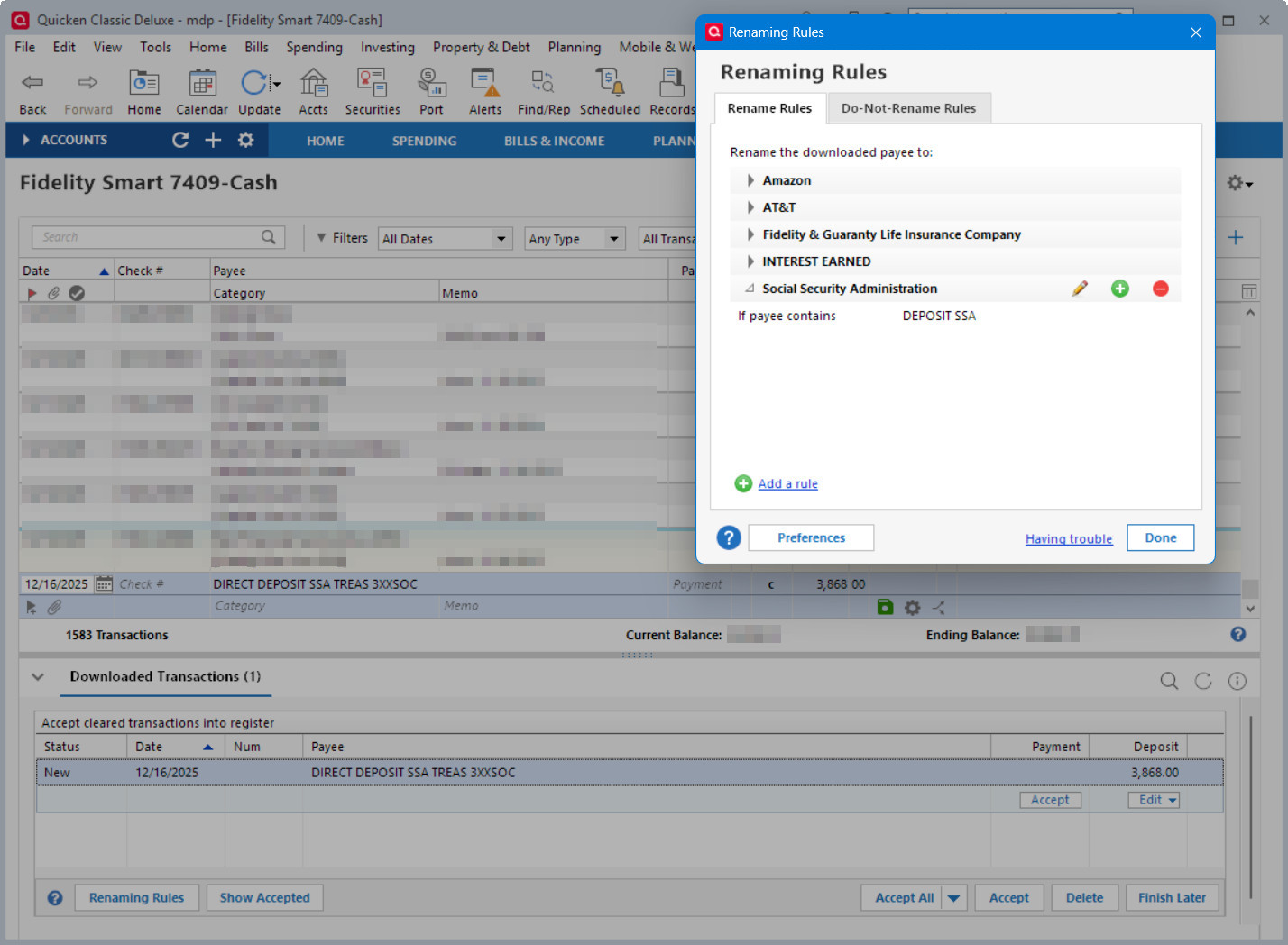
As of R65.17, the renaming rules for Fidelity accounts still do not work after the EWC+ cutover.
Deluxe R66.23, Windows 11 Pro
1 -
In the screenshot, SWGXX is used as the cash equivalent (sweep fund). All buy/sell transactions should be ignored and only their dividends added to the account. I have to delete each buy/sell or the cash balance will be incorrect.
The button for selecting the cash security is missing in Update Cash Balance. This problem occurs in 2 Schwab (SWGXX) brokerage accounts in 3 data files and is a general issue in how Quicken handles cash.
In the Fidelity accounts, the Update Cash Balance button is missing too. Fidelity accounts don't download the buy/sells, so handle the transactions better. But, instead of downloading FDRXX, they download FIS. Fidelity's website transactions correctly show FDRXX.
Quicken tech support says Fidelity is sending the wrong information. There are other securities downloaded with the wrong symbols only in the Fidelity accounts. Fidelity says they send the same information to their other aggregators without complaint and it's one of the open issues they have with Quicken.
 1
1 -
Ray, just a thought, but I found the CUSIP ID (316067107) that belongs to FDRXX assigned to a totally different Security. Look in your Security List and make sure FDRXX has the correct CUSIP ID assigned and that that number is NOT assigned to a different Security.
Just a thought……
"No Matter Where You Go, There You Are"Windows 11 Pro, Quicken SubscriptionIntel Core i7-12700, 32GB Ram1 -
@leishirsute I doubt your issue with renaming rules will get much attention in this discussion. It would probably be better to start a new discussion about that. In that discussion, you might want to answer the following:
Do you have non Fidelity investing accounts where Renaming Rules work OK?
Do you have a Memorized Payee for the Social Security deposit?
I find it better to create a Reminder for recurring transactions like Social Security. That way you can record any splits for deductions. If you enter the Reminder or it is auto-entered before the download, it should match based on the date and amount and keep the Payee from the Reminder.
QWin Premier subscription1 -
@Jim_Harman I can do that. I had prior discussion about it but the discussion was closed. I submitted a problem report and a Quicken developer did a screen share with me to view the issue. So they are aware of it in R64.35. I was just updating the status for R65.17 as well as submitted a new problem report. Here's the discussion that was closed.
Non-Fidelity accounts are processing renaming rules correctly. They are mainly credit card accounts.
There is a memorized payee for the Social Security deposit. In fact, when selecting the downloaded transaction, I just type a part of the payee as "Social" and the remainder of the transaction fills out correctly including the category splits.
Deluxe R66.23, Windows 11 Pro
0 -
You got me on the right trail. I used Copilot to look up the CUSIP numbers. As you said, FDRXX is 316067107. My Security List doesn't have FDRXX. FIS incorrectly has 316067107. It should be 31620M106. If I open a security for edit, I can change name, symbol, and other things but not the CUSIP.
I decided to edit the name and symbol. First, I created a backup of my working file. I have a 3rd "Test" data file. It has FDRXX so I edited my working file's symbol to match the settings. When I saved the changes, "Symbol Change Affects Price History" popped up with choices of Merge quotes from FIS into FDRXX, Delete them, or "click Default and Quicken will do the safest thing." I clicked Default.
I then compared account balances with my backup data file. The Fidelity accounts were the same, but a Schwab account was $9,674 off because any security change affects all account using it. Schwab actually has FIS that are about $67/share. Quicken kept the shares but now they are FDRXX at $1/share.
I had to add FIS as a security, then edit all of the Schwab FDRXX transactions to change then from FDRXX back to FIS. The accounts holdings and cash are again correct. However, FIS doesn't have a CUSIP number and I don't see any way to add it.
I exported my Security List and had Chat GPT verify names, symbols, and that CUSIPs are correct. It found this FDRXX problem as well as missing CUSIPs for FXI, GE, and GM. CASH's CUSIP is not FCASH. All of these have had errors that I've had to correct. CUSIP is the only unique identified for a security.
0 -
In my case I had to edit the mis-matched security by un-checking the "Matched with Online Security" to get it to remove the CUSIP ID number, so I could assign it to FDRXX. In my case the incorrect security was an old one and I not longer had shares anywhere.
I believe this incorrect assignment happens when Quicken prompts users when it sees a new security if its a match for an already held security or new security. If you gloss over this too quickly, it will assume you want the wrong security to be used everytime it gets trans for FDRXX, because the incorrect security contains the CUSIP ID of FDRXX.
It seems editing the CUSIP ID number for a Security Code is not possible?
Hope my experience helps you.
"No Matter Where You Go, There You Are"Windows 11 Pro, Quicken SubscriptionIntel Core i7-12700, 32GB Ram1 -
@Ray "I exported my Security List and had Chat GPT verify names, symbols, and that CUSIPs are correct. It found this FDRXX problem as well as missing CUSIPs for FXI, GE, and GM. CASH's CUSIP is not FCASH. All of these have had errors that I've had to correct. CUSIP is the only unique identified for a security."
Can you tell me how you exported the Security List and had ChatGPT verify it. I stumbled across another example of an Old Security (Sears) had the CUSIP number for (ServiceNow). Also, other than removing the checkmark on the incorrect Security for "Matched with Online Security", is the only way I can find to remove the incorrect association. Somehow, the correct association is repaired, I guess when there is a new transaction for it.
Now I am nervous there may be more, and would like to check the whole Security List.
Thanks,
"No Matter Where You Go, There You Are"Windows 11 Pro, Quicken SubscriptionIntel Core i7-12700, 32GB Ram0 -
To export your Security List, open it and in the lower-left corner click the Printer icon. In the pop up, change the output to Export to CSV file. You can sort by Security, Symbol, or CUSIP either in the Security List or later in the CSV file.
Interestingly, the FIS security I added didn't have a CUSIP, but has since picked it up. My FXI, GE, and GM's CUSIP's are still blank.
Today's OSU downloaded a GIS (General Mills) transaction that is actually GM. I found that GIS has GM's CUSIP. (ChatGPT found this error, but I glossed over it.)
Quicken needs a method of editing or adding the CUSIP. Instead, I have to change the name and symbol to match the QUSIP. Then, move each transaction, one at a time to the correct security. This process is very, very tedious and it's easy to make mistakes.
0 -
Sorry about the length of this response, but it should provide the information you need to correct these mismatches.
Quicken uses the CUSIP ID to match securities in its Security List to downloaded investing transactions.
When you manually set up a security in Quicken, it gets a name and optionally a ticker symbol but not a CUSIP number. Its Matched to online security box will not be checked.
Downloaded investing transactions include a security name and a CUSIP ID. If the CUSIP ID matches the ID of an existing security, Quicken records the transaction for that security. If no matching security is found, Quicken compares the name to the securities in your file that don't have the Matched to online box checked and it proposes a match based on the name. This is just a guess; it is your responsibility to confirm that the match is correct, select a different security, or create a new one. When you confirm the match, it marks the security as Matched to online and records the CUSIP ID. It uses this ID for future downloads.
This process is what lets the quote provider and different FIs use different variations on security names and lets you give the securities in your file names that are convenient and meaningful to you rather than the downloaded name.
Ticker symbols are only used by Quicken's quote provider to provide updated prices and quote information, not for matching to downloaded transactions.
Correcting mismatches:
If you make a mistake on the first download, you will end up with a mismatched security. To clear mismatches:
- Go to Tools > Security List, find the mismatched security in question and click on it.
- The Security Detail View window opens. Click the button "Edit Details" in the middle left of the window.
- The Edit Security Details window opens. Uncheck the "Matched with Online Security" box.
The next time that security is referenced in a download, you'll get the dialog mentioned above asking how to match it or create a new security. Be sure to answer this correctly. This will record the security's CUSIP ID and check the "Matched to Online Security" box in the Security Details.
This will correct downloads going forward, but to correct previous incorrect entries, you must change any incorrect security names.
- Back up your data in case something goes wrong.
- Go to Edit > Preferences > Keyboard mappings and select Windows standard if it is not already selected
- Click on the Security header in the account’s Transaction List (Register) to sort them by name.
- Correct one of the incorrect names, then highlight the corrected name and hit Ctrl-C to copy the name.
- Save the edited transaction.
- Select the name of the next affected transaction to highlight it and hit Ctrl-V
- Repeat steps 4-6 for the remaining incorrect transactions.
QWin Premier subscription1 -
Thanks Ray for your feedback.
Thanks Jim, for your feedback too. This is what I tried to state in my previous post, but not as succinct and detailed as your input.
Anybody else reading your two Posts should understand the issue.
"No Matter Where You Go, There You Are"Windows 11 Pro, Quicken SubscriptionIntel Core i7-12700, 32GB Ram0 -
Thanks. (A minor correction is in 2. Go to Edit > Preferences > Setup and select Keyboard mappings). I noticed that my newer Security List has added columns for Type, Asset Class, Downloaded Quotes, and Watch List.
If a One Step Update transaction has the wrong name, you need to look up the CUSIP for the correct security (Google). You probably will need to change the security and symbol in your Security List. Before editing, double-click the name to get a detail view. Make sure each transaction listed should be changed. If not, this can quickly become complicated and isn't for the faint of heart. My experience has been that phone support doesn't seem to know any of these details.
0 -
After a couple of downloads on the new system, I suspect the security match for Fidelity 401k is unmatching/rematching the existing securities from other accounts as they both required me to select an existing security.
Also annoying is that Quicken sometimes - but not always - defaults to "add this security to Quicken" even if a match is selected in the supper part of the dialog box.
0 -
I am still having problems with my two managed Roth accounts that use FDIC33309 as the sweep account. Dec interest posted as reinvest and added shares instead of just posting to cash within Quicken. All my other fidelity accounts are processing the Core positions correctly. I am in contact with Quicken support and sent them files requested, so hopefully they will find a resolution.
"No Matter Where You Go, There You Are"Windows 11 Pro, Quicken SubscriptionIntel Core i7-12700, 32GB Ram1



