My list of broken Fidelity EWC+ functions
I know there are other problems with EWC+ for Quicken that I am not experiencing (so far). This is a list of features that worked with my Fidelity accounts using the DC connection and no longer work using the EWC+ connection. I hope to keep this list updated as broken features are resolved or new broken features are encountered. Ideally, Quicken development would have provided a current and running list of problems, the problem ticket # assigned, the status if it is being worked or in the queue to be worked or considered not a bug.
Updated 10/17/2025:
+ fdrxx is being treated as a security for some accounts when it is the core money market account. Result is the Quicken cash balance doesn't match Fidelity cash balance as shown in Quicken. Workaround: ignore discrepancy to have Fidelity & Quicken match cash balance or Buy shares of FDRXX in Quicken to have quantity of shares match between Fidelity and Quicken
+ Some reinvested dividends are being treated as a Deposit with no assigned security along with a Bought transaction for the matching security . Workaround: delete the Deposit transaction and change Bought to a ReinvDiv
+ Some regular dividends are treated as Deposits with no assigned security. Workaround:look at Activity on Fidelity website and change the deposit to a Div for the security matching the Deposit's $ amount.
+ Renaming rules don't work for a linked cash account. This issue may be occurring for non-linked accounts as well. The renaming rules are ignored. Workaround: use memorized transaction to correct the downloaded payee. Reference:
+ Reconnect of an investment account that has linked cash register fails without an error. Workaround: Undo linked cash register, reconnect the investment account, recreate the linked cash register. Reference:
Issues reported by others:
+ Brokered CDs are sometimes still downloading at 100X the actual share volume at 1% of the actual share price…example, instead of downloading them as 25 shares @ $1000 dollars each ($25K total) it is downloaded as 25K shares @ $1 each (for $25K total). Workaround: When these transactions occur, they must be manually corrected, especially with Sold transactions or they will not properly decrement the original Buys which were downloaded correctly. Reference:
[Edited - Enabled Links]
Deluxe R65.17, Windows 11 Pro
Comments
-
what works?😉
0 -
Quite a bit still works for me. Enough to keep using Quicken.
Deluxe R65.17, Windows 11 Pro
0 -
@Quicken Janean Regarding the post at: "https://community.quicken.com/discussion/7967194/updated-10-17-25-fidelity-migration#latest"
I am concerned that not all issues have been addressed. In particular, reinvestments and dividends that are being processed as deposits.
Please look at my list I posted, and, if possible, update your list with the status of the issues listed. Some of the issues overlap with your list but others do not. I have submitted problem reports for all of my issues listed.
Thank you
Deluxe R65.17, Windows 11 Pro
0 -
Hello @leishirsute,
Thank you for reaching out! A couple of the issues you list are known issues that aren't listed on the new alert.
fdrxx is being treated as a security for some accounts when it is the core money market account. Result is the Quicken cash balance doesn't match Fidelity cash balance as shown in Quicken.
This is a known issue that our teams are working with Fidelity to resolve. We do not currently have an ETA.
Some reinvested dividends are being treated as a Deposit with no assigned security along with a Bought transaction for the matching security .
This issue has been reported to our teams for further investigation and resolution. (CBT-862)
I'm not finding open tickets for the other issues you list yet, but I can get tickets created for them.
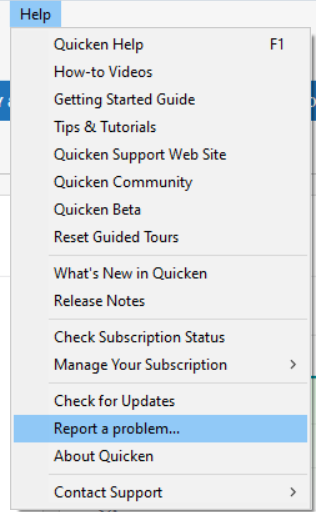
To anyone encountering these issues, please navigate to Help>Report a Problem and send a problem report with log files attached. If possible, please also include screenshots showing the issue you are encountering.
If you send a problem report, please post to let me know, so I can add them to the appropriate tickets.
Thank you!
Quicken Kristina
Make sure to sign up for the email digest to see a round up of your top posts.
2 -
@Quicken Kristina Thank you for the feedback on these issues. I will see if I can locate the posts about the dividends issue and the renaming rules issue. I used the same photos in the discussion posts as in the Report A Problem submissions.
The renaming rules issue and the reconnect of a linked cash account issue were submitted about 2 days ago
Deluxe R65.17, Windows 11 Pro
1 -
Perhaps this is one of the post about Dividends?
https://community.quicken.com/discussion/comment/20514895#Comment_20514895
"No Matter Where You Go, There You Are"Windows 11 Pro, Quicken SubscriptionIntel Core i7-12700, 32GB Ram0 -
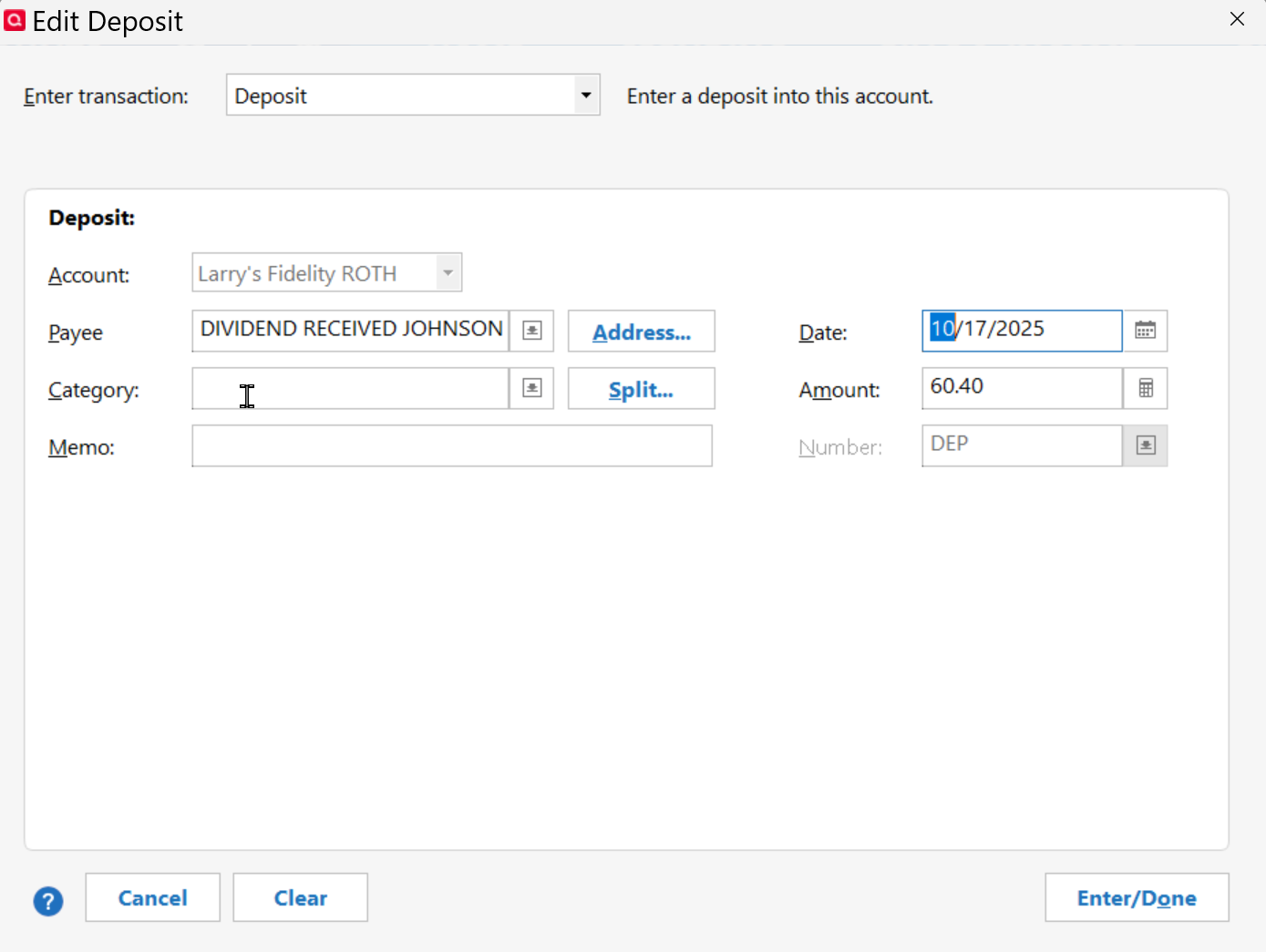
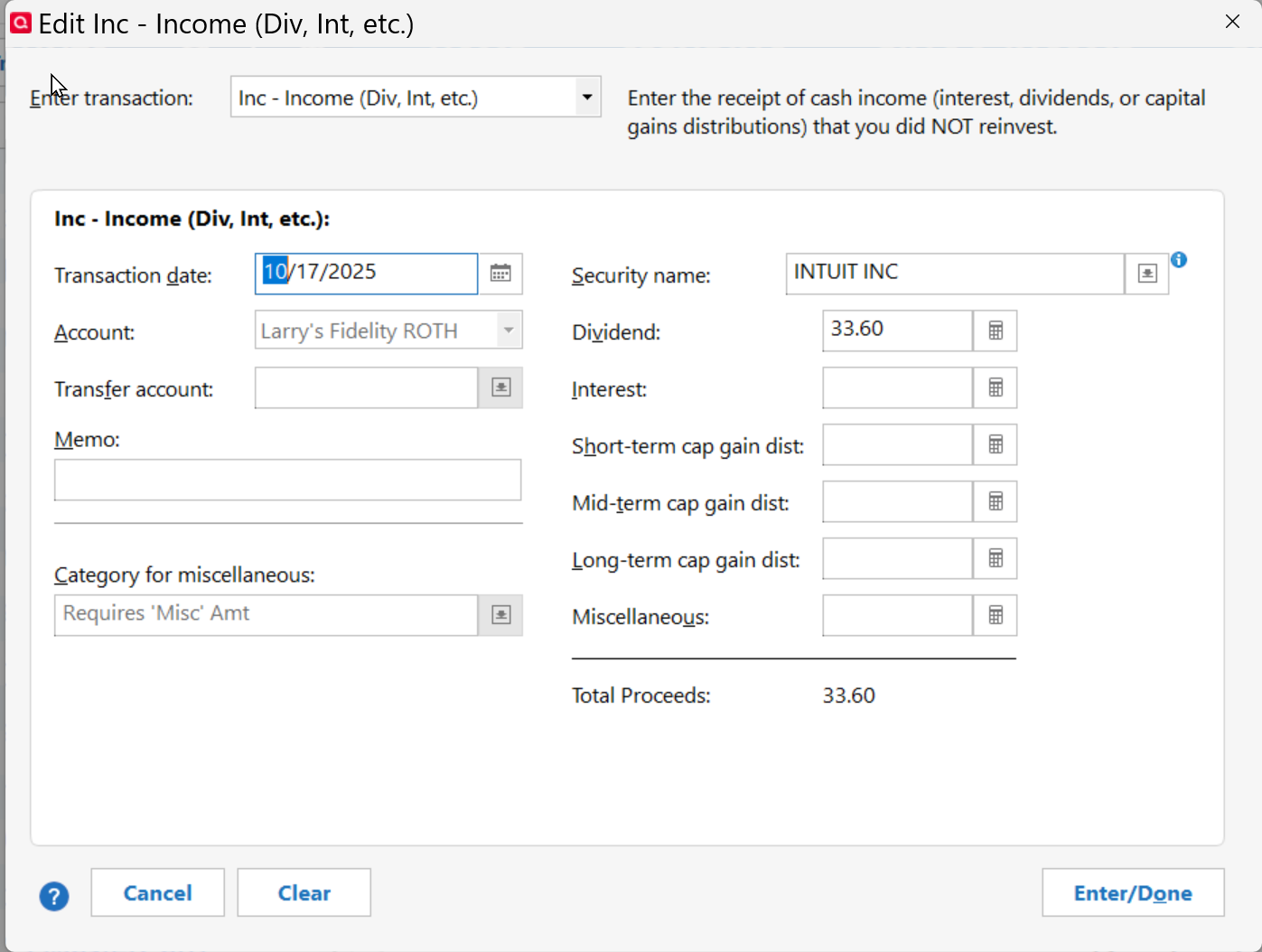
Another example of incorrect Dividend transaction posting as a Deposit without a category assigned.
In screenshot, two transactions, one (Intuit) processed correctly, the other (Johnson Controls) processed as deposit instead of Dividend.
I believe Johnson Controls (JCI) is an international stock.
Register Screen shot
Edit of incorrect Deposit screenshot
Edit of Correct Dividend screenshot
I will manually correct the Johnson Controls entry to reflect Dividend and Category _DivInt
"No Matter Where You Go, There You Are"Windows 11 Pro, Quicken SubscriptionIntel Core i7-12700, 32GB Ram0 -
@Movie Nut Thanks for finding the post. That is one of them, but I also added to a post as well and they weren't foreign investments.
@Quicken Kristina In the discussion of the post below, you noted you had received the logs. So this issue should be listed as an existing problem.
This was my post:
Deluxe R65.17, Windows 11 Pro
0 -
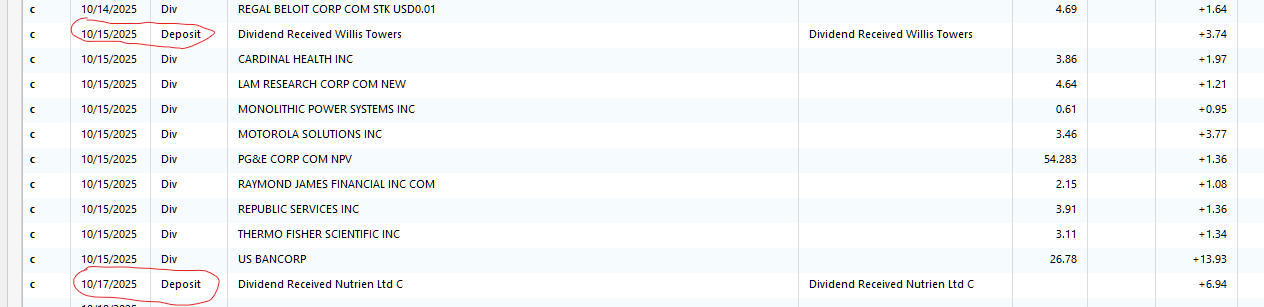
I am also having problems with "Div" transactions being treated as a deposit. In my case, I am not reinvesting dividends, they are just being deposited into my core account. One interesting thing for me is the correct transactions are all in UPPER case, as they have always been. the Deposit transactions are in upper/lower case. Here is a sample showing two bad entries - one on 10/15 and one on 10/17.
0 -
This is another bug that needs to be added to the Official List of items being worked on for Fidelity. Dividends being transferred as DEPOSITS. From the various discussions, it seems most of these occur when the dividend is from a foreign stock. That has been the case for my accounts. MANY people are seeing this problem so this issue needs to be added to the "all known Fidelity issues" list.
0 -
My wife and I both have Fidelity accounts under different logins. It's worked for years under Direct Connect. When I went to EWC+ on my account everything mostly worked fine and I was able to link all of my accounts to the existing accounts.
When I tried to do this for my wife's login, it won't let me link to the existing accounts. They don't even show up in the list of accounts to link to. The only option seems to be to start from scratch with this account. I obviously don't want to do that and screw up my historical reporting.
I don't understand why @Quicken Kristina closed the other thread other than that it was not looking good for Quicken that we had a 20 page thread with ongoing, active issues. I wonder how long before this one is closed.
1 -
Adding a variation of the dividend issue…
I have my cash (SPAXX) shown as a checking account. I don't reinvest dividends and the correct way these have been treated prior to EWC+ is a DivX action from the brokerage account to the checking account. Now they just appear in the checking account like @jersey42 screenshot. I have to delete that transaction and manually enter the DivX under the correct symbol.
1 -
Not sure if this helps, but I have both my and my wife's Fidelity accounts accessible under one login ID at Fidelity. So during reauthorization login to Fidelity all accounts appear.
I think I had my Fidelity advisor set this up for me several years ago. She still has a login to just see her accounts, but hers are shown under my login too.
"No Matter Where You Go, There You Are"Windows 11 Pro, Quicken SubscriptionIntel Core i7-12700, 32GB Ram0 -
The account in my screenshot does not have a separate linked checking account. My samples both are foreign dividends, but I need to see additional downloads to figure out if it is all foreign dividends and only foreign dividends.
I did not post an example of what you bring up. I have another account with a separate linked cash (checking) account. The behavior I am seeing so far (only one sample) is exactly what you are seeing. With Direct Connect, I saw a DivX in the brokerage account and the cash transaction in the linked cash account. With EWC+, I only see the transaction in the linked cash account. I have not yet figured out the impact of this. The cash is correct, but I have a feeling I will have ongoing impacts with reports and analysis.
0 -
Thank you for the update. I reported the issues with linked cash accounts and responded in the discussions for those issues (to view the renaming issue post, click here; to view the post about being unable to connect Fidelity accounts that have linked checking accounts, click here).
Thank you for letting us know. While that issue isn't listed in the alert, it has been reported to our teams.
(CBT-862)
I can see that you use Quicken for Mac (QMac) This is a Quicken for Windows discussion. Please start a new discussion detailing the issue you are encountering, since the troubleshooting steps are different in QMac.
To answer your question about why the other thread got shut down, it's because people were posting about multiple issues, and their concerns were being buried by a flood of posts about unrelated issues. Closing the discussions and requesting people create new discussions was intended to get the discussions to stick to one issue per discussion so that problems can be more easily identified and corrected through troubleshooting or reported as appropriate.
Thank you!
Quicken Kristina
Make sure to sign up for the email digest to see a round up of your top posts.
0 -
Thanks for the above discussion updates.
Glad to see the thread
has not been closed as it Deals with the specific issue of "Fidelity Investments - Dividend transactions for Foreign Stocks are not being automatically recorded".
I see you referenced it is not on Quicken's List, but you stated, "While that issue isn't listed in the alert, it has been reported to our teams".
This is causing a lot of manual labor on our part to review downloaded transactions, spot these incorrect "Deposits" and then Edit them to a correct status. I would request that this be added to Quicken's list so there is a Master List of all defects.
[Edited - Enabled Link]
"No Matter Where You Go, There You Are"Windows 11 Pro, Quicken SubscriptionIntel Core i7-12700, 32GB Ram0 -
Thank you for your reply @Movie Nut,
The more recently reported issues, such as the issues with Dividends, do not have Community Alerts associated with them yet, and therefore didn't make it onto the consolidated list.
I forwarded your feedback internally to my team.
Thank you!
Quicken Kristina
Make sure to sign up for the email digest to see a round up of your top posts.
0 -
Thanks very much
"No Matter Where You Go, There You Are"Windows 11 Pro, Quicken SubscriptionIntel Core i7-12700, 32GB Ram0 -
I use Quicken for Windows and always have. I found the other thread incredibly useful to see all of the issues and know how other people have worked around them. I understand your point but closing the other thread just requires other threads like this one to pop up and continue to bifurcate issues.
1 -
I was able to get my wife's accounts working by deactivating and reactivating each one individually. I didn't have to do that for my Fidelity login which has 6 accounts on it.
In doing so I discovered that despite my 401k updating without errors, it isn't actually updating the prices of the securities. The securities don't have ticker symbols so the only way to update the price is to update Quicken. I update every day and it isn't downloading the prices. I now have to manually update them each day.
Any suggestions on this one?
0 -
Thank you for your replies @Matt,
Are the prices delayed in updating, or are they not updating at all?
If they are completely failing to update, then I recommend that you contact Quicken Support directly for further assistance, as they have access to tools that we can't access on the Community and they're able to escalate the issue as needed. The Quicken Support phone number can be found through this link here. Phone support is available from 5:00 am PT to 5:00 pm PT, Monday through Friday.
If they are delayed in updating, about how long is the delay before they finally update?
Thank you!
Quicken Kristina
Make sure to sign up for the email digest to see a round up of your top posts.
0 -
I noticed that despite selecting and linking every account, my brokerage account did not actually have any online services attached to it. I set that one up and it downloaded the transfer transaction so at least that is fixed. That one is on me, though it did let me link every single account it found at Fidelity so I didn't check every account.
As for my 401k, I reset the account to hopefully fix it. That account does not have ticker symbols associated with the holdings so it can't just download it with the full quote prices for the previous day. It needs to connect to Fidelity to get it.
Fingers crossed it updates tomorrow. I don't have high hopes but 🤞
0 -
I have 2 working data files, each with my wife's and my Roth IRA account. They were originally at Schwab that connected with EWC+. The accounts were moved to Fidelity in March and connected with DC. I created a new test data file for Fidelity using EWC+ to track issues. Other than correcting a few mislabeled securities, the portfolio and cash balance were correct in both Roth IRA accounts in the 3 data files.
This week, I updated the Fidelity connection in my working files from DC to EWC+. After matching about 120 downloaded transactions to existing transactions and deleting about 100 duplicates, the portfolios and cash balances are again correct.
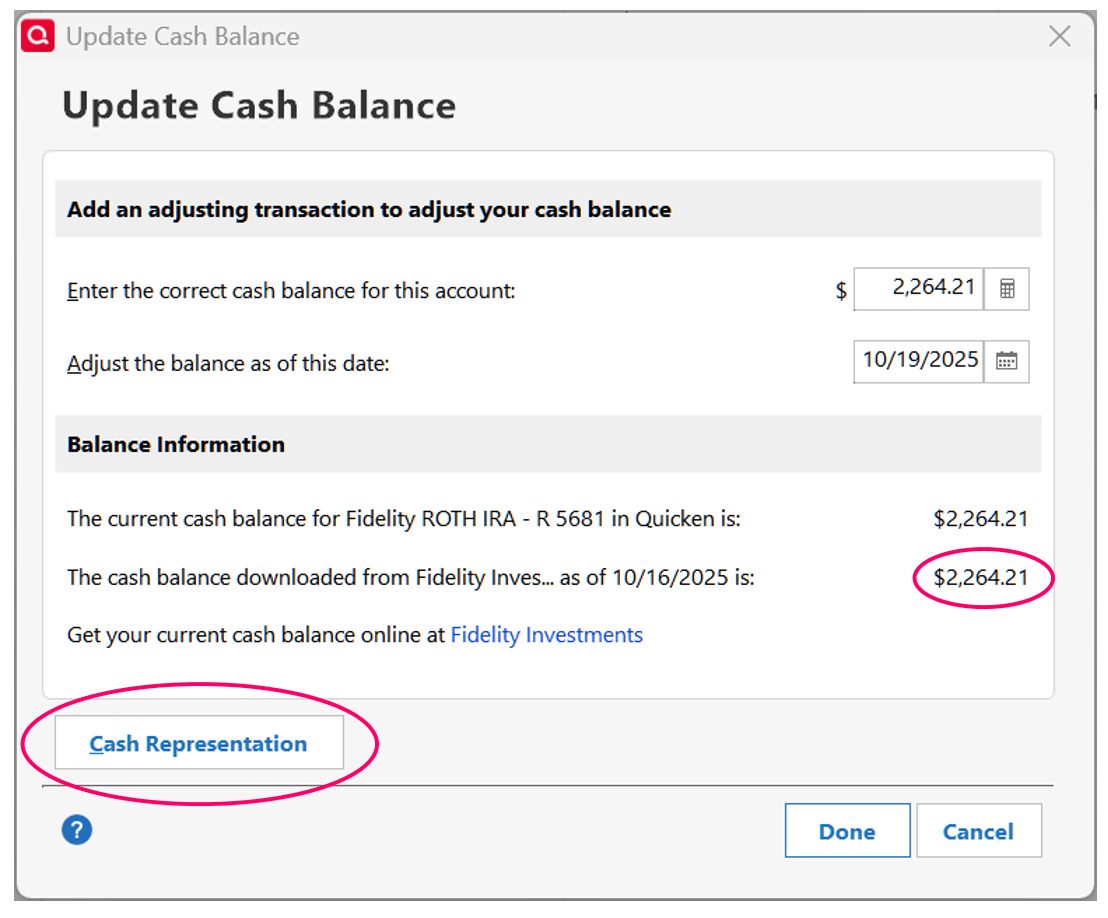
Below is a screenshot of the "Update Cash Balance" pop up from Fidelity in my test data file. It always used EWC+.
In both working data files, both before with DC and after updating the connection to EWC+, the "Cash Representation" button is missing in Fidelity and the cash balance from the website is zero. The button is needed to select the correct sweep fund used for cash. Fidelity uses FDRXX and Schwab uses SWGXX.
Interestingly, the button is also missing in Schwab but the cash balance from the website is correct. During the conversion, Fidelity creates a CASH account using a symbol of FCASH. It doesn't appear it is ever used.
0 -
Happy to report that, at least as of the update today, both my brokerage account updated and my 401k updated prices. Fingers crossed this holds!
1 -
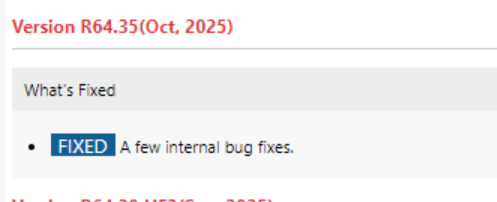
Had a Quicken Software Updated today.
I guess the few internal bug fixes were NOT associated with the Fidelity EWC+ issues.
😥
"No Matter Where You Go, There You Are"Windows 11 Pro, Quicken SubscriptionIntel Core i7-12700, 32GB Ram2 -
While progress has been made to smooth out the migration, want to flag a few persistent issues (which multiple users have raised and submitted tickets) not fixed yet related to accounts formerly using NetBenefits OSU. The prices for non-public funds, like Fidelity's comingled pooled funds, are missing updates, so far looks like Mondays are not being updated at all and when there are updates, there is a 2-day delay. For this week so far, only received delayed price updates for Tue, Wed and Thu. The challenge with this issue is there is no price history stored anywhere to fill-in missing prices. The other issue is still getting transaction downloads with no information. Today downloaded "contribution" where as previously would get the security name, quantity and price. Welcome to hear if other users are having different experience.
0 -
Hello @AAR,
Thank you for sharing your experience. The issue with delayed price updates has already been reported (CTP-14996).
Please provide more information about the transactions downloading missing data. When did you first notice this happening? Are the problem transactions showing as pending or posted on Fidelity's website? Is this happening with a specific kind of transaction and/or a specific security?
I look forward to your reply!
Quicken Kristina
Make sure to sign up for the email digest to see a round up of your top posts.
0 -
@Quicken Kristina Appreciate the follow-up. The issue of "no assigned security" for these transactions has been going on since the beginning of the migration in early July. This is not new, was raised in a few of the now closed discussion threads. It occurred when we initially migrated to EWC+ in July. We rolled back to DC until we migrated to EWC+ in early October, still seeing same behavior. This seems similar to the issues raised above about dividends posting without any security information. The two most common types of transactions in our retirement account are contributions and fees. The missing security information relates to FXAIX. The only information we receive now is "contribution" or "fee" plus the $ amount. Given these transactions occur bi-weekly and quarterly, respectively, makes it hard to troubleshoot. In the instance of the last set of “fee” transactions, only one of three transactions downloaded. These transactions are posted so the current workaround is pulling the data from the Fidelity website.
0 -
This sounds like the issue where the account is using Simple investment tracking even though it's set to Complete.
0 -
Thank you for your reply @AAR,
The "no assigned security" issue you mention sounds like the issue described in this Community Alert:
If that is the problem you're seeing, then I recommend following the instructions in the alert to resolve it.
For the issue with missing information and missing transactions, I recommend waiting for it to happen again, and then, before making any corrections or filling in any missing information, please reach out to Quicken Support directly for assistance. They have access to tools we can't access on the Community and they're able to escalate the issue as needed. The Quicken Support phone number can be found through this link here. Phone support is available from 5:00 am PT to 5:00 pm PT, Monday through Friday.
I apologize that I could not be of more assistance!
Quicken Kristina
Make sure to sign up for the email digest to see a round up of your top posts.
0
Categories
- All Categories
- 56 Product Ideas
- 36 Announcements
- 225 Alerts, Online Banking & Known Product Issues
- 22 Product Alerts
- 703 Welcome to the Community!
- 671 Before you Buy
- 1.2K Product Ideas
- 53.7K Quicken Classic for Windows
- 16.3K Quicken Classic for Mac
- 1K Quicken Mobile
- 812 Quicken on the Web
- 111 Quicken LifeHub


![2025-10-17 23_20_31-Quicken Classic Premier - Home - [Larry's Fidelity ROTH].jpg](https://us.v-cdn.net/6031128/uploads/RN9MXGFJKSJN/2025-10-17-23-20-31-quicken-classic-premier-home-5blarry-27s-fidelity-roth-5d.jpg)
![2025-10-17 23_21_53-Quicken Classic Premier - Home - [Larry's Fidelity ROTH].jpg](https://us.v-cdn.net/6031128/uploads/05UTBJZ42YPJ/2025-10-17-23-21-53-quicken-classic-premier-home-5blarry-27s-fidelity-roth-5d.jpg)